
مقدمة
The Fender LTX-5 Footswitch is designed to provide intuitive control over Fender Mustang LTX 50 and 100 watt amplifiers. It offers direct access to presets and effects, enhancing the user's ability to shape their tone during performance or practice. This manual provides essential information for the proper setup, operation, and maintenance of your LTX-5 Footswitch.
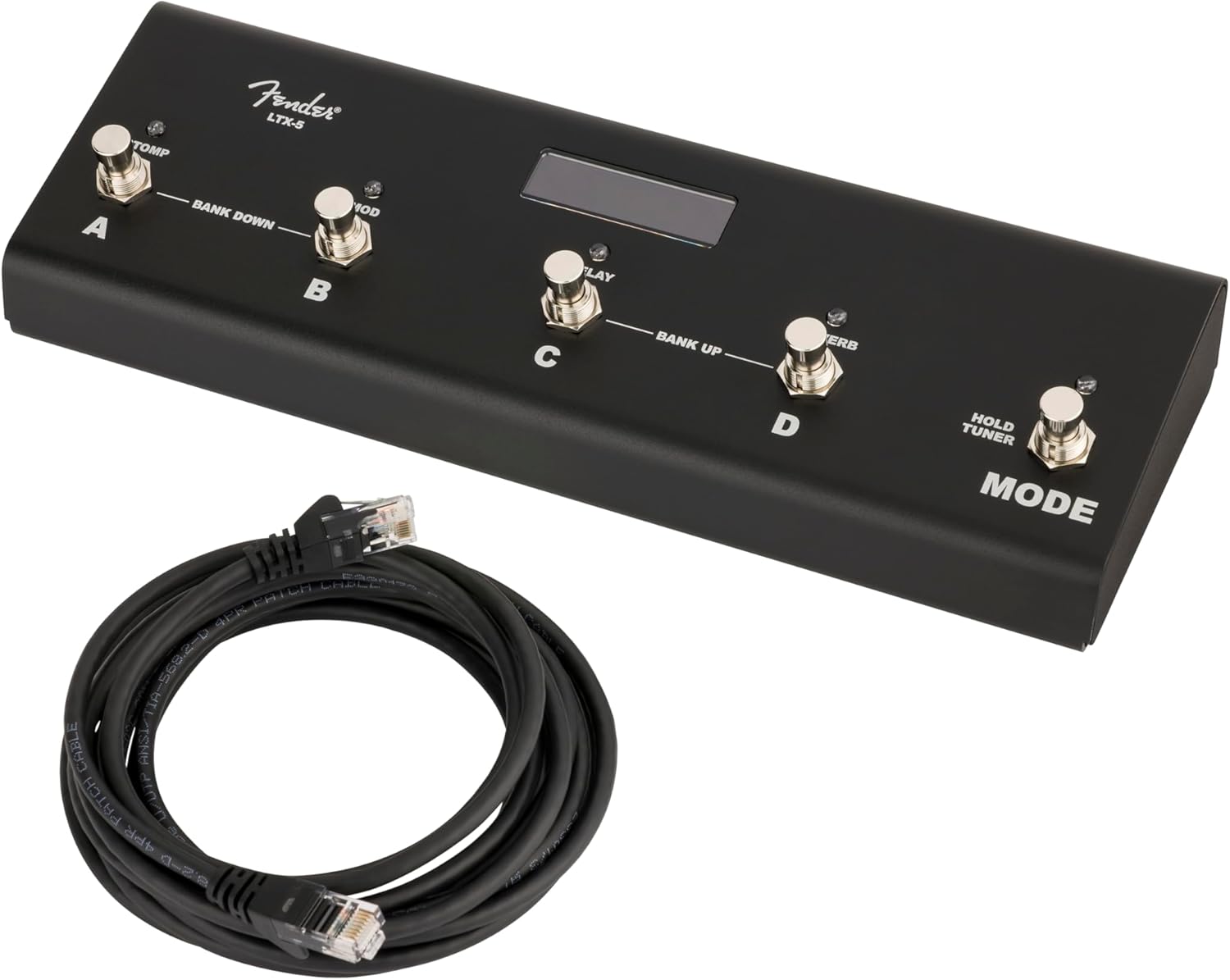
Image: The Fender LTX-5 Footswitch, showing its compact design and the included connection cable.
محتويات الحزمة
تأكد من وجود جميع العناصر في العبوة:
- LTX-5 Button Footswitch
- Connection Cable (RJ45 type)
يثبت
توصيل مفتاح القدم
- Ensure your Fender Mustang LTX 50 or 100 watt ampمكبر الصوت متوقف.
- Locate the footswitch input port on your amplifier. This is typically an RJ45 (Ethernet-style) port.
- Connect one end of the provided RJ45 cable to the footswitch input port on your ampمكبر.
- Connect the other end of the RJ45 cable to the input port on the side of the LTX-5 Footswitch.
- قوة على amplifier. The footswitch should initialize and be ready for use.

الصورة: الجانب view of the LTX-5 Footswitch, highlighting the RJ45 connection port.
تعليمات التشغيل
The LTX-5 Footswitch offers two primary modes of operation: Preset Mode and Effects Mode, along with an integrated tuner function.
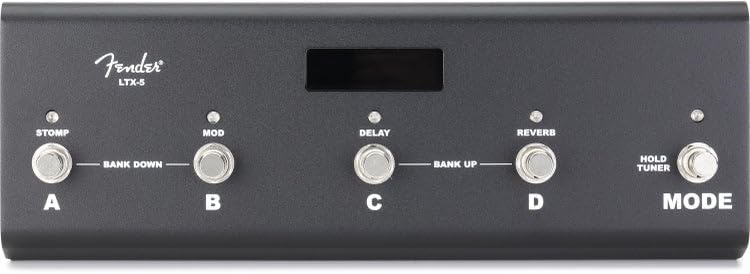
الصورة: أعلى view of the LTX-5 Footswitch, showing the labeled buttons (A, B, C, D, Mode) and the LED display.
وضع الضبط المسبق
- وظيفة: Allows for instant recall of ampالإعدادات المسبقة.
- ملاحة: Presets are organized in groups of four. Each of the four footswitches (A, B, C, D) corresponds to a specific preset within the active bank.
- الإشارة: Bicolor LEDs above each footswitch indicate the currently active preset.
- Bank Navigation: To move between banks of presets, simultaneously press the two leftmost switches (A and B) to move down four presets, or the two rightmost switches (C and D) to move up four presets.
وضع التأثيرات
- وظيفة: Provides control over individual effects within your amplifier's effect chain.
- يتحكم: Dedicated switches are assigned to Stomp, Modulation, Delay, and Reverb effects.
- ارتباط: Pressing the corresponding footswitch will engage or bypass the effect.
- الإشارة: Bicolor LEDs above each footswitch indicate the active status of each effect.
مفتاح الوضع
- وظيفة: Toggles between Preset Mode and Effects Mode.
- تنشيط الموالف: Briefly hold the Mode switch to activate the onboard chromatic tuner.
وضع الموالف
- التفعيل: Briefly hold the Mode switch.
- عرض: The LED display will show the closest note being played.
- Pitch Indication: The bicolor LEDs on the footswitches indicate whether the pitch is flat or sharp relative to the target note.
- مخرج: Step on any footswitch (A, B, C, D, or Mode) to exit Tuner Mode and return to the previous operating mode. The amplifier's signal is muted while in Tuner Mode.
المصابيح الوظيفية
- A series of five bicolor LEDs are located along the top of each footswitch, just below the display screen.
- These LEDs provide visual feedback on various functions and active states within both Preset and Effects Modes.
صيانة
التنظيف والعناية
- Disconnect the footswitch from the ampالمنظف قبل التنظيف.
- Use a soft, dry cloth to wipe down the exterior of the footswitch.
- Avoid using abrasive cleaners, solvents, or waxes, as these can damage the finish and electronic components.
- Do not expose the footswitch to excessive moisture or extreme temperatures.
استكشاف الأخطاء وإصلاحها
المشاكل الشائعة والحلول
- Footswitch not responding: Ensure the RJ45 cable is securely connected to both the footswitch and the amplifier. Verify the ampتم تشغيل جهاز التبريد ويعمل بشكل صحيح.
- Incorrect preset/effect changes: Confirm you are in the correct operating mode (Preset or Effects). Refer to the Operating Instructions for proper bank navigation and effect control.
- Tuner not activating: Ensure you are briefly holding the Mode switch, not just pressing it.
- مصابيح LED لا تضيء: Check all connections. If the issue persists, contact Fender support.
تحديد
| ميزة | التفاصيل |
|---|---|
| ماركة | درابزين |
| اسم الموديل | ال تي اكس-5 |
| رقم الموديل | 0994073000 |
| رمز المنتج الموحد | 717669705084 |
| نوع الضوابط | التبديل القدم |
| واجهة الأجهزة | RJ45 (for ampتوصيل مكبر الصوت) |
| مؤثرات إخراج الصوت | Stomp, Modulation, Delay, Reverb |
| أبعاد العنصر (الطول × العرض × الارتفاع) | 24.1 x 21.6 x 2.8 inches (Note: These dimensions may refer to packaging) |
| الشركة المصنعة | شركة فيندر للآلات الموسيقية |
معلومات الضمان
The Fender LTX-5 Footswitch comes with a ضمان محدود لمدة سنة واحدة. This warranty covers defects in materials and workmanship under normal use. For specific terms and conditions, please refer to the warranty documentation provided with your product or visit the official Fender webموقع.
يدعم
For technical assistance, troubleshooting beyond this manual, or warranty claims, please contact Fender Musical Instruments Corporation customer support. You can find contact information and additional resources on the official Fender webموقع: