
1. المقدمة
This manual provides essential instructions for setting up, operating, and maintaining your LEFFOT H618 Plus 4K Ultra HD Streaming Device. Please read this guide thoroughly before use to ensure proper functionality and to maximize your entertainment experience.
2. معلومات السلامة
- تأكد من وضع الجهاز على سطح مستوٍ وثابت لمنع السقوط العرضي.
- لا تعرض الجهاز للماء أو الرطوبة أو درجات الحرارة العالية.
- تجنب سد فتحات التهوية لمنع ارتفاع درجة الحرارة.
- استخدم محول الطاقة المرفق فقط لتجنب التلف.
- احفظ الجهاز وملحقاته بعيدًا عن متناول الأطفال.
- لا تحاول تفكيك الجهاز أو إصلاحه بنفسك. اتصل بفني صيانة مؤهل للحصول على المساعدة.
3. محتويات العبوة
تأكد من وجود جميع العناصر في العبوة:
- LEFFOT H618 Plus Streaming Device
- التحكم عن بعد بالصوت
- محول الطاقة
- كابل HDMI
- دليل المستخدم

الشكل 3.1: محتويات العبوة
4. تعليمات الإعداد
4.1 توصيل الجهاز
- الاتصال بالتلفزيون: Plug one end of the HDMI cable into the HDMI port on the LEFFOT H618 Plus device and the other end into an available HDMI input on your television.
- توصيل الطاقة: Connect the power adapter to the DC port on the device and then plug the adapter into a wall outlet.
- تشغيل الطاقة: يجب أن يتم تشغيل الجهاز تلقائيًا. إذا لم يحدث ذلك، فاضغط على زر التشغيل في جهاز التحكم عن بعد.

الشكل 4.1: الاتصال عبرview
4.2 إعداد جهاز التحكم عن بعد
- أدخل البطاريات: Open the battery compartment on the back of the voice remote control and insert two AAA batteries (included), ensuring correct polarity.
- الاقتران: The remote control should automatically pair with the device upon first use. If not, follow the on-screen instructions or press and hold the pairing button (usually located inside the battery compartment or on the side of the remote) until the indicator light flashes.
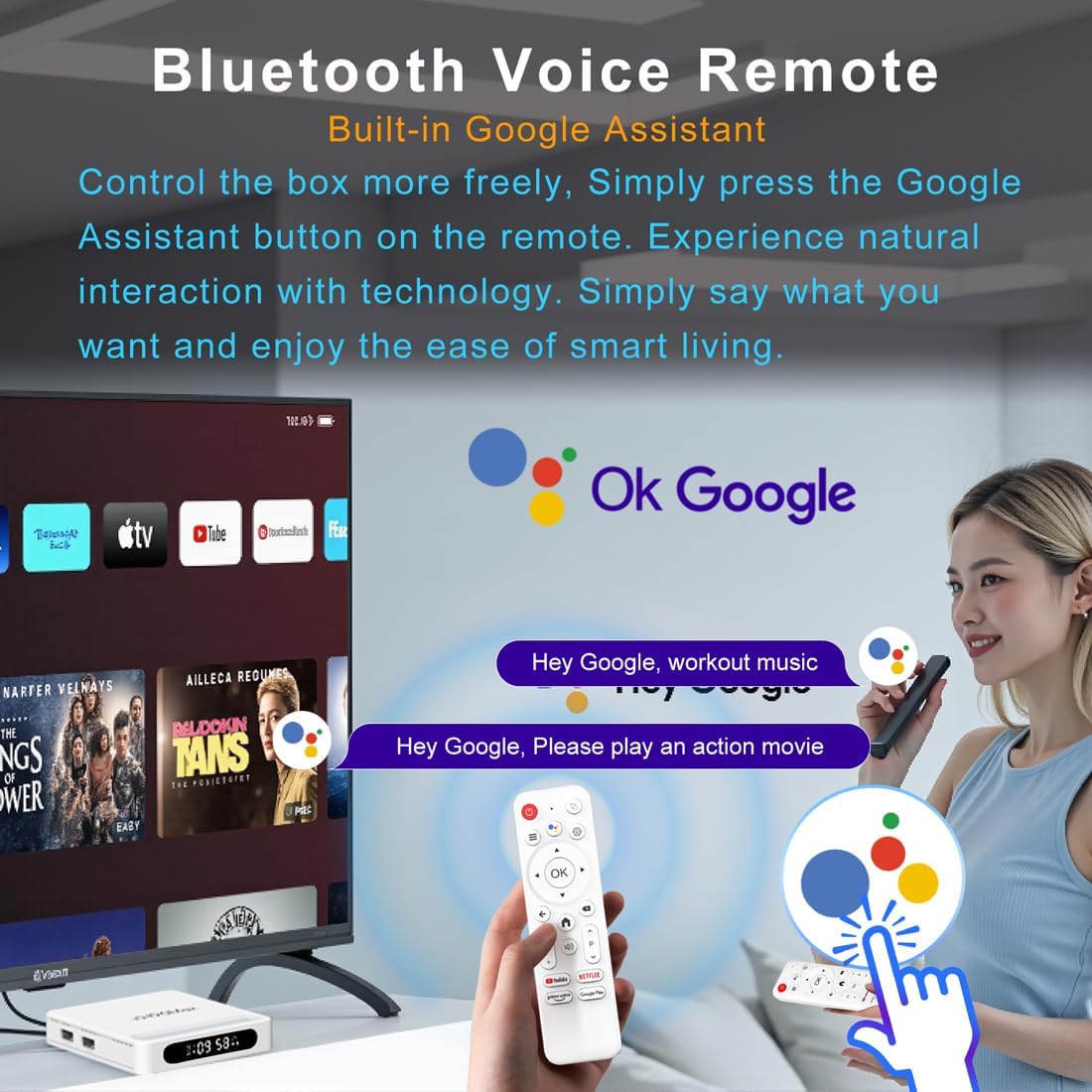
Figure 4.2: Voice Remote Control
4.3 تكوين الجهاز الأولي
اتبع التعليمات التي تظهر على الشاشة لإكمال الإعداد الأولي، والذي يتضمن عادةً ما يلي:
- اختيار اللغة.
- Connecting to a Wi-Fi network or Ethernet.
- تسجيل الدخول باستخدام حسابك على جوجل.
- Installing essential applications.
5. تعليمات التشغيل
5.1 التنقل والواجهة
Use the directional pad (D-pad) on your remote to navigate through the Android TV interface. The 'OK' button confirms selections, 'Back' returns to the previous screen, and 'Home' takes you to the main screen.
5.2 Voice Remote with Google Assistant
Press the Google Assistant button on your remote and speak your commands. You can search for content, open apps, control playback, and more using your voice.
5.3 الوصول إلى التطبيقات
The device comes pre-loaded with Google Play, allowing access to over 5000+ applications. Navigate to the 'Apps' section on the home screen to browse, download, and manage your applications.

Figure 5.1: Accessing Apps via Google Play
5.4 4K UHD Playback and HDR10
The LEFFOT H618 Plus supports 8K@22fps decoding and 4K@60fps playback with HDR10. Ensure your television is 4K HDR compatible and that you are streaming 4K HDR content for the best visual experience.

Figure 5.2: 4K UHD and HDR10 Visuals
5.5 عرض الشاشة
Utilize the built-in Airplay and Miracast features to cast content from your smartphone or tablet directly to your TV screen.
6. المواصفات
| ميزة | وصف |
|---|---|
| ماركة | يسار |
| اسم الموديل | H618 بلس |
| نظام التشغيل | أندرويد 14 |
| وحدة المعالجة المركزية | Allwinner H618 Quad-Core ARM Cortex A53 |
| وحدة معالجة الرسوميات | مالي-G31 MP2 |
| كبش | 2 جيجا بايت |
| ذاكرة للقراءة فقط | 16 جيجا بايت |
| فك تشفير الفيديو | 8K@22fps, 4K@60fps with HDR10 |
| الاتصال | Dual-band WiFi 6 (2.4G/5G), 100M Ethernet, Bluetooth 5.4 |
| الموانئ | HDMI 2.0a, USB 2.0 (x2), AV, DC |
| المميزات الخاصة | Voice Remote with Google Assistant, Airplay, Miracast |
| أبعاد | 3.2 × 3.2 × 0.67 بوصة |
| وزن | 4.1 أونصات |

الشكل 6.1: الميزات الرئيسيةview
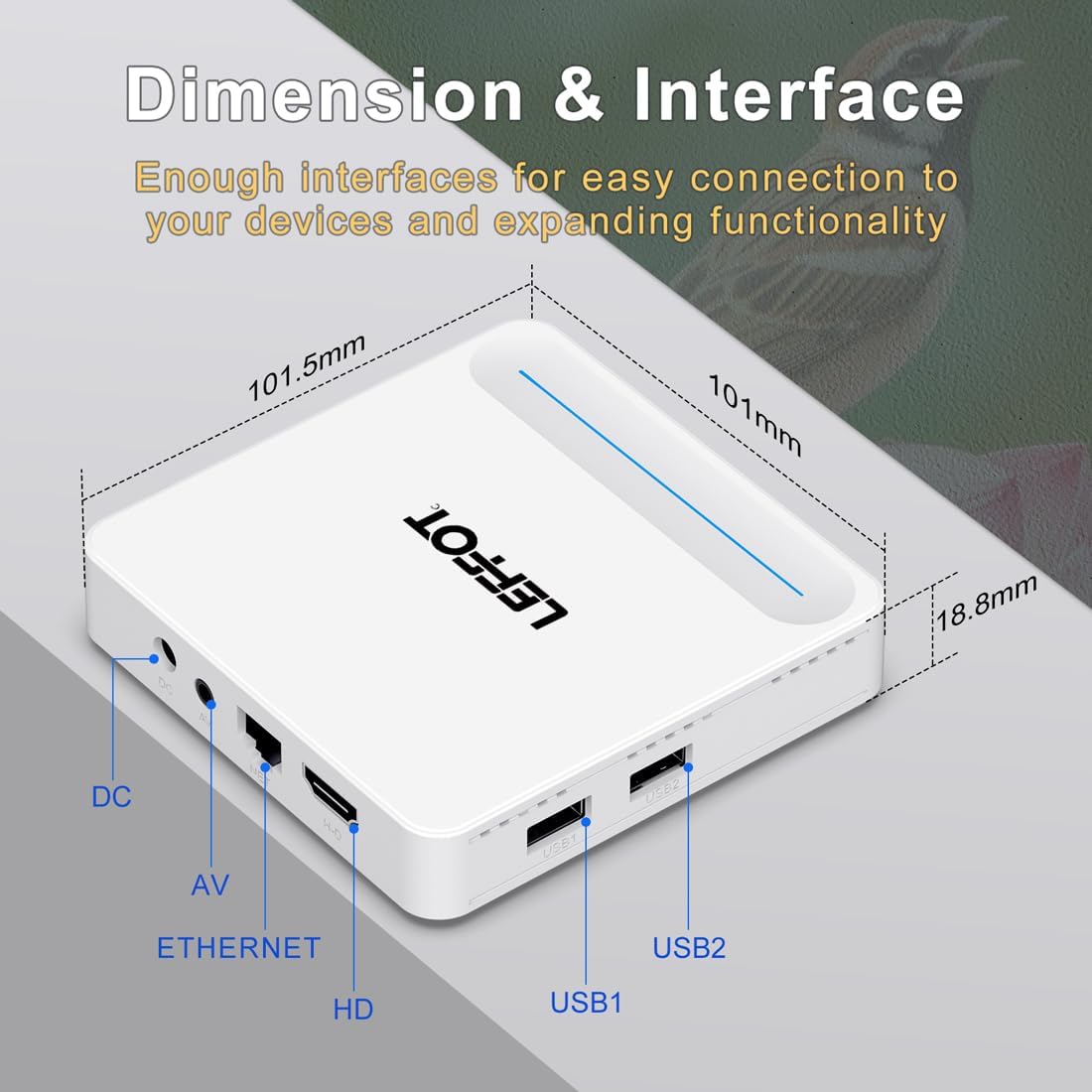
Figure 6.2: Device Dimensions and Interface
7. استكشاف الأخطاء وإصلاحها
7.1 لا يوجد طاقة / الجهاز لا يعمل
- تأكد من توصيل محول الطاقة بالجهاز وبمأخذ الطاقة بشكل آمن.
- Ensure the power outlet is functional. Try plugging another device into the same outlet.
- Press the power button on the remote control or the device itself.
7.2 No Signal on TV Screen
- Verify that the HDMI cable is securely connected to both the device and the TV.
- تأكد من ضبط التلفزيون الخاص بك على مصدر إدخال HDMI الصحيح.
- Try using a different HDMI cable or a different HDMI port on your TV.
- Restart the streaming device and your TV.
7.3 جهاز التحكم عن بعد لا يستجيب
- قم بفحص البطاريات الموجودة في جهاز التحكم عن بعد واستبدالها.
- تأكد من عدم وجود أي عوائق بين جهاز التحكم عن بعد والجهاز.
- Re-pair the remote control with the device by following the instructions in Section 4.2.
7.4 التخزين المؤقت أو الأداء البطيء
- تحقق من سرعة اتصالك بالإنترنت. فالاتصال المستقر والسريع ضروري لبث محتوى بدقة 4K.
- إذا كنت تستخدم شبكة Wi-Fi، فحاول تقريب الجهاز من جهاز التوجيه الخاص بك أو الاتصال عبر كابل إيثرنت للحصول على اتصال أكثر استقرارًا.
- Close any unused applications running in the background on the device.
- Clear the cache of streaming applications.
- Restart your router, modem, and the streaming device.
8. الصيانة
- Clean the device regularly with a soft, dry cloth. Do not use liquid cleaners or aerosols.
- Keep the device free from dust and debris, especially around ventilation areas.
- قم بتخزين الجهاز في مكان بارد وجاف عندما لا يكون قيد الاستخدام لفترات طويلة.
9. الضمان والدعم
For warranty information and technical support, please refer to the documentation included with your purchase or visit the official LEFFOT webالموقع. احتفظ بإثبات الشراء الخاص بك لتقديم مطالبات الضمان.