
ARNSSIEN Y5
ARNSSIEN Y5 4K 48MP Dual Screen Digital Camera User Manual
الموديل: Y5
مقدمة
This manual provides detailed instructions for the ARNSSIEN Y5 4K 48MP Digital Camera. Please read it thoroughly before using the camera to ensure proper operation and to maximize its features. This camera is designed for ease of use, making it suitable for beginners, children, and teenagers.

Image: The ARNSSIEN Y5 Digital Camera, showcasing its dual screen feature and compact design.
محتويات الحزمة
تأكد من وجود جميع العناصر في الحزمة الخاصة بك:
- 1x Digital Camera
- 1 × بطاقة ذاكرة 32 جيجابايت
- 1 × كابل من النوع C
- قارئ بطاقة شنومكس
- 1x Protective Pouch
- 1 × حبل
- 1 × دليل المستخدم
- علبة هدايا واحدة

Image: All items included in the ARNSSIEN Y5 Digital Camera package, neatly arranged.
انتهت الكاميراview
تعرّف على مكونات الكاميرا وأدوات التحكم بها.
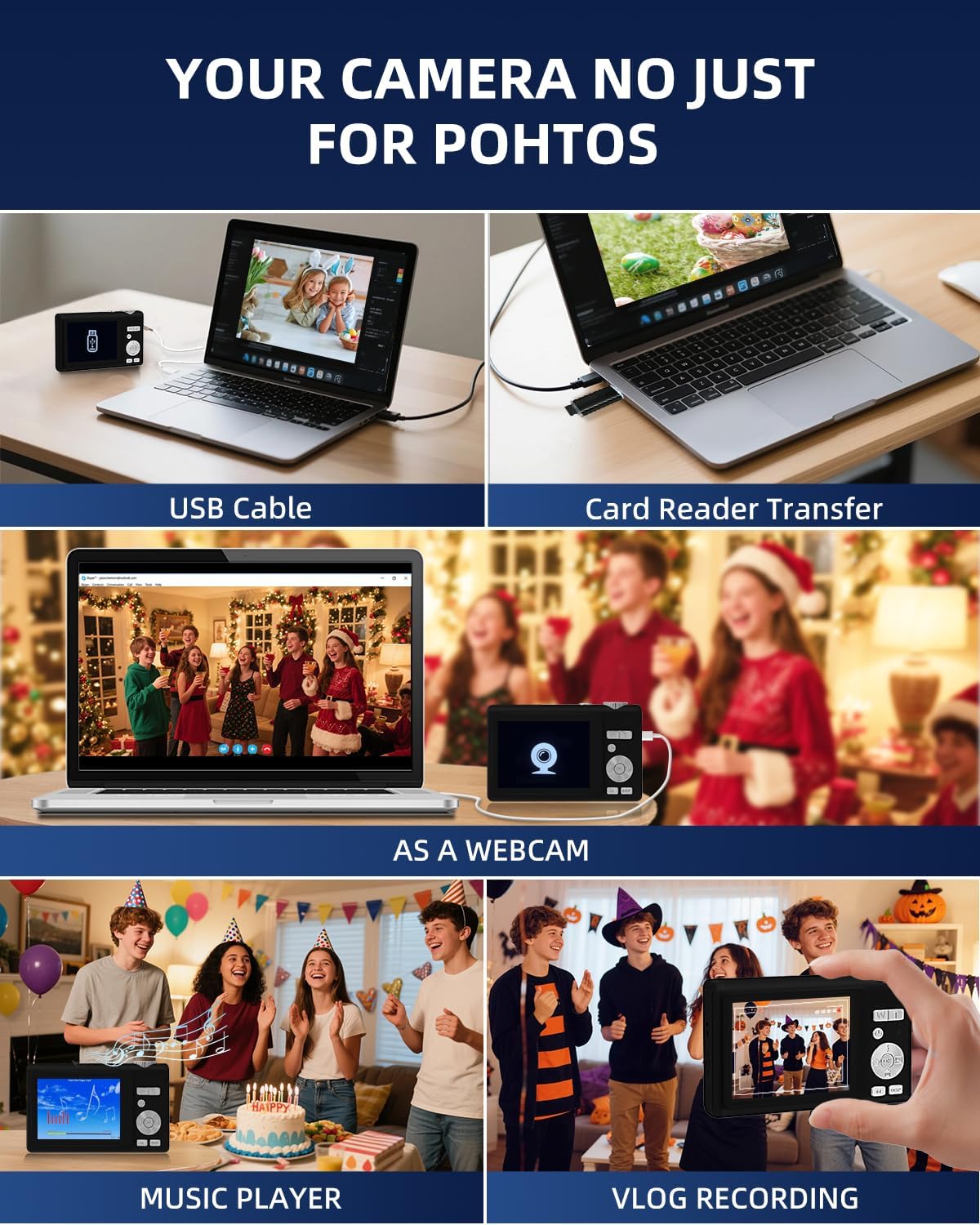
Image: Detailed diagram showing the camera's front, top, and rear views with labels for all buttons, ports, and screens.
- Mode Rotation Key: For selecting different camera modes.
- زر المصراع: لالتقاط الصور أو بدء/إيقاف تسجيل الفيديو.
- ضوء الفلاش: فلاش مدمج للظروف ذات الإضاءة المنخفضة.
- منفذ الشحن (النوع C): For charging the camera and data transfer.
- المسؤول Lamp: يشير إلى حالة الشحن.
- منفذ بطاقة TF: Slot for the microSD card.
- Selfie Display: The smaller front screen for self-portraits.
- Zoom Key (W/T): To zoom in (T) or zoom out (W).
- زر الطاقة: To turn the camera on or off.
- مؤشر الحالة الضوئي: Shows camera's operational status.
- Up Button (Flash): Controls flash settings.
- الزر الأيمن: Navigation or specific function button.
- زر موافق: Confirms selections or accesses special effects (1-15 types).
- زر لأسفل: Navigation or specific function button.
- DISP Key: Switches to the selfie screen.
- تبديل الوضع: Toggles between photo and video modes.
- الزر الأيسر: Navigation or specific function button.
- Hang Rope Hole: لتثبيت الحبل.
- مكبر الصوت: لتشغيل الصوت.
يثبت
1. شحن البطارية
Before first use, fully charge the camera. Connect the camera to a power source using the provided Type-C cable. The Charge Lamp سوف تشير إلى حالة الشحن.
Note: The camera uses a built-in Lithium-polymer battery. No battery swaps are needed; simply charge and go.
2. إدخال بطاقة الذاكرة
The camera supports microSD cards up to 128GB. A 32GB memory card is included. Insert the memory card into the TF Card Port until it clicks into place.
Important: For optimal performance, format the SD card within the camera before its first use.
3. تشغيل / إيقاف التشغيل
اضغط مع الاستمرار على زر الطاقة لتشغيل الكاميرا أو إيقاف تشغيلها.
تعليمات التشغيل
1. أساسيات التصوير الفوتوغرافي والفيديو
- التقاط الصور: في وضع الصورة، اضغط على زر الغالق to capture a 48MP image. The camera features autofocus for clear shots.
- تسجيل مقاطع الفيديو: Switch to video mode using the مفتاح الوضعثم اضغط على زر الغالق to start/stop 4K video recording.
- تكبير: استخدم Zoom Key (W/T) to adjust the 16x digital zoom.
- Dual Screen Function: The camera has a 2.8" main screen and a 1.4" selfie screen. Press the مفتاح DISP to switch to the selfie screen for easy self-portraits.
2. Camera Settings and Modes
The camera offers various settings and modes for enhanced creativity and control. Access these through the menu system or dedicated buttons.

Image: On-screen display of photo mode settings including flash, anti-shake, burst, time-lapse, music player, photo size, white balance, exposure, ISO, scene, sharpness, quality, and general settings.

Image: On-screen display of video mode settings including audio recording, flash, video bitrate, motion detection, loop recording, music player, white balance, exposure, ISO, scene, sharpness, quality, and general settings.
- ايزو: Adjusts light sensitivity.
- EV (قيمة التعرض): Controls image brightness.
- WB (توازن اللون الأبيض): Corrects color cast based on lighting.
- WDR (نطاق ديناميكي عريض): Improves detail in both bright and dark areas.
- فلاش: Use the Up Button to cycle through flash modes (e.g., Auto, Fill-flash).
- حدة: يضبط وضوح الصورة.
- المرشحات: Apply 15 different filter effects for creative shots.
- وضع الجمال: يُحسّن ملامح الوجه في الصور الشخصية.
- Burst Shot: يلتقط صوراً متعددة بسرعة متتالية.
- الحركة البطيئة: Records video at a slower playback speed.
- الفاصل الزمني: Captures images at set intervals to create a sped-up video.
- Stabilization (Anti-Shake): Reduces blur caused by camera movement.
- كشف الحركة: Camera starts recording when motion is detected.
- Composition Aid: Assists in framing your shots.

Image: A visual comparison demonstrating the effect of Beauty Mode when activated and deactivated on a group photo.

Image: A sequence of three images showing a snowboarder in mid-air, illustrating the continuous shooting feature.

Image: A four-panel sequence showing a person blowing bubbles, demonstrating the time-lapse feature with timestamps.

Image: A visual comparison showing the difference in image stability with Anti-Shake mode activated versus deactivated, illustrated with a skier.

Image: A multi-panel comparison demonstrating the effects of different sharpness levels, white balance modes, ISO settings, filter effects, and exposure values on an image.
3. وظائف إضافية
- مشغل الموسيقى: The camera includes a built-in music player.
- Webوظيفة الكاميرا: Connect the camera to a computer via USB-C to use it as a webكام.
- File نقل: Transfer photos and videos to a computer using the Type-C cable or the included card reader.

Image: Illustration of two methods for transferring files: directly via USB cable to a laptop, and using a card reader for the memory card.
صيانة
- تنظيف: Use a soft, dry cloth to clean the camera body. For the lens and screens, use a specialized lens cleaning cloth and solution. Avoid abrasive materials.
- العناية بالبطارية: To prolong battery life, avoid fully discharging the battery frequently. Charge the camera regularly, especially if not used for extended periods. Store the camera in a cool, dry place.
- تخزين: When not in use, store the camera in its protective pouch to prevent scratches and dust accumulation.
استكشاف الأخطاء وإصلاحها
| مشكلة | السبب المحتمل | حل |
|---|---|---|
| الكاميرا لا تعمل. | بطارية منخفضة. | Charge the camera fully using the provided Type-C cable. |
| لا يمكن التقاط الصور/مقاطع الفيديو. | بطاقة الذاكرة ممتلئة أو لم يتم إدخالها بشكل صحيح. | Check memory card insertion. Delete unnecessary files or replace the card. Ensure the card is formatted. |
| الصور ضبابية. | Anti-shake feature off, camera movement, or focus issue. | Ensure Anti-Shake is enabled. Hold the camera steady. For autofocus, hold down the shutter button halfway to lock focus before fully pressing. |
| Camera freezes or crashes. | خلل في البرنامج أو مشكلة في بطاقة الذاكرة. | Turn off the camera and restart. If the problem persists, remove and reinsert the memory card. |
If you encounter issues not listed here, please refer to the "Warranty & Support" section for assistance.
تحديد
| ميزة | التفاصيل |
|---|---|
| رقم الموديل | Y5 |
| Effective Capture Resolution | 48 ميجا بكسل |
| دقة التقاط الفيديو | 2160p (4K UHD) |
| التكبير البصري | 16x |
| تقريب رقمي | 16x |
| تثبيت الصورة | بصري |
| التركيز التلقائي | نعم |
| نوع العرض | شاشة الكريستال السائل |
| حجم الشاشة الرئيسية | 2.8 بوصة |
| Selfie Screen Size | 1.4 بوصة |
| نوع بطاقة الذاكرة | microSD (TF Card) |
| بطاقة الذاكرة القصوى المدعومة | 128 جيجا بايت |
| بطاقة ذاكرة مرفقة | 32 جيجا بايت |
| نوع البطارية | ليثيوم بوليمر |
| متوسط عمر البطارية | 2 ساعات |
| تكنولوجيا الاتصال | Micro USB (Type-C) |
| الأبعاد (الطول × العرض × الارتفاع) | 2.54 × 5.08 × 3.81 سم |
| وزن | 250 جرام |
| مستوى المهارة | مبتدئ |
| مدعوم File التنسيقات | جبيغ، MP4 |
| فلاش | Integrated, Fill-flash automatic |
| مستوى مقاومة الماء | غير مقاوم للماء |
الضمان والدعم
- ضمان: This product comes with a 30-day warranty from the date of purchase. Please retain your proof of purchase.
- دعم العملاء: For any questions, technical assistance, or warranty claims, please contact ARNSSIEN customer support. 24-hour assistance is available. Refer to the contact information provided with your purchase or on the official ARNSSIEN webموقع.