
Dyurwa Smart Watch T60 User Manual
الموديل: T60
1. المقدمة
Thank you for choosing the Dyurwa Smart Watch T60. This manual provides essential information for setting up, operating, and maintaining your new smartwatch. Please read it thoroughly to ensure proper use and to maximize your device's potential.
2. ماذا يوجد في الصندوق
Upon opening your Dyurwa Smart Watch T60 package, you should find the following items:
- Dyurwa Smart Watch T60
- كابل الشحن
- دليل المستخدم (هذا المستند)

Image: Package contents showing the Dyurwa Smart Watch T60, an extra strap, a charging cable, and the user manual.
3. الإعداد
3.1 تثبيت التطبيق
- Scan the QR code provided in the quick start guide or search for the "GloryFit" app in your smartphone's app store (Apple App Store for iOS, Google Play Store for Android).
- Download and install the "GloryFit" app.
- افتح التطبيق واتبع التعليمات التي تظهر على الشاشة لإنشاء حساب وإعداد حسابك الشخصيfile.
3.2 Device Pairing (Bluetooth Connection)
To connect your Dyurwa Smart Watch T60 to your smartphone:
- تأكد من تشغيل البلوتوث في هاتفك الذكي.
- Open the "GloryFit" app.
- In the app, navigate to the device section and select "Add Device" or "بحث عن Device."
- The app will search for available devices. Select "T60" from the list to initiate pairing.
- قم بتأكيد طلب الاقتران على كل من هاتفك الذكي والساعة الذكية إذا طُلب منك ذلك.
For iOS 13.0 and above, and Android 5.0 and above, a single connection through the GloryFit app is usually sufficient for all functions. For older iOS versions (13.0 and below), an additional Bluetooth connection for audio functions (answer/make calls) may be required:
- After successful binding in the GloryFit app, go to your phone's Bluetooth settings.
- Find "T60" in the list of available devices and tap to connect.
- Once connected, you can use the watch to answer and make calls.

Image: Visual guide for connecting the smartwatch to your phone, showing app download, Bluetooth activation, device search, and binding confirmation.
4. تعليمات التشغيل
4.1 Display and Dials
The Dyurwa Smart Watch T60 features a 1.91-inch HD full touch screen. You can customize your watch face:
- تغيير وجوه الساعة: Access over 200 designs through the "GloryFit" app.
- أقراص مخصصة: Upload your favorite picture via the app to set it as your watch face.
- ضبط السطوع: Manually adjust the screen brightness through the watch settings (4 levels available) for optimal visibility in various lighting conditions.

صورة: عرض الساعة الذكيةasing its large 1.91-inch HD display and several customizable watch face options, including data like steps, heart rate, and weather.

Image: A user customizing their watch face with a personal photo through the companion app, demonstrating the DIY dial feature.
4.2 Calling and Messaging
With Bluetooth 5.3, the watch offers stable connectivity for communication features:
- مكالمات بلوتوث: Make and receive calls directly from your watch using the built-in microphone and Hi-Fi speaker.
- إخطارات الرسائل: Receive alerts for text messages and notifications from social media applications (e.g., Facebook, WhatsApp, Twitter) directly on your watch.

Image: The smartwatch displaying its Bluetooth call features, including a dial pad, contact list, incoming call screen, and call history.

Image: The smartwatch displaying notifications from various social media platforms and other apps, indicating its smart notification capabilities.
4.3 مراقبة الصحة
The Dyurwa Smart Watch T60 provides comprehensive health tracking features:
- مراقب معدل ضربات القلب: Continuously monitors your heart rate 24/7. Data is for reference only and not for medical diagnosis.
- متتبع النوم: Automatically measures your sleep patterns, including awake, light, and deep sleep stages, to help you understand and improve your sleep habits.
- مراقبة الأكسجين في الدم: يقيس مستويات الأكسجين في الدم.
- تتبع صحة المرأة: Manage and track menstrual cycles and predict fertile periods through the app.
- تمارين التنفس: Guided breathing sessions to help with relaxation.

Image: A split image showing the smartwatch's sleep monitoring function with sleep duration, and heart rate and blood oxygen monitoring displays.

Image: A woman exercising while wearing the smartwatch, with a close-up of the watch displaying heart rate data and a corresponding app screen.

Image: Demonstrates breathing exercises and blood oxygen monitoring features of the smartwatch, showing users engaging with these functions.
4.4 وضعًا رياضيًا
The watch supports over 110 built-in sports modes. During exercise, it records data such as steps, calories burned, distance, and heart rate.

Image: A cyclist wearing the smartwatch, with an overlay showing various sports icons and the watch displaying real-time exercise data like calories, steps, distance, and heart rate.

Image: A collage of people participating in various sports like running, cycling, yoga, and tennis, illustrating the wide range of supported sport modes.
4.5 وظائف أخرى
The Dyurwa Smart Watch T60 includes several practical features:
- مساعد صوت: Access your phone's voice assistant directly from the watch.
- التحكم بالموسيقى: التحكم في تشغيل الموسيقى على هاتفك الذكي.
- التحكم بالكاميرا: قم بتشغيل غالق كاميرا هاتفك الذكي عن بُعد.
- النشرة الجوية: View الأحوال الجوية الحالية والتوقعات.
- المنبه والمؤقت: ضبط المنبهات واستخدام وظيفة المؤقت.
- ساعة التوقيف: للأنشطة التوقيتية.
- ابحث عن هاتفك: حدد موقع هاتفك الذكي المفقود عن طريق جعله يرن.
- آلة حاسبة: Basic calculation functions.
- مصباح يدوي: Uses the screen as a light source.

Image: A comprehensive display of the smartwatch's various utility features, including calendar, stopwatch, camera remote, weather, alarm, timer, flashlight, calculator, breathing exercises, phone finder, voice assistant, and music control.
5. البطارية والشحن
The Dyurwa Smart Watch T60 is equipped with a large capacity battery, offering extended usage times:
- وقت الشحن: حوالي ساعتين للشحن الكامل.
- الاستخدام المنتظم: قد يستغرق الأمر من 7 إلى 10 يومًا.
- وقت الاستعداد: حتى 30 يومًا.
Use the provided magnetic charging cable to charge your device. Connect the magnetic end to the charging points on the back of the watch and the USB end to a standard USB power adapter (not included).
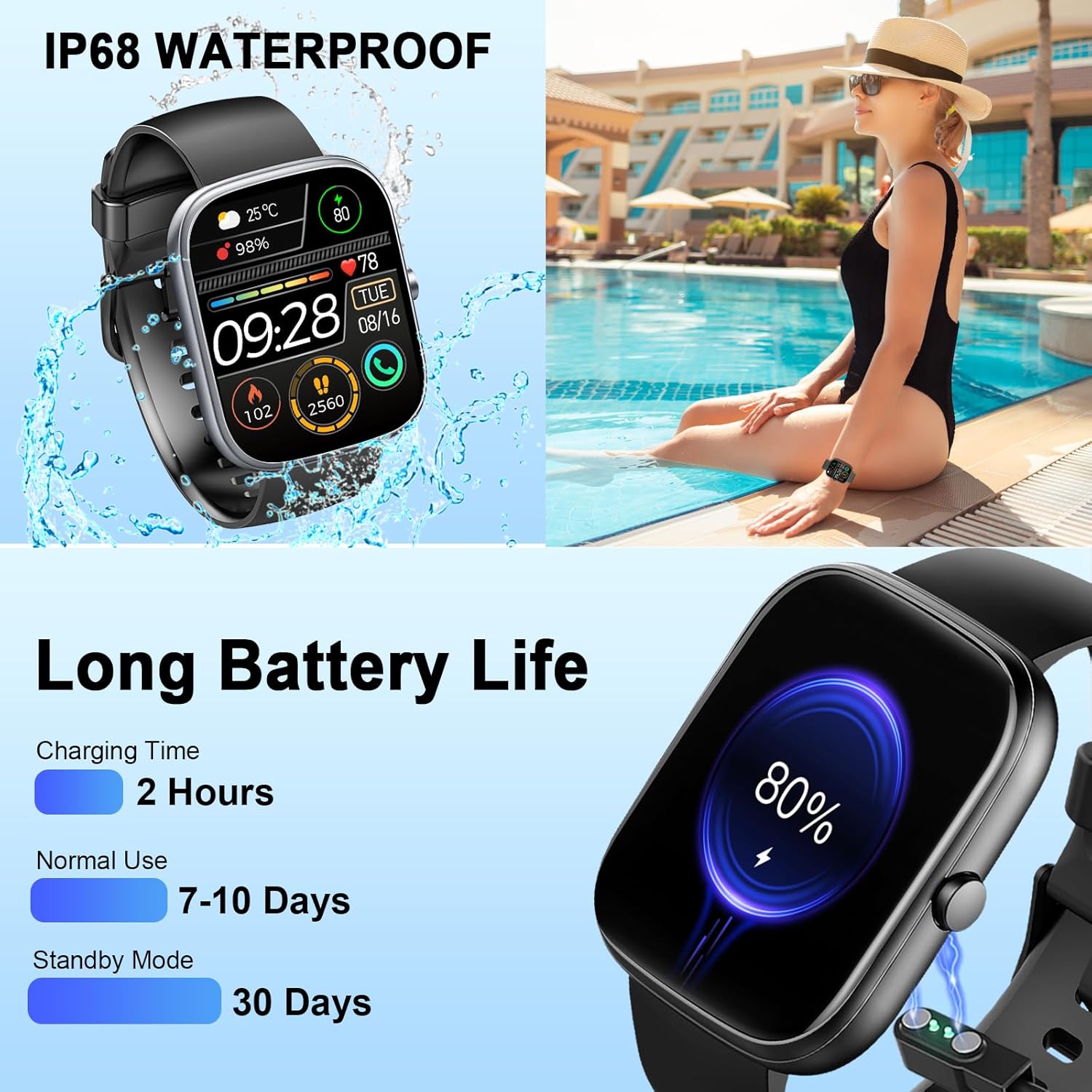
Image: The smartwatch connected to its magnetic charging cable, illustrating the charging process and highlighting its long battery life specifications.

Image: The smartwatch on its magnetic charger, with text indicating a daily use time of 7 days and a standby time of 30 days.
6. معلومات حول مقاومة الماء
The Dyurwa Smart Watch T60 is IP68 waterproof. This means it is resistant to dust and can withstand immersion in water up to 1.5 meters for up to 30 minutes. It is suitable for daily use, such as hand washing, bathing, and swimming.
ملحوظة:
- Not suitable for hot water, saunas, or diving.
- Avoid exposure to high humidity or corrosive liquids.
- قد تقل مقاومة الماء بمرور الوقت نتيجة الاستخدام العادي.

Image: The smartwatch being splashed with water, accompanied by icons indicating its IP68 waterproof rating for activities like bathing and swimming.
7. الصيانة
- تنظيف: امسح الساعة وحزامها بانتظام بقطعة قماش ناعمة وجافة. إذا لزم الأمر، استخدم قطعة قماش مبللة قليلاً.amp قطعة قماش وتجفف جيدا.
- تجنب المواد الكيميائية: لا تستخدم مواد كيميائية قاسية أو مذيبات تنظيف أو منظفات قوية، لأنها قد تتلف طلاء الساعة وأختامها.
- شحن جهات الاتصال: Keep the charging contacts on the back of the watch clean and free of debris to ensure proper charging.
- تخزين: قم بتخزين الساعة في مكان بارد وجاف عندما لا تكون قيد الاستخدام.
8. استكشاف الأخطاء وإصلاحها
| مشكلة | الحل المحتمل |
|---|---|
| الساعة لا تعمل | تأكد من شحن الساعة بالكامل. وصلها بالشاحن لمدة 10 دقيقة على الأقل. |
| لا يمكن الاقتران بالهاتف الذكي | 1. تأكد من تفعيل البلوتوث على هاتفك. 2. تأكد من أن الساعة ضمن نطاق هاتفك. 3. أعد تشغيل كل من الساعة والهاتف. 4. Try unpairing and re-pairing the device through the GloryFit app and phone's Bluetooth settings. |
| بيانات غير دقيقة لمعدل ضربات القلب/النوم | Ensure the watch is worn snugly on your wrist, not too tight or too loose. Clean the sensor on the back of the watch. Note that data is for reference and not medical use. |
| لم يتم تلقي الإخطارات | 1. Check app permissions for GloryFit on your phone (notifications, background activity). 2. Ensure Bluetooth connection is stable. 3. Verify notification settings within the GloryFit app. |
| عمر البطارية قصير | Reduce screen brightness, limit continuous heart rate monitoring, and disable unnecessary notifications. Ensure proper charging. |
9. المواصفات
| ميزة | مواصفة |
|---|---|
| نموذج | ت60 |
| حجم الشاشة | 1.91 inches (4.85 cm) HD Full Touch Screen |
| الاتصال | بلوتوث 5.3 |
| نظام التشغيل | Android Wear 1.0 (compatible with iOS 9.0+ and Android 4.0+) |
| تصنيف مقاومة الماء | IP68 |
| نوع البطارية | بطارية ليثيوم أيون (بطارية 1 أمبير مرفقة) |
| وقت الشحن | حوالي 2 ساعات |
| وقت الاستخدام النموذجي | 7-10 أيام |
| وقت الاستعداد | حتى 30 يوما |
| وزن العنصر | 3.2 أونصات |
| نظام تحديد المواقع العالمي (جي بي اس) | لا يوجد نظام تحديد المواقع العالمي (GPS) |
10. الضمان والدعم
For warranty information and customer support, please refer to the documentation included with your purchase or contact Dyurwa customer service directly. Details for contacting support are typically available on the product packaging or the official Dyurwa webموقع.