
1. المقدمة والمنتجview
This manual provides detailed instructions for the installation, operation, and maintenance of your WALI Vertical Dual Monitor Wall Mount, Model 012ARMV-49. This mount is designed to support two monitors in a stacked configuration, optimizing desk space and providing ergonomic viewزوايا متعددة.
The mount supports displays from 17 to 49 inches, with a maximum weight capacity of 44 lbs (20 kg) per arm. It is compatible with VESA 75x75mm and 100x100mm mounting patterns. Key features include flexible tilt, swivel, and height adjustments, along with 360-degree rotation for versatile screen positioning.
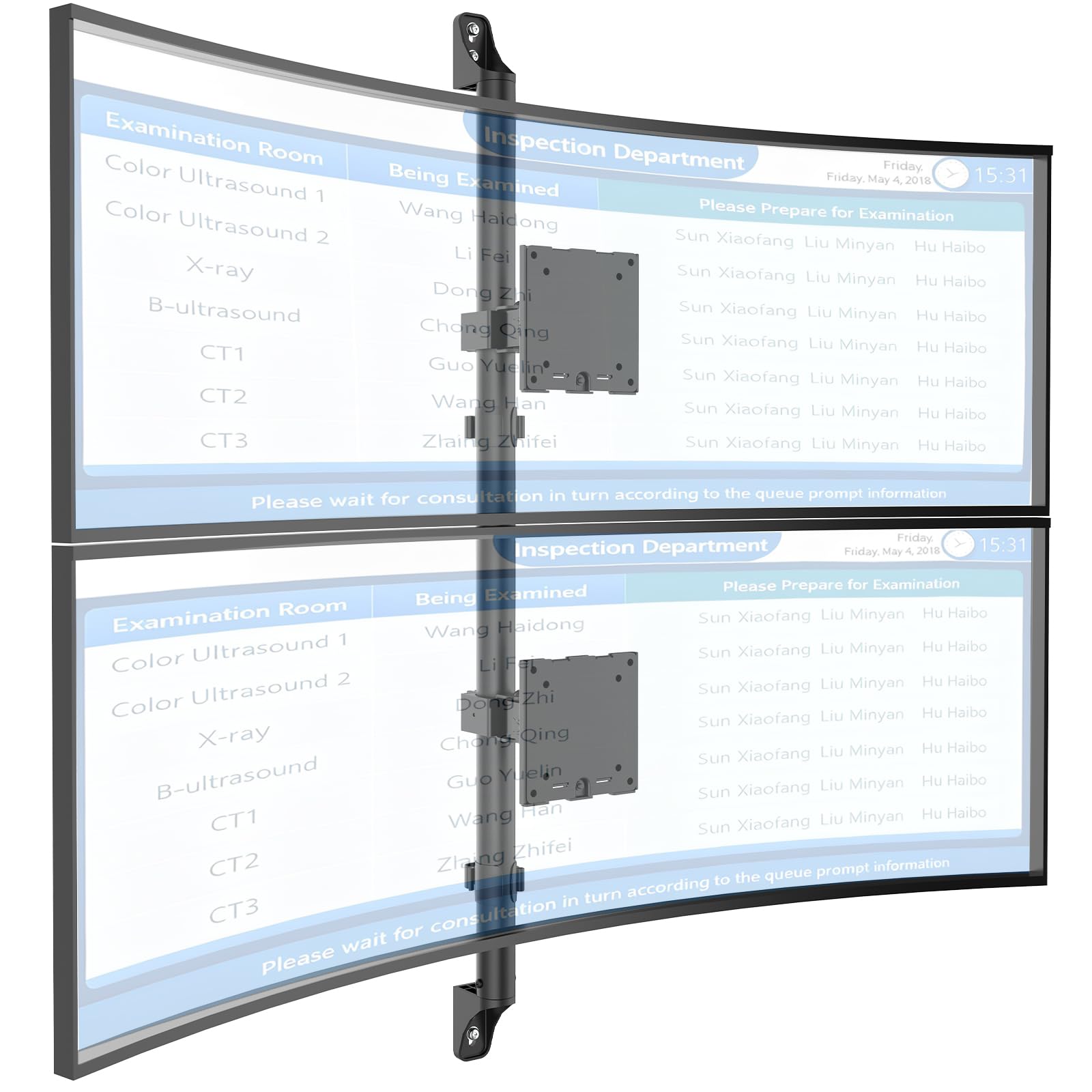
Figure 1: WALI Vertical Dual Monitor Wall Mount with two curved monitors.
2. معلومات السلامة
يرجى قراءة جميع التعليمات وفهمها جيدًا قبل التركيب والاستخدام. قد يؤدي عدم القيام بذلك إلى إصابة شخصية أو تلف في الممتلكات. احتفظ بهذا الدليل للرجوع إليه لاحقًا.
- قدرة الوزن: Do not exceed the maximum weight capacity of 44 lbs (20 kg) per monitor. Exceeding this limit can result in serious injury or product failure.
- حجم الشاشة: Ensure your monitors are within the supported size range of 17-49 inches.
- التوافق مع VESA: Verify your monitor's VESA mounting pattern (75x75mm or 100x100mm) before installation.
- نوع الجدار: This mount is designed for installation on concrete/brick walls or wooden studs. Do not install on drywall alone.
- التثبيت الاحترافي: إذا كنت غير متأكد من عملية التركيب أو نوع الجدار، فاستشر متخصصًا مؤهلًا.
- أجزاء متحركة: احرص على إبقاء يديك وأصابعك بعيدة عن الأجزاء المتحركة أثناء الضبط لمنع حدوث انحشار.
- أطفال: احتفظ بالأجزاء الصغيرة ومواد التغليف بعيدًا عن متناول الأطفال، لأنها قد تشكل خطر الاختناق.
3. محتويات العبوة
Verify that all components are present and undamaged. If any parts are missing or damaged, contact WALI customer support.
- 1 x WALI Vertical Dual Monitor Wall Mount (Black)
- Mounting Hardware Kit (includes screws, washers, wall anchors for masonry, and self-tapping screws for wood)
- دليل المستخدم
4. المواصفات
| ميزة | مواصفة |
|---|---|
| نوع التركيب | حامل الحائط |
| نوع الحركة | مفصل |
| ماركة | والي |
| مادة | Dual aerospace-grade aluminum mounting brackets, High-strength steel pole |
| لون | أسود |
| الأجهزة المتوافقة | شاشة، تلفزيون |
| أقصى زاوية الميل | 20 درجة |
| Minimum Supported Screen Size | 17 بوصة |
| Maximum Supported Screen Size | 49 بوصة |
| رقم الموديل | 012ARMV-49 |
| التوافق مع VESA | 75×75 مم، 100×100 مم |
| سعة الوزن | 44 رطلاً (20 كجم) لكل ذراع |
5. الإعداد والتثبيت
Follow these steps carefully to install your WALI Vertical Dual Monitor Wall Mount.
5.1 تحضير الجدار
- تحديد نوع الجدار: This mount is suitable for wooden studs, solid concrete walls, and brick walls.
- Locate Studs (for wood walls): Use a stud finder to locate the center of a wooden stud. Mark the drilling locations.
- تحديد مواقع الحفر: Hold the wall plate against the wall at your desired height and mark the screw holes. Ensure it is level.

Figure 2: Wall compatibility for installation.
5.2 Attaching the Wall Plate
- حفر ثقوب تجريبية: Drill pilot holes at the marked locations. The size of the drill bit will depend on your wall type and the provided hardware.
- لوحة تثبيت جدارية آمنة: Attach the wall plate to the wall using the appropriate screws and anchors for your wall type. Ensure it is firmly secured.

Figure 3: Securing the wall mount plate.
5.3 Attaching VESA Plates to Monitors
- Remove Original Stand: Carefully remove the original stand from your monitors.
- إرفاق لوحة VESA: Align the VESA plate with the mounting holes on the back of your monitor. Use the provided screws to secure the plate. Ensure the plate is oriented correctly for vertical stacking.
5.4 Mounting Monitors to the Arm
- Slide Arm onto Wall Base: Carefully slide the monitor arm assembly onto the secured wall base.
- Attach Monitors: With assistance, carefully lift each monitor and slide its VESA plate onto the corresponding arm bracket. Ensure it clicks securely into place.
- Secure Monitors: Use the safety screws or clips to prevent accidental dislodgement of the monitors from the arms.

Figure 4: Monitor arm assembly and attachment points.
5.5 إدارة الكابلات
- كابلات الطريق: Utilize the integrated cable management system to route monitor cables neatly along the arm and down the wall pole.
- الكابلات الآمنة: Use the provided clips or ties to secure the cables, preventing clutter and ensuring a clean setup.

Figure 5: Integrated cable management system.
6. تعليمات التشغيل (التعديلات)
The WALI Vertical Dual Monitor Wall Mount offers various adjustments for optimal viewجي الراحة.
- ضبط الارتفاع: The monitors can be adjusted vertically along the main pole. Loosen the adjustment screws on the arm brackets, slide the monitors to the desired height, and then re-tighten the screws. The maximum height adjustment is 28.74 inches.
- تعديل الميل: Tilt the monitors up to +50 degrees or down to -20 degrees to reduce glare and find your preferred viewزاوية جي.
- تعديل الدوران: Swivel the monitors up to +/-90 degrees horizontally for collaborative work or to adjust the viewجي الاتجاه.
- تناوب: Rotate the monitors 360 degrees to switch between landscape and portrait orientations.

Figure 6: Tilt, Swivel, and Rotation adjustments.

Figure 7: Full motion adjustment range and dimensions.
7. الصيانة
تضمن الصيانة المنتظمة طول عمر حامل الشاشة وتشغيله بشكل آمن.
- تنظيف: امسح الحامل بقطعة قماش ناعمة.amp القماش. تجنب استخدام المنظفات أو المذيبات الكاشطة.
- التحقق من ضيق: افحص جميع البراغي والوصلات بشكل دوري للتأكد من إحكامها وثباتها. أعد ربطها إذا لزم الأمر.
- فحص الضرر: Regularly inspect the mount for any signs of wear, damage, or corrosion. Discontinue use and contact support if any issues are found.
8. استكشاف الأخطاء وإصلاحها
If you encounter issues with your WALI Vertical Dual Monitor Wall Mount, refer to the following common problems and solutions:
- شاشة العرض تترهل أو لا تثبت في مكانها:
- Ensure the monitor weight is within the 44 lbs (20 kg) per arm limit.
- Tighten the tension adjustment screws on the arm joints using the included tool.
- الجبل يشعر بعدم الاستقرار:
- Verify that the wall plate is securely fastened to the wall with appropriate anchors for your wall type.
- Check that all connections between the arm and the VESA plates are tight.
- صعوبة ضبط وضع الشاشة:
- Loosen the tension adjustment screws slightly if the movement is too stiff.
- Ensure no cables are obstructing the movement of the arms.
9. الضمان والدعم
Your WALI Vertical Dual Monitor Wall Mount comes with a ضمان لمدة سنتين، تغطية عيوب المواد والصناعة في ظل الاستخدام العادي.
For technical assistance, missing parts, or warranty claims, please contact WALI customer support. Our experienced and friendly US-based customer support team is available to assist you 7 days a week.
معلومات الاتصال: Refer to the WALI webقم بزيارة موقع الويب أو عبوة المنتج للحصول على تفاصيل الاتصال الحالية.