
1. المقدمة
Thank you for choosing the DEPSTECH DS650-DL Dual-Lens Articulating Industrial Endoscope. This device is designed for detailed visual inspection in hard-to-reach areas, featuring a dual-lens system with 210° bidirectional rotation, a 4.5-inch IPS monitor, and 1080P high-definition imaging. It is an essential tool for home maintenance, vehicle inspection, and machinery checks.
Please read this manual thoroughly before use to ensure proper operation and to maximize the product's lifespan.
2. معلومات السلامة
- Do not use the endoscope in environments with flammable or explosive gases.
- The probe is IP67 waterproof, but the main unit is not. Avoid exposing the main unit to water or excessive moisture.
- لا تحاول تفكيك الجهاز أو تعديله. سيؤدي ذلك إلى إلغاء الضمان وقد يتسبب في تلفه.
- احتفظ بالجهاز بعيدًا عن متناول الأطفال.
- تجنب تعرض العين المباشر لأضواء LED.
- The device features overheat protection. If the temperature exceeds 70°C, a warning will display. If it exceeds 80°C, the device will automatically shut down to prevent damage. Allow the device to cool down before resuming operation.
3. محتويات العبوة
تأكد من وجود جميع العناصر وأنها في حالة جيدة عند فتح العبوة.
- DEPSTECH DS650-DL Endoscope Unit
- حقيبة التخزين
- دليل المستخدم
- كابل شحن من النوع C
- بطاقة ذاكرة بسعة 32 جيجابايت (مثبتة مسبقًا أو مرفقة بشكل منفصل)

Image: Contents of the DEPSTECH DS650-DL package.
4. الإعداد
4.1 شحن الجهاز
Before first use, fully charge the endoscope unit. Connect the provided Type-C charging cable to the charging port on the device and to a suitable USB power adapter (not included).
4.2 إدخال بطاقة الذاكرة
If the 32GB memory card is not pre-installed, locate the TF card slot on the side of the monitor unit. Insert the memory card with the contacts facing down until it clicks into place.
4.3 تشغيل/إيقاف التشغيل
Press and hold the power button (usually located near the monitor) for a few seconds to turn the device on or off. The IPS monitor will display the startup screen.
5. التشغيل
5.1 فهم عناصر التحكم

الصورة: أكثر منview of the endoscope controls and ports.
- OK/Confirm Button: تأكيد الاختيارات في القوائم.
- Up/Zoom In Button: Navigates up in menus or zooms in on the image.
- Down/Zoom Out Button: Navigates down in menus or zooms out on the image.
- زر الدوران 180 درجة: Rotates the real-time image on the screen by 180 degrees.
- Lens Switch Button: Toggles between front camera, side camera, and dual-view وضع.
- زر الصورة/الفيديو: Short press to take a photo, long press to start/stop video recording.
- Power Button/LED Adjustment: Short press to adjust LED brightness (3 levels), long press to power on/off.
- Articulating Angle Dial: Controls the 210° bidirectional rotation of the probe tip.
- فتحة بطاقة TF: لإدخال بطاقة الذاكرة.
- ميناء من النوع C: للشحن ونقل البيانات.
- زر إعادة الضبط: Resets the device (use a pin to press).
5.2 Using the Dual-Lens and Articulation
The DS650-DL features both a front camera and a side camera, allowing for a wider inspection range. The probe tip can be articulated up to 210° in two directions for comprehensive viewعمل.
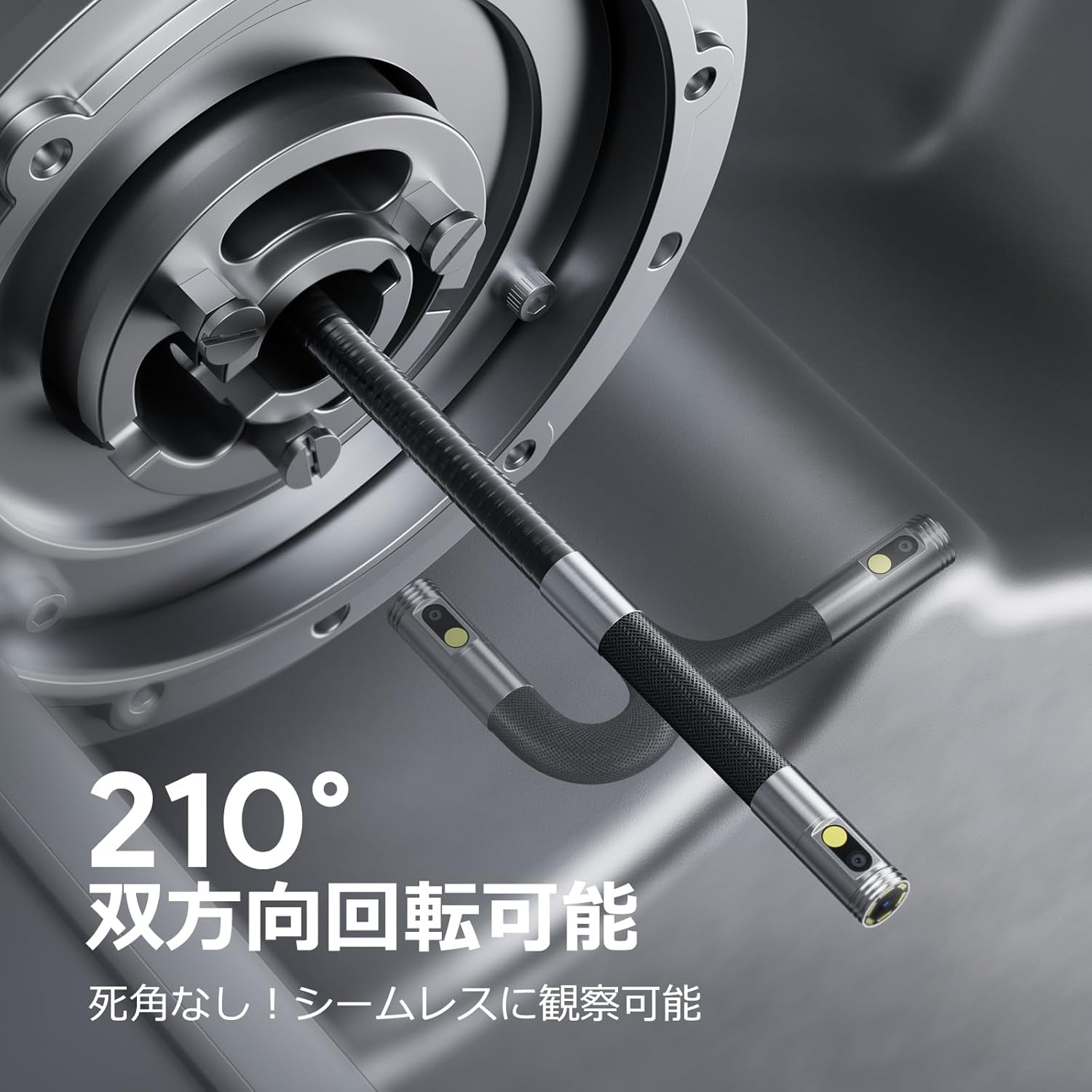
Image: Endoscope probe demonstrating 210° bidirectional articulation.
- استخدم زر تبديل العدسة to cycle between the front camera, side camera, or a split-screen dual-view وضع.
- تدوير Articulating Angle Dial to precisely adjust the direction of the probe tip. This allows you to navigate around obstacles and view areas from multiple angles without repositioning the entire cable.
5.3 التقاط الصور ومقاطع الفيديو
The device supports capturing both still images and video recordings directly to the inserted 32GB memory card.

Image: Monitor display showing photo and video capture features.
- لالتقاط صورة: اضغط لفترة قصيرة على زر الصورة / الفيديو.
- لتسجيل الفيديو: اضغط لفترة طويلة على زر الصورة / الفيديو to start recording. Long press again to stop recording.
- تم التقاطها files are saved to the 32GB memory card. You can store approximately 10,000 images or 50 videos.
5.4 ضبط سطوع LED
The probe is equipped with high-brightness LED lights to illuminate dark inspection areas. Short press the Power Button/LED Adjustment button to cycle through 3 levels of LED brightness.

Image: IP67 waterproof probe with adjustable LED illumination.
5.5 نقل البيانات
You can transfer captured images and videos to a computer via the Type-C cable or by directly accessing the memory card.

Image: High-speed data transfer from endoscope to PC.
6. الصيانة
- تنظيف المسبار: After use, especially in dirty or wet environments, gently wipe the probe with a soft, damp cloth. Ensure no debris remains on the camera lenses.
- تنظيف الشاشة: Use a soft, dry cloth to clean the IPS monitor. Avoid abrasive cleaners or solvents.
- تخزين: Store the endoscope in its provided storage case in a cool, dry place, away from direct sunlight and extreme temperatures. This prevents damage from improper storage and moisture.
- العناية بالبطارية: لإطالة عمر البطارية، تجنب تفريغ الجهاز بالكامل بشكل متكرر. اشحنه بانتظام، حتى لو لم تستخدمه لفترات طويلة.
7. استكشاف الأخطاء وإصلاحها
| مشكلة | السبب المحتمل | حل |
|---|---|---|
| الجهاز لا يعمل. | بطارية منخفضة، عطل في الجهاز. | اشحن الجهاز بالكامل. إذا استمرت المشكلة، تواصل مع الدعم. |
| لا توجد صورة على الشاشة. | Cable not connected properly; camera lens obstructed. | Ensure the probe cable is securely connected. Check for obstructions on the lens. |
| الصورة ضبابية أو غير واضحة. | Lens is dirty; focus distance incorrect. | Clean the camera lens. Ensure the object is within the optimal focal range (3-10cm). |
| لا يمكن تسجيل الصور/الفيديوهات. | بطاقة الذاكرة ممتلئة أو لم يتم إدخالها بشكل صحيح. | Check if the 32GB memory card is inserted correctly. Delete old fileأو استبدل البطاقة إذا كانت ممتلئة. |
| Device shuts down automatically. | تفعيل الحماية من الحرارة الزائدة. | Allow the device to cool down. Avoid using in excessively hot environments. |
8. المواصفات
| ميزة | التفاصيل |
|---|---|
| ماركة | ديبستيك |
| رقم الموديل | DS650DJ |
| عرض | 4.5-inch IPS LCD Monitor |
| دقة الكاميرا | 1080 بكسل |
| قطر التحقيق | 8.5 ملم |
| زاوية المفصل | 210° Bidirectional |
| نوع الكابل | 1.5M Semi-rigid |
| تصنيف مقاومة الماء | IP67 (Probe only) |
| إضاءة | أضواء LED قابلة للتعديل |
| تخزين | بطاقة مايكرو اس دي سعة 32 جيجابايت (مضمنة) |
| البطارية متضمنة | نعم |
| أبعاد الحزمة | 43.1 × 21.4 × 7.4 سم |
| وزن الحزمة | 1.33 كجم |
9. الضمان والدعم
9.1 ضمان الشركة المصنعة
This DEPSTECH product comes with a ضمان الشركة المصنعة لمدة 24 شهرًا. Your order number serves as your proof of purchase for warranty claims. Please retain it.
9.2 دعم العملاء
For any questions, technical assistance, or warranty inquiries, please contact our professional support team:
بريد إلكتروني: support.jp@depstech.com
We aim to respond to all inquiries within 24 hours (excluding weekends and public holidays, where responses will be provided on the next business day).

Image: DEPSTECH customer support and warranty information.