
1. المقدمة
This manual provides instructions for the assembly, operation, and maintenance of your SSUPD Meshroom D Mini-ITX Small Form Factor (SFF) PC case. Please read this manual thoroughly before beginning installation to ensure proper setup and optimal performance.
2. مواصفات المنتج
- تصميم ITX صغير الحجم: 14.93L footprint, exclusively designed to accommodate Mini-ITX motherboards.
- Large GPU Support: Compatible with 3.5 slot GPUs.
- Dual Radiator Ready: Fully prepared for dual radiator custom loop configurations.
- Ultra Ventilation: Extreme fine mesh panel in 1.5mm aperture on all sides.
- دعم مزود الطاقة: Supports SFX/SFX-L/ATX power supply.
- دعم مروحة التبريد: Interior fits up to 3x 140mm cooling fans, along with multiple radiators.
3. الإعداد والتثبيت
The SSUPD Meshroom D case is designed for tool-free and easy accessibility. Follow these steps for component installation.
3.1. الوصول إلى الداخل
The side panels and top panel can be easily removed for access.

Image: The SSUPD Meshroom D case with its side panel removed, revealing the internal structure and mounting points for components.
The mesh panels are flexible for easy removal and reattachment.
Video: This video demonstrates the tool-free removal of the side panels and the flexible nature of the mesh material, highlighting the ease of access for installation.
3.2. تثبيت وحدة معالجة الرسومات (GPU)
The case supports large GPUs, up to 3.5 slots.

Image: A large graphics processing unit (GPU) installed within the SSUPD Meshroom D case, demonstrating the ample space for high-performance components.
Video: This video provides a build reference, showing the installation process of a GPU and other components within the SSUPD Meshroom D case.
3.3. تركيب نظام التبريد
The Meshroom D supports various cooling configurations, including up to three 140mm fans and dual radiators for custom liquid cooling loops.
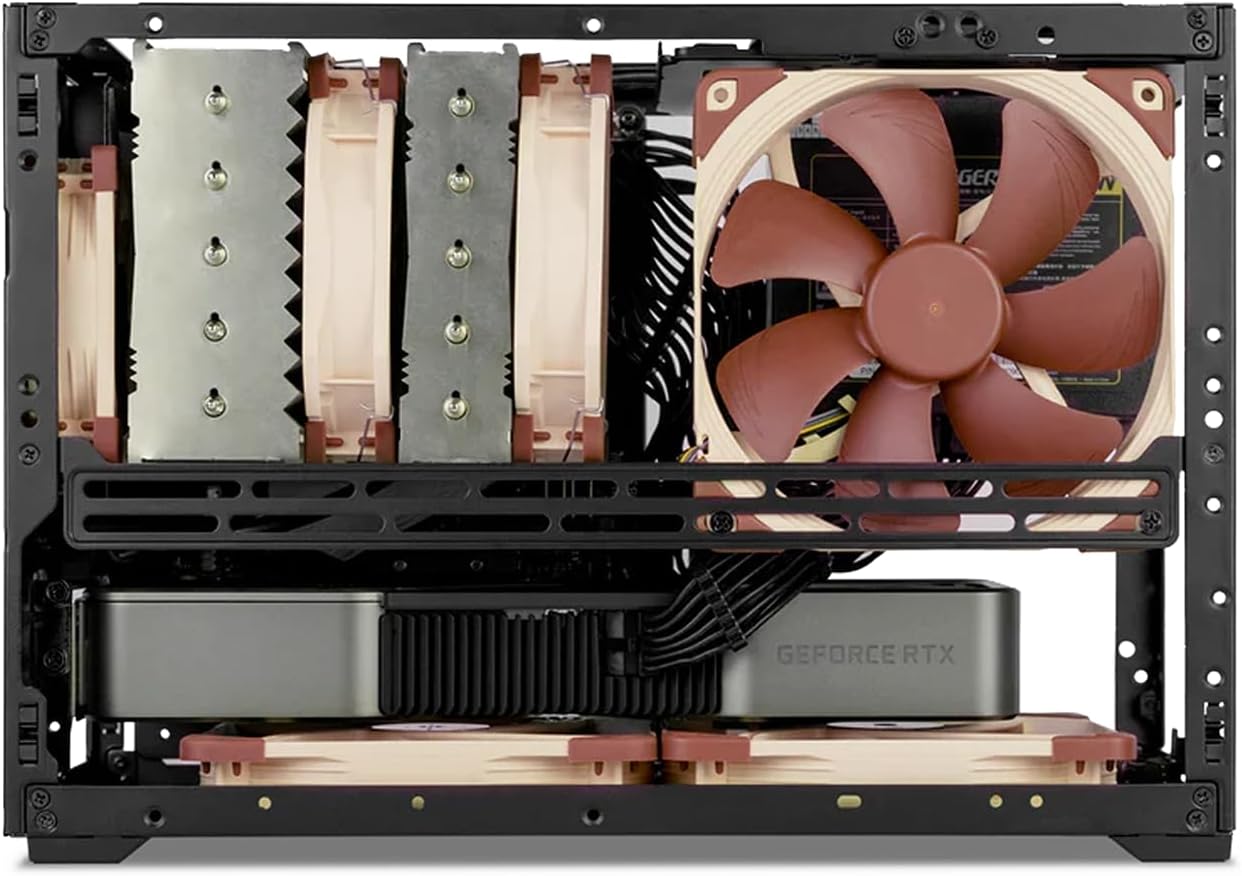
الصورة: داخلية view of the SSUPD Meshroom D case, showcasing a CPU air cooler and two fans installed at the bottom for enhanced airflow.

Image: The SSUPD Meshroom D case configured with dual radiators for a custom liquid cooling setup, illustrating its advanced cooling capabilities.
4. توافق المكونات
The Meshroom D offers flexible compatibility for various PC components.
4.1. توافق اللوحة الأم
- ميني آي تي إكس
- Mini DTX
- Micro-ATX (requires optional expansion bracket)
4.2. Power Supply Compatibility
- ايه تي اكس
- SFX-L
- مؤثرات صوتية
4.3. Storage Drive Support
- Up to 3 x 3.5" HDDs
- Up to 5 x 2.5" SSDs
4.4. GPU Dimensions
Refer to the specifications table for detailed GPU length and height limitations based on motherboard type and I/O configuration.

Image: A diagram illustrating GPU compatibility for the SSUPD Meshroom D, detailing supported lengths and slot sizes for different configurations.
5. الصيانة
5.1. التنظيف
- Regularly clean the mesh panels to ensure optimal airflow. Use a soft brush or compressed air to remove dust.
- For deeper cleaning, panels can be removed and gently washed with water and mild soap, then thoroughly dried before reinstallation.
5.2. فحص المكونات
- Periodically check all internal components for secure connections and dust buildup.
- Ensure cooling fans are free from obstructions and operating correctly.
6. استكشاف الأخطاء وإصلاحها
6.1. مشاكل ارتفاع درجة الحرارة
- Verify all fans are spinning and correctly oriented for airflow.
- Check for excessive dust buildup on mesh panels and component heatsinks.
- Ensure proper thermal paste application on the CPU cooler.
6.2. Power On Failure
- Confirm all power cables are securely connected to the motherboard, GPU, and power supply.
- تحقق من توصيل زر الطاقة باللوحة الأم.
- Test the power supply with another system if possible.
7. المواصفات
| ميزة | التفاصيل |
|---|---|
| أبعاد الهيكل (الطول × العرض × الارتفاع) | 17 × 7.7 × 12.4 بوصة |
| مقدار | 14.93 لتر |
| مادة العلبة | Alloy Steel, Aluminum, Plastic, Tempered Glass |
| التوافق مع اللوحة الأم | Mini ITX, Mini DTX, Micro-ATX (with optional bracket) |
| GPU Max Length (ITX MB) | 3-slot mode: 325mm length x 140mm height; 3.4-slot mode: 325mm length x 136mm height |
| GPU Max Length (MATX MB) | 3-slot mode: 325mm length x 140mm height (with expansion bracket); 4.6-slot mode: 325mm length x 136mm height (with expansion bracket) |
| أقصى ارتفاع لمبرد وحدة المعالجة المركزية | 142mm (no side fan bracket), 138mm (with side fan bracket) |
| نوع مصدر الطاقة | ATX, SFX-L, SFX |
| Power Supply Max Length | 150mm (PSU left side), 140mm (PSU right side), 130mm (PSU top) |
| 2.5" Drive Mounts | 5 x 2.5" SSD (SFX PSU); 4 x 2.5" SSD (ATX PSU) |
| 3.5" Drive Mounts | 3 x 3.5" HDD (SFX PSU); 2 x 3.5" HDD (ATX PSU) |
| Front Interface (Variant B) | 1x USB 3.2 Gen 2 Type-C (20 Gbps), 1x USB 3.0 Type-A (5 Gbps), 1x Power button |
| طريقة التبريد | الماء والهواء |
| وزن العنصر | 6.16 جنيه (2.8 كيلوجرام) |

Image: A comprehensive table detailing the specifications and compatibility of the SSUPD Meshroom D case, including dimensions, component support, and cooling options.
8. الضمان والدعم
For warranty information and technical support, please refer to the official SSUPD webالموقع أو تواصل مع خدمة العملاء. احتفظ بإيصال الشراء لطلبات الضمان.