
باجوت A21
Bagotte Robot Vacuum and Mop Model A21 User Manual
دليلك للإعداد والتشغيل والصيانة
1. تعليمات السلامة الهامة
Please read this user manual carefully before using the Bagotte Robot Vacuum and Mop Model A21. Keep this manual for future reference.
- يمكن استخدام هذا الجهاز من قبل الأطفال الذين تبلغ أعمارهم 8 سنوات فأكثر والأشخاص ذوي القدرات البدنية أو الحسية أو العقلية المحدودة أو الذين يفتقرون إلى الخبرة والمعرفة إذا تم الإشراف عليهم أو توجيههم فيما يتعلق باستخدام الجهاز بطريقة آمنة وفهم المخاطر التي ينطوي عليها.
- لا يجوز للأطفال اللعب بالجهاز، ولا يجوز للأطفال القيام بأعمال التنظيف والصيانة دون إشراف.
- استخدم فقط محول الطاقة الأصلي الذي توفره لك الشركة المصنعة.
- لا تستخدم الروبوت في البيئات التي تحتوي على لهب مكشوف أو أشياء هشة.
- Ensure the charging station is placed on a level surface against a wall, with no obstacles within 1 meter on either side and 2 meters in front.
- Before cleaning, remove power cords, small objects, and any items that could entangle the robot.
- لا تغمر الروبوت أو مكوناته الإلكترونية في الماء.
- Turn off the robot and unplug the charging station before performing any maintenance or cleaning.
2. محتويات العبوة
تأكد من وجود جميع المكونات وأنها في حالة جيدة عند فتح العبوة.

Image: All items included in the Bagotte Robot Vacuum A21 package.
- A21 Robot Vacuum Cleaner * 1
- Charging Station * 1
- Remote Control (2 AAA batteries included) * 1
- محول الطاقة * 1
- 2-in-1 Water Tank * 1
- فرشاة جانبية * 2
- Mop Holder * 1
- Mop Cloth * 2
- Hepa Filters * 1
- فرشاة التنظيف * 1
- دليل المستخدم * 1
3. انتهى المنتجview
The Bagotte A21 is a 3-in-1 robot vacuum designed for vacuuming, sweeping, and mopping. It features a slim design, powerful suction, and multiple control options.

Image: Bagotte Robot Vacuum A21 main unit and accessories.
مكونات الوحدة الرئيسية
- الغطاء العلوي: Power button, Wi-Fi indicator.
- المصد الأمامي: أجهزة استشعار التصادم.
- الفرش الجانبية: لتنظيف الحواف والزوايا.
- عجلات القيادة: For movement.
- صندوق القمامة/خزان المياه: وحدة متكاملة للتنظيف الجاف والرطب.
- شحن جهات الاتصال: For automatic recharging.
- Bottom Sensors: Cliff sensors to prevent falls.
4. الإعداد
4.1 وضع محطة الشحن
Place the charging station against a wall on a hard, level surface. Ensure there are no obstacles within 1 meter (3.3 feet) to the left and right, and 2 meters (6.6 feet) in front of the charging station. This allows the robot to return for charging without obstruction.

Image: Robot vacuum returning to its charging station.
4.2 الشحن الأولي
Connect the power adapter to the charging station and plug it into a wall outlet. Place the robot onto the charging station, ensuring the charging contacts align. For first-time use, charge the robot for at least 6 hours to ensure the battery is fully conditioned.
4.3 تركيب الفرش الجانبية
Attach the side brushes to the corresponding posts on the bottom of the robot until they click into place. Ensure the brushes are securely fastened.
4.4 Installing the 2-in-1 Water Tank/Dustbin
To use the mopping function, fill the water tank with clean water. Attach the mop cloth to the mop holder, then slide the mop holder onto the water tank. Insert the combined 2-in-1 water tank/dustbin unit into the back of the robot until it clicks securely.

Image: Components for 3-in-1 cleaning functionality.
5. تعليمات التشغيل
5.1 تشغيل/إيقاف التشغيل
- تشغيل الطاقة: Press and hold the power button on the robot for a few seconds until the indicator light turns on.
- إيقاف التشغيل: Press and hold the power button for a few seconds until the indicator light turns off.
5.2 أوضاع التنظيف
The robot offers four cleaning modes to suit different needs:

Image: Illustration of different cleaning modes.
- التنظيف التلقائي: يقوم الروبوت بالتنظيف تلقائيًا وفق نمط منهجي.
- تنظيف البقعة: يقوم الروبوت بتنظيف منطقة محددة بنمط حلزوني لتنظيف مركز.
- تنظيف الحواف: يقوم الروبوت بالتنظيف على طول الجدران وحواف الأثاث.
- التنظيف اليدوي: Control the robot's direction using the remote control or app.
5.3 التحكم في التطبيق (تطبيق Tuya Smart)
Download the Tuya Smart app from your smartphone's app store. Follow the in-app instructions to connect your robot to your home's 2.4GHz Wi-Fi network. The app allows for advanced control and scheduling.
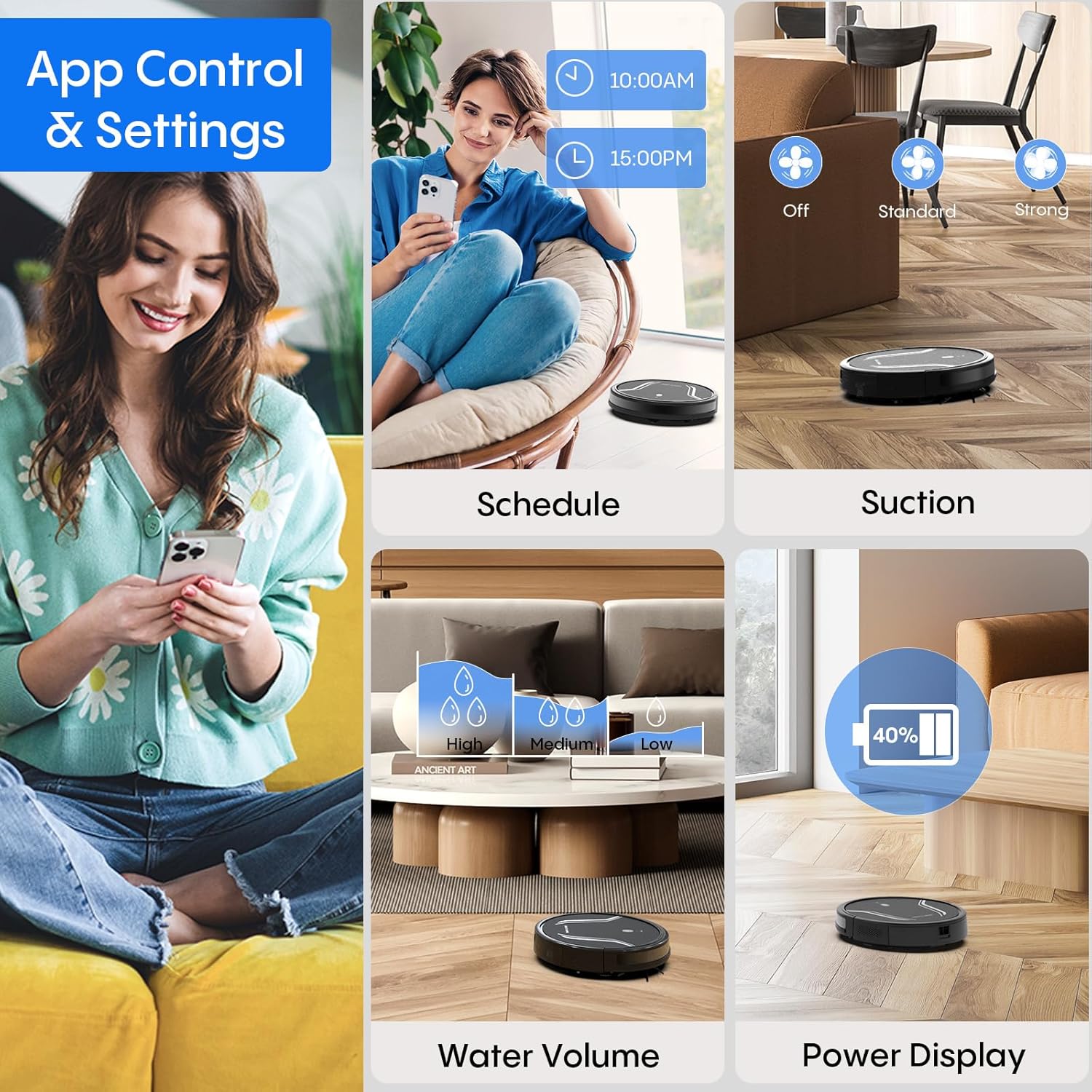
Image: App control interface for the robot vacuum.
- الجدولة: حدد أوقاتًا محددة ليقوم الروبوت بالتنظيف تلقائيًا.
- طرق التنظيف: Select desired cleaning modes.
- قوة الشفط: Adjust suction levels (e.g., Standard, Strong).
- حجم المياه: Control water flow for mopping (e.g., Low, Medium, High).
- حالة البطارية: Monitor the robot's battery level.
- Find My Robot: Locate the robot if it gets stuck or lost.
5.4 التحكم عن بعد
Use the included remote control to manually direct the robot, start/pause cleaning, select cleaning modes, and send it back to the charging station.
5.5 التحكم الصوتي (أليكسا/مساعد جوجل)
Once connected to the Tuya Smart app, you can link your robot to Amazon Alexa or Google Assistant for voice commands. For example, say "Alexa, turn on the robot."

Image: Robot vacuum controlled via voice command.
5.6 إعادة الشحن التلقائي
When the battery level is low, the robot will automatically return to its charging station to recharge. You can also manually send it back using the app or remote control.
6. الصيانة
تضمن الصيانة الدورية الأداء الأمثل وتطيل عمر مكنسة الروبوت الخاصة بك.
6.1 إفراغ سلة المهملات
Press the release button to remove the 2-in-1 water tank/dustbin unit. Open the dustbin cover and empty its contents into a trash bin. It is recommended to empty the dustbin after each cleaning cycle.
6.2 تنظيف المرشحات
Remove the HEPA filter and sponge filter from the dustbin. Tap them gently to remove dust. The filters are not washable and should be replaced every 3-6 months, depending on usage.
6.3 تنظيف الفرش الجانبية
Periodically check the side brushes for tangled hair or debris. Carefully remove any obstructions. If brushes are worn or damaged, replace them with new ones.
6.4 تنظيف أجهزة الاستشعار
Wipe the cliff sensors (located on the bottom of the robot) and the charging contacts (on both the robot and charging station) with a clean, dry cloth. This ensures proper navigation and charging.
6.5 Cleaning Mop Cloth and Water Tank
After each mopping session, remove the mop cloth and wash it thoroughly. Allow it to air dry completely before reattaching. Empty any remaining water from the water tank and rinse it out. Ensure the water tank is dry before storage.
7. استكشاف الأخطاء وإصلاحها
إذا واجهت مشاكل مع مكنسة الروبوت الخاصة بك، فراجع المشاكل والحلول الشائعة التالية:
| مشكلة | السبب المحتمل | حل |
|---|---|---|
| الروبوت لا يعمل | بطارية منخفضة؛ زر الطاقة غير مضغوط بشكل صحيح | Charge the robot; Press and hold the power button until the indicator lights up. |
| الروبوت لا يشحن | Charging contacts are dirty; Charging station not powered | Clean charging contacts on both robot and station; Ensure power adapter is plugged in. |
| الروبوت يتعطل بشكل متكرر | Too many obstacles; Cliff sensors are dirty | Clear the cleaning area of loose cables and small objects; Clean cliff sensors. |
| أداء التنظيف الضعيف | Dustbin full; Filters clogged; Side brushes worn | Empty dustbin; Clean or replace filters; Clean or replace side brushes. |
| وظيفة المسح لا تعمل | Water tank empty; Mop cloth not attached; Water flow setting too low | Fill water tank; Attach mop cloth correctly; Adjust water flow setting in the app. |
| لا يمكن الاتصال بشبكة Wi-Fi | Incorrect Wi-Fi password; Not 2.4GHz network; Robot too far from router | Verify password; Ensure router is 2.4GHz; Move robot closer to router during setup. |
8. المواصفات
| ميزة | التفاصيل |
|---|---|
| رقم الموديل | أ21 |
| أبعاد المنتج | 15 × 12.5 × 4 بوصة |
| وزن العنصر | 7.24 رطل |
| قوة الشفط | يصل إلى 5000 باسكال |
| سعة صندوق الغبار | 250mL (integrated with water tank) |
| سعة خزان المياه | 200mL (integrated with dust box) |
| طرق التحكم | App, Remote Control, Voice Control (Alexa/Google Assistant) |
| التوافق مع شبكة Wi-Fi | 2.4 جيجا هرتز فقط |
| الميزات التلقائية | Auto-recharge, Obstacle avoidance, Fall prevention |
9. الضمان والدعم
Bagotte provides a 12-month service warranty for the Robot Vacuum and Mop Model A21. For technical support, warranty claims, or any questions regarding your product, please contact Bagotte customer service through the official webالموقع أو منصة الشراء الخاصة بك.
يرجى تجهيز رقم الطراز (A21) ومعلومات الشراء عند الاتصال بالدعم.
Ask a question about this manual
Ask about setup, troubleshooting, compatibility, parts, safety, or missing instructions. Manuals+ will review the question and use this page’s manual context to help answer it.