
KOOSMILE N150 (P8)
دليل مستخدم جهاز الكمبيوتر المحمول الصغير KOOSMILE N150 مقاس 8 بوصات 2 في 1
Model: N150 (P8)
1. المقدمة
This manual provides essential information for the setup, operation, maintenance, and troubleshooting of your KOOSMILE N150 8-inch 2-in-1 Mini Laptop. Please read this manual thoroughly before using the device to ensure proper functionality and to prevent damage.
2. محتويات العبوة
تأكد من وجود جميع العناصر في العبوة:
- KOOSMILE N150 8-inch 2-in-1 Mini Laptop x1
- PD Adapter x1
- Active Stylus x1
- كابل HDMI x1
- HUB x1
- دليل المستخدم x1
- Data Cables x2
3. انتهى المنتجview
Familiarize yourself with the components and ports of your mini laptop.
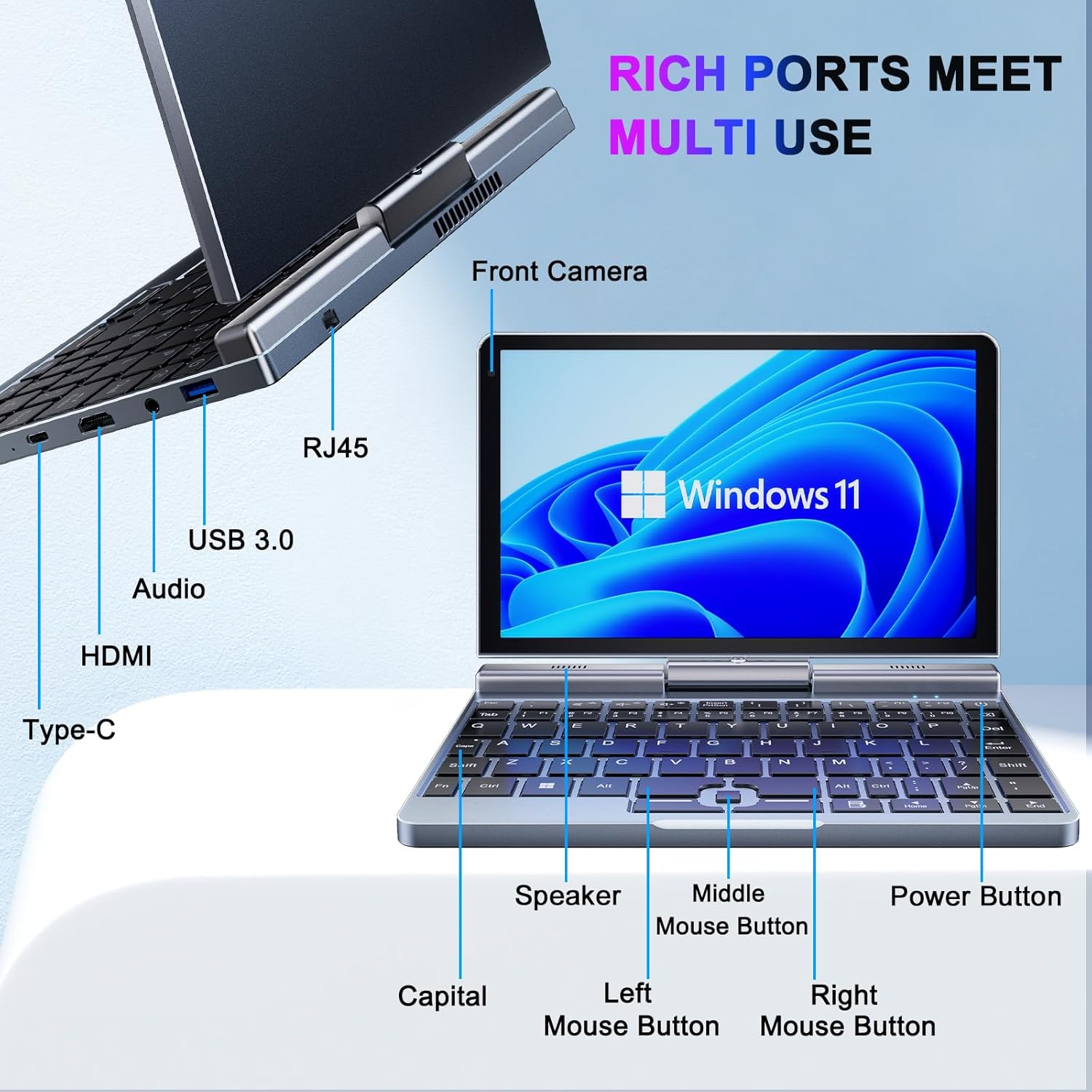
الصورة 3.1: KOOSMILE N150 Mini Laptop with labeled ports and buttons. Key components include the Front Camera, RJ45 port, USB 3.0 port, Audio jack, HDMI port, Type-C port, Speaker, Middle Mouse Button, Left Mouse Button, Right Mouse Button, Capital indicator, and Power Button.
3.1 الميزات الرئيسية
- المعالج: Intel N150 (4 cores/4 threads, up to 3.6GHz)
- نظام التشغيل: ويندوز 11 برو
- عرض: 8-inch HD Touch Screen (1280x800 pixels)
- ذاكرة: 12GB LPDDR5 RAM (4800 MHz)
- تخزين: 512GB or 1TB M.2 SSD (expandable up to 2TB)
- الاتصال: Wi-Fi 6 (802.11ax), Bluetooth 5.2, Gigabit Ethernet (via RJ45)
- الموانئ: USB 3.0, USB Type-C, HDMI, Headphone Jack
- آلة تصوير: كاميرا أمامية بدقة 2 ميجا بكسل
- تصميم: 180° Rotating Screen, 2-in-1 Convertible (Laptop/Tablet mode), CNC-machined full-metal body
- وزن: حوالي 0.78 كجم (1.72 رطل)
4. الإعداد
4.1 الشحن الأولي
- Connect the provided PD Adapter to the USB Type-C port on the laptop.
- قم بتوصيل المحول بمأخذ الطاقة.
- Allow the device to charge fully before first use. A full charge is indicated by the charging LED changing color or turning off.
- ملحوظة: Use only the provided PD adapter or a compatible Type-C charger with sufficient voltage (e.g., a laptop or Steamdeck charger) to ensure proper charging. Standard phone USB blocks may not provide enough power.
4.2 التمهيد الأول وإعداد Windows
- Press and hold the Power Button (refer to Image 3.1) until the screen illuminates.
- Follow the on-screen instructions to complete the Windows 11 Pro setup process. This typically includes selecting your region, language, connecting to a Wi-Fi network, and creating a user account.
5. تعليمات التشغيل
5.1 تشغيل/إيقاف التشغيل ووضع السكون
- تشغيل الطاقة: اضغط على زر الطاقة.
- وضع السكون: Briefly press the Power Button while the device is on. Press again to wake.
- اغلق: Click the Windows Start button, then Power, and select "Shut down."
- إعادة تشغيل: Click the Windows Start button, then Power, and select "Restart."
5.2 استخدام وظيفة 2 في 1
The laptop features a 180° rotating screen, allowing it to transform into various modes.
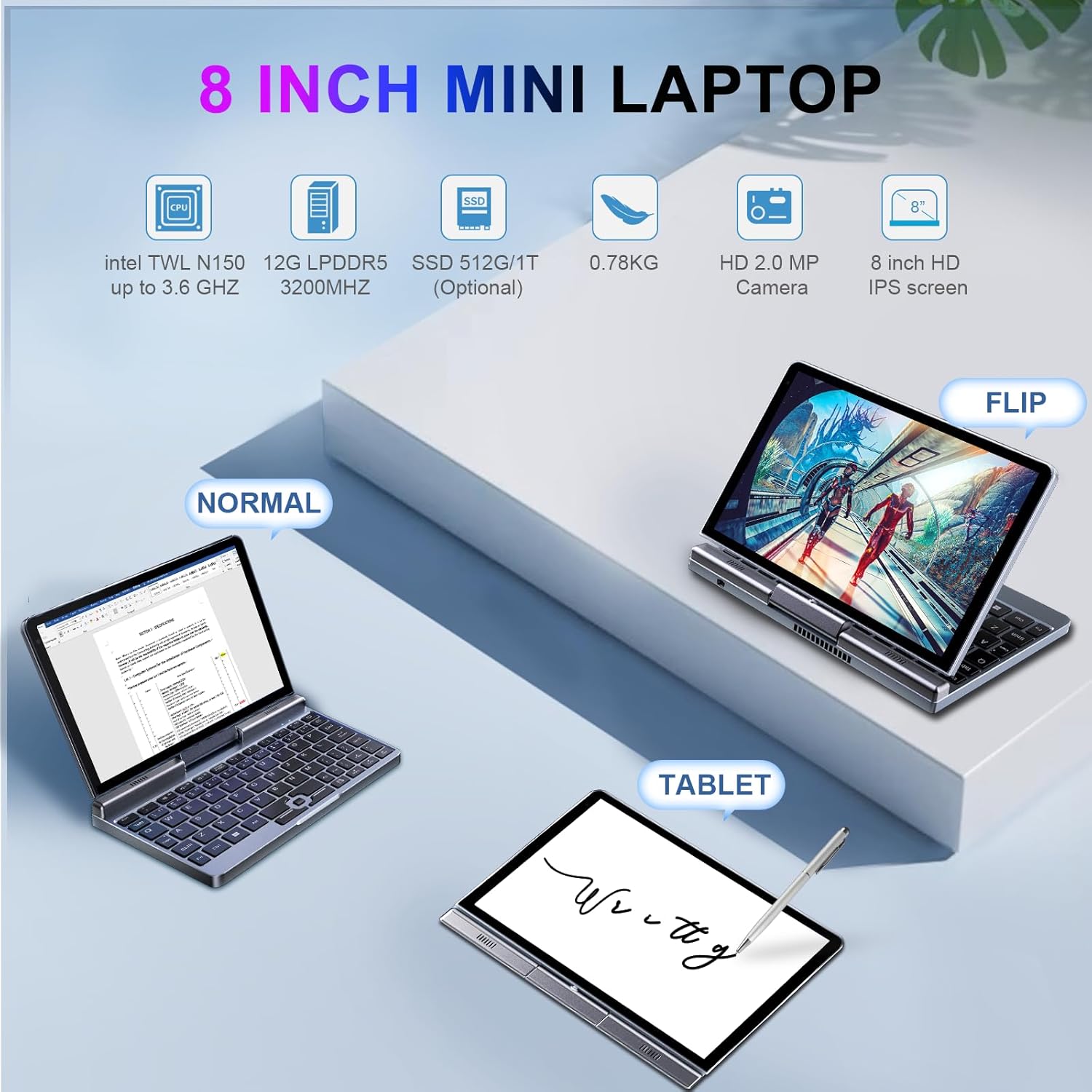
الصورة 5.1: Demonstrates the KOOSMILE N150 Mini Laptop in its three primary modes: Normal (traditional laptop), Flip (tent mode), and Tablet (screen folded back). This highlights the device's versatility for different usage scenarios.
- وضع الكمبيوتر المحمول: Standard configuration for typing with the physical keyboard.
- Tent Mode (Flip): Rotate the screen 180 degrees and stand the device in a tent shape for media consumption or presentations.
- وضع الجهاز اللوحي: Fold the screen completely back against the base for a full touchscreen experience. The physical keyboard will automatically disable in this mode.
5.3 Touch Screen and Stylus Usage
- The 8-inch HD screen supports multi-touch gestures.
- Use the included Active Stylus for precise input, drawing, or note-taking, especially in Tablet mode.
5.4 توصيل الشاشات الخارجية
The laptop supports external displays via HDMI and USB Type-C (DisplayPort out).

الصورة 5.2: The KOOSMILE N150 Mini Laptop connected to an external monitor, demonstrating its capability for multi-screen display and enhanced productivity. The image shows the laptop displaying a document while the external monitor shows a larger view of the same document.

الصورة 5.3: The KOOSMILE N150 Mini Laptop configured as a micro desktop, connected to two external monitors, a keyboard, and a mouse. This setup illustrates its potential for multi-tasking and extended workspace.
- Connect an HDMI cable from the laptop's HDMI port to your external display.
- Alternatively, use a USB Type-C to DisplayPort cable or adapter for compatible monitors.
- يضعط مفتاح الويندوز + P to open the Project menu and select your desired display mode (e.g., Duplicate, Extend, Second screen only).
5.5 الاتصال بالشبكة
- واي فاي: Access Wi-Fi settings via the Windows taskbar icon to connect to available wireless networks.
- بلوتوث: Enable Bluetooth in Windows settings to pair with Bluetooth devices like headphones or keyboards.
- إيثرنت: قم بتوصيل كابل إيثرنت بمنفذ RJ45 للحصول على اتصال شبكة سلكي.
6. الصيانة
6.1 التنظيف
- استخدم قطعة قماش ناعمة وخالية من الوبر لتنظيف الشاشة والجزء الخارجي.
- بالنسبة للعلامات العنيدة، قم بالتدليك برفقampاغسل القماش بالماء أو بمحلول تنظيف الشاشة. تجنب المواد الكيميائية القاسية.
- تأكد من إيقاف تشغيل الجهاز وفصله قبل التنظيف.
6.2 العناية بالبطارية
- لإطالة عمر البطارية، تجنب درجات الحرارة القصوى.
- لا تسمح للبطارية بالتفريغ الكامل بشكل متكرر.
- If storing the device for an extended period, charge it to approximately 50-70%.
6.3 تحديثات البرامج
- تحقق بانتظام من تحديثات Windows وثبّتها لضمان الأداء والأمان الأمثل. انتقل إلى الإعدادات > تحديث Windows.
7. استكشاف الأخطاء وإصلاحها
| مشكلة | الحل المحتمل |
|---|---|
| الجهاز لا يعمل. |
|
| البطارية لا تشحن. |
|
| مشاكل في الاتصال بشبكة Wi-Fi. |
|
| Touchscreen or stylus not responding. |
|
| Device runs hot during use. |
|
8. المواصفات
| ميزة | التفاصيل |
|---|---|
| نموذج | P8 (N150) |
| المعالج | Intel N150 (4 cores/4 threads, up to 3.6GHz) |
| الرسومات | رسومات Intel UHD (متكاملة) |
| نظام التشغيل | ويندوز 11 برو |
| عرض | 8-inch HD Touch Screen, 1280 x 800 pixels |
| كبش | 12 جيجابايت LPDDR5 (4800 ميجاهرتز) |
| تخزين | 512GB or 1TB M.2 SSD (Expandable up to 2TB) |
| الاتصال اللاسلكي | واي فاي 6 (802.11ax)، بلوتوث 5.2 |
| الموانئ | 1x USB 3.0, 1x USB Type-C (DisplayPort out), 1x HDMI, 1x Headphone Jack, 1x RJ45 (Ethernet) |
| آلة تصوير | كاميرا أمامية بدقة 2 ميجا بكسل |
| بطارية | 36.5 WH Lithium Polymer |
| الأبعاد (الطول × العرض × الارتفاع) | 7.87 × 5.51 × 0.79 بوصة |
| وزن | 1.72 رطل (0.78 كجم) |
| لون | رمادي |
9. الضمان والدعم
KOOSMILE provides a 1-year warranty for this product. For technical support, warranty claims, or any inquiries, please contact KOOSMILE customer support. Contact details can typically be found on the KOOSMILE official webالموقع أو من خلال منصة الشراء الخاصة بك.
قد تكون الموارد عبر الإنترنت والأسئلة الشائعة متاحة أيضًا على KOOSMILE Store.
Ask a question about this manual
Ask about setup, troubleshooting, compatibility, parts, safety, or missing instructions. Manuals+ will review the question and use this page’s manual context to help answer it.