
1. المقدمة
The Swann DVR8-4685 2K Security System is designed to provide comprehensive surveillance for your home or business. This system features crystal-clear 2K video recording, advanced True Detect™ motion and heat detection, and color night vision for enhanced visibility in low-light conditions. With reliable wired connections and local storage options, your property remains protected without reliance on monthly fees.
فيديو: أكثر منview of the Swann AdvancedX Security System, highlighting features like 4K resolution, reliable Ethernet connection, real-time alerts, and smart video analytics.
المميزات الرئيسية:
- Crystal-Clear 2K Video: Capture every detail with 2K Full HD resolution.
- رؤية ليلية ملونة: See clearly in color, even in low-light conditions.
- Powerful Deterrents: Integrated spotlights deter intruders.
- TrueDetect Motion Detection: Advanced sensors provide accurate alerts, minimizing false alarms.
- مراقبة الصوت: Cameras include microphones to capture audio for identifying key details.
- اتصال سلكي موثوق: Ensures uninterrupted security with stable wired connections.
- Free Local Storage: Retain weeks of footage on the included 256GB MicroSD Card and back up to the cloud.
2. ماذا يوجد في الصندوق
Your Swann DVR8-4685 2K Security System package includes the following components:
- 1 x 8 Channel DVR with 256GB MicroSD Card
- 4 x 2KMQB Bullet Cameras with Lights
- 4 x Extension Cables (60ft/18m)
- 1 × محولات الطاقة
- شنومكس x إيثرنت كابل
- 1 × موزع
- 1 x Mounting Screws & Plugs
- 1 × تعليمات التشغيل (هذا الدليل)
- 1 x Theft Deterrent Sticker
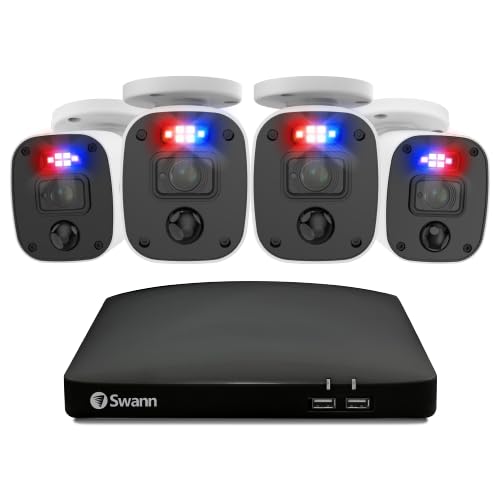
الصورة: أكثر منview of the Swann DVR8-4685 2K Security System components, including the DVR, four bullet cameras, and various cables and accessories.
3. الإعداد
Before permanent installation, it is recommended to set up and test the system to ensure all components are functioning correctly.
3.1 الاتصال الأولي بالنظام
- توصيل الكاميرات بجهاز التسجيل الرقمي (DVR): Connect each 2KMQB Bullet Camera to an available PoE port on the DVR using the provided Ethernet cables.
- Connect DVR to Router: Connect the DVR's WAN port to a spare port on your internet router using the supplied Ethernet cable.
- Connect DVR to Display: Plug one end of an HDMI cable into the HDMI port on the back of the DVR and the other end into an HDMI input on your TV or monitor.
- توصيل الماوس: Plug the USB mouse into an available USB port on the rear of the DVR.
- تشغيل الطاقة: Connect the power adapter to the DVR and then plug the power cable into a power outlet. The system should power on and display the setup wizard on your connected screen.
Video: A quick start guide demonstrating the hardware connections for a Swann NVR security system, including connecting cameras, display, mouse, and power.
3.2 إعداد تطبيق الهاتف المحمول
Download the Swann Security app from your device's app store (Android or iOS) to access live viewالتحكم عن بعد في التشغيل والتسجيل والنظام.
- Download and install the "Swann Security" app on your smartphone or tablet.
- Follow the in-app instructions to add your DVR system. This typically involves scanning a QR code on the DVR or manually entering device details.
- بمجرد الاتصال ، يمكنك ذلك view live feeds, access recordings, and configure settings from anywhere.
4. تشغيل النظام الخاص بك
4.1 مباشر View والتشغيل
الوصول إلى بث الكاميرات المباشر وإعادةview تم تسجيل فوtage through the connected monitor or the Swann Security mobile app. The system allows for customizable layouts to prioritize important areas.
Video: Demonstrates live viewing and playback features of a Swann security system, including customizable layouts and remote access via mobile app.
4.2 True Detect™ Motion Detection
The True Detect™ technology uses heat and motion sensors to accurately detect activity, reducing false alarms. You can adjust the motion sensitivity for each camera to suit specific areas, ensuring you receive alerts only when it truly matters.
4.3 رؤية ليلية ملونة
The 2KMQB Bullet Cameras feature color night vision, allowing you to see detailed, full-color footage even in low-light conditions, providing clearer identification than traditional black and white night vision.
4.4 تسجيل الصوت
Each camera is equipped with a microphone to record audio, adding another layer of detail to your surveillance footage. This can be crucial for capturing conversations or identifying sounds associated with events.
4.5 Storage and Backup
The DVR includes a 256GB MicroSD card for local storage, capable of retaining weeks of footage. You can also configure cloud backup options for added security and accessibility of your incident videos.
5. الصيانة
- التنظيف المنتظم: نظف عدسات الكاميرا بشكل دوري باستخدام منظف ناعم.amp قماش لضمان جودة صورة واضحة.
- تحديثات البرامج الثابتة: Check the Swann Security app or website for available firmware updates for your DVR and cameras to ensure optimal performance and security.
- فحص الكابلات: Regularly inspect all wired connections for any signs of wear or damage, especially for outdoor cameras.
- ادارة التخزين: Monitor your storage usage and ensure regular backups to prevent loss of important footage.

Image: A Swann camera being sprayed with water, demonstrating its sturdy weatherproof design suitable for outdoor use.
6. استكشاف الأخطاء وإصلاحها
- لا يوجد عرض فيديو: Ensure all HDMI/VGA cables are securely connected and the display input is set correctly. Check power connections for both the DVR and cameras.
- لا يوجد اتصال بالإنترنت: Verify the Ethernet cable from the DVR to your router is connected. Check your router's internet status.
- تنبيهات الحركة الكاذبة: Adjust the motion sensitivity settings for individual cameras via the DVR interface or mobile app. Ensure detection zones are configured to avoid irrelevant areas.
- ضعف جودة الصورة: Clean camera lenses. Check cable connections for any damage or loose fittings. Ensure cameras are positioned correctly for optimal lighting.
- مشكلات الوصول عن بعد: Confirm your mobile device has a stable internet connection. Verify the DVR is connected to the internet and the Swann Security app is updated to the latest version.
7. المواصفات
| ميزة | التفاصيل |
|---|---|
| ماركة | سوان |
| رقم الموديل | DVK-8468542KMQB |
| دقة التقاط الفيديو | 1440 بكسل (2K) |
| تكنولوجيا الاتصال | سلكي |
| مصدر الطاقة | كهرباء سلكية |
| الأجهزة المتوافقة | حاسوب شخصي، هاتف ذكي، جهاز لوحي |
| نوع التنبيه | Motion Only (True Detect™) |
| طريقة التحكم | صوت |
| تخزين | بطاقة ذاكرة مايكرو إس دي سعة 256 جيجابايت (مرفقة) |
| أبعاد العنصر (الطول × العرض × الارتفاع) | 2.5 × 9.06 × 9.06 بوصة |
| طريقة التثبيت | برغي في |
8. الضمان والدعم
For warranty information and technical support, please refer to the official Swann webالموقع أو تواصل مع خدمة العملاء. احتفظ بإثبات الشراء لأي مطالبات بالضمان.
الدعم عبر الإنترنت: يزور www.swann.com للحصول على الأسئلة الشائعة، وأدلة استكشاف الأخطاء وإصلاحها، وتنزيلات البرامج.