Diyife HMK25 Waterproof Rechargeable Kitchen Scale User Manual
Model: HMK25
1. انتهى المنتجview
The Diyife HMK25 kitchen scale is a versatile and durable weighing instrument designed for various kitchen and household tasks. It features IP67 full waterproofing, a high accuracy of 0.1g, and a maximum capacity of 10kg (22lb). The scale offers multiple power supply options, an adjustable LCD display, and convenient functions like tare and piece counting.
IP67 تصميم مقاوم للماء: Fully submersible for easy cleaning, resistant to dust and moisture.
دقة عالية: Measures with 0.1g precision, up to 10kg/22lb capacity.
وحدات متعددة: Supports 10+ units including g, oz, lb:oz, ml, and more.
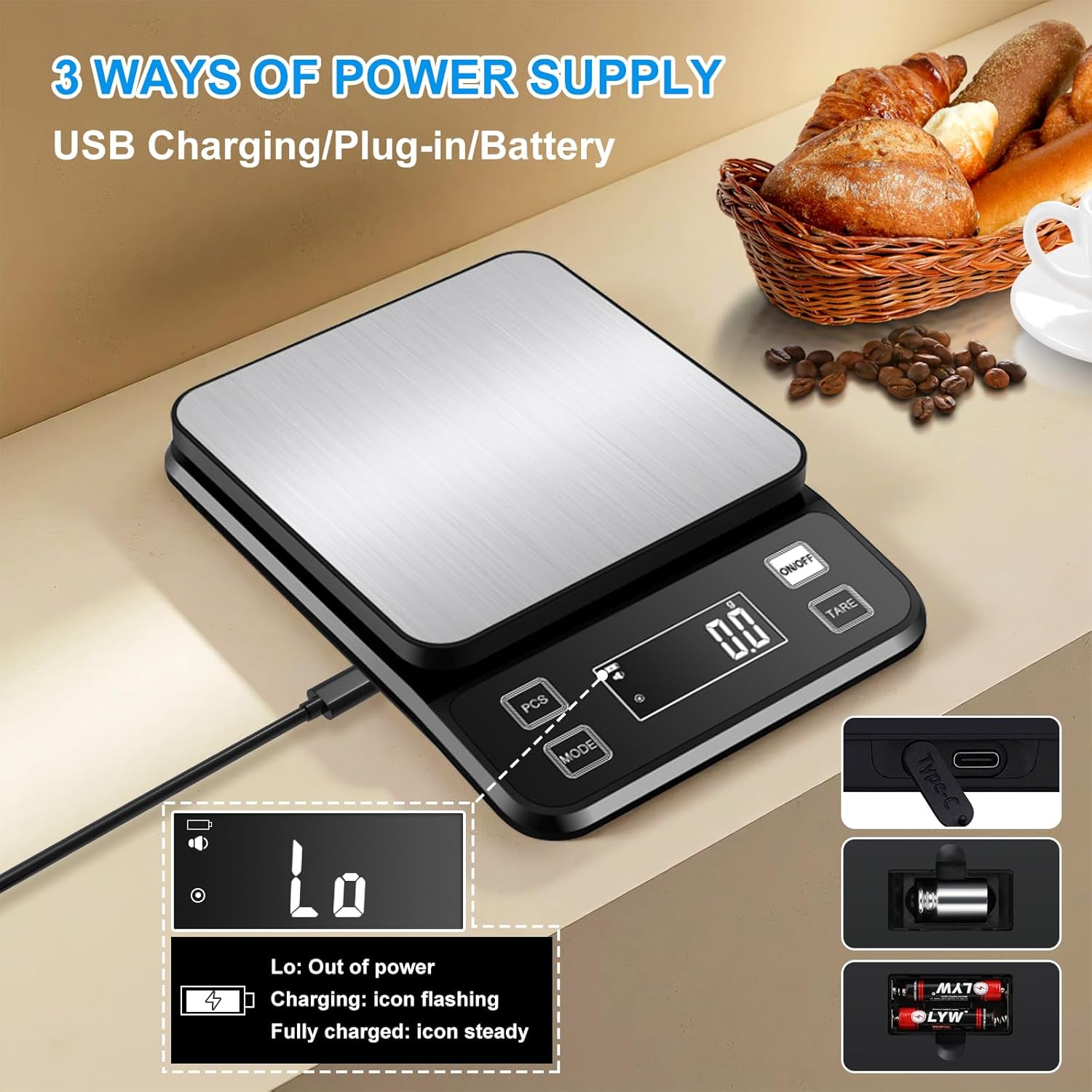
مصدر طاقة ثلاثي: Rechargeable via Type-C USB, plug-in use, or 2x AAA batteries.
Adjustable LCD Display: Large, backlit display with adjustable brightness for clear reading.
Smart Standby Mode: Customizable auto-off times (OFF, 1, 3, 5, 10, 30 minutes) to conserve battery.
Image: Multifunctional Kitchen Scale with various feature icons.
2. الإعداد
2.1 مصدر الطاقة
The Diyife HMK25 scale offers three power options:
شحن USB من النوع C: Connect the provided Type-C cable to the scale and a USB power source for charging the internal rechargeable battery.
Direct Plug-in Use: The scale can be operated directly while connected via the Type-C cable.
بطاريات AAA: Install 2 AAA batteries (included) into the battery compartment located on the underside of the scale. Ensure correct polarity.
A single charge of the internal battery can provide several months of daily use.
Image: Three ways to power the scale: USB charging, plug-in, or AAA batteries.
2.2 الاستخدام الأولي
Place the scale on a flat, stable surface. Press the "ON/OFF" button to power on the scale. The display will show "0.0" or "0.00" indicating it's ready for use.
3. تعليمات التشغيل
3.1 وحدة التحويل
Press the "MODE" button to cycle through the available measurement units. The scale supports over 10 units, including grams (g), ounces (oz), pounds:ounces (lb:oz), milliliters (ml), kilograms (kg), and more. Select the desired unit before weighing.
Image: The scale supports 10 different units for various measurement needs.
Video: Demonstrates how to switch between various measurement modes on the scale.
3.2 الوظيفة الفارغة
To weigh items in a container without including the container's weight, use the Tare function:
ضع الحاوية الفارغة على المقياس.
انتظر حتى تستقر الشاشة.
Press the "TARE" button. The display will reset to "0.0" or "0.00".
Add the items you wish to weigh into the container. The display will show only the net weight of the items.
3.3 PCS Counting Function
The PCS (Piece Counting System) function allows you to count multiple small items of uniform weight.
ضع كملفample quantity (e.g., 25, 50, 75, or 100 pieces) of the items on the scale.
Press the "PCS" button.
The scale will enter counting mode and display the number of pieces.
Add more items, and the scale will count them based on the sampجنيه الوزن.
3.4 Adjusting Settings (Sound, Standby Time, Auto-Off Time, Brightness)
The scale allows adjustment of sound, standby time, auto-off time, and screen brightness. To enter the setting mode:
Press "ON/OFF" to turn on the scale.
Press "MODE" three times to enter the setting mode. The display will show "C1-10".
3.4.1 تشغيل/إيقاف الصوت
While in setting mode ("C1-10"), press "TARE" to cycle through settings until "C4-1" or "C4-2" is displayed.
Press "MODE" to switch between "C4-1" (sound on) and "C4-2" (sound off).
Video: Instructions on how to turn the sound on or off for the scale.
3.4.2 Adjust Standby Time
While in setting mode ("C1-10"), press "TARE" to cycle through settings until "C-1" is displayed.
Press "MODE" to adjust the standby time. Options include 1, 3, 5, 10, or 30 minutes. "Off" disables the standby time.
3.4.3 Set Automatic Shutdown Time
While in setting mode ("C1-10"), press "TARE" to cycle through settings until "C5-5" is displayed.
Press "MODE" to set the automatic shutdown time. Options include 0, 1, 2, 3, 5, 10, or 30 minutes. "0" means no automatic shutdown. The default is 5 minutes.
3.4.4 ضبط سطوع الشاشة
While in setting mode ("C1-10"), press "TARE" to cycle through settings until "C6-2" is displayed.
Press "MODE" to adjust the screen brightness. There are three brightness settings available.
Image: Adjustable LCD Display with three brightness settings.
4. الصيانة
4.1 التنظيف
The Diyife HMK25 kitchen scale is IP67 waterproof, allowing for direct rinsing under water. This makes cleaning simple and efficient.
قبل التنظيف: Ensure to remove any AAA batteries and the 50g calibration weight from their compartments before immersing the scale in water.
الشطف: The scale can be directly rinsed under running water.
تجفيف: Wipe the scale clean with a soft cloth. The smart drainage port design prevents water buildup.
سطح: The 304 stainless steel platform is scratch-resistant and easy to wipe clean.
Image: IP67 Waterproof design with professional drainage ports.
Image: Easy to store and clean features, including a hook hole and direct rinsing capability.
Video: Demonstrates the waterproof capabilities and easy cleaning of the scale.
4.2 التخزين
The scale features a back hook design for convenient storage, allowing it to be hung on a wall or hook to save kitchen space.
5. استكشاف الأخطاء وإصلاحها
This section provides solutions to common issues you might encounter with your Diyife HMK25 kitchen scale.
شاشة "منخفض": Indicates low battery. Recharge the scale via Type-C USB or replace the AAA batteries.
قراءات غير دقيقة:
تأكد من أن الميزان مثبت على سطح مستوٍ ومستقر.
Avoid placing the scale near strong electromagnetic fields or vibrating equipment.
Calibrate the scale using the included 50g weight if readings are consistently off.
عدم تشغيل المقياس:
Check battery levels or ensure the USB-C cable is properly connected and receiving power.
Verify AAA batteries are correctly installed with proper polarity.
العرض لا يستجيب:
Try turning the scale off and on again.
Ensure no objects are pressing against the buttons or platform.
5.1 المعايرة
A 50g calibration weight is included with your scale for quick calibration or testing to ensure accuracy.
Image: The scale includes a 50g weight for calibration.
Image: Dimensions and accuracy details of the scale.
7. الضمان والدعم
For any questions, concerns, or technical support regarding your Diyife HMK25 kitchen scale, please refer to the contact information provided in the included instruction manual or visit the official Diyife support webموقع.
Ask a question about this manual
Ask about setup, troubleshooting, compatibility, parts, safety, or missing instructions. Manuals+ will review the question and use this page’s manual context to help answer it.