
1. المقدمة
This manual provides essential instructions for the safe and efficient operation of your Lenyes LW-330 Smart Watch. Please read this manual thoroughly before using the device to ensure proper functionality and to prevent damage.
The Lenyes LW-330 Smart Watch combines advanced technology with a sleek design, featuring a 2.12-inch IPS HD curved screen and an aluminum alloy frame. It offers comprehensive health monitoring, Bluetooth calling, and smart notifications, making it a versatile companion for daily life and fitness activities. The device is IP68 water-resistant, ensuring durability in various conditions.
2. معلومات السلامة
- Do not attempt to disassemble, repair, or modify the device. This may cause damage, electric shock, or fire.
- احتفظ بالجهاز بعيدًا عن درجات الحرارة العالية وأشعة الشمس المباشرة والرطوبة العالية.
- تجنب تعريض الجهاز للصدمات القوية أو الاهتزازات.
- The health monitoring features are for reference only and should not be used for medical diagnosis or treatment. Consult a medical professional for health-related concerns.
- Ensure the charging cable is connected correctly to prevent short circuits or damage.
- احتفظ بالجهاز بعيدًا عن متناول الأطفال والحيوانات الأليفة.
3. محتويات العبوة
تأكد من وجود جميع العناصر في العبوة:
- Lenyes LW-330 Smart Watch
- كابل الشحن
- دليل المستخدم (هذا المستند)
4. انتهى المنتجview
Familiarize yourself with the components of your Lenyes LW-330 Smart Watch.
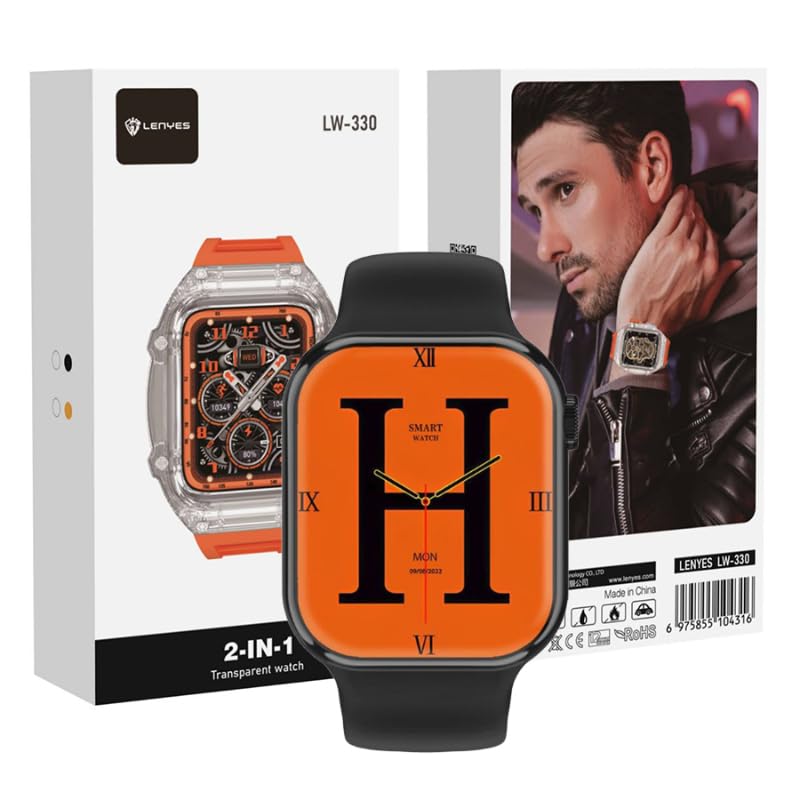
الشكل 1: الجبهة view of the Lenyes LW-330 Smart Watch, displaying an orange watch face with a large 'H' and digital time.

Figure 2: Packaging of the Lenyes LW-330 Smart Watch, highlighting the transparent watch design.

الشكل 3: الجانب view of the Lenyes LW-330 Smart Watch packaging, featuring a lifestyle image of the watch being worn.
المكونات الرئيسية:
- شاشة العرض: 2.12-inch IPS HD curved touch screen.
- الزر الجانبي/التاج: Used for power on/off, menu navigation, and selection.
- أجهزة الاستشعار: يوجد في الخلف جهاز لمراقبة معدل ضربات القلب وضغط الدم ونسبة تشبع الأكسجين في الدم (SpO2).
- شحن جهات الاتصال: توجد نقاط توصيل مغناطيسية في الخلف للشحن.
- الميكروفون/مكبر الصوت: لوظيفة إجراء المكالمات عبر البلوتوث.
5. الإعداد
5.1. شحن الجهاز
قبل الاستخدام الأول، قم بشحن ساعتك الذكية بالكامل.
- قم بتوصيل كابل الشحن المغناطيسي بجهات اتصال الشحن الموجودة على الجزء الخلفي من الساعة.
- Connect the USB end of the cable to a standard USB power adapter (5V/1A recommended) or a computer USB port.
- ستظهر على شاشة الساعة مؤشر الشحن. يستغرق الشحن الكامل حوالي ساعتين.
5.2. تثبيت التطبيق
To unlock the full features of your smartwatch, download and install the companion application on your smartphone.
- Scan the QR code provided in the watch packaging or search for the designated app name (refer to packaging or watch display for app name) in your phone's app store (App Store for iOS, Google Play Store for Android).
- قم بتحميل وتثبيت التطبيق.
- افتح التطبيق واتبع التعليمات التي تظهر على الشاشة لإنشاء حساب وإعداد حسابكfile.
5.3. الاقتران بهاتفك
Ensure your phone's Bluetooth is enabled before pairing.
- افتح تطبيق المرافق على هاتفك الذكي.
- انتقل إلى قسم "الجهاز" أو "إضافة جهاز" داخل التطبيق.
- The app will search for available devices. Select 'LW-330' from the list of found devices.
- قم بتأكيد طلب الاقتران على كل من هاتفك والساعة الذكية إذا طُلب منك ذلك.
- بمجرد الاقتران، ستقوم الساعة بمزامنة البيانات مع التطبيق.
6. تعليمات التشغيل
6.1. تشغيل/إيقاف التشغيل
- تشغيل الطاقة: اضغط مع الاستمرار على الزر الجانبي لعدة ثوانٍ حتى تضيء الشاشة.
- إيقاف التشغيل: Press and hold the side button, then select 'Power Off' on the screen, or navigate to the 'Settings' menu and choose 'Power Off'.
6.2. التنقل عبر الشاشة
- اسحب لأعلى/لأسفل: التنقل عبر القوائم أو الإشعارات.
- اسحب لليسار/اليمين: الوصول إلى أدوات مختلفة أو وظائف سريعة.
- مقبض: حدد عنصرًا أو قم بتأكيد إجراء.
- اضغط على الزر الجانبي: العودة إلى الشاشة الرئيسية أو الوصول إلى القائمة الرئيسية.
6.3. مراقبة الصحة
The LW-330 offers various health tracking features:
- معدل ضربات القلب: Navigate to the heart rate interface and the watch will automatically measure your heart rate.
- ضغط الدم: Access the blood pressure function to initiate a measurement.
- أكسجين الدم (SpO2): Select the SpO2 feature for blood oxygen level readings.
- تتبع النوم: Wear the watch during sleep to monitor sleep patterns. Data is viewقادر في التطبيق
Note: These measurements are for general wellness and fitness purposes only. They are not intended for medical use.
6.4. مكالمات وإشعارات البلوتوث
- مكالمات بلوتوث: Once paired, you can make and receive calls directly from your watch. Access the dialer or answer incoming calls on the watch screen.
- إشعارات: Enable app notifications in the companion app to receive alerts for messages, calls, and other applications on your watch.
6.5. أوضاع الرياضة
The watch supports multiple sports modes to track your workouts.
- Swipe to the 'Sports' or 'Workout' menu.
- Select your desired activity (e.g., running, walking, cycling).
- The watch will begin tracking your activity data, such as duration, calories burned, and heart rate.
- End the workout by following the on-screen prompts.
6.6. ميزات أخرى
- التحكم بالموسيقى: تحكم في تشغيل الموسيقى على هاتفك (تشغيل، إيقاف مؤقت، تخطي المقاطع).
- جهاز التحكم عن بعد بالكاميرا: استخدم ساعتك كجهاز تحكم عن بعد لكاميرا هاتفك.
- طقس: View real-time weather updates after synchronization with the app.
7. الصيانة
7.1. التنظيف
- امسح شاشة الساعة وحزامها بقطعة قماش ناعمة وجافة وخالية من الوبر.
- بالنسبة للبقع العنيدة، يتم وضع القليل منampاغسل قطعة القماش بالماء. لا تستخدم مواد كيميائية قاسية أو منظفات كاشطة.
- تأكد من أن جهات اتصال الشحن نظيفة وجافة قبل الشحن.
7.2. مقاومة الماء (IP68)
The LW-330 is IP68 water-resistant, meaning it can withstand immersion in water up to 1.5 meters for up to 30 minutes. It is suitable for daily use, such as hand washing, rain, and shallow swimming. However, it is not recommended for hot showers, saunas, or diving, as steam and high water pressure can compromise the seals.
7.3. التخزين
When not in use for extended periods, store the watch in a cool, dry place. Charge the watch periodically (e.g., every 3 months) to maintain battery health.
8. استكشاف الأخطاء وإصلاحها
إذا واجهت مشاكل مع ساعتك الذكية، فراجع المشاكل والحلول الشائعة التالية:
| مشكلة | حل |
|---|---|
| الساعة لا تعمل | Ensure the watch is fully charged. Press and hold the side button for at least 10 seconds. |
| لا يمكن الاقتران بالهاتف | Ensure Bluetooth is enabled on your phone. Make sure the watch is charged and within range. Restart both the watch and your phone. Clear previous pairing records on your phone. |
| بيانات صحية غير دقيقة | Ensure the watch is worn snugly on your wrist, not too tight or too loose. Keep the sensor clean. Avoid excessive movement during measurement. Remember, data is for reference only. |
| لم يتم تلقي الإخطارات | Check if notifications are enabled in the companion app and in your phone's system settings for the app. Ensure the watch is connected via Bluetooth. |
| الشاشة لا تستجيب | أعد تشغيل الساعة. إذا استمرت المشكلة، فتأكد من أن الشاشة نظيفة وجافة. |
9. المواصفات
| ميزة | التفاصيل |
|---|---|
| ماركة | Lenyes |
| اسم الموديل | ل.و-330 |
| حجم الشاشة | 2.12 بوصة |
| نظام التشغيل | iOS, Android compatible |
| تكنولوجيا الاتصال | بلوتوث |
| المميزات الخاصة | Blood Pressure Monitor, SpO2 Monitor, Sleep Monitor, Heart Rate Monitor, Bluetooth Calls |
| مقاومة الماء | IP68 |
| شكل العنصر | مستطيل |
| أبعاد الشحن | 20.1 × 11.2 × 7.2 سم |
| وزن العنصر | 330 grams (shipping) |
10. الضمان والدعم
يتم عادةً توفير المعلومات المتعلقة بضمان المنتج ودعم العملاء مع وثائق الشراء الخاصة بك أو على الموقع الرسمي للشركة المصنعة website. Please refer to those resources for details on warranty coverage, service centers, and contact information for technical assistance.