
Pisichen 21.5INTS-White-NEW
Pisichen 21.5-Inch Touchscreen Monitor User Manual
Model: 21.5INTS-White-NEW
مقدمة
This user manual provides comprehensive instructions for the setup, operation, maintenance, and troubleshooting of your Pisichen 21.5-Inch Touchscreen Monitor. Please read this manual thoroughly before using the product to ensure proper functionality and to prevent damage.
The Pisichen 21.5-inch touch monitor is designed to enhance your work efficiency and provide an interactive experience with its responsive 10-point capacitive touchscreen. It features a Full HD 1920x1080 resolution display, built-in speakers, and versatile connectivity options including HDMI, VGA, and USB for touch functionality.
الميزات الرئيسية
- Sensitive 10-Point Capacitive Touchscreen: Offers seamless and responsive interaction, allowing direct engagement with content and simultaneous multi-finger input.
- Stunning FHD 1080P Display: A 21.5-inch Full HD (1920x1080) resolution screen with a 1000:1 contrast ratio, 250cd/㎡ brightness, 170° viewing angle, and 60Hz refresh rate for clear and smooth visuals. Includes low-blue-light and eye-care technology.
- توافق الجهاز الواسع: Equipped with USB2.0 (for touch), HDMI, VGA, and DC ports for easy connection to PCs, laptops, PS3/4, and gaming consoles.
- أوضاع العرض المتنوعة: Supports duplicate, extend, and second-screen modes to enhance productivity and workspace.
- Built-in Speakers and VESA Mounting: Integrated speakers provide audio, and the 75x75mm VESA mount allows for flexible installation options.
محتويات الحزمة
Please verify that all items are present in the package before proceeding with the setup.

The package includes the Pisichen 21.5-inch touchscreen monitor, a user manual, an HDMI cable, a USB cable, and a power adapter, ensuring it is ready for immediate use.
- Pisichen 21.5-Inch Touchscreen Monitor
- محول الطاقة
- كابل HDMI
- USB Cable (for touch function)
- دليل المستخدم
تعليمات الإعداد
1. توصيل الشاشة
The monitor offers various connection options to suit your needs. Ensure all connections are secure before powering on the device.

مفصل view of the monitor's input/output ports, including HDMI, VGA, headphone, DC power, and USB 2.0 touch ports.
- توصيل الطاقة: Connect the provided power adapter to the DC power port on the monitor and then plug it into a wall outlet.
- وصلة الفيديو (HDMI): Use the HDMI cable to connect the monitor's HDMI port to the HDMI output port on your computer, laptop, or gaming console.
- اتصال الفيديو (VGA): Alternatively, use a VGA cable to connect the monitor's VGA port to the VGA output port on your computer or laptop.
- Touch Function Connection: To enable the touch function, connect the included USB cable from the monitor's USB 2.0 touch port to an available USB port on your computer. This step is crucial for touch signal transmission.
- مخرج الصوت (اختياري): If you prefer external audio, you can connect headphones or external speakers to the headphone jack. The monitor also has built-in speakers.
2. خيارات التركيب
The Pisichen monitor supports both desktop placement and VESA wall mounting for flexible setup.
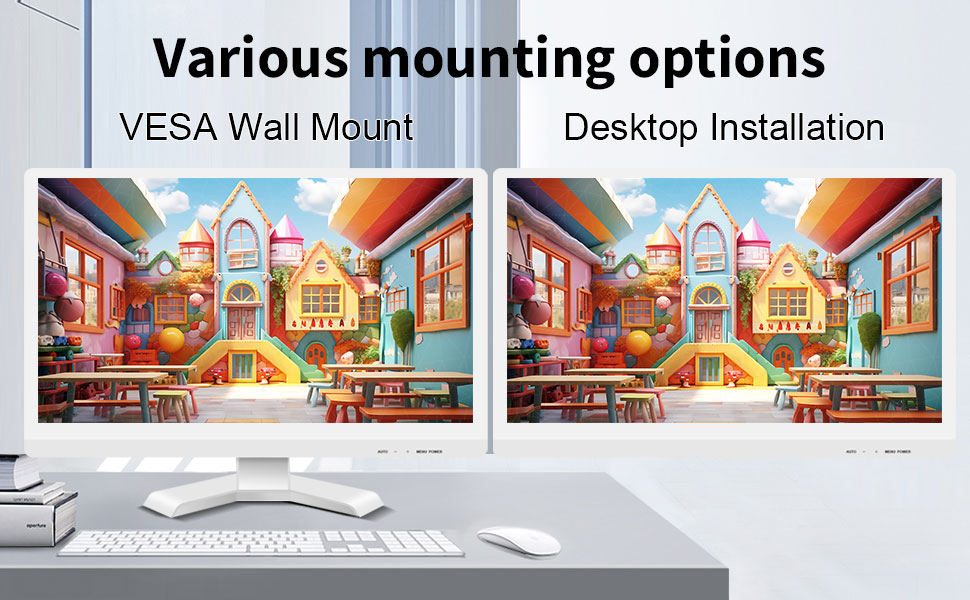
The monitor can be set up on a desktop stand or mounted on a wall using a VESA compatible bracket.
- تثبيت سطح المكتب: Attach the provided stand to the monitor base and place it on a stable, flat surface.
- حامل حائط متوافق مع معايير VESA: The monitor features a 75x75mm VESA mounting pattern. Use a compatible VESA bracket (not included) to mount the monitor on a wall or an adjustable arm. Ensure the mount can support the monitor's weight (9.88 pounds).

مؤخرة view of the monitor highlighting the VESA 75x75mm mounting pattern and overall dimensions.
تعليمات التشغيل
1. تشغيل / إيقاف التشغيل
Locate the power button on the monitor. Press it to turn the monitor on or off. The power indicator light will illuminate when the monitor is on.
2. Using the Touchscreen Function
Once the USB cable is connected to your computer, the 10-point capacitive touch function will be active. You can interact with the screen using your fingers or a passive capacitive stylus.

The monitor supports direct touch interaction for intuitive control.
- لمسة واحدة: ما يعادل نقرة الماوس.
- انقر مع الاستمرار: ما يعادل النقر بزر الماوس الأيمن.
- سحب: Move items by touching and dragging.
- التكبير والتصغير: استخدم إصبعين للتكبير أو التصغير للمحتوى.
- اللمس المتعدد: The monitor supports up to 10 simultaneous touch points, enabling collaborative work or complex gestures.

The 10-point multi-touch feature allows for multiple users or complex interactions simultaneously.
ملاحظة هامة: The touch functionality is disabled on Mac OS, iPad OS, and iOS. This monitor only supports passive capacitive styluses.
3. أوضاع العرض
تدعم الشاشة أوضاع عرض متنوعة عند توصيلها بجهاز كمبيوتر:
- وضع مكرر: Displays the same content on both your primary screen and the Pisichen monitor.
- تمديد الوضع: Extends your desktop across both screens, providing more workspace.
- وضع الشاشة الثانية فقط: Displays content only on the Pisichen monitor, turning off your primary screen.
You can typically switch between these modes through your operating system's display settings (e.g., Windows Display Settings).
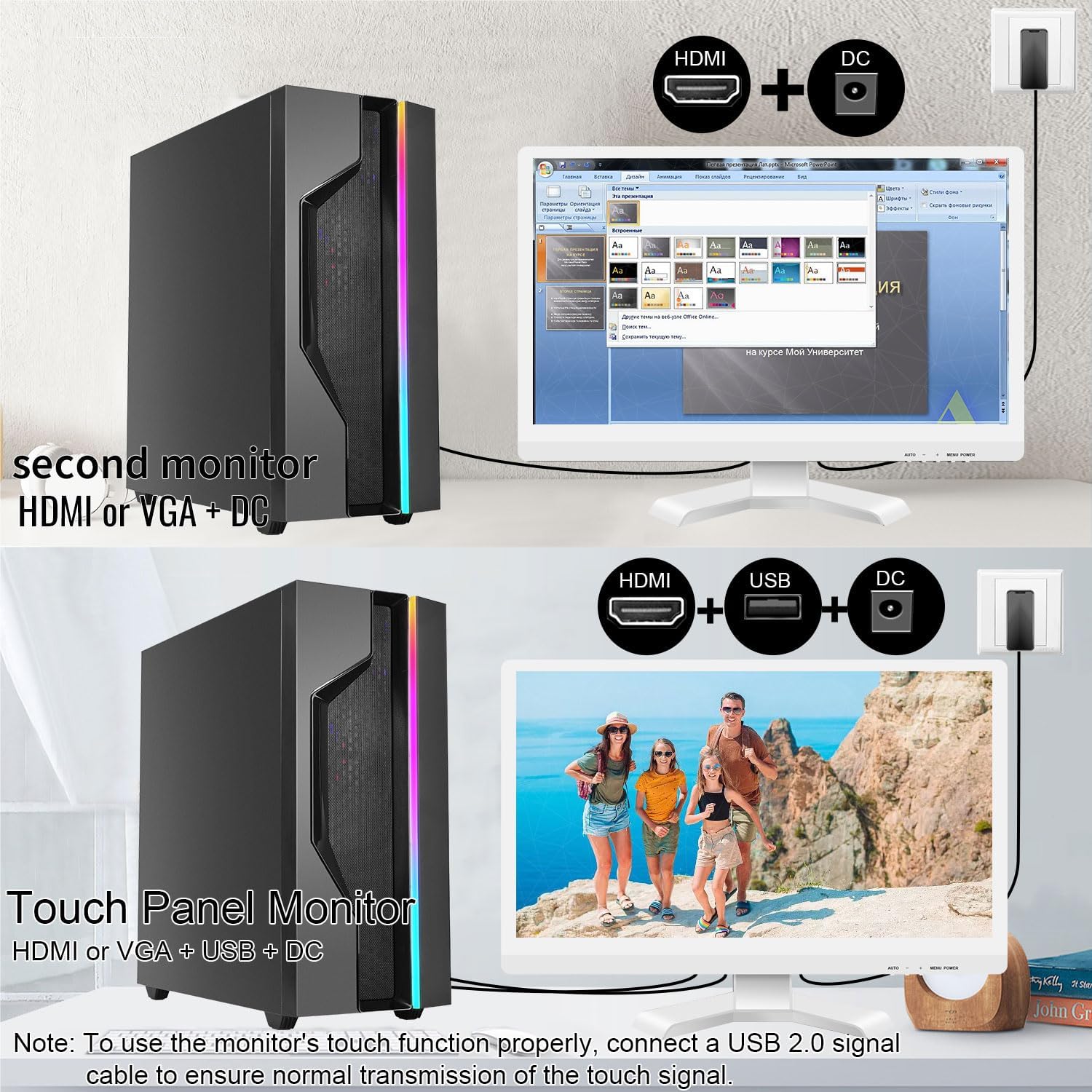
Illustrations of connecting the monitor as a secondary display or as a touch-enabled display.
4. قائمة العرض على الشاشة (OSD)
The monitor features an OSD menu for adjusting display settings. Use the buttons located on the monitor's frame (usually on the bottom right) to navigate and select options.
- زر القائمة: يفتح قائمة OSD.
- أزرار أعلى / أسفل: التنقل عبر خيارات القائمة.
- زر الإدخال/التحديد: يؤكد الاختيار أو يدخل إلى قائمة فرعية.
- زر الخروج: يخرج من القائمة الحالية أو شاشة العرض على الشاشة.
Common OSD settings include brightness, contrast, color temperature, input source selection, and aspect ratio.
الصيانة والعناية
- تنظيف الشاشة:
Always power off the monitor and unplug it before cleaning. Use a soft, lint-free cloth lightly dampened with water or a non-abrasive, monitor-specific cleaning solution. Do not spray liquid directly onto the screen. Avoid using alcohol, ammonia, or abrasive cleaners, as they can damage the screen surface.
- تنظيف Casing:
امسح الشاشةasinبقطعة قماش ناعمة وجافة. إذا لزم الأمر، امسحها برفق.amp يمكن استخدام القماش، ولكن تأكد من عدم دخول أي رطوبة إلى فتحات التهوية أو المنافذ.
- تخزين:
When not in use for extended periods, store the monitor in a cool, dry place, away from direct sunlight and extreme temperatures. If possible, use the original packaging for protection.
- تهوية:
Ensure the monitor's ventilation openings are not blocked. Proper airflow is essential to prevent overheating.
- التعامل:
Handle the monitor with care. Avoid dropping it or subjecting it to strong impacts. Do not place heavy objects on top of the monitor.
استكشاف الأخطاء وإصلاحها
| مشكلة | السبب المحتمل | حل |
|---|---|---|
| لا توجد صورة على الشاشة |
|
|
| شاشة اللمس لا تستجيب |
|
|
| الصورة ضبابية أو مشوهة |
|
|
| لا يوجد صوت من مكبرات الصوت المدمجة |
|
|
تحديد
| رقم الموديل | 21.5INTS-White-NEW |
| حجم الشاشة | 21.5 بوصة |
| دقة | 1920 × 1080 بكسل (FHD 1080p) |
| نسبة العرض إلى الارتفاع | 16:9 |
| سطوع | 250 Candela (cd/㎡) |
| نسبة التباين | 1000:1 |
| Viewزاوية جي | 170° |
| معدل التحديث | 60 هرتز |
| اتصال تقنية | شاشة لمس سعوية بـ 10 نقاط |
| منافذ الإدخال | HDMI, VGA, USB 2.0 (for touch), DC Power |
| صوتي | مكبرات صوت مدمجة، منفذ سماعة رأس |
| التوافق مع حامل VESA | 75×75 ملم |
| أبعاد المنتج (الطول × العرض × الارتفاع) | 0.78 × 20.4 × 14.9 بوصة |
| وزن العنصر | 9.88 رطل |
| الشركة المصنعة | شركة شنتشن كونوا للإلكترونيات المحدودة |
| بلد المنشأ | الصين |
الضمان والدعم
For warranty information and technical support, please refer to the official Pisichen website or contact their customer service directly. Details are typically provided on the product packaging or the manufacturer's official support channels.
يمكنك زيارة Pisichen Store on Amazon for more product information and potential support contacts.
Ask a question about this manual
Ask about setup, troubleshooting, compatibility, parts, safety, or missing instructions. Manuals+ will review the question and use this page’s manual context to help answer it.