
1. المقدمة
شكرا لك على الشراءasing the Greadio CD-W16 Multifunction Portable CD Player. This device offers a comprehensive audio experience with multiple playback options including CD, cassette, FM radio, Bluetooth 5.1, USB, AUX, and TF/SD card. Designed for ease of use and portability, it features a rechargeable battery, remote control, and high-quality stereo sound. Please read this manual carefully to ensure proper operation and to fully enjoy all the features of your new audio system.
2. معلومات السلامة
- لا تعرض الجهاز للمطر أو الرطوبة لتجنب نشوب حريق أو التعرض لصدمة كهربائية.
- لا تفتح الصندوقasinز. أسند الصيانة إلى الموظفين المؤهلين فقط.
- تجنب وضع الوحدة بالقرب من مصادر الحرارة أو في ضوء الشمس المباشر.
- استخدم فقط محول الطاقة والكابلات المحددة.
- يحفظ بعيدًا عن متناول الأطفال.
3. محتويات العبوة
- Greadio CD-W16 CD Radio Cassette Player x 1
- كابل AUX × 1
- النوع- C كابل × 1
- جهاز التحكم عن بعد × 1
- دليل المستخدم × 1
4. انتهى المنتجview
The Greadio CD-W16 is a versatile audio system designed for various listening preferences. It combines classic and modern features in a compact, portable design.
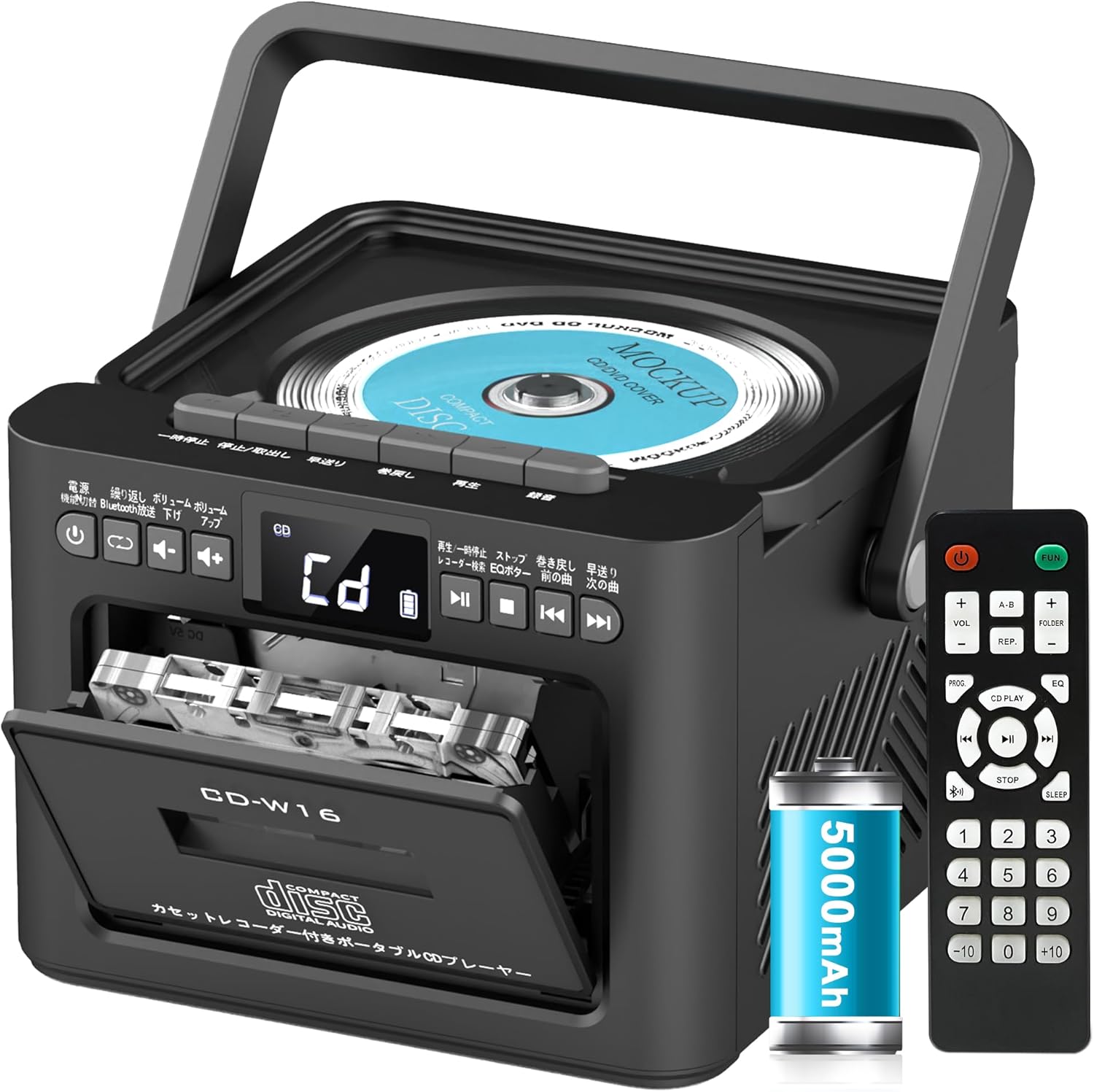
تتضمن الميزات الرئيسية ما يلي:
- CD Player (CD, CD-R, CD-RW compatible)
- Cassette Player & Recorder
- راديو FM (76-108 ميجا هرتز)
- Bluetooth 5.1 (Transmitter & Receiver)
- تشغيل USB
- مدخلات AUX
- TF/SD Card Playback
- بطارية قابلة لإعادة الشحن بسعة 5000 مللي أمبير في الساعة
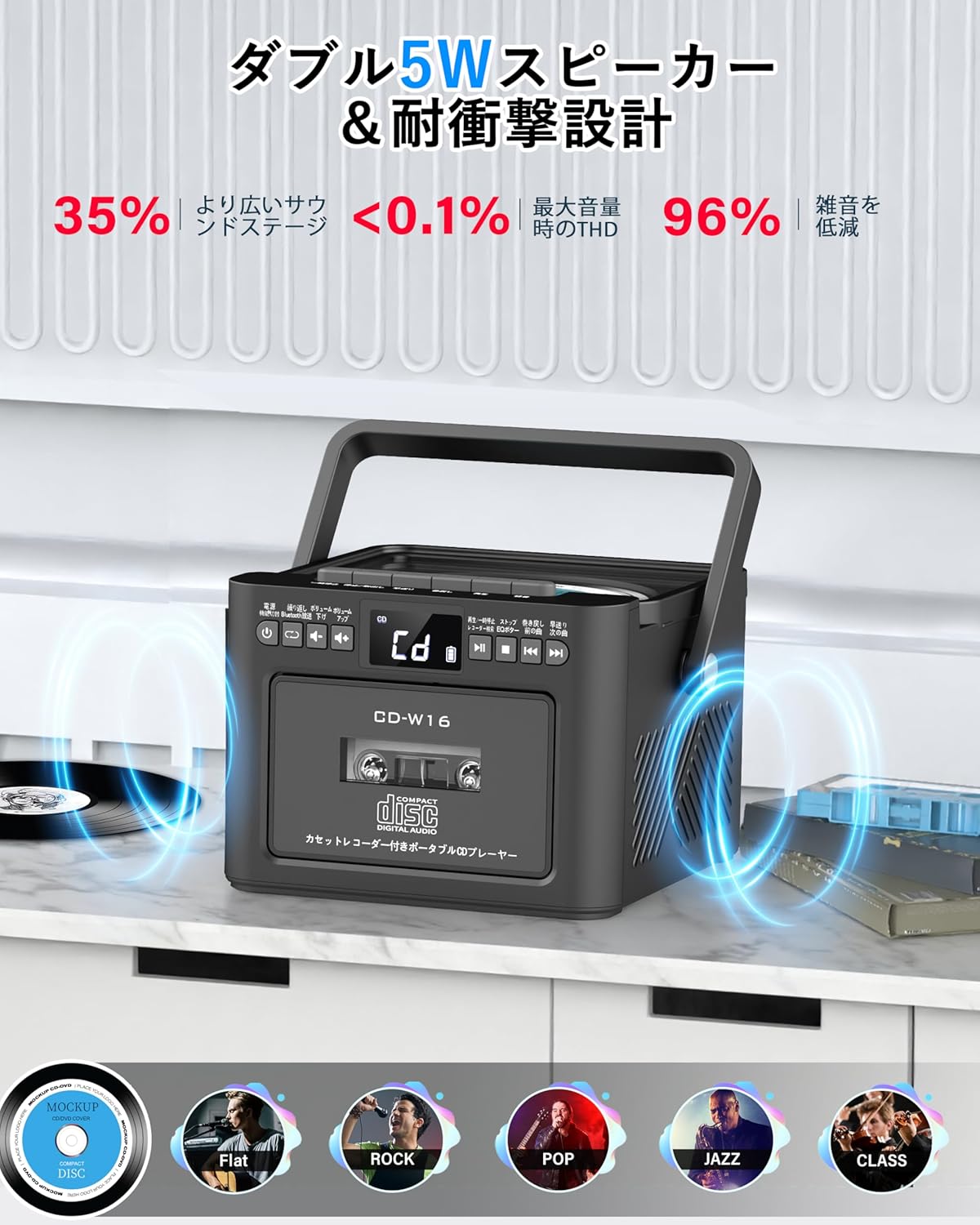
- مكبرات صوت ستيريو مزدوجة بقوة 5 وات
- جهاز التحكم عن بعد
- مؤقت النوم
- 5 أوضاع صوت EQ

5. الإعداد
5.1. شحن البطارية
The Greadio CD-W16 is equipped with a built-in 5000mAh rechargeable battery. To charge the device:
- Connect the provided Type-C cable to the charging port on the unit.
- Connect the other end of the Type-C cable to a 5V/2A USB power adapter (not included).
- The charging indicator will illuminate. A full charge takes approximately 3 hours and provides up to 16 hours of playback.

5.2. تشغيل/إيقاف التشغيل
To power on or off the CD player:
- اضغط مع الاستمرار على زر الطاقة on the unit or the remote control for 2 seconds.
- وبدلاً من ذلك، اضغط لفترة قصيرة على زر الطاقة on the remote control to toggle the CD player on/off.
6. تعليمات التشغيل
6.1. General Controls (Remote Control)
The remote control provides convenient access to all functions. Refer to the video below for a demonstration of remote control operations.
- تشغيل/إيقاف التشغيل: اضغط لفترة قصيرة على زر الطاقة.
- اختيار وضع الوظيفة: اضغط لفترة قصيرة على FUNC. زر to cycle through CD, Bluetooth, Radio, Cassette, AUX, USB, and TF/SD card modes.
- ضبط مستوى الصوت: ضغطة قصيرة المجلد+ or المجلد- أزرار.
- تتبع الملاحة: ضغطة قصيرة NEXT (>>|) for the next track or PREV (|<<) للمسار السابق.
- تقديم سريع / ترجيع: الضغط لفترة طويلة NEXT (>>|) for fast forward or PREV (|<<) for rewind.
- اختيار المسار المباشر: In CD mode, input 0-9 on the remote to quickly skip to the desired track.
- وضع EQ: اضغط لفترة قصيرة على زر المعادل to cycle through NORMAL, ROCK, POP, JAZZ, and CLASS sound modes.
- كرر الوضع: اضغط لفترة قصيرة على زر REP to cycle through repeat options (ONE, FOLDER, ALL, SHUFFLE, OFF).
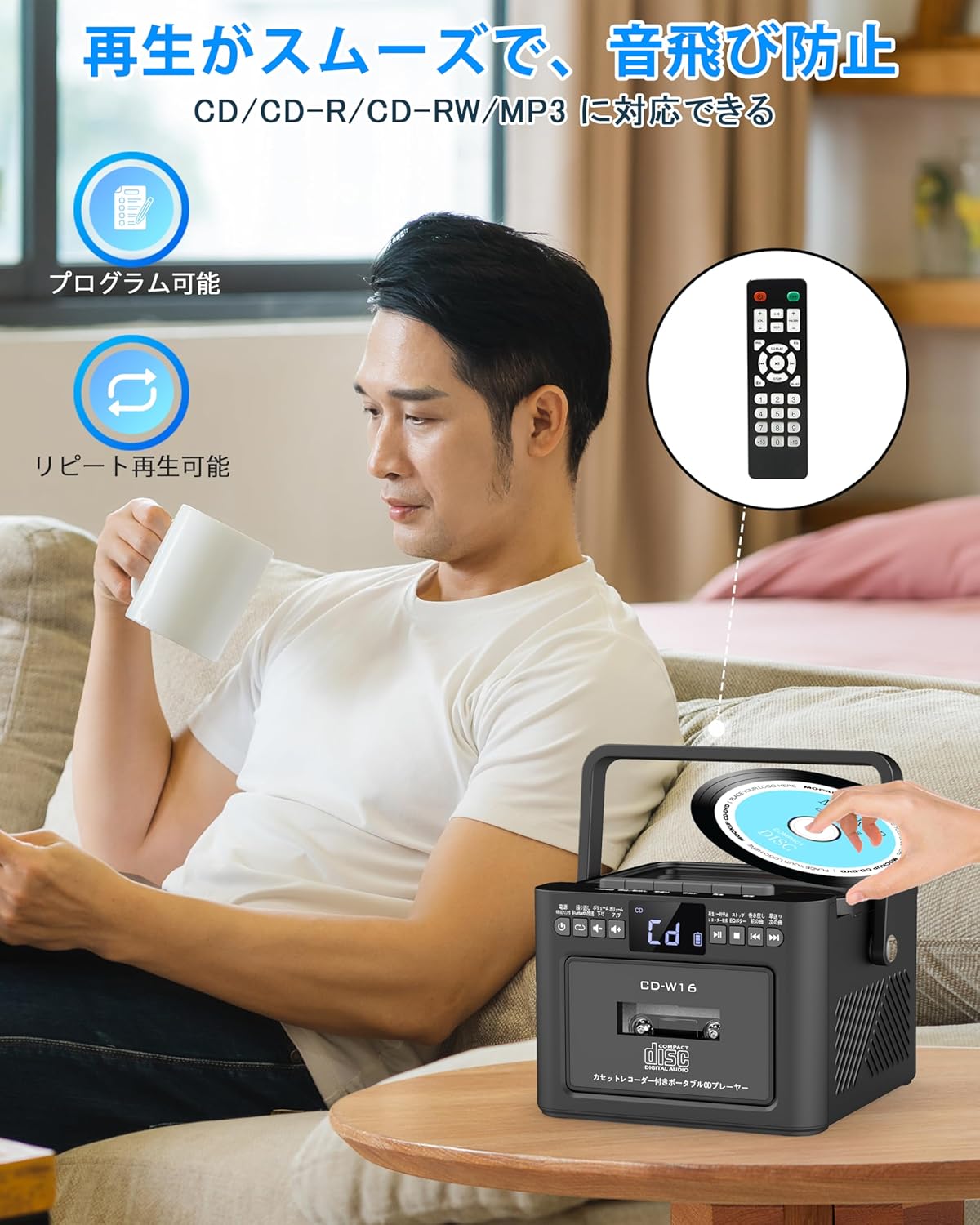
6.2. تشغيل القرص المضغوط
- تأكد من تشغيل الوحدة.
- اضغط لفترة قصيرة على FUNC. زر to select CD mode. The display will show "CD".
- افتح غطاء حجرة الأقراص المدمجة برفعه برفق.
- Place a CD (CD, CD-R, CD-RW compatible) onto the spindle with the label side facing up.
- Close the CD compartment lid. The CD will begin playing automatically.
- استخدم Play/Pause (||) button for temporary stop/resume.
- يستخدم NEXT (>>|) و PREV (|<<) أزرار للتنقل بين المسارات.
6.3. Cassette Playback & Recording
- اضغط لفترة قصيرة على FUNC. زر to select Tape mode. The display will show "TAPE".
- اضغط على STOP/EJ. button to open the cassette compartment.
- Insert a cassette tape into the compartment and close the lid.
- اضغط على زر التشغيل to start cassette playback.
- To fast forward or rewind, long press the FFWD or FREW أزرار على التوالي.
- To stop playback, short press the STOP/EJ. button.
Cassette Recording:
To record audio from other modes (CD, FM Radio, USB, AUX, TF/SD) onto a blank cassette:
- Insert a blank cassette into the cassette compartment.
- Select the desired source mode (e.g., CD, FM Radio).
- اضغط في نفس الوقت على يلعب و تسجيل (سجل) buttons. Recording will begin.
- اضغط على STOP/EJ. button لإيقاف التسجيل.

6.4. تشغيل راديو FM
- اضغط لفترة قصيرة على FUNC. زر to select FM Radio mode. The display will show the FM frequency.
- قم بتمديد الهوائي التلسكوبي لتحسين الاستقبال.
Auto Scan & Preset Stations:
- اضغط لفترة طويلة على زر المسح الضوئي to automatically scan and save available FM stations. The unit can store up to 30 preset stations.
- اضغط لفترة قصيرة على زر المسح الضوئي to recall preset stations (P01, P02, etc.).
ضبط يدوي:
- اضغط لفترة قصيرة على NEXT (>>|) or PREV (|<<) أزرار لضبط التردد المطلوب يدويًا.

6.5. تشغيل بلوتوث
The Greadio CD-W16 supports Bluetooth 5.1 for both transmitting and receiving audio.
وضع الارسال بلوتوث:
To transmit audio from the CD player to a Bluetooth speaker or headphones:
- اضغط لفترة طويلة على زر البلوتوث on the unit or remote to activate Bluetooth transmission mode. The display will show "BT".
- Ensure your Bluetooth receiving device (speaker, headphones) is in pairing mode.
- The CD-W16 will automatically search for nearby Bluetooth devices. Once found, it will connect.

وضع استقبال البلوتوث:
To play audio from your smartphone or other Bluetooth device through the CD player's speakers:
- اضغط لفترة قصيرة على FUNC. زر لتحديد وضع البلوتوث. ستظهر على الشاشة كلمة "أزرق".
- على هاتفك الذكي أو جهازك الذي يعمل بتقنية البلوتوث، قم بتمكين البلوتوث وابحث عن الأجهزة المتاحة.
- Select "CD-W16" from the list to connect.
- Once connected, you can play music from your device, and the audio will output through the CD-W16 speakers.
6.6. USB & TF/SD Card Playback
The unit supports playback from USB drives and TF/SD cards (up to 32GB, not included).
- اضغط لفترة قصيرة على FUNC. زر to select USB mode or TF/SD card mode. The display will show "USB" or "TF" respectively.
- Insert your USB drive into the USB port or your TF/SD card into the card slot.
- The unit will automatically detect and begin playing MP3 audio files.
- استخدم NEXT (>>|) و PREV (|<<) أزرار للتنقل بين المسارات.

6.7. مدخلات AUX
To play audio from an external device via AUX cable:
- اضغط لفترة قصيرة على FUNC. زر to select AUX mode. The display will show "LINE".
- Connect one end of the provided AUX cable to the AUX port on the CD-W16.
- Connect the other end to the audio output of your external device (e.g., smartphone, MP3 player).
- Play audio on your external device, and it will be output through the CD-W16 speakers.
6.8. مؤقت النوم
The sleep timer allows you to set a duration after which the unit will automatically power off.
- اضغط لفترة قصيرة على زر النوم on the remote control. The display will show the current sleep timer setting (e.g., 10, 20, 30 minutes).
- استخدم NEXT (>>|) or PREV (|<<) buttons to adjust the sleep timer duration (10-120 minutes).
- اضغط لفترة قصيرة على زر النوم مرة أخرى لتأكيد الإعداد.

6.9. أوضاع صوت EQ
Customize your audio experience with five different EQ sound modes.
- اضغط لفترة قصيرة على زر المعادل on the unit or remote control to cycle through the available modes: NORMAL, ROCK, POP, JAZZ, and CLASS.
7. الصيانة
7.1. التنظيف
- امسح الوحدة بقطعة قماش ناعمة وجافة. لا تستخدم منظفات أو مذيبات كاشطة.
- بالنسبة لعدسة الأقراص المضغوطة، استخدم منظفًا متخصصًا لعدسة الأقراص المضغوطة.
- Keep the cassette head clean to ensure optimal playback and recording quality.
7.2. التخزين
- قم بتخزين الوحدة في مكان بارد وجاف بعيدًا عن أشعة الشمس المباشرة ودرجات الحرارة القصوى.
- قم بإزالة البطاريات من جهاز التحكم عن بعد إذا لم يتم استخدامه لفترات طويلة.
8. استكشاف الأخطاء وإصلاحها
| مشكلة | السبب المحتمل | حل |
|---|---|---|
| لا يوجد طاقة | Battery depleted or power cable not connected. | Charge the unit or ensure the power cable is securely connected. |
| القرص المضغوط لا يعمل | CD inserted incorrectly, dirty, scratched, or incompatible format. | Reinsert CD correctly, clean the CD, try a different CD. Ensure it's CD/CD-R/CD-RW. |
| لا يعمل شريط الكاسيت/لا يسجل | Cassette inserted incorrectly, tape damaged, or dirty head. | Reinsert cassette, try a different tape, clean the cassette head. |
| استقبال راديو FM ضعيف | الهوائي غير ممتد أو منطقة الإشارة ضعيفة. | Fully extend the telescopic antenna. Try repositioning the unit. |
| البلوتوث غير متصل | Device not in pairing mode, too far, or already connected to another device. | تأكد من أن كلا الجهازين في وضع الاقتران وضمن النطاق. افصل الاتصال بالأجهزة الأخرى. |
| USB/TF/SD card not recognized | Card/drive not inserted correctly, incompatible format, or damaged. | Reinsert, ensure files are MP3 format, try a different card/drive. |
9. المواصفات
- ماركة: جراديو
- نموذج: سي دي-W16
- تقنية الاتصال: مدخل AUX، بلوتوث، منفذ USB
- لون: أسود
- نوع السماعة: ستيريو
- مصدر الطاقة: تعمل بالبطارية
- الأجهزة المتوافقة: Smartphones, Tablets, PCs
- واتtage: 5 W (Dual 5W speakers)
- تنسيقات الصوت المدعومة: CD/CD-R/CD-RW
- عدد مكبرات الصوت: 2
- وضع إخراج الصوت: ستيريو
- سعة البطارية: 5000 مللي أمبير
- وقت الشحن: حوالي 3 ساعات
- وقت التشغيل: تصل إلى 16 ساعة
- نطاق تردد FM: 76-108 ميجا هرتز
10. الضمان والدعم
This product comes with a 1-year manufacturer's warranty. For any issues or support inquiries, please contact Greadio customer service.