
1. المقدمة
This manual provides comprehensive instructions for the REVODATA I706-2-P-HS82 4K 8MP POE Mini IP Security Camera. Please read this manual thoroughly before installation and operation to ensure proper use and to maximize the camera's performance. Keep this manual for future reference.
The REVODATA I706-2-P-HS82 is a compact 4K (8MP) Power over Ethernet (POE) IP camera designed for indoor security surveillance. It features a 3.7mm pinhole lens, H.265/H.264 video compression, motion detection, and remote viewing capabilities via a mobile application or web واجهة.

Image 1.1: REVODATA 8MP POE Mini IP Camera overview, highlighting 8MP resolution, POE connection, H.265/H.264 support, 170° FOV (Note: Product description states 75° FOV, please refer to specifications), P2P, and Detection Alarm features.
2. محتويات العبوة
تأكد من تضمين جميع العناصر المذكورة أدناه في عبوتك. في حال وجود أيٍّ منها مفقودًا أو تالفًا، يُرجى التواصل مع البائع.
- 1 x REVODATA I706-2-P-HS82 4K 8MP POE Mini IP Security Camera
- 1 × دليل التعليمات
- مجموعة براغي واحدة للتثبيت

Image 2.1: Visual representation of the camera, user manual, and screw set included in the package. Also shows camera dimensions and port details.
3. مواصفات المنتج
- دقة عالية الوضوح 8 ميجابكسل: Equipped with a 1/2.7-inch 8.0-pixel CMOS sensor, providing 3840x2160P resolution at 20 frames per second for clear and detailed images.
- دعم تقنية PoE وطاقة التيار المستمر: Features a built-in POE module supporting 48V 802.3af POE for simplified wiring. An auxiliary power interface allows for standard 12V 2A power supply for non-POE setups.
- Mini 3.7mm Lens Design: Compact camera with a 3.7mm lens offering a 75° viewing angle, suitable for discreet placement in small areas.
- التشفير المزدوج H.265/H.264: Supports both H.265 and H.264 compression formats, optimizing storage space and bandwidth usage. H.265 requires approximately half the bandwidth and storage compared to H.264 for the same image quality.
- كشف الحركة: Integrated motion detection function triggers alarms and can be configured to record only when motion is detected, further saving storage.
- P2P Cloud Function & Remote View: Access live and recorded surveillance footage remotely via a mobile app (iOS, Android) or VMS software for Windows computers.
- Web دعم الواجهة: Compatible with IE6.0 and later browsers for configuration and live viewعمل.
- بناء متين: Features a metal shell for enhanced durability.

Image 3.1: Illustrates the difference between 4K (8MP) and 2MP resolution, showing enhanced detail with 8MP.
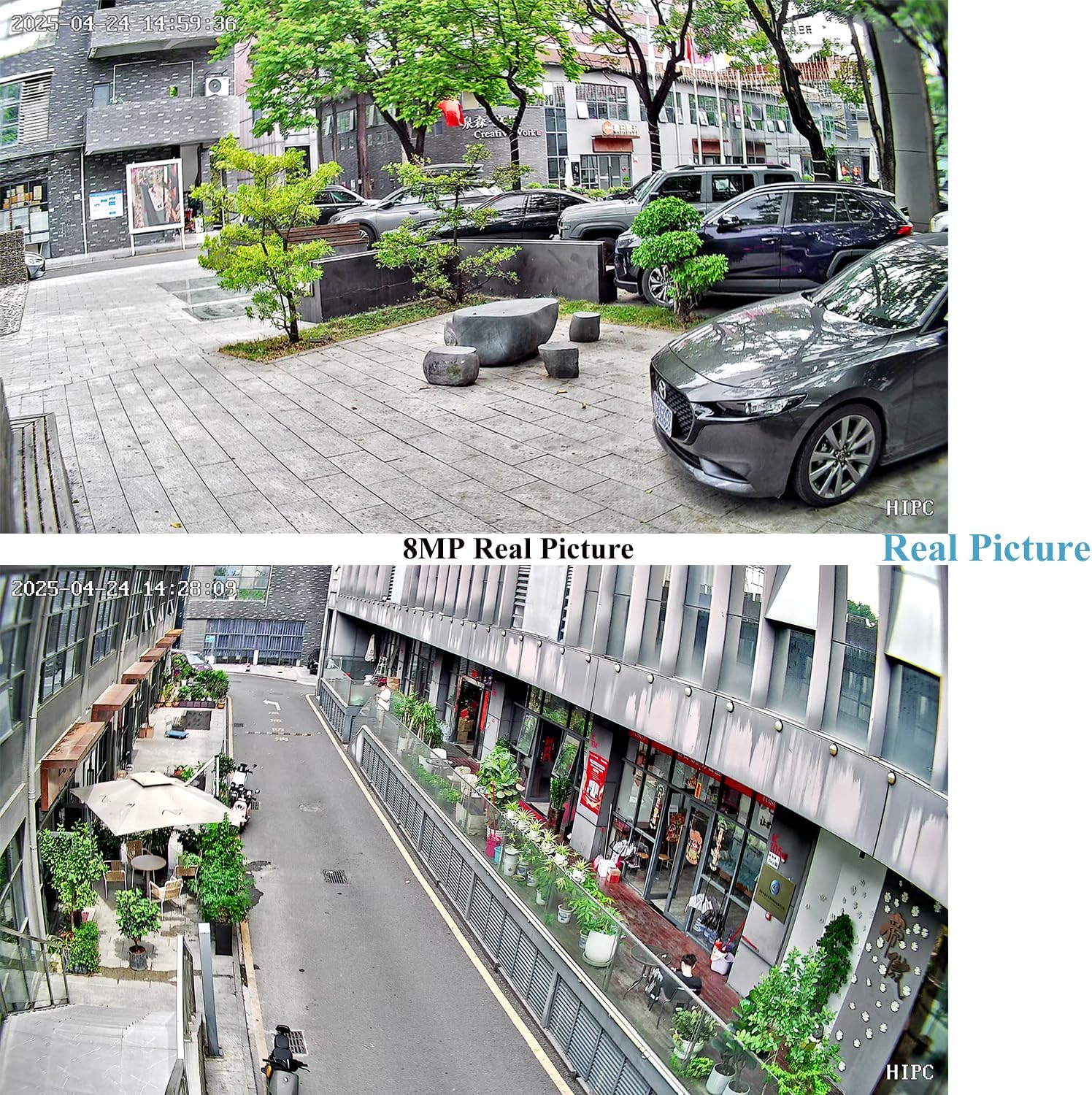
Image 3.2: Displays real-world 8MP image quality from the camera in an outdoor setting.

Image 3.3: Highlights POE cable connection and the benefits of H.265/H.264 dual encoding, including reduced bandwidth and storage requirements.
4. الإعداد
4.1 تشغيل الكاميرا
يمكن تشغيل الكاميرا بطريقتين:
- الطاقة عبر الإيثرنت (POE): Connect the camera to an 802.3AF standard 48V POE switch using an Ethernet cable. This provides both power and data connectivity.
- طاقة التيار المستمر: Use a standard 12V 2A power adapter (not included) and connect it to the auxiliary power interface.
4.2 Connecting to VMS Software, Web Interface, and Mobile App
تدعم الكاميرا التحكم عن بعد viewing and configuration through VMS software on a PC, a web browser, or a dedicated mobile application. The following video demonstrates the connection process for these platforms.
Video 4.1: This video demonstrates how to connect the REVODATA IP camera to VMS software, access its web interface via a browser, and set up remote viewing through a smartphone application. It covers initial login credentials and device discovery.
4.2.1 VMS Software Setup
- Install the VMS software on your Windows computer.
- Launch the VMS software. The default username is مسؤل وكلمة المرور الافتراضية هي مسؤل.
- Navigate to the Device Manager section.
- Perform an IP search to discover the camera on your local network.
- Add the discovered camera to your device list.
- Once added, you can access the live view and configure camera settings through the VMS interface.
4.2.2 Web تجهيز الواجهة
- Obtain the camera's IP address from the VMS software or your network router.
- افتح web browser (e.g., Internet Explorer) and enter the camera's IP address in the address bar.
- أدخل اسم المستخدم الافتراضي مسؤل وكلمة المرور الافتراضية 123456 لتسجيل الدخول.
- يمكنك الآن view the live feed and access various configuration options, including video settings, network settings, and alarm management.
4.2.3 إعداد تطبيق الهاتف المحمول
- Download and install the recommended mobile application (e.g., Linklemo) from your smartphone's app store (iOS or Android).
- قم بالتسجيل للحصول على حساب وتسجيل الدخول.
- Tap the "Add Device" or "+" icon to add a new camera.
- Select the appropriate camera type (e.g., Box Camera (RJ-45)).
- Follow the on-screen prompts to connect the camera, ensuring it is powered on and connected to the same network as your phone.
- Once the device is detected, add it and set a desired name.
- يمكنك الآن view the live feed, access playback, and manage settings directly from your smartphone.

Image 4.2: Illustrates the compact size of the camera and its P2P cloud function, enabling remote viewing via mobile phone or computer.

Image 4.3: Shows the interface of the mobile application and VMS software for live viewجي والإدارة.
5. التشغيل
5.1 مباشر View والتشغيل
After successful setup, you can access the live video feed from your camera through the VMS software, web interface, or mobile application. These platforms also allow you to review تم تسجيل فوtage.
5.2 كشف الحركة وأجهزة الإنذار
The camera features a motion detection function that can trigger alerts. When motion is detected, the system can send notifications to your mobile phone or email, and initiate recording.

Image 5.1: Depicts the motion detection alarm feature, showing a mobile phone notification upon human movement detection.
To configure motion detection settings:
- Access the camera's configuration settings via the VMS software or web واجهة.
- Locate the "Alarm Manager" or "Motion Detect" section.
- قم بتفعيل خاصية كشف الحركة واضبط مستويات الحساسية حسب الحاجة.
- Set up recording schedules and notification preferences (e.g., email alerts, push notifications to app).
6. الصيانة
Regular maintenance helps ensure the longevity and optimal performance of your security camera.
- تنظيف: Gently clean the camera lens with a soft, dry cloth to remove dust or smudges. Avoid using harsh chemicals.
- تحديثات البرامج الثابتة: التحقق بشكل دوري من الشركة المصنعة webموقع لتحديثات البرامج الثابتة. يمكن أن يؤدي تحديث البرامج الثابتة إلى تحسين الأداء، وإضافة ميزات جديدة، وتعزيز الأمان.
- الظروف البيئية: Ensure the camera operates within its specified temperature and humidity ranges (-25°C to 60°C, 10% to 90% humidity).
- إدارة الكابلات: Ensure all cables are securely connected and protected from damage.
7. استكشاف الأخطاء وإصلاحها
If you encounter issues with your REVODATA I706-2-P-HS82 camera, refer to the following common troubleshooting tips:
- لا يوجد طاقة: Verify that the POE switch is providing power or that the 12V 2A DC adapter is correctly connected and functional.
- لا يوجد فيديو/غير متصل بالإنترنت:
- تحقق من توصيلات كابل الشبكة.
- تأكد من أن عنوان IP الخاص بالكاميرا صحيح ولا يتعارض مع عناوين الأجهزة الأخرى الموجودة على الشبكة.
- Confirm that your NVR or viewing software supports 8MP and H.265. If not, you may need to adjust the camera's settings to 1080P (2MP) and H.264.
- Restart the camera and your network equipment (router/POE switch).
- ضعف جودة الصورة:
- تنظيف عدسة الكاميرا.
- Check network bandwidth; insufficient bandwidth can affect streaming quality.
- Ensure the camera's resolution and encoding settings are appropriate for your viewing device and network.
- كشف الحركة لا يعمل:
- Verify that motion detection is enabled in the camera's settings.
- Adjust the sensitivity level.
- Check the alarm schedule to ensure it is active during desired times.
- Cannot Connect to Mobile App: Ensure your smartphone and camera are on the same network during initial setup. Verify correct login credentials for the app.
If the problem persists, please contact REVODATA customer support for further assistance.
8. المواصفات
| ميزة | مواصفة |
|---|---|
| اسم الموديل | I706-2-P-HS82 |
| دقة | 3840 x 2160P (8MP) |
| المستشعر | 1/2.7 inch CMOS (Hi3516CV610+GC8613) |
| Minimum Lighting | 0.005Lux @ (F1.2 ، AGC ON) |
| سرعة الغالق | 1/25 sec - 1/100,000 sec |
| معدل الإطارات | 8MP/20fps |
| تنسيق الضغط | H.264 / H.265 |
| Output Compression Rate | 128 Kbps ~ 8Mbps |
| عدسة | عدسة 3.7 مم |
| نوع حامل العدسة | م12 |
| Viewزاوية جي | 75° |
| تخزين | NVR or PC (No Cloud Storage support via app) |
| عنوان IP | Dynamic (default) / Static |
| إنذار ذكي | Motion detection, email alarm |
| البروتوكولات المدعومة | HTTP, TCP/IP, RTSP, RTP, UPNP, SMTP, DHCP, DDNS, DNS, FTP, NTP |
| بروتوكول وارد | Standard NVR ONVIF port (Port: 80) |
| الوظائف العامة | Dual stream, password protection, video fade out |
| إيثرنت | 10M/100M Mbit/s Ethernet (RJ-45) |
| درجة حرارة التشغيل | -25 درجة مئوية ~ 60 درجة مئوية |
| رطوبة العمل | 10% ~ 90% |
| وضع امدادات الطاقة | POE (802.3af) or DC 12V 2A |
| الأبعاد (سم) | 5.7 × 4.4 × 3.9 سم |
| وزن | 0.2 كجم |
| مواد التغليف | معدن |
| الاستخدام الداخلي والخارجي | داخلي |
| الأجهزة المتوافقة | أندرويد، آي أو إس، ويندوز |
9. الضمان والدعم
للحصول على معلومات الضمان والدعم الفني، يرجى الرجوع إلى الوثائق المرفقة مع عملية الشراء أو زيارة موقع REVODATA الرسمي. webالموقع. احتفظ بإثبات الشراء الخاص بك لاستخدامه في أي مطالبات بالضمان.
If you require assistance with installation, configuration, or troubleshooting beyond the scope of this manual, please contact REVODATA customer service.