
1. المقدمة
The DOOGEE Blade 10 Ultra Energy is a rugged smartphone designed for durability and high performance. It features the latest Android 15 OS, a powerful octa-core processor, and extensive memory for smooth operation. This device is built to withstand challenging environments while providing advanced camera capabilities, a long-lasting battery, and secure access features.
تتضمن الميزات الرئيسية ما يلي:
- Android 15 OS with Octa-Core Processor and 36GB RAM (8GB physical + 28GB virtual) and 256GB internal storage.
- Ultra-slim 10.7mm design with a 6.56" HD+ 90Hz display.
- 64MP AI Main Camera and 8MP Front Camera, including an Underwater Camera Mode.
- 6150mAh battery with 18W fast charging and OTG reverse charging.
- Dual 4.5G SIM support, NFC, Fingerprint and Face ID unlock.
- IP68/IP69K water and dust resistance, MIL-STD-810H drop protection, and extreme temperature resilience.
2. ماذا يوجد في الصندوق
عند فتح العبوة، تأكد من وجود جميع العناصر المذكورة أدناه:
- 1 x DOOGEE Blade 10 Ultra Energy Rugged Phone
- 1 × كابل من النوع C
- شاحن واحد بقوة 18 واط
- 1 x Thicken Protective Film (Pre-applied or separate)
- 1 × حافظة واقية
- 1 x Phone Strap
- 1 × دليل المستخدم
- شنومكس x بطاقة الخدمة

Figure 2.1: Packaging Contents of the DOOGEE Blade 10 Ultra Energy.
3. الإعداد
3.1 تركيب بطاقة SIM وبطاقة MicroSD
The device supports Dual SIM cards (Nano SIM size) and a MicroSD card for expanded storage up to 2TB. Ensure the phone is powered off before inserting or removing cards.
- حدد مكان درج بطاقة SIM على جانب الهاتف.
- استخدم أداة إخراج بطاقة SIM المتوفرة لفتح الدرج.
- Carefully place your Nano SIM cards and/or MicroSD card into the designated slots on the tray. Ensure they are correctly oriented.
- ادفع الدرج برفق إلى داخل الهاتف حتى يصبح مستوياً مع جانب الجهاز.

Figure 3.1: Inserting SIM and MicroSD cards into the tray.
3.2 التشغيل الأولي والإعداد الأساسي
- اضغط مع الاستمرار على زر الطاقة (الموجود على الجانب) حتى يظهر شعار DOOGEE.
- اتبع التعليمات التي تظهر على الشاشة لتحديد اللغة والاتصال بشبكة Wi-Fi وإعداد حساب Google الخاص بك.
- Configure security features such as Fingerprint Recognition and Face ID for secure and convenient access.
4. تشغيل جهازك
4.1 العرض وواجهة المستخدم
The DOOGEE Blade 10 Ultra Energy features a 6.56-inch HD+ display with a 90Hz refresh rate, providing vivid colors and smooth visuals. The device runs on Android 15, offering a clean and user-friendly interface with enhanced security and privacy controls.

Figure 4.1: The 6.56" HD+ 90Hz display for fluid streaming experience.

Figure 4.2: Android 15 OS provides a secure, fluid, and fast user experience.
4.2 الأداء والتخزين
Equipped with an UNISOC T7250 Octa-Core Processor and 36GB of RAM (8GB physical + 28GB virtual), the device ensures ultra-fast performance and efficient multitasking. It comes with 256GB of internal storage, expandable up to 2TB with a MicroSD card (sold separately).
Video 4.1: Demonstrating the UNISOC T7250 Octa-Core Processor for smooth performance.

Figure 4.3: The UNISOC T7250 4.5G Octa-Core Processor for enhanced performance.

Figure 4.4: 36GB RAM and 256GB ROM for ample storage and smooth operation.
4.3 ميزات الكاميرا
Capture high-quality photos and videos with the 64MP AI main camera and 8MP front camera. The device also features an Underwater Camera Mode, allowing you to take pictures and record videos while submerged.
Video 4.2: Highlighting the 64MP AI Camera capabilities of the DOOGEE Blade 10 Ultra Energy.

Figure 4.5: Capture more details with the 64MP main camera and 8MP front camera, including underwater shots.
4.4 البطارية والشحن
The device is powered by a large 6150mAh silicone-negative battery, providing extended usage. It supports 18W fast charging for quick power-ups and OTG reverse charging, allowing the phone to act as a power bank for other devices.
الفيديو 4.3: انتهىview of the 6150mAh Battery in the DOOGEE Blade 10 Ultra Energy.

Figure 4.6: The 6150mAh battery offers extended duration and 18W fast charging.
4.5 الأمن والاتصال
The device offers secure access via fingerprint recognition and Face ID, even in challenging conditions or while wearing gloves (Glove Mode 2.0). Dual 4.5G SIM slots provide seamless global connectivity, while built-in NFC enables secure contactless payments. High-precision GPS ensures accurate navigation.

Figure 4.7: Glove Mode 2.0 allows easy operation while wearing gloves.

Figure 4.8: Advanced security and connectivity features including NFC and biometric unlock.
5. المتانة والحماية
The DOOGEE Blade 10 Ultra Energy is built to endure harsh conditions, certified with IP68/IP69K ratings for water and dust resistance, and MIL-STD-810H for drop protection. It can withstand submersion in 1.5 meters of water for up to 30 minutes and operates reliably in extreme temperatures from -4°F to 131°F (-20°C to 55°C).
Video 5.1: Demonstrating the IP68 and IP69K water and dust resistance of the DOOGEE Blade 10 Ultra Energy.

Figure 5.1: IP68/IP69K/MIL-STD-810H certifications ensure high quality and durability.
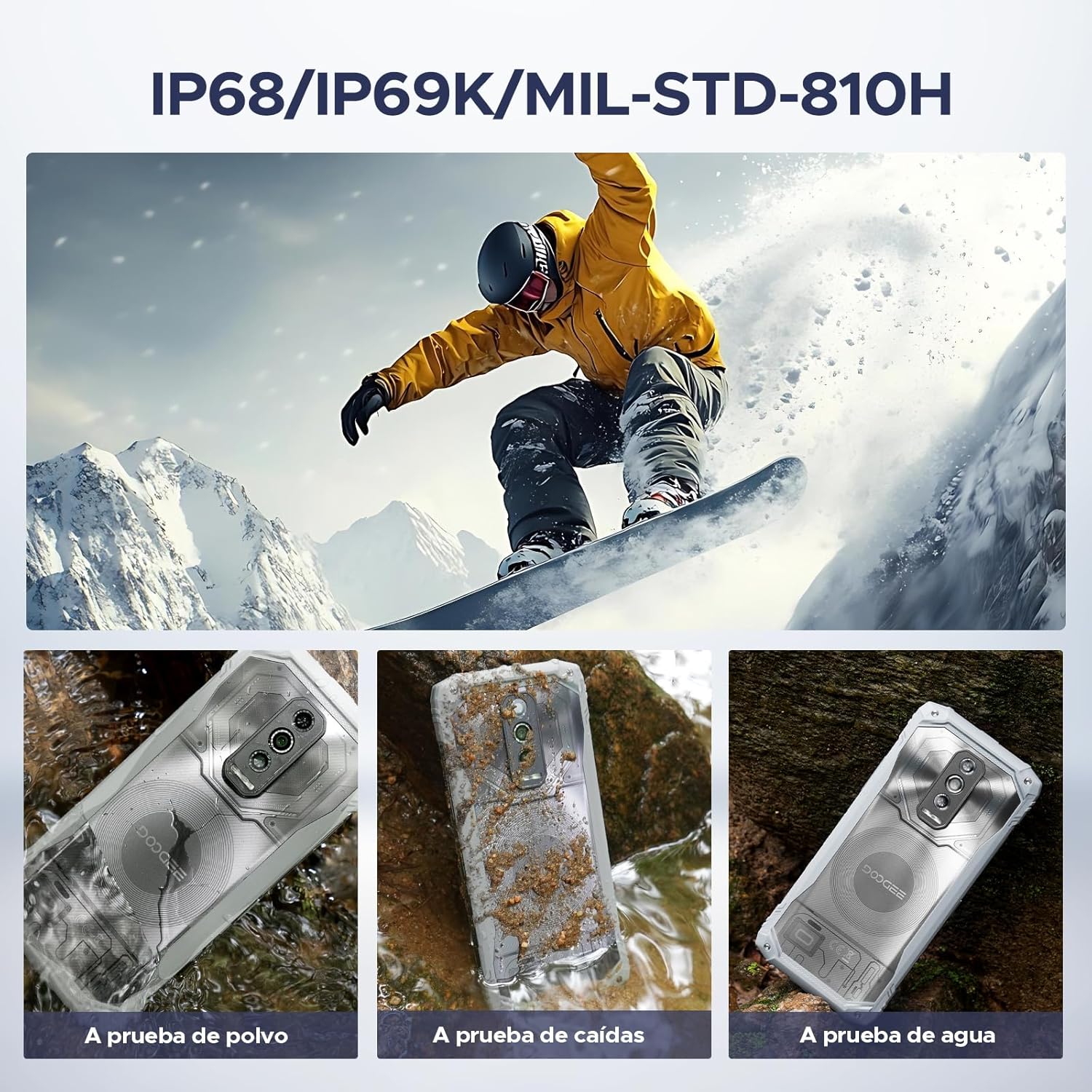
Figure 5.2: The phone is waterproof, drop-proof, and dust-proof.
6. المواصفات
| ميزة | التفاصيل |
|---|---|
| ماركة | دوجي |
| اسم الموديل | بليد 10 ألترا إنرجي |
| نظام التشغيل | أندرويد 15 |
| حجم ذاكرة الوصول العشوائي المثبتة | 36 جيجابايت (8 جيجابايت فعلي + 28 جيجابايت افتراضي) |
| سعة تخزين الذاكرة | 256 جيجابايت (قابلة للتوسيع حتى 2 تيرابايت) |
| حجم الشاشة | 6.56 بوصة |
| دقة | 720 × 1612 HD+ |
| معدل التحديث | 90 هرتز |
| المعالج | UNISOC T7250 ثماني النواة |
| الكاميرا الرئيسية | 64 MP AI |
| الكاميرا الأمامية | 8 ميجا بكسل |
| سعة البطارية | 6150 مللي أمبير |
| الشحن | شحن سريع بقوة 18 واط، وشحن عكسي بتقنية OTG |
| تكنولوجيا الخلوية | 4.5G Dual SIM (Unlocked for All Carriers) |
| الأمن البيومتري | التعرف على بصمات الأصابع والتعرف على الوجه |
| مستوى مقاومة الماء | IP68/IP69K مقاوم للماء |
| معيار المتانة | المعيار العسكري 810H |
| الاتصال | NFC, GPS |
| أبعاد العنصر | 3.15 × 4.8 × 6.8 بوصة |
7. الصيانة
To ensure the longevity and optimal performance of your DOOGEE Blade 10 Ultra Energy, follow these maintenance guidelines:
- تنظيف: Use a soft, lint-free cloth to clean the screen and body. For stubborn dirt, especially after exposure to mud or saltwater, rinse the phone under fresh water and dry thoroughly. Do not use harsh chemicals or abrasive materials.
- رعاية المنفذ: Ensure the charging port and headphone jack (if applicable) are free from dust, dirt, or moisture before charging or connecting accessories. The device's waterproof seals require clean ports to maintain integrity.
- تحديثات البرامج: Regularly check for and install software updates to benefit from improved performance, security patches, and new features.
- العناية بالبطارية: Avoid exposing the phone to extreme heat or cold for prolonged periods, as this can degrade battery life. Use only the provided charger or a certified compatible charger.
- ادارة التخزين: قم بإزالة غير الضروري بشكل دوري fileاستخدم التطبيقات والملفات للحفاظ على الأداء الأمثل. استفد من مساحة التخزين القابلة للتوسيع للوسائط الكبيرة files.
8. استكشاف الأخطاء وإصلاحها
This section addresses common issues you might encounter with your device. If you experience problems not covered here, please refer to the support section.
| مشكلة | حل |
|---|---|
| لن يتم تشغيل الجهاز. | Ensure the battery is charged. Connect the phone to the charger and wait a few minutes before attempting to power on again. If unresponsive, perform a forced restart by holding the Power button for 10-15 seconds. |
| استقبال إشارة سيئة. | Check if your SIM card is correctly inserted. Move to an area with better network coverage. Contact your carrier to verify service in your location. |
| يتم استنزاف البطارية بسرعة. | Reduce screen brightness, close unused apps running in the background, disable Wi-Fi/Bluetooth/GPS when not in use. Check battery usage in settings to identify power-hungry apps. |
| شاشة اللمس لا تستجيب. | Restart the device. If the issue persists, ensure the screen is clean and dry. Remove any screen protectors that might be interfering. |
| لا يمكن الاتصال بشبكة Wi-Fi. | Restart your Wi-Fi router and the phone. Forget the network in your phone's Wi-Fi settings and reconnect. Ensure you are entering the correct password. |
9. الضمان والدعم
DOOGEE provides comprehensive customer service for your Blade 10 Ultra Energy rugged phone.
- ضمان استرداد الأموال لمدة 30 يومًا وإرجاع مجاني: إذا لم تكن راضيًا عن عملية الشراء الخاصة بك، فيمكنك إرجاعها خلال 30 يومًا لاسترداد أموالك بالكامل.
- ضمان محدود لمدة عامين: Your device is covered by a 2-year limited warranty against manufacturing defects. Please refer to the included Service Card for detailed terms and conditions.
- دعم فردي عبر الإنترنت على مدار الساعة طوال أيام الأسبوع: لأي مساعدة فنية أو استفسارات، يتوفر دعم مخصص عبر الإنترنت على مدار الساعة.

Figure 9.1: DOOGEE's customer service commitment.
للحصول على مزيد من المساعدة، يرجى زيارة موقع دوجي الرسمي website or contact their customer support team using the information provided in your Service Card.