
1. المقدمة
Thank you for choosing the TELESIN C03 Magnetic Phone Selfie Light. This device is designed to enhance your photography and videography with adjustable lighting and convenient features. Please read this manual carefully to ensure proper use and maintenance.
2. محتويات العبوة
- TELESIN C03 Magnetic Phone Selfie Light
- كابل شحن USB من النوع C
- Metal Ring Adhesive Adapter (for non-MagSafe devices)
- دليل المستخدم
3. انتهى المنتجview
The TELESIN C03 features a compact, foldable design with a magnetic attachment for easy use. It includes a built-in mirror and offers multiple lighting modes.
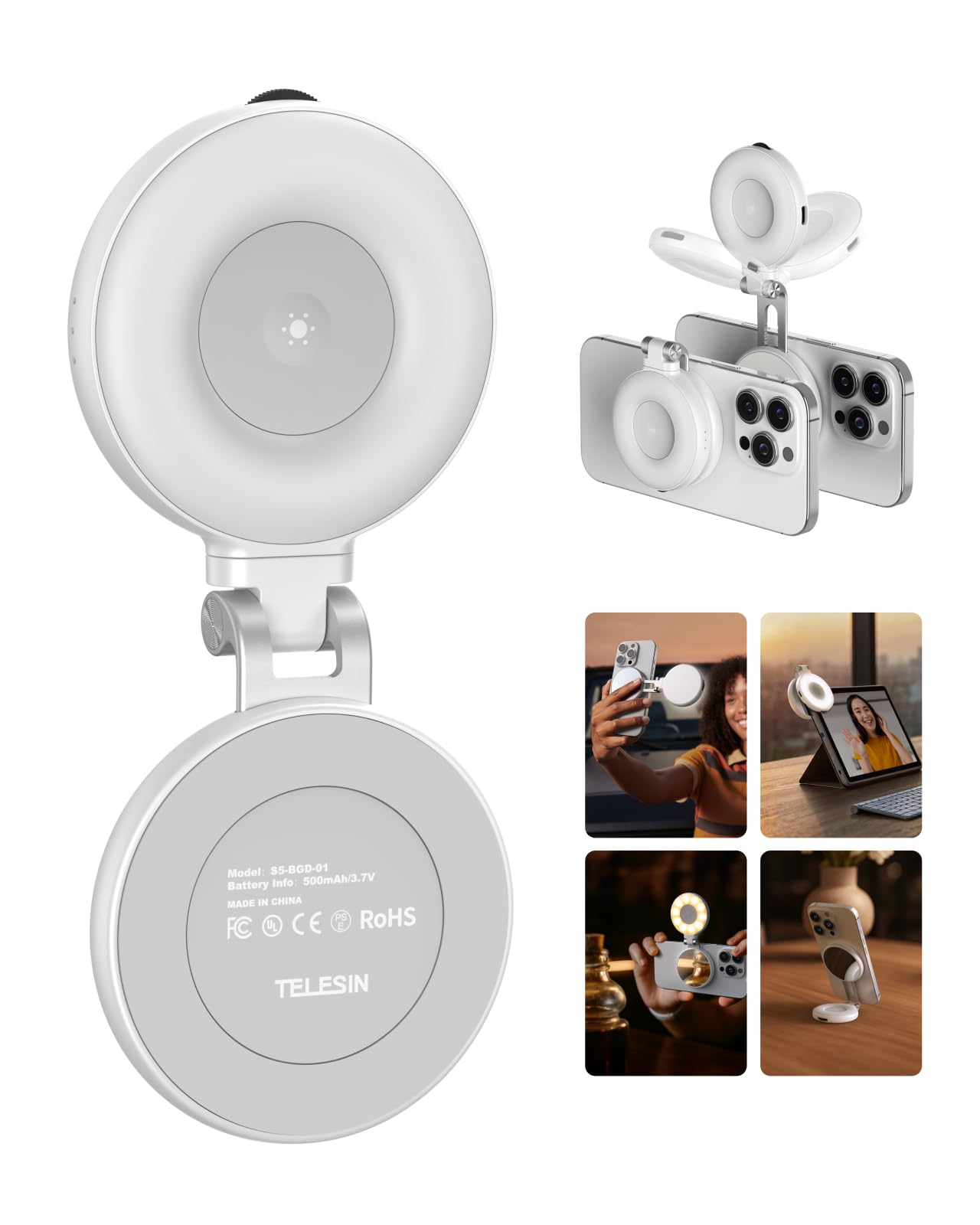
Figure 1: TELESIN C03 Magnetic Phone Selfie Light (folded)
4. الإعداد والتثبيت
4.1 شحن الجهاز
Before first use, fully charge the selfie light. Connect the provided USB Type-C cable to the charging port on the device and to a compatible USB power source. The indicator light will show charging status.

Figure 2: Charging the Selfie Light
4.2 التوصيل بالهاتف
The TELESIN C03 is designed for magnetic attachment. For MagSafe compatible iPhones (iPhone 12 series and newer), simply align the selfie light with the MagSafe area on the back of your phone until it snaps into place securely.

الشكل 3: التثبيت المغناطيسي
For non-MagSafe phones, laptops, or other devices, use the included metal ring adhesive adapter. Peel off the protective film from the adhesive side of the metal ring and firmly attach it to the desired location on your device. Ensure the surface is clean and dry for optimal adhesion. Once the ring is attached, the selfie light can be magnetically connected to it.
5. تعليمات التشغيل
5.1 تشغيل/إيقاف الطاقة وضبط السطوع
Press and hold the power button to turn the light on or off. Once on, rotate the wave wheel on the side of the device to adjust the brightness from 10% to 100% steplessly.
5.2 اختيار درجة حرارة اللون
Short press the power button to cycle through the three available color temperatures:
- ضوء دافئ (2700 كلفن): For a cozy ambiance.
- الضوء الطبيعي (5600 كلفن): For a balanced, natural glow.
- ضوء بارد (7500 كلفن): For a chic, bright illumination.

Figure 4: Light Modes and Brightness Control
5.3 360° Rotation and 180° Flip
The selfie light features a hinge that allows for 360° rotation and a 180° flip. This enables you to direct the light from various angles, whether for front-facing selfies, rear-camera photography, or as a small desktop stand.

Figure 5: Rotatable and Flippable Design
5.4 Using the Built-in Mirror
The device includes a 56mm high-definition makeup mirror. This mirror can be used for quick touch-ups or to assist with framing shots when using your phone's rear camera.
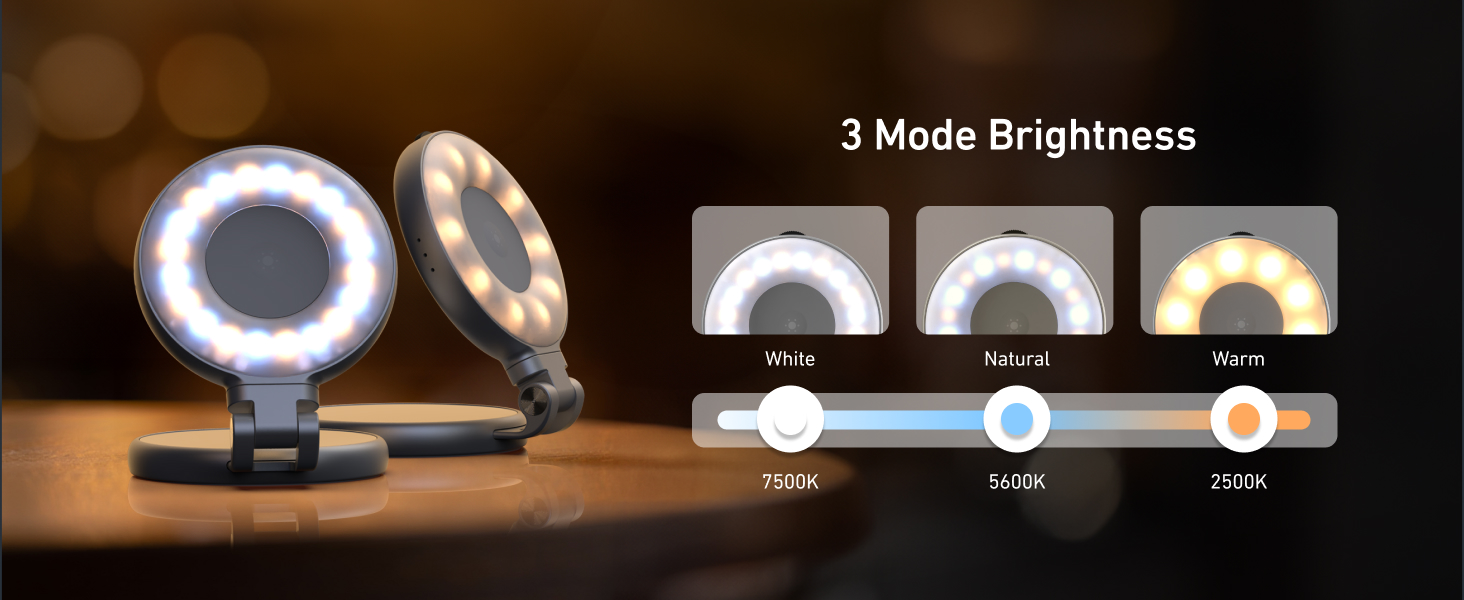
Figure 6: Built-in Makeup Mirror
6. المميزات
- ملحق مغناطيسي: Compatible with MagSafe iPhones and other devices via adhesive metal ring.
- إضاءة قابلة للتعديل: 3 color temperatures (2700K, 5600K, 7500K) and 10-100% stepless brightness adjustment.
- 360° Rotation & 180° Flip: Flexible positioning for various shooting angles and use as a stand.
- مرآة مدمجة: 56mm high-definition mirror for convenience.
- قابلة للشحن والمحمولة: Compact pocket size with a built-in 500mAh battery, charged via USB Type-C.
7. الصيانة
- حافظ على نظافة الجهاز بمسحه بقطعة قماش ناعمة وجافة.
- تجنب تعريض الجهاز لدرجات الحرارة العالية أو الرطوبة أو أشعة الشمس المباشرة.
- لا تحاول تفكيك الجهاز أو إصلاحه بنفسك، لأن هذا قد يؤدي إلى إبطال الضمان.
- قم بتخزينه في مكان بارد وجاف عند عدم استخدامه.
8. استكشاف الأخطاء وإصلاحها
- الضوء لا يضيء: تأكد من شحن الجهاز بالكامل. قم بتوصيله بمصدر طاقة باستخدام كابل USB من النوع C.
- ضوء وامض أو خافت: Recharge the device. If the issue persists, contact customer support.
- Magnetic attachment is weak: Ensure the device is properly aligned with the MagSafe area or the metal ring adapter. Clean the surfaces to remove any debris.
- الجهاز لا يستجيب: Try resetting the device by fully discharging and then recharging it.
9. المواصفات
| يصف | التفاصيل |
|---|---|
| ماركة | تيليسين |
| اسم الموديل | TELESIN-SL-MAG-WHT-001 |
| وزن العنصر | 80 جرام |
| تكنولوجيا الاتصال | USB |
| واجهة الأجهزة | يو اس بي نوع سي |
| متوسط عمر البطارية | 272.5 دقائق |
| وصف أوضاع الفلاش | Adjustable brightness and color temperature (cold, natural, warm) for constant illumination |
| مستوى مقاومة الماء | غير مقاوم للماء |
| الأجهزة المتوافقة | iPhone, Android phones, laptops, magnetic selfie stick tripod |
10. مقاطع فيديو رسمية للمنتج
TELESIN C03 Magnetic Selfie Light Overview
يقدم هذا الفيديو شرحًا موجزًاview of the TELESIN C03 Magnetic Selfie Light, demonstrating its magnetic attachment and basic lighting functions.
TELESIN C03 Mirror Selfie Light Demonstration
This video showcases the mirror feature of the TELESIN C03 Selfie Light, highlighting its utility for self-monitoring during content creation.
TELESIN C03 Magnetic Phone Light Features
This video demonstrates various features of the TELESIN C03 Magnetic Phone Light, including its magnetic attachment and adjustable lighting.
11. الضمان والدعم
The TELESIN C03 Magnetic Phone Selfie Light comes with a 2-year warranty. For warranty claims, technical support, or any product-related inquiries, please contact TELESIN customer service through their official webالموقع أو بائع التجزئة الذي تم شراء المنتج منه.
لمزيد من المساعدة، يرجى زيارة TELESIN Store on Amazon.