
1. المقدمة
شكرا لك على الشراءasing the XDOBO Dolby Atmos 7.1.4 Surround Sound System. This manual provides essential information for setting up, operating, and maintaining your new audio system. Please read it thoroughly before use to ensure optimal performance and safety.
2. مواصفات المنتج
- Dolby Atmos 7.1.4 Channel System: Delivers a revolutionary, immersive sound experience with overhead audio effects.
- صوت محيطي بزاوية 360 درجة: يُصدر أصواتًا واسعةtage for enhanced immersion, reproducing environmental sounds with precision through left/right sky channels (up-firing speakers), a center speaker, and left/right surround channels.
- 8-inch Wireless Subwoofer: Provides powerful, deep bass, covering frequencies down to 40Hz for impactful audio.
- بلوتوث 5.3 EDR: Ensures stable, high-speed wireless connectivity for seamless audio streaming.
- 500 واط ذروة الإخراج: Delivers overwhelming power for a truly moving audio experience.
- DSP Digital Tuning Technology: Optimizes sound sources and adjusts the sound field for enhanced spatial presence.
- Wireless Speaker Connectivity: All speakers connect wirelessly, allowing for flexible placement with only power connections required.
- خيارات اتصال متعددة: Supports HDMI ARC, HDMI IN, Bluetooth, USB, Optical, and Coaxial inputs for versatile connectivity.
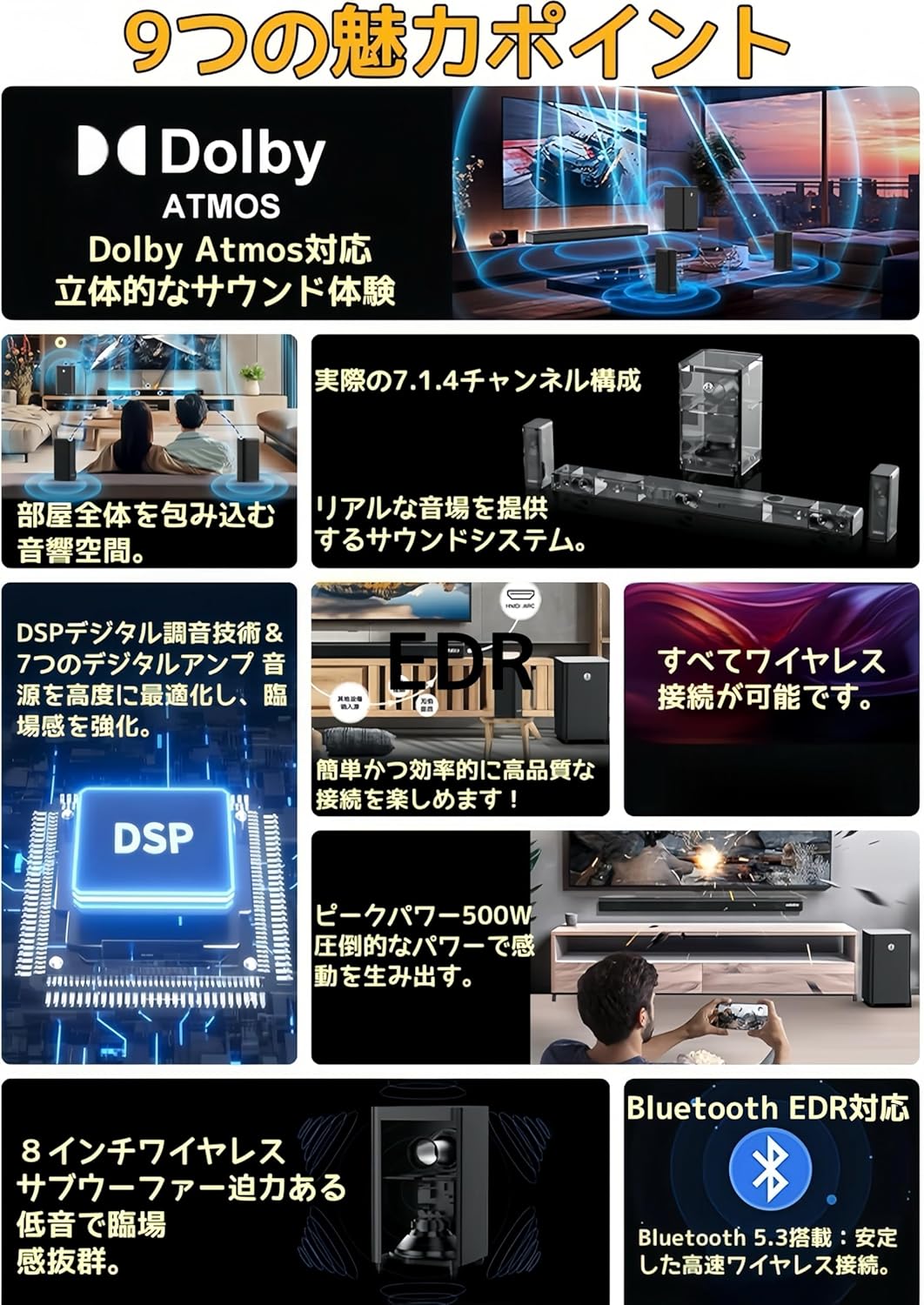
الصورة: أكثر منview of the system's key features, including Dolby Atmos, 7.1.4 channel configuration, wireless connectivity, DSP technology, 500W peak power, 8-inch wireless subwoofer, and Bluetooth 5.3 EDR.

Image: Illustration of the DSP (Digital Signal Processor) technology, highlighting its role in optimizing Dolby Atmos content and enhancing the sound field.

الصورة: عن قرب view of an up-firing speaker, demonstrating how it reflects sound off the ceiling at a 20-degree angle to create a three-dimensional audio space.
3. محتويات العبوة
يرجى التأكد من وجود جميع العناصر في العبوة:
- Soundbar x 1 (with Power Cable x 1)
- Surround Speakers x 2 (with Power Adapters x 2, Wall Mount Brackets x 2)
- Subwoofer x 1 (with Power Cable x 1)
- جهاز التحكم عن بعد × 1
- مجموعة براغي التثبيت × 1
- دليل التعليمات × 1
4. الإعداد
4.1 وضع السماعات
The XDOBO 7.1.4 system consists of a soundbar, two surround speakers, and a subwoofer. All speakers are wireless, offering flexibility in placement.
- شريط الصوت: Place the soundbar centrally below your TV. Ensure there are no obstructions in front of the up-firing speakers on top of the soundbar.
- مكبرات الصوت المحيطية: Position the two surround speakers behind or to the sides of your listening position. They should be equidistant from the main listening area for optimal surround sound. Wall mounting is also an option using the included brackets.
- مضخم الصوت: The wireless subwoofer can be placed anywhere in the room where it provides the best bass response. Experiment with different locations to find the ideal spot.

Image: Diagram showing the layout of the soundbar, subwoofer, and left/right surround speakers, illustrating the 7.1.4 channel configuration with left/right, center, left/right surround, and left/right sky channels.

الصورة: حبيب سابقample setup showing a soundbar and two wireless surround speakers positioned around a TV and sofa, demonstrating the flexibility of wireless placement for an immersive experience.
4.2 توصيل الطاقة
Connect the provided power cables to the soundbar, subwoofer, and surround speakers, then plug them into appropriate power outlets. The speakers will automatically pair upon powering on.
5. تعليمات التشغيل
5.1 تشغيل/إيقاف التشغيل
اضغط على زر الطاقة الموجود على مكبر الصوت أو جهاز التحكم عن بعد لتشغيل النظام أو إيقاف تشغيله.
5.2 اختيار المدخلات
Use the 'Input' button on the remote control or the soundbar to cycle through available input sources: HDMI ARC, HDMI IN, Bluetooth, USB, Optical, Coaxial, and AUX.
5.3 التحكم في مستوى الصوت
Adjust the volume using the Volume Up (+) and Volume Down (-) buttons on the remote control or the soundbar.
5.4 اقتران بلوتوث
- Select 'Bluetooth' as the input source on the soundbar. The soundbar will enter pairing mode.
- على جهازك المحمول، قم بتمكين Bluetooth وابحث عن الأجهزة المتاحة.
- Select "XDOBO Draco Mini" (or similar) from the list to connect.
- Once connected, you can stream audio from your device to the sound system.
6. الاتصالات
The soundbar offers various connection options for different audio sources.
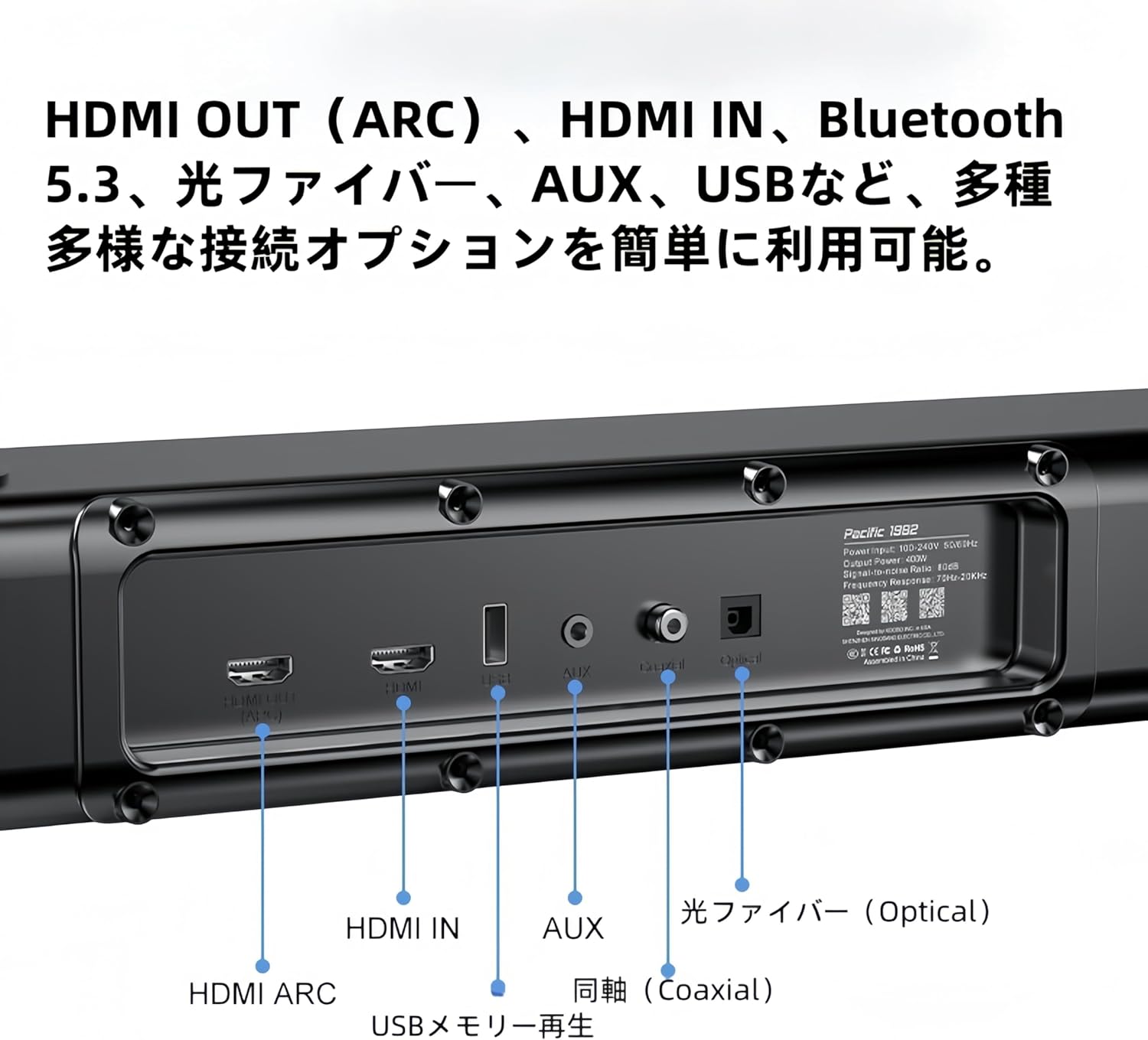
الصورة: مفصلة view of the soundbar's rear panel, showing various input ports including HDMI ARC, HDMI IN, USB, AUX, Optical, and Coaxial connections.
- اتش دي ام اي ارك: Connect to your TV's HDMI ARC port for high-quality audio transmission and control.
- مدخل HDMI: Connect external devices like Blu-ray players or game consoles.
- بلوتوث: For wireless audio streaming from compatible devices (refer to 5.4 Bluetooth Pairing).
- USB: Insert a USB memory stick for direct audio playback.
- بصري: Connect to your TV or other audio sources using an optical cable.
- متحد المحور: Connect to compatible audio sources using a coaxial cable.
- مساعد: Use a 3.5mm audio cable to connect to devices with an analog audio output.
7. الصيانة
لضمان طول عمر نظام الصوت الخاص بك وأدائه الأمثل، اتبع إرشادات الصيانة التالية:
- تنظيف: Use a soft, dry cloth to wipe the surfaces of the speakers. Do not use liquid cleaners, aerosols, or abrasive materials, as they may damage the finish.
- تهوية: Ensure proper ventilation around all speaker units. Do not block any ventilation openings.
- تخزين: في حالة تخزين النظام لفترة طويلة، افصله عن مصدر الطاقة وخزنه في مكان بارد وجاف بعيدًا عن أشعة الشمس المباشرة ودرجات الحرارة القصوى.
8. استكشاف الأخطاء وإصلاحها
If you encounter any issues with your XDOBO sound system, please refer to the following common problems and solutions:
| مشكلة | السبب المحتمل | حل |
|---|---|---|
| لا يوجد طاقة | كابل الطاقة غير موصول؛ مأخذ الطاقة معطل | تأكد من توصيل جميع كابلات الطاقة بشكل آمن وأن مأخذ الطاقة يعمل بشكل صحيح. |
| لا يوجد صوت | Incorrect input selected; Volume too low; Cables not connected properly | Select the correct input source. Increase the volume. Check all audio cables for secure connections. |
| فشل اقتران البلوتوث | الجهاز بعيد جدًا؛ مكبر الصوت ليس في وضع الاقتران؛ تداخل | Ensure the soundbar is in Bluetooth pairing mode. Move your device closer to the soundbar. Avoid strong electromagnetic interference. |
| Surround speakers or subwoofer not connecting wirelessly | Power issue; Out of range; Interference | Ensure all wireless speakers are powered on. Place them within range of the soundbar. Restart the soundbar and speakers. |
9. المواصفات
| ميزة | التفاصيل |
|---|---|
| اسم الموديل | Draco Mini |
| نوع السماعة | شريط الصوت |
| تكوين قناة الصوت المحيطي | 7.1.4 |
| أبعاد المنتج (شريط الصوت) | 5 عمق × 110 عرض × 6 ارتفاع سم |
| أبعاد المنتج (مضخم الصوت الفرعي) | 240 × 240 × 420 ملم |
| Product Dimensions (Surround Speakers) | 228 × 114 × 72 ملم |
| تكنولوجيا الاتصالات اللاسلكية | بلوتوث 5.3 + EDR |
| نطاق استجابة التردد | شنومكهز ~ شنومكهز |
| مستوى ضغط الصوت الناتج | >80 ديسيبل |
| معدل التشويه | <10% |
| Speaker Max Output | 500 واط |
| تكنولوجيا الاتصال | HDMI ARC, Bluetooth, USB, Optical Fiber, Coaxial |
| وضع إخراج الصوت | محيط |
| نوع التركيب | الجدار، الطاولة |

Image: A table summarizing the product specifications for the XDOBO Draco Mini, including model number, dimensions, Bluetooth version, frequency range, and interface types.
10. معلومات السلامة
Please observe the following safety precautions to prevent damage to the product and ensure your safety:
- لا تعرض الوحدة للمطر أو الرطوبة أو درجات الحرارة العالية.
- لا تضع الوحدة بالقرب من مصادر الحرارة مثل المشعات أو فتحات التدفئة أو المواقد أو أي أجهزة أخرى (بما في ذلك ampالمُضخِّمات) التي تنتج الحرارة.
- لا تضع أشياء مملوءة بالسوائل، مثل المزهريات، على الوحدة.
- لا تسد أي فتحات تهوية. ثبّت المنتج وفقًا لتعليمات الشركة المصنعة.
- احمِ سلك الطاقة من أن يدوس عليه أحد أو يضغط عليه، وخاصةً عند المقابس ومنافذ التوصيل الكهربائية ونقطة خروجها من الجهاز.
- استخدم فقط المرفقات/الملحقات المحددة من قبل الشركة المصنعة.
- افصل هذا الجهاز أثناء العواصف الرعدية أو عند عدم استخدامه لفترات طويلة من الزمن.
11. الضمان والدعم
XDOBO products are designed and manufactured to the highest quality standards. For information regarding warranty coverage, technical support, or service inquiries, please refer to the warranty card included in your package or contact XDOBO customer support through the retailer where you purchased the product.