
1. المقدمة
Thank you for choosing the Behringer B-2 Pro Dual-Diaphragm Condenser Microphone. This versatile microphone is designed for professional audio recording in various applications, including vocals, instruments, and ambient sound capture. Its robust construction and flexible features make it an excellent choice for home studios, project studios, and professional recording environments. This manual provides essential information for the proper setup, operation, and maintenance of your B-2 Pro microphone.
2. تعليمات السلامة الهامة
- اقرأ هذه التعليمات جيداً قبل استخدام المنتج.
- احتفظ بهذه التعليمات للرجوع إليها في المستقبل.
- انتبه لجميع التحذيرات واتبع جميع التعليمات.
- لا تستخدم هذا الجهاز بالقرب من الماء أو الرطوبة.
- نظف فقط بقطعة قماش جافة.
- لا تسد أي فتحات تهوية. ثبّت المنتج وفقًا لتعليمات الشركة المصنعة.
- لا تقم بالتثبيت بالقرب من أي مصادر للحرارة مثل المشعات أو فتحات التدفئة أو المواقد أو أي أجهزة أخرى (بما في ذلك ampالمُضخِّمات) التي تنتج الحرارة.
- استخدم فقط المرفقات/الملحقات المحددة من قبل الشركة المصنعة.
- أحل جميع أعمال الصيانة إلى موظفي الصيانة المؤهلين. يلزم إجراء الصيانة عند تعرض الجهاز للتلف بأي شكل من الأشكال، مثل تلف سلك مصدر الطاقة أو القابس، أو انسكاب السوائل أو سقوط الأشياء داخل الجهاز، أو تعرض الجهاز للمطر أو الرطوبة، أو عدم تشغيله بشكل طبيعي، أو سقوطه.
- This microphone requires +48V phantom power to operate. Ensure your audio interface or mixer provides phantom power and that it is enabled before connecting the microphone.
3. محتويات العبوة
تأكد من وجود جميع العناصر المذكورة أدناه في طردك. في حال وجود أي عناصر مفقودة أو تالفة، يرجى الاتصال بالبائع.
- Behringer B-2 Pro Dual-Diaphragm Condenser Microphone
- Custom Shockmount
- الزجاج الأمامي
- Durable Aluminum Carrying Case
- حامل ثلاثي القوائم للميكروفون
- كابل XLR
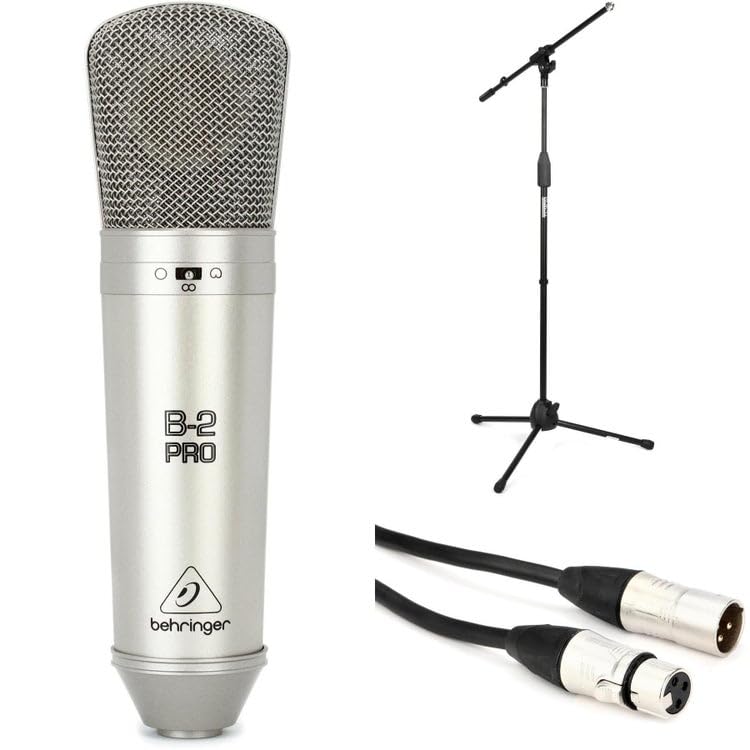
Image: Behringer B-2 Pro microphone with its shockmount, windscreen, and XLR cable, as typically included in the package.
4. مواصفات المنتج
The B-2 Pro is engineered to deliver high-quality audio performance with exceptional versatility.
- Dual-Diaphragm Design: Enables selection of multiple polar patterns for diverse recording applications.
- Selectable Polar Patterns: Choose between Cardioid, Omnidirectional, and Figure-8 patterns to optimize sound capture for different sources and environments.
- Switchable 10dB Pad: Attenuates input signals by 10dB, allowing the microphone to handle very loud sound sources without distortion. Ideal for drums, guitar amplifiers, or brass instruments.
- مرشح القطع المنخفض: Reduces unwanted low-frequency rumble or proximity effect, improving clarity in recordings.
- موصل XLR مطلي بالذهب: Ensures signal integrity and corrosion resistance.
- بناء قوي: Designed for durability and reliable performance in studio settings.
5. الإعداد
- فك الميكروفون: Carefully remove the B-2 Pro microphone and its accessories from the aluminum carrying case.
- قم بتجميع حامل الميكروفون: Extend the tripod legs of the included microphone stand for stability. Adjust the height as needed.
- Attach the Shockmount: Screw the custom shockmount onto the top of the microphone stand. Ensure it is securely fastened.
- تركيب الميكروفون: Gently insert the B-2 Pro microphone into the shockmount. The shockmount's elastic suspension helps isolate the microphone from vibrations and handling noise.
- Attach the Windscreen: Place the foam windscreen over the microphone capsule to reduce plosives (harsh "p" and "b" sounds) and protect the microphone from dust.
- قم بتوصيل كابل XLR: Connect one end of the supplied XLR cable to the microphone's XLR output. Connect the other end to an XLR input on your audio interface, mixer, or preampمكبر.
- تفعيل الطاقة الوهمية: The B-2 Pro is a condenser microphone and requires +48V phantom power to operate. Ensure that phantom power is enabled on your audio interface or mixer قبل connecting the microphone to prevent potential damage.

Image: Illustration of the B-2 Pro microphone setup, including stand, shockmount, and cable connection to an audio interface.
6. Operating the B-2 Pro
6.1. اختيار النمط القطبي
The B-2 Pro features a switch on the microphone body to select between three polar patterns. Adjust this switch according to your recording needs.
- قلبي الشكل: This pattern picks up sound primarily from the front of the microphone, rejecting sound from the sides and rear. It is ideal for isolating a single sound source, such as a vocalist or an instrument, in a live or studio setting.
- احادي: This pattern picks up sound equally from all directions. It is suitable for capturing room ambiance, group vocals, or multiple instruments simultaneously.
- الشكل 8: This pattern picks up sound equally from the front and rear of the microphone, while rejecting sound from the sides. It is commonly used for recording two vocalists facing each other, or for capturing a specific instrument while minimizing room reflections from the sides.

Image: Visual representation of the three selectable polar patterns: Cardioid, Omnidirectional, and Figure-8, showing their sound pickup characteristics.
6.2. 10dB Pad Switch
The B-2 Pro includes a switchable 10dB pad. When engaged, this pad reduces the microphone's output level by 10 decibels.
- Engage the Pad: Use the 10dB pad when recording very loud sound sources, such as drums, loud guitar amplifiers, or brass instruments, to prevent input clipping at your audio interface or mixer.
- Disengage the Pad: For quieter sources like vocals or acoustic guitars, disengage the pad to ensure a healthy signal level.
6.3. Low-Cut Filter Switch
The low-cut filter (also known as a high-pass filter) reduces low-frequency content below a certain point.
- Engage the Filter: Use the low-cut filter to reduce unwanted rumble, handling noise, or proximity effect (an increase in bass response when a microphone is close to the sound source). This can improve clarity, especially for vocals and acoustic instruments.
- Disengage the Filter: For sources where full low-frequency response is desired, such as bass instruments or kick drums, disengage the filter.
6.4. وضع الميكروفون
Proper microphone placement is crucial for optimal sound quality. Experiment with distance and angle to achieve the desired tone.
- غناء: Start with the microphone 6-12 inches from the vocalist, slightly off-axis to reduce plosives. Use the cardioid pattern.
- جيتار صوتي: Aim the microphone towards the 12th fret at a distance of 6-18 inches. Cardioid pattern is generally preferred.
- أجواء الغرفة: Use the omnidirectional pattern and place the microphone in the center of the room or at a distance that captures the desired room sound.
- Two Vocalists: Use the Figure-8 pattern with vocalists positioned on opposite sides of the microphone.
7. الصيانة
- تنظيف: استخدم قطعة قماش ناعمة وجافة لتنظيف جسم الميكروفون. لا تستخدم المنظفات السائلة أو المذيبات، لأنها قد تُتلف الطلاء أو المكونات الداخلية.
- تخزين: When not in use, store the B-2 Pro microphone in its aluminum carrying case to protect it from dust, moisture, and physical damage. Avoid extreme temperatures and humidity.
- التعامل: Always handle the microphone with care. Avoid dropping it or subjecting it to strong impacts.
8. استكشاف الأخطاء وإصلاحها
| مشكلة | السبب المحتمل | حل |
|---|---|---|
| لا يوجد مخرج صوت |
|
|
| صوت مشوه |
|
|
| همهمة أو ضوضاء |
|
|
9. المواصفات
| ماركة | بيهرينغر |
| رقم الموديل | B2ProPk |
| يكتب | ميكروفون مكثف |
| الأنماط القطبية | Cardioid, Omnidirectional, Figure-8 (Switchable) |
| وسادة قابلة للتحويل | -10 ديسيبل |
| فلتر القطع المنخفض | نعم |
| تكنولوجيا الاتصال | إكس إل آر |
| متطلبات الطاقة | طاقة وهمية +48 فولت |
| وزن العنصر | 1 رطل (0.45 كجم) |
| الأجهزة المتوافقة | Audio Interfaces, Mixers, Preamplifiers with XLR input |
| البرامج المدعومة | Any DAW with microphone input |
| توافق نظام التشغيل | ويندوز، ماك أو إس |
| الحد الأقصى Sampمعدل جنيه | 192 كيلو هرتز |
ملاحظة: المواصفات عرضة للتغيير دون إشعار.
10. الضمان والدعم
للحصول على معلومات مفصلة حول الضمان والدعم الفني، يرجى الرجوع إلى موقع Behringer الرسمي. webقم بزيارة الموقع الإلكتروني أو اتصل بموزع Behringer المحلي. احتفظ بإيصال الشراء كإثبات للشراء لأي مطالبات ضمان.
موقع بيرينجر الرسمي Webموقع: www.behringer.com