
TenHutt 20V 6.0Ah Battery and Multi-Functional Charger Kit
TenHutt 20V 6.0Ah Lithium-ion Battery and Multi-Functional Charger Kit for Craftsman V20 Tools Instruction Manual
1. المقدمة
This manual provides essential instructions for the safe and efficient operation, maintenance, and troubleshooting of your TenHutt 20V 6.0Ah Lithium-ion Battery and Multi-Functional Charger Kit. Please read this manual thoroughly before using the product to ensure proper handling and to prevent damage or injury.
The kit includes one 20V 6.0Ah Lithium-ion battery and one multi-functional charger designed for compatibility with Craftsman V20 series power tools and original Craftsman V20 batteries and chargers.
2. تعليمات السلامة الهامة
تحذير: اقرأ جميع تحذيرات السلامة وجميع التعليمات. قد يؤدي عدم اتباع التحذيرات والتعليمات إلى حدوث صدمة كهربائية و/أو نشوب حريق و/أو إصابة خطيرة.
- Always use the charger indoors in a dry location.
- لا تقم بشحن البطاريات في وضع damp أو البيئات الرطبة.
- Use only the charger provided with this kit or a compatible Craftsman V20 charger to charge the battery.
- لا تحاول شحن البطاريات غير القابلة لإعادة الشحن.
- Keep the battery and charger away from heat sources, direct sunlight, and flammable materials.
- لا تقم بتقصير أطراف البطارية.
- لا تقم بتفكيك البطارية أو سحقها أو حرقها.
- إذا كانت البطارية جasinإذا كان الجهاز متصدعًا أو تالفًا، فلا تستخدمه.
- تخلص من البطاريات بطريقة مسؤولة وفقًا للوائح المحلية.
- افصل الشاحن عن مأخذ الطاقة عندما لا يكون قيد الاستخدام أو قبل التنظيف.
- Do not allow liquid to enter the charger.
3. انتهى المنتجview
The TenHutt 20V 6.0Ah Lithium-ion Battery and Multi-Functional Charger Kit is designed to provide reliable power for your Craftsman V20 tools and convenient charging for various USB-powered devices.
3.1 مكونات المجموعة
- 1 x TenHutt 20V 6.0Ah Lithium-ion Battery
- 1 x TenHutt Multi-Functional Battery Charger
3.2 الميزات الرئيسية
- بطارية عالية السعة: 6.0Ah (6000mAh) Lithium-ion battery for extended runtime.
- مؤشر البطارية LED: 3 LED lights on the battery to check charge status.
- Multi-Functional Charger: Features a standard battery charging port, a USB-A port, and a Type-C port for charging external devices.
- توافق واسع: Designed to be compatible with Craftsman V20 series tools and original Craftsman V20 batteries and chargers.
- حماية السلامة: Integrated intelligent chip provides protection against short circuits, overcharging, over-discharging, over-voltagه ، وارتفاع درجة الحرارة.
- بناء متين: Robust PC+ABS outer shell for impact and wear resistance.

Figure 1: TenHutt 20V 6.0Ah Lithium-ion Battery and Multi-Functional Charger Kit.
4. المواصفات الفنية
| عنصر | مواصفة |
|---|---|
| حجم إخراج البطاريةtage | 20 فولت |
| نوع البطارية | ليثيوم أيون |
| سعة البطارية | 6000 مللي أمبير في الساعة (6.0 أمبير في الساعة) |
| بطارية واتtage | 120 واط/ساعة |
| مدخل التيار المتردد للشاحن | 100 فولت -240 فولت / 50-60 هرتز |
| مخرج تيار مستمر للشاحن | 21V Max / 2.5A Max |
| Charger USB-A Output | شنومكسف / شنومكسا ماكس |
| Charger Type-C Output | شنومكسف / شنومكسا ماكس |
| أبعاد المنتج | 6.57 × 8.35 × 4.72 بوصة |
| وزن العنصر | 2.88 رطل |

الشكل 2: انتهىview of battery and charger specifications.
5. الإعداد والاستخدام الأول
5.1 الشحن الأولي للبطارية
- Unpack the battery and charger from the packaging.
- Plug the charger into a standard 100-240V AC power outlet. The charger's LED indicator will illuminate to show it is powered.
- Align the battery with the charging port on the charger and slide it in until it clicks securely into place.
- The charger's LED indicator will change to show that charging has begun. Allow the battery to fully charge before first use.
- Once fully charged, the charger's LED indicator will change again (e.g., solid green). Remove the battery by pressing the quick release button and sliding it out.

Figure 3: Charger with USB-A and Type-C ports for versatile charging.
6. تعليمات التشغيل
6.1 شحن البطارية
To charge the battery, follow the steps outlined in Section 5.1. The charger is compatible with TenHutt 20V batteries and original Craftsman V20 batteries (e.g., CMCB201, CMCB202, CMCB204, CMCB205, CMCB206, CMCB209).
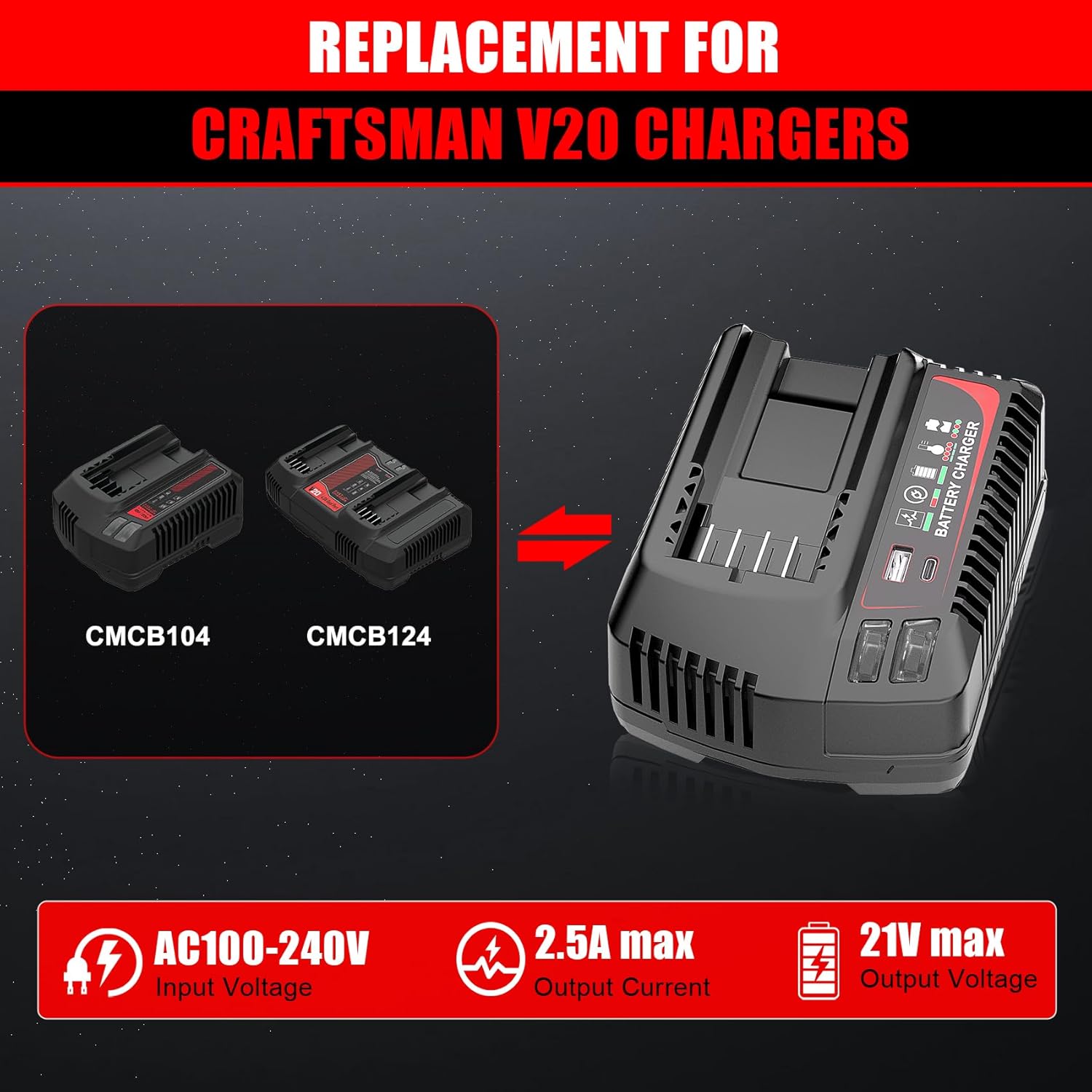
Figure 4: The TenHutt charger is a replacement for Craftsman V20 chargers like CMCB104 and CMCB124.

Figure 5: The TenHutt battery is compatible with various Craftsman V20 battery models.
6.2 Using the Battery with Power Tools
- تأكد من شحن البطارية بالكامل.
- Align the battery with the battery port on your Craftsman V20 power tool.
- أدخل البطارية في الأداة حتى تسمع صوت طقطقة عند تثبيتها في مكانها.
- To remove the battery, press the quick release button on the battery and slide it out of the tool.

Figure 6: The TenHutt battery and charger are compatible with a wide range of Craftsman V20 tools.
6.3 Using the Charger's USB Ports
The charger features a USB-A port and a Type-C port, allowing you to charge smartphones, tablets, and other USB-powered devices simultaneously while charging a power tool battery or independently.
- Plug the charger into a standard 100-240V AC power outlet.
- Connect your USB-powered device to either the USB-A or Type-C port on the charger using an appropriate USB cable.
- The charger will begin providing power to your device.
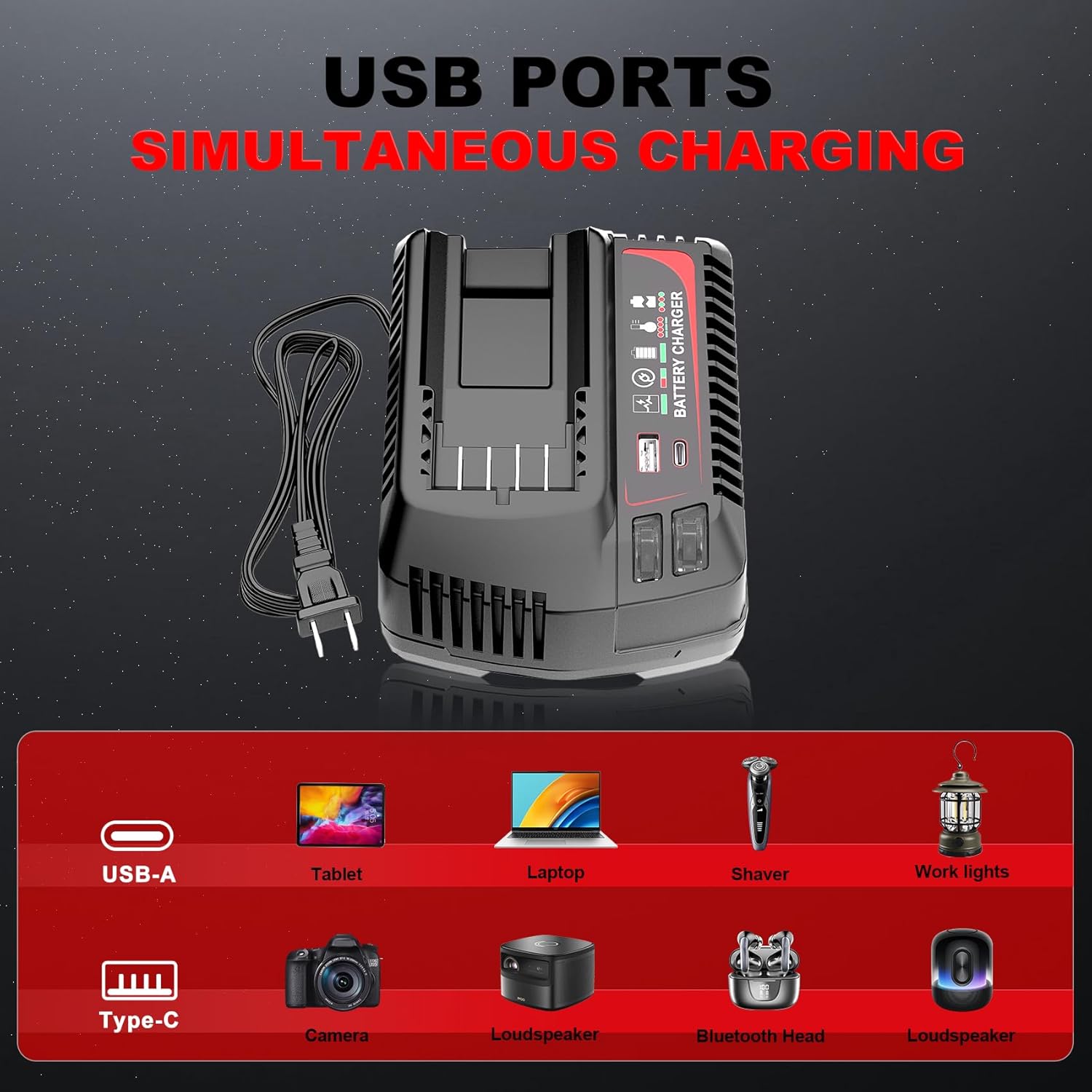
Figure 7: The charger's USB-A and Type-C ports allow for simultaneous charging of various electronic devices.
7. الصيانة والتخزين
7.1 الصيانة العامة
- Keep the battery and charger clean and free from dust and debris. Use a dry cloth to wipe surfaces.
- Do not use cleaning agents or solvents that could damage plastic parts.
- Regularly inspect the battery and charger for any signs of damage, such as cracks, frayed cables, or loose connections. Do not use damaged components.
7.2 التخزين
- قم بتخزين البطارية والشاحن في مكان بارد وجاف، بعيدًا عن أشعة الشمس المباشرة ودرجات الحرارة القصوى.
- For long-term storage, charge the battery to approximately 50-70% capacity. Avoid storing fully charged or completely discharged batteries for extended periods.
- يحفظ بعيدًا عن متناول الأطفال.
8. استكشاف الأخطاء وإصلاحها
If you encounter issues with your TenHutt battery or charger, refer to the following common problems and solutions:
| مشكلة | السبب المحتمل | حل |
|---|---|---|
| البطارية لا تشحن | Charger not plugged in; faulty outlet; battery not seated correctly; damaged battery/charger. | Ensure charger is securely plugged into a working outlet. Re-seat the battery. Inspect for damage. If damaged, discontinue use. |
| Charger LED not indicating charge status | Battery fully charged; charger malfunction. | Check battery LED indicator. If battery is full, remove it. If not, try another battery or contact support. |
| البطارية لا تغذي الأداة | Battery discharged; battery not seated correctly in tool; tool malfunction. | Charge the battery. Ensure battery is fully inserted into the tool. Test with another battery if available. |
| منافذ USB لا تشحن الأجهزة | Charger not powered; faulty USB cable; device not compatible. | Ensure charger is plugged in. Try a different USB cable. Verify device compatibility with 5V/2.4A output. |
9. الضمان ودعم العملاء
The product comes with a replacement warranty. Please refer to the product packaging or purchase documentation for specific warranty terms and duration. For technical assistance, troubleshooting beyond this manual, or warranty claims, please contact TenHutt customer support through your retailer or the official TenHutt webموقع.
ملحوظة: The product description mentions a "Free Refund for 1.5 YEAR New Replacement". Please verify this information with your purchase documentation.
Ask a question about this manual
Ask about setup, troubleshooting, compatibility, parts, safety, or missing instructions. Manuals+ will review the question and use this page’s manual context to help answer it.