
Thundeal TD93 Pro
دليل مستخدم جهاز العرض المصغر Thundal TD93 Pro
Model: TD93 Pro | Brand: Thundeal
1. المقدمة
This manual provides detailed instructions for the setup, operation, and maintenance of your Thundeal TD93 Pro Mini Projector. Please read this manual thoroughly before using the product to ensure proper functionality and to extend its lifespan.

Image 1.1: Thundeal TD93 Pro Mini Projector overview.
2. ماذا يوجد في الصندوق
تأكد من تضمين جميع العناصر المدرجة أدناه في الحزمة الخاصة بك:
- جهاز عرض ثنديل TD93 برو
- جهاز التحكم عن بعد
- سلك الطاقة
- دليل المستخدم (هذا المستند)
- كبل AV
- كابل HDMI
- غطاء عدسة جهاز الإسقاط

Image 2.1: Package contents of the TD93 Pro Projector.
3. مواصفات المنتج وميزاته
3.1. المواصفات الفنية
| رقم الموديل | TD93 Pro (Item Model Number: TD97) |
| الدقة الأصلية | 1920 × 1080 (دقة عالية كاملة) |
| دعم أقصى دقة | 2K 4K UHD (from HD Signal) |
| سطوع | 12000 لومن |
| نسبة التباين | 15000:1 |
| نسبة العرض إلى الارتفاع | 4: 3/16: 9 / تلقائي |
| نظام التشغيل | نظام التشغيل أندرويد 9.0 |
| الاتصال اللاسلكي | 2.4G / 5G WiFi, Bluetooth-compatible |
| ذاكرة | ذاكرة وصول عشوائي 1 جيجابايت DDR3 + ذاكرة قراءة فقط 8 جيجابايت |
| تصحيح الانحراف | 6D Keystone (4-point corner +/- 60°, Vertical +/- 60°) |
| وظيفة التكبير | 50-100% Proportional Reduction |
| حجم العرض | 49 to 300 inches (recommended 93-150 inches) |
| مسافة الإسقاط | 1.6 to 6.5 meters (recommended 3-5 meters) |
| Lamp حياة | 50,000 ساعات |
| صوتي | Built-in 5W stereo speakers with SRS sound system |
| المميزات الخاصة | 3D-Ready (Red-Blue 3D), Auto Horizontal Keystone, Built-In Wi-Fi, Portable, Dust Removal Net |
3.2. الميزات الرئيسية
- High Definition Visuals: Native 1080P resolution with support for 2K/4K UHD signals, delivering clear and vibrant images.
- نظام التشغيل أندرويد الذكي: Integrated Android 9.0 operating system allows direct app downloads and streaming.
- شبكة WiFi مزدوجة النطاق: 2.4G and 5G WiFi connectivity for stable and fast wireless streaming and screen mirroring.
- الاتصال عبر البلوتوث: قم بتوصيل مكبرات صوت بلوتوث خارجية أو سماعات رأس لتحسين الصوت.
- Advanced Image Correction: 6D Keystone correction (4-point and vertical) for flexible placement and precise image alignment.
- الإسقاط المرن: Adjustable zoom from 50% to 100% and support for screen sizes up to 300 inches.
- طويل الأمد Lamp: الصمام لamp designed for up to 50,000 hours of operation.
- Multi-Media Compatibility: Supports various input sources including HDMI, USB, AV, and direct office file التشغيل عبر USB.

Image 3.1: Visual comparison of projector brightness and resolution.
4. دليل الإعداد
4.1. وضع جهاز العرض
The projector can be placed in various positions to suit your viewبيئة العمل:
- على المكتب: ضع جهاز العرض على سطح ثابت ومستوٍ.
- على حامل ثلاثي القوائم: Utilize the 6mm screw hole on the bottom for tripod mounting.
- Ceiling Hoisting: Mount the projector to the ceiling using a compatible hanger.
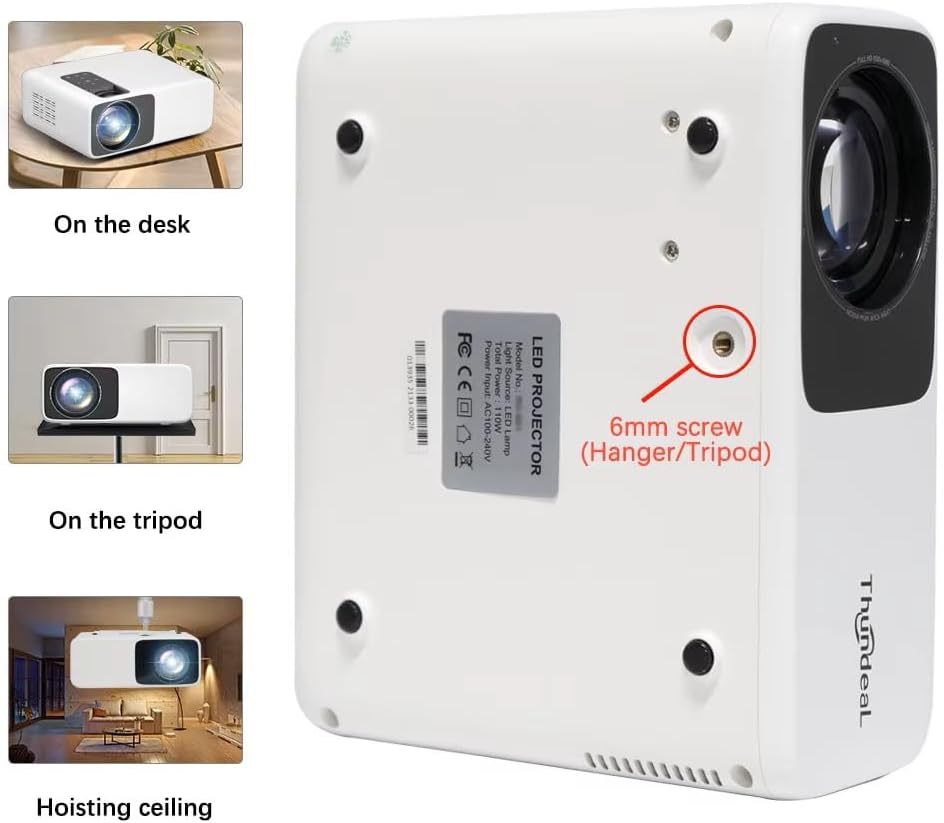
Image 4.1: Projector placement options and mounting point.
للحصول على أفضل النتائج viewing, ensure the projector is positioned perpendicular to the screen or wall. Adjust the projection distance (1.6 to 6.5 meters) to achieve your desired screen size (49 to 300 inches). A distance of 3-5 meters for a 93-150 inch screen is recommended for eye comfort.
4.2. توصيل الطاقة
- قم بتوصيل سلك الطاقة بمنفذ إدخال الطاقة الخاص بجهاز العرض.
- قم بتوصيل الطرف الآخر من سلك الطاقة بمأخذ كهربائي قياسي.
- اضغط على زر الطاقة الموجود على جهاز العرض أو جهاز التحكم عن بعد لتشغيله.
5. تعليمات التشغيل
5.1. Multi-Media Connections
The TD93 Pro projector offers various ports for connecting external devices:
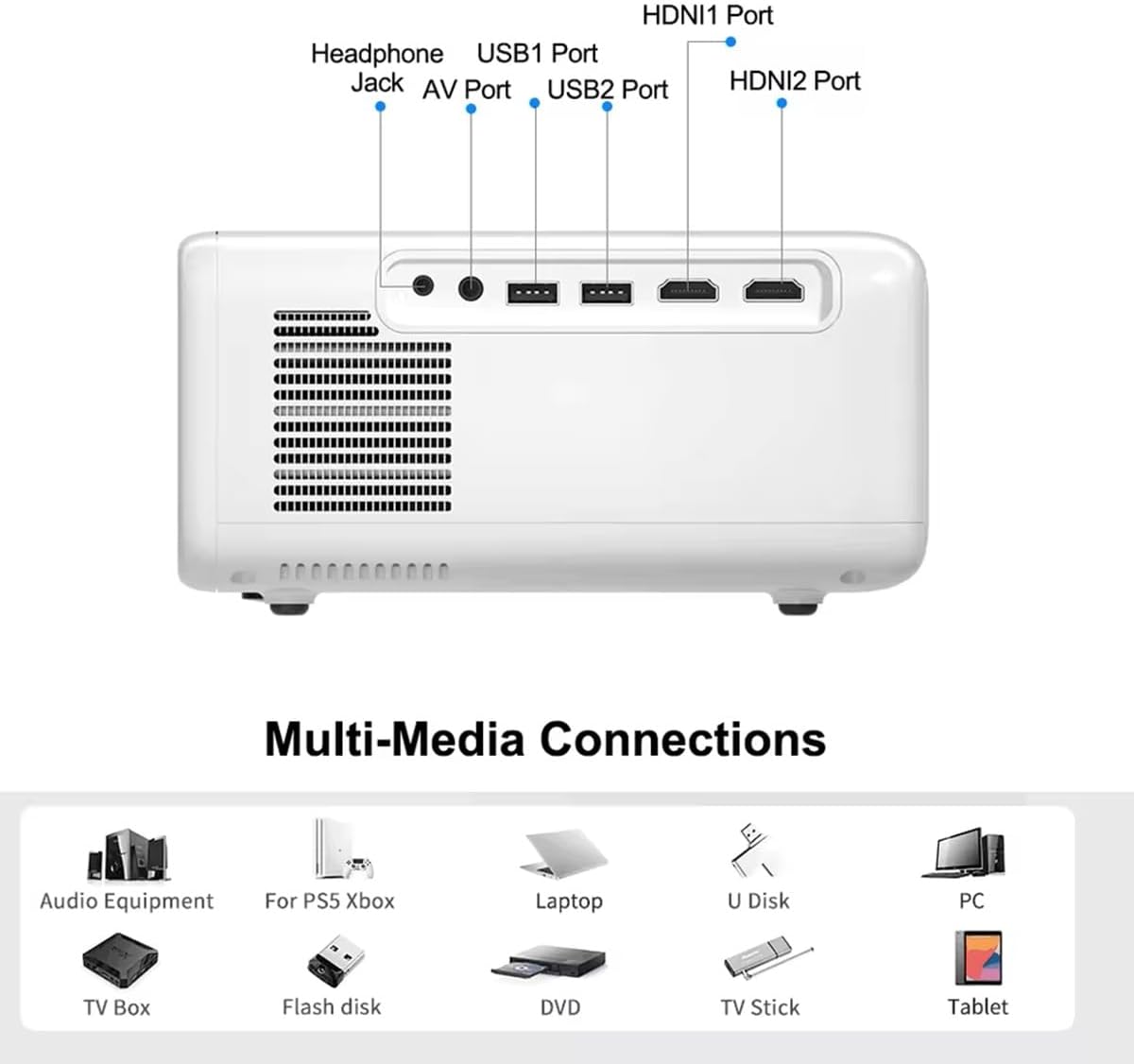
Image 5.1: Available multimedia connection ports.
- منافذ HDMI (HDMI1، HDMI2): Connect devices such as TV boxes, gaming consoles (PS5, Xbox), laptops, or Blu-ray players.
- منافذ USB (USB1، USB2): Connect USB flash drives for direct media playback (photos, videos, office documents).
- منفذ AV: قم بتوصيل الأجهزة القديمة باستخدام كابل الصوت والفيديو المرفق.
- مقبس سماعة الرأس (3.5،XNUMX ملم): قم بتوصيل سماعات الرأس أو مكبرات الصوت الخارجية.
To switch input sources, use the "Source" button on the remote control or the projector's control panel and select the desired input (HDMI1, HDMI2, AV, USB).
5.2. الاتصال اللاسلكي
5.2.1. WiFi Connection (2.4G/5G)
The projector supports dual-band WiFi for internet access and network features:
- Navigate to the "Settings" menu on the projector's Android interface.
- Select "Network & Internet" and then "Wi-Fi".
- قم بتشغيل الواي فاي واختر الشبكة التي تريدها من القائمة.
- أدخل كلمة المرور إذا طُلب منك ذلك، ثم قم بالاتصال.
5.2.2. اتصال بلوتوث
Connect Bluetooth-compatible audio devices like speakers or headphones:
- Go to "Settings" > "Connected devices" > "Bluetooth".
- قم بتشغيل البلوتوث.
- ضع جهاز Bluetooth في وضع الإقران.
- قم بتحديد جهازك من قائمة الأجهزة المتاحة للإقران.
5.3. Screen Mirroring (Airplay/WiFi-Display)
Wirelessly display content from your Android or iOS phone:

Image 5.2: Screen mirroring from iOS and Android devices.
- Ensure both your projector and mobile device are connected to the same Wi-Fi network.
- On the projector's main interface, select the "Screen Mirroring" or "Airplay/WiFi-Display" application.
- For iOS devices: Open Control Center, tap "Screen Mirroring" or "AirPlay Mirroring", and select the projector from the list.
- For Android devices: Open the notification panel, find "Cast", "Smart View", "Wireless Display", or similar function, and select the projector.
5.4. ضبط الصورة
5.4.1. Keystone Correction (6D)
The projector features 6D keystone correction to adjust image shape:
- حجر الزاوية الرأسي: Adjust +/- 60 degrees vertically using the remote control.
- 4-Point Corner Keystone: Adjust each of the four corners independently by +/- 60 degrees for side projection or irregular surfaces. This allows for precise rectangular image alignment.
Access keystone settings via the projector's menu or dedicated buttons on the remote.
5.4.2. وظيفة التكبير
Adjust the display size from 50% to 100% proportionally without moving the projector. This feature is useful for fine-tuning the image size to fit your screen or wall.
Access the zoom function through the projector's menu settings.
5.5. Android OS and App Usage
The integrated Android 9.0 OS allows you to download and install applications directly from the Play Store. Ensure the projector is connected to Wi-Fi to access online services and apps.
- متجر بلاي: Access the Google Play Store to download streaming apps, games, and utilities.
- تشغيل الوسائط: Use pre-installed media players or download alternatives (e.g., VLC player for AC3 audio support).
6. الصيانة
6.1. إزالة الغبار
The projector is equipped with a built-in dust net for easy cleaning. Regularly clean the dust net to maintain optimal performance and prevent overheating. Press to pop out the dust net for cleaning.
6.2. نظام التبريد
The advanced cooling system is designed to dissipate heat efficiently and extend the lamp's lifespan. Ensure proper ventilation around the projector and avoid blocking air vents during operation.
6.3. لamp حياة
الصمام لamp has an estimated lifespan of 50,000 hours. No lamp replacement is typically required during the product's operational life under normal usage conditions.
7. استكشاف الأخطاء وإصلاحها
7.1. No Image Displayed
- تأكد من تشغيل جهاز العرض.
- Verify the input source is correctly selected (e.g., HDMI1, USB).
- تأكد من توصيل كافة الكابلات بشكل آمن.
- اضبط التركيز وتصحيح الانحراف.
7.2. لا يوجد صوت
- تحقق من مستوى الصوت على جهاز العرض وجهاز المصدر المتصل.
- Ensure external speakers or headphones are properly connected and powered on if used.
- في حال استخدام مصدر خارجي، تحقق من إعدادات إخراج الصوت الخاصة به.
- For AC3 audio, ensure you are using a compatible player like VLC.
7.3. Connectivity Issues (WiFi/Bluetooth)
- Ensure WiFi is enabled and you are connected to the correct network.
- أعد تشغيل جهاز العرض وجهاز التوجيه/جهاز البلوتوث.
- For screen mirroring, confirm both devices are on the same Wi-Fi network.
7.4. الصورة ضبابية أو مشوهة
- اضبط حلقة التركيز البؤري على عدسة جهاز العرض.
- Use the keystone correction features to correct any trapezoidal distortion.
- تأكد من أن سطح العرض مسطح وأملس.
8. الضمان والدعم
للحصول على معلومات الضمان والدعم الفني، يرجى الرجوع إلى الوثائق المرفقة وقت الشراء أو الاتصال بالبائع. احتفظ بإيصال الشراء كإثبات للشراء.
Ask a question about this manual
Ask about setup, troubleshooting, compatibility, parts, safety, or missing instructions. Manuals+ will review the question and use this page’s manual context to help answer it.