
1. المقدمة
شكرا لك على الشراءasing the JVC XS-N1154B Bluetooth Speaker. This manual provides essential information for the safe and efficient operation of your device. Please read it thoroughly before use and retain it for future reference.
2. معلومات السلامة
- لا تعرض مكبر الصوت لدرجات حرارة عالية أو أشعة الشمس المباشرة أو الرطوبة العالية.
- تجنب إسقاط السماعة أو تعريضها لصدمات قوية.
- لا تحاول تفكيك السماعة أو تعديلها. سيؤدي ذلك إلى إلغاء الضمان.
- أبقِ السماعة بعيدة عن الماء والسوائل، على الرغم من تصنيفها المقاوم للماء، لمنع تلف المكونات الداخلية.
- استخدم فقط كابل الشحن ومحول الطاقة المحددين.
- نظّف السماعة بقطعة قماش ناعمة وجافة. لا تستخدم منظفات أو مذيبات كاشطة.
3. محتويات العبوة
تأكد من وجود جميع العناصر في العبوة:
- JVC XS-N1154B Bluetooth Speaker
- كابل الشحن
- دليل المستخدم
- جهاز التحكم عن بعد (إذا كان متضمنًا)
4. انتهى المنتجview
تعرف على مكونات مكبر الصوت وأدوات التحكم فيه.
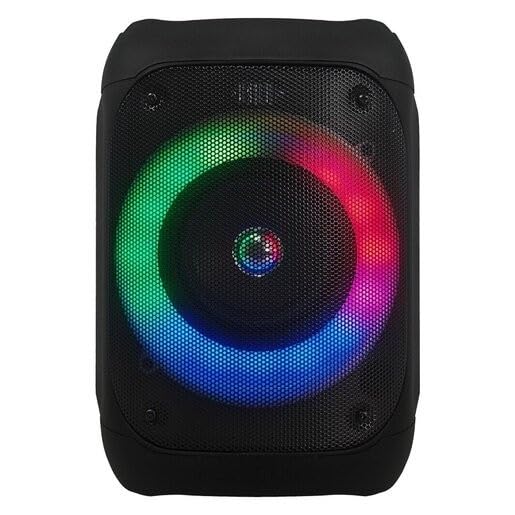
الشكل 1: أمام view of the JVC XS-N1154B Bluetooth Speaker, showcasing the speaker grille and integrated music-activated LED lights.
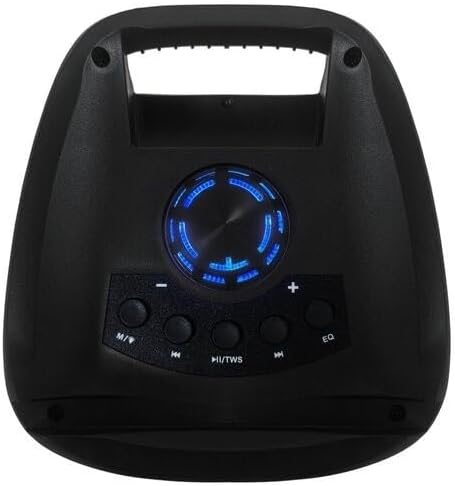
الشكل 2: قمة view of the JVC XS-N1154B Bluetooth Speaker, displaying the control panel with various buttons and the volume knob.
وظائف لوحة التحكم:
- زر الطاقة: لتشغيل مكبر الصوت أو إيقاف تشغيله.
- زر الوضع (M): Switches between Bluetooth, USB, SD Card, and FM Radio modes.
- Play/Pause (►||) / TWS Button: Plays or pauses audio. Long press for TWS (True Wireless Stereo) pairing.
- Previous Track (◀◀) Button: Skips to the previous track or tunes down in FM mode.
- Next Track (►►) Button: Skips to the next track or tunes up in FM mode.
- زر EQ: التنقل عبر إعدادات مسبقة للمعادل.
- مقبض الصوت: Rotates to adjust the volume level.
5. الإعداد
5.1 شحن السماعة
- قم بتوصيل كابل الشحن بمنفذ الشحن الخاص بالسماعة.
- قم بتوصيل الطرف الآخر من الكابل بمحول طاقة USB مناسب (غير مرفق) أو بمنفذ USB مزود بالطاقة.
- سيضيء مؤشر الشحن، عادةً باللون الأحمر، أثناء الشحن.
- Once fully charged, the indicator light may change color (e.g., turn off or turn blue/green). Disconnect the speaker from the power source.
5.2 تشغيل/إيقاف التشغيل
- لتشغيل: Press and hold the Power button until the speaker powers on and you hear an audible prompt.
- لإيقاف التشغيل: Press and hold the Power button again until the speaker powers off.
6. تعليمات التشغيل
6.1 اقتران بلوتوث
- Ensure the speaker is powered on and in Bluetooth mode. If not, press the Mode (M) button to switch to Bluetooth mode. The speaker will indicate it is ready for pairing (e.g., a blinking LED or audible prompt).
- على جهازك المحمول (الهاتف الذكي، الجهاز اللوحي، الكمبيوتر المحمول)، قم بتمكين البلوتوث وابحث عن الأجهزة المتاحة.
- Select "JVC XS-N1154B" from the list of devices.
- Once paired, the speaker will provide an audible confirmation, and the Bluetooth indicator light will become solid.
- يمكنك الآن تشغيل الصوت من جهازك عبر مكبر الصوت.
6.2 تشغيل بطاقة USB/SD
- Insert a USB flash drive or an SD card (with supported audio files) في المنفذ المقابل على السماعة.
- The speaker will automatically switch to USB or SD card mode and begin playing audio. If not, press the Mode (M) button to select the correct input.
- Use the Previous Track (◀◀), Next Track (►►), and Play/Pause (►||) buttons to control playback.
تشغيل راديو 6.3 FM
- اضغط على زر الوضع (M) للتبديل إلى وضع راديو FM.
- To auto-scan and save available stations, press and hold the Play/Pause (►||) button. The speaker will scan and store stations automatically.
- Use the Previous Track (◀◀) and Next Track (►►) buttons to navigate between saved FM stations.
6.4 وضع ليد
The speaker features music-activated LED lights. These lights typically synchronize with the audio playback. There may be an additional button or a combination of buttons to cycle through different light modes or to turn them off. Refer to the remote control section for specific controls if available.
6.5 التحكم في مستوى الصوت
Rotate the Volume Knob on the top panel clockwise to increase volume and counter-clockwise to decrease volume.
6.6 استخدام جهاز التحكم عن بعد
If your package includes a remote control, it provides convenient access to various functions:
- قوة: تشغيل/إيقاف
- وضع: Switch input sources (Bluetooth, USB, SD, FM)
- الحجم +/-: ضبط مستوى الصوت
- تشغيل/إيقاف مؤقت: التحكم في التشغيل
- السابق التالي: Skip tracks/stations
- EQ: Change equalizer presets
- قاد: Control LED light modes (if applicable)
7. الصيانة
7.1 التنظيف
Wipe the speaker's exterior with a soft, dry, lint-free cloth. Do not use liquid cleaners, sprays, or solvents, as these may damage the finish or internal components. Ensure all ports are dry before use, especially given its waterproof nature.
7.2 التخزين
When not in use for extended periods, store the speaker in a cool, dry place, away from direct sunlight and extreme temperatures. It is recommended to charge the battery periodically to maintain its lifespan.
8. استكشاف الأخطاء وإصلاحها
| مشكلة | السبب المحتمل | حل |
|---|---|---|
| لا يتم تشغيل مكبر الصوت. | نفدت طاقة البطارية. | اشحن السماعة بالكامل. |
| لا يوجد صوت. | Volume is too low or muted. Device not paired correctly. | Increase volume. Re-pair Bluetooth device. Check audio source. |
| فشل اقتران البلوتوث. | السماعة ليست في وضع الاقتران. الجهاز بعيد جدًا. تداخل. | Ensure speaker is in Bluetooth pairing mode. Move device closer. Turn off other Bluetooth devices. |
| بطاقة USB/SD لا تعمل. | غير صحيح file تهيئة. لم يتم إدخال البطاقة/محرك الأقراص بشكل صحيح. | ضمان الصوت files are in a supported format. Reinsert the USB drive/SD card. Press Mode button to select correct input. |
| استقبال الراديو FM ضعيف. | اشارة ضعيفة. | قم بنقل مكبر الصوت إلى منطقة ذات استقبال أفضل. |
9. المواصفات
- نموذج: XS-N1154B
- ماركة: جيه في سي
- الاتصال: بلوتوث ، USB ، بطاقة SD
- راديو: راديو FM رقمي
- انتاج الطاقة: 4 واط
- وضع إخراج الصوت: ستيريو
- طريقة التحكم: بعيد
- مادة: بلاستيك
- ضد للماء: نعم
- مصدر الطاقة: تعمل بالبطارية
- أبعاد: الأبعاد التقريبية: 18.6 سم عمق × 18.9 سم عرض × 25.5 سم ارتفاع
- وزن: حوالي 1.2 كجم
- الأجهزة المتوافقة: الكمبيوتر المحمول والهاتف الذكي
10. الضمان والدعم
10.1 معلومات الضمان
This JVC XS-N1154B Bluetooth Speaker comes with a ضمان لمدة سنة واحدة يسري هذا الضمان من تاريخ الشراء. ويغطي عيوب التصنيع وجودة الصنع في ظل الاستخدام العادي. ولا يغطي الأضرار الناجمة عن سوء الاستخدام أو الحوادث أو التعديلات غير المصرح بها أو التلف الناتج عن الاستخدام العادي.
10.2 دعم العملاء
For technical assistance, warranty claims, or further inquiries, please contact JVC customer support through their official website or the retailer where the product was purchased. Please have your product model number (XS-N1154B) and proof of purchase ready when contacting support.