
1. المقدمة
شكرا لك على الشراءasing the JVC XS-N3214PB Portable Bluetooth Party Speaker. This manual provides important information regarding the setup, operation, and maintenance of your speaker. Please read it thoroughly before using the product to ensure proper function and to maximize your listening experience. Keep this manual for future reference.
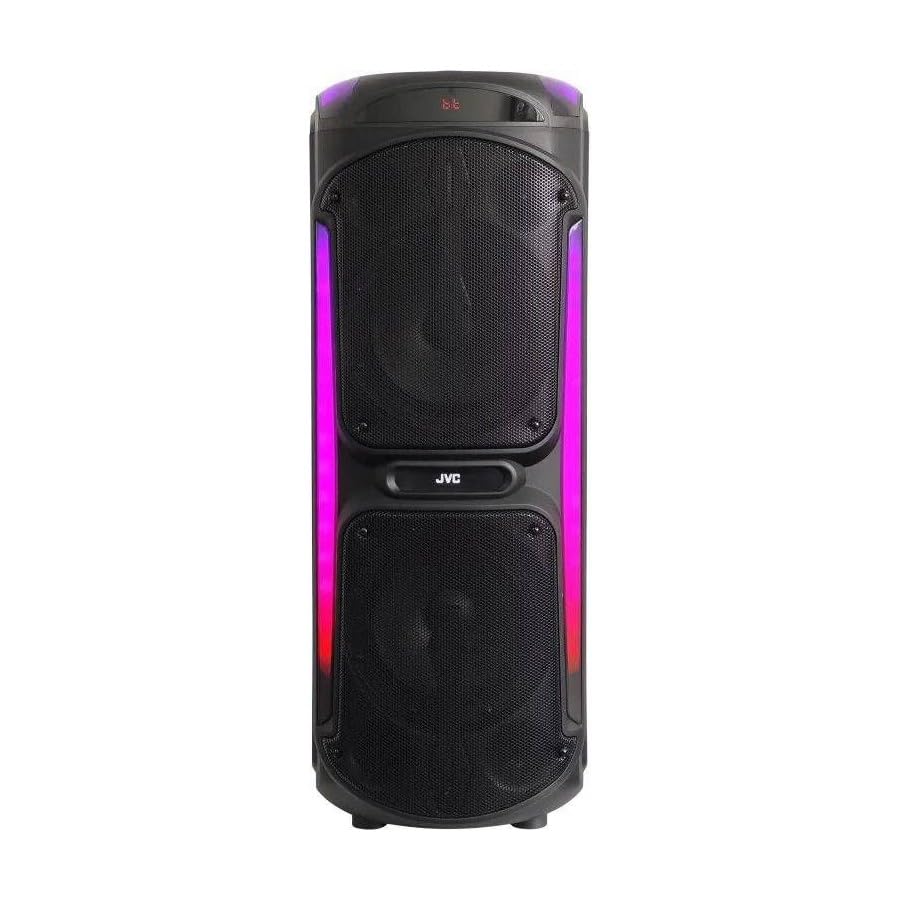
Image: The JVC XS-N3214PB Portable Bluetooth Party Speaker, shown with two microphones, highlighting its versatile connectivity options including Bluetooth, FM Radio, MP3 playback, AUX input, and USB input. The speaker features integrated LED lighting.
2. معلومات السلامة
لضمان التشغيل الآمن ومنع الضرر، يرجى مراعاة الاحتياطات التالية:
- لا تعرض السماعة للماء أو الرطوبة أو درجات الحرارة القصوى.
- لا تحاول تفكيك السماعة أو تعديلها. قم بإحالة جميع أعمال الصيانة إلى فنيين مؤهلين.
- أبقِ السماعة بعيدة عن مصادر الحرارة وأشعة الشمس المباشرة والمواد القابلة للاشتعال.
- استخدم محول الشحن المحدد فقط.
- تجنب وضع أشياء ثقيلة على السماعة.
- نظّف السماعة بقطعة قماش ناعمة وجافة. لا تستخدم المنظفات السائلة أو البخاخات.
- تأكد من توفير تهوية مناسبة حول السماعة أثناء الاستخدام.
3. محتويات العبوة
تأكد من وجود جميع العناصر في العبوة:
- JVC XS-N3214PB Portable Bluetooth Party Speaker (1 unit)
- Power Adapter/Charging Cable (1 unit)
- جهاز التحكم عن بعد (وحدة واحدة)
- دليل المستخدم (هذا المستند)
- (Optional: Microphone, if included with your specific purchase)
4. انتهى المنتجview
4.1. المميزات
- Powerful 800W Audio Output
- اتصال بلوتوث لاسلكي
- بطارية مدمجة قابلة لإعادة الشحن لسهولة النقل
- Integrated LED Party Lights
- موالف راديو FM
- تشغيل USB
- مدخلات AUX
- Microphone Input for Karaoke
- تشغيل التحكم عن بعد
- Deep Bass Performance
4.2. عناصر التحكم والمنافذ
Familiarize yourself with the speaker's control panel and connection ports. (Refer to diagrams in the full printed manual for exact locations).
- زر الطاقة: تشغيل/إيقاف تشغيل مكبر الصوت.
- زر الوضع: يقوم بالتبديل بين أوضاع البلوتوث، وراديو FM، وUSB، وAUX.
- التحكم في مستوى الصوت: يضبط مستوى الصوت الرئيسي.
- زر التشغيل/الإيقاف المؤقت: يتحكم في تشغيل الوسائط.
- أزرار المسار السابق/التالي: يتنقل بين المسارات أو محطات الراديو FM.
- زر ضوء LED: Toggles LED lighting effects.
- أزرار التحكم في مستوى صوت الميكروفون/الصدى: يضبط مدخل الميكروفون وتأثير الصدى.
- منفذ USB: لتشغيل الملفات من محرك أقراص USB.
- مدخل AUX (3.5 مم): لتوصيل أجهزة الصوت الخارجية.
- مدخل الميكروفون (6.35 مم): لتوصيل ميكروفون سلكي.
- منفذ تيار مستمر: لتوصيل محول الطاقة لشحن السماعة.
5. الإعداد
5.1. شحن مكبر الصوت
- Connect the power adapter to the DC IN port on the speaker.
- قم بتوصيل الطرف الآخر من محول الطاقة بمأخذ التيار الموجود على الحائط.
- The charging indicator light will illuminate (color may vary) to show the speaker is charging.
- Allow approximately 4-6 hours for a full charge. The indicator light may change or turn off when fully charged.
- Disconnect the power adapter once charging is complete or when using the speaker on battery power.
5.2. تشغيل / إيقاف التشغيل
- لتشغيل: اضغط مع الاستمرار على زر التشغيل لبضع ثوانٍ حتى تضيء الشاشة.
- لإيقاف التشغيل: اضغط مع الاستمرار على زر الطاقة مرة أخرى لبضع ثوانٍ حتى تنطفئ الشاشة.
6. تعليمات التشغيل
6.1. اقتران بلوتوث
- Power on the speaker. It will automatically enter Bluetooth pairing mode, indicated by a flashing Bluetooth icon or voice prompt.
- على جهازك المحمول (الهاتف الذكي، الجهاز اللوحي، وما إلى ذلك)، قم بتمكين البلوتوث وابحث عن الأجهزة المتاحة.
- Select "JVC XS-N3214PB" from the list of devices.
- Once paired, the speaker will confirm with an audible tone or a solid Bluetooth icon.
- يمكنك الآن تشغيل الصوت من جهازك عبر مكبر الصوت.
6.2. راديو FM
- Press the Mode button until "FM" is displayed.
- اضغط على زر التشغيل/الإيقاف المؤقت لمسح وحفظ محطات FM المتاحة تلقائيًا.
- استخدم أزرار المسار السابق/التالي للتنقل بين المحطات المحفوظة.
6.3. تشغيل USB
- أدخل محرك أقراص فلاش USB (مهيأ بنظام FAT32) يحتوي على ملفات صوتية MP3 files في منفذ USB.
- The speaker will automatically switch to USB mode and begin playing the first track. If not, press the Mode button to select USB.
- استخدم أزرار التشغيل/الإيقاف المؤقت والمسار السابق/التالي للتحكم في التشغيل.
6.4. مدخلات AUX
- قم بتوصيل أحد طرفي كابل الصوت 3.5 ملم (غير مرفق) بمنفذ AUX IN الموجود على السماعة.
- قم بتوصيل الطرف الآخر من الكابل بمخرج الصوت الخاص بجهازك الخارجي (مثل مشغل MP3 أو الكمبيوتر المحمول).
- Press the Mode button until "AUX" is displayed.
- التحكم في التشغيل ومستوى الصوت من جهازك الخارجي.
6.5. وظيفة الميكروفون والكاريوكي
- Connect a wired microphone (not included) to the Microphone Input port.
- Adjust the microphone volume and echo effect using the dedicated controls on the speaker.
- Play music via Bluetooth, USB, or AUX, and sing along through the microphone.
6.6. أضواء حفلات LED
Press the LED Light button to cycle through different lighting modes or to turn the lights off.
6.7. جهاز التحكم عن بعد
The included remote control allows for convenient operation of the speaker from a distance. Functions include power on/off, mode selection, volume adjustment, track control, and LED light control. Ensure the remote control has working batteries and is pointed towards the speaker's sensor.
7. الصيانة
- تنظيف: Wipe the speaker's exterior with a soft, dry, lint-free cloth. Do not use abrasive cleaners, waxes, or solvents.
- تخزين: If storing the speaker for an extended period, ensure it is fully charged, then power it off. Store in a cool, dry place away from direct sunlight. Recharge the battery every few months to maintain its lifespan.
- العناية بالبطارية: To prolong battery life, avoid fully discharging the speaker frequently. Charge it before the battery is completely depleted.
8. استكشاف الأخطاء وإصلاحها
| مشكلة | السبب المحتمل | حل |
|---|---|---|
| لا يتم تشغيل مكبر الصوت. | البطارية فارغة. كابل الطاقة غير موصول. | Charge the speaker. Ensure power cable is securely connected to both speaker and outlet. |
| لا يوجد صوت. | Volume is too low. Incorrect mode selected. Device not paired (Bluetooth). AUX cable loose. | Increase volume on speaker and source device. Press Mode button to select correct input. Re-pair Bluetooth device. Check AUX cable connection. |
| لا يمكن لجهاز البلوتوث الاقتران. | مكبر الصوت غير مُقترن. الجهاز بعيد جدًا. يوجد تداخل. | Ensure speaker is in Bluetooth mode and flashing. Move device closer to speaker. Turn off other Bluetooth devices. |
| تشغيل الملفات عبر منفذ USB لا يعمل. | USB drive not formatted correctly (FAT32). Unsupported file format. USB drive faulty. | Ensure USB drive is FAT32 and contains MP3 fileس. حاول استخدام محرك أقراص USB آخر. |
| جهاز التحكم عن بعد لا يعمل. | Batteries depleted. Obstruction between remote and speaker. | Replace remote control batteries. Ensure clear line of sight to speaker's IR sensor. |
9. المواصفات
| رقم الموديل | XS-N3214PB |
| ماركة | جيه في سي |
| طاقة الإخراج | 800 واط (الذروة) |
| الاتصال | Bluetooth, USB, AUX (3.5mm), FM Radio, Microphone Input (6.35mm) |
| وضع إخراج الصوت | ستيريو |
| مادة | بلاستيك |
| نوع التركيب | يقف الكلمة |
| طريقة التحكم | زر التحكم عن بعد |
| الأبعاد (D x W x H) | 35 سم عمق × 31 سم عرض × 94 سم ارتفاع |
| المكونات المضمنة | 1 x JVC XS-N3214PB 800W Party Portable Bluetooth Speaker, Power Adapter, Remote Control, User Manual |
10. الضمان والدعم
10.1. معلومات الضمان
This JVC XS-N3214PB speaker comes with a ضمان لمدة سنة واحدة يسري هذا الضمان من تاريخ الشراء. ويغطي عيوب التصنيع وجودة الصنع في ظل الاستخدام العادي. ولا يغطي الأضرار الناجمة عن سوء الاستخدام أو الحوادث أو التعديلات غير المصرح بها أو التلف الناتج عن الاستخدام العادي. يرجى الاحتفاظ بإثبات الشراء لتقديم مطالبات الضمان.
10.2. دعم العملاء
For technical assistance, warranty claims, or product inquiries, please contact JVC customer support through the retailer where the product was purchased or visit the official JVC webالموقع للحصول على معلومات الاتصال الخاصة بمنطقتك.