
1. المقدمة
This manual provides essential information for setting up, operating, maintaining, and troubleshooting your GIGABYTE AORUS Elite 16 BWH gaming laptop. The AORUS Elite 16 BWH is designed for high-performance gaming and demanding applications, featuring an Intel Core Ultra 9 processor, NVIDIA GeForce RTX 5070 laptop GPU, a 16-inch WQXGA 165Hz display, and Windows 11 Pro.
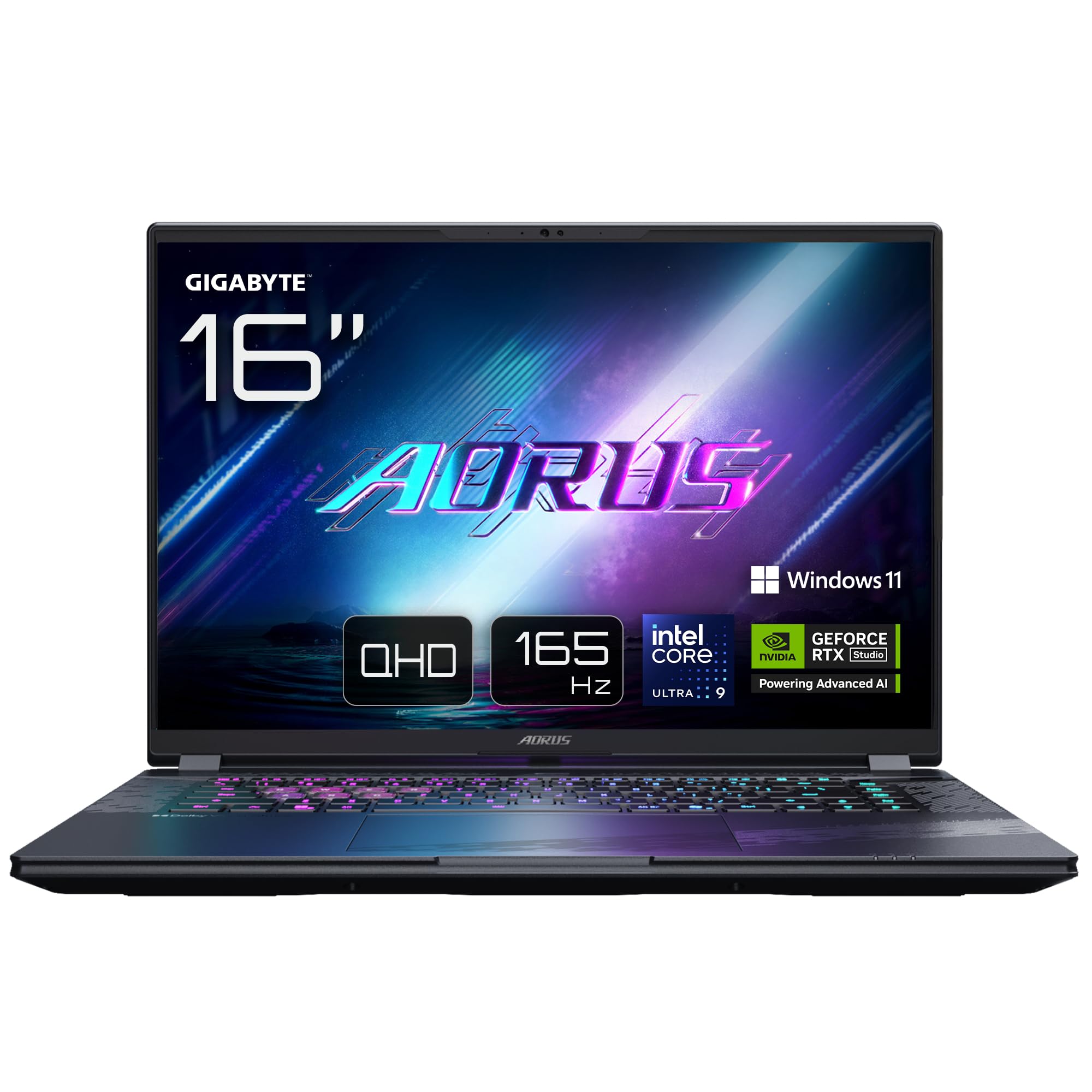
Image: The GIGABYTE AORUS Elite 16 BWH gaming laptop, showcasing its open display and keyboard.
2. الإعداد
2.1 فك الصندوق والفحص الأولي
أخرج الكمبيوتر المحمول وجميع ملحقاته من العبوة بعناية. تأكد من وجود جميع المكونات المذكورة في قسم "محتويات العلبة" وسلامتها.
- GIGABYTE AORUS ELITE 16 BWHC3FRC65SP Laptop
- محول الطاقة والكابل
- الوثائق (هذا الدليل، بطاقة الضمان)
2.2 توصيل الطاقة
Connect the power adapter to the laptop's power input port and then plug the power cable into an electrical outlet. It is recommended to fully charge the battery before initial use.
2.3 التشغيل الأول
Press the power button to turn on the laptop. Follow the on-screen instructions to complete the Windows 11 Pro setup process, including language selection, network connection, and user account creation.
2.4 توصيل الأجهزة الطرفية والشبكة
The laptop features various ports for connecting external devices and networks.
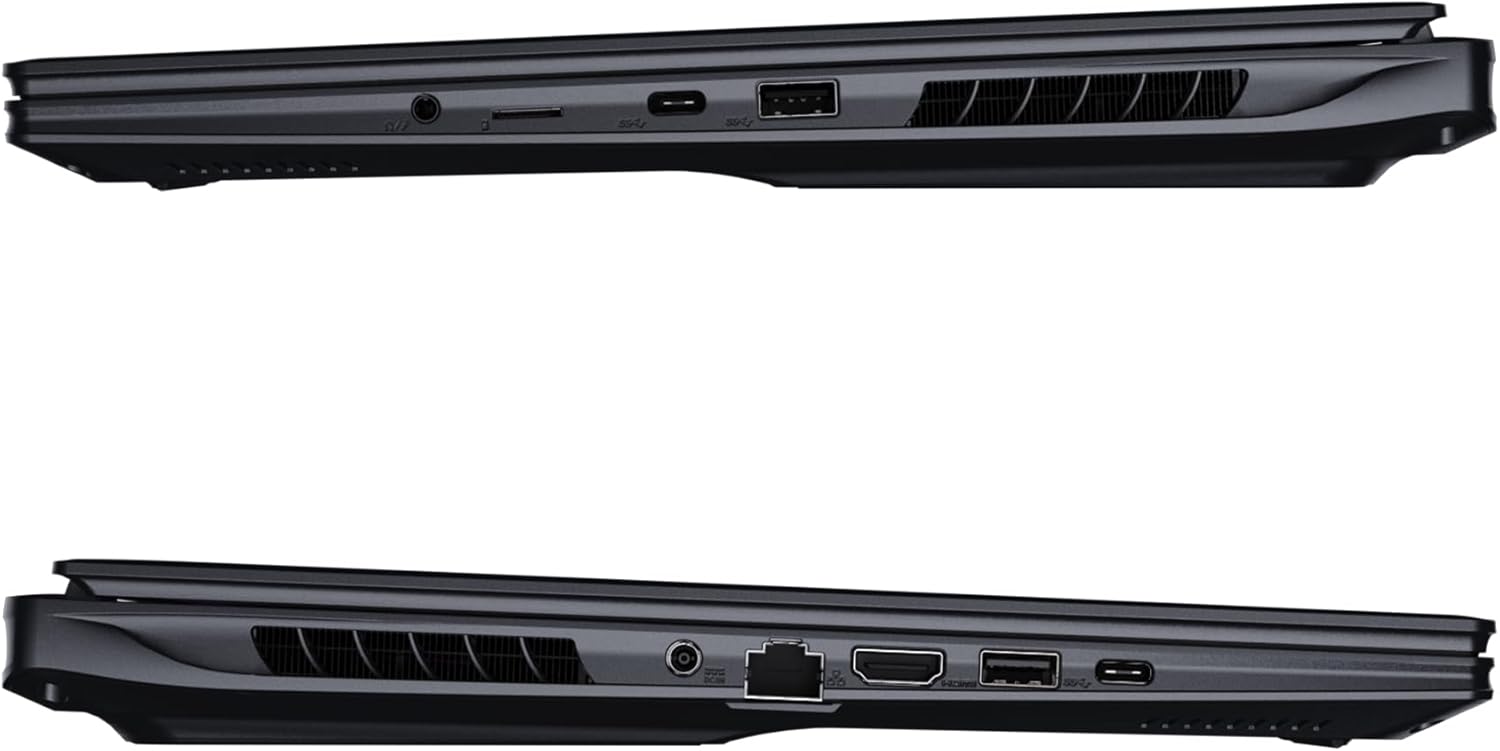
الصورة: الجانب view of the laptop illustrating the available ports for connectivity.
- منافذ USB: Connect USB devices such as mice, keyboards, or external storage.
- منفذ HDMI: قم بتوصيله بشاشة خارجية أو تلفزيون.
- منفذ ثاندربولت 4: لنقل البيانات وعرض المخرجات بسرعة عالية.
- منفذ إيثرنت: للاتصال بالشبكة السلكية.
- مقبس سماعة الرأس: لإخراج الصوت إلى سماعات الرأس أو مكبرات الصوت الخارجية.
- واي فاي 7: Connect to wireless networks via the integrated Wi-Fi 7 module.
- بلوتوث شنومكس: قم بالاقتران مع الأجهزة التي تدعم تقنية البلوتوث.
3. تشغيل الكمبيوتر المحمول
3.1 ميزات العرض
Your AORUS Elite 16 BWH features a 16-inch WQXGA (2560x1600) IPS display with a 165Hz refresh rate and 16:10 aspect ratio, offering a wide viewing experience. It supports Dolby Vision for enhanced visual quality and is Pantone validated for color accuracy.

Image: The laptop's 16:10 aspect ratio display, highlighting its IPS panel and Pantone validation.
3.2 لوحة المفاتيح ولوحة اللمس
The laptop is equipped with a backlit keyboard for comfortable typing in various lighting conditions and a responsive touchpad for navigation.
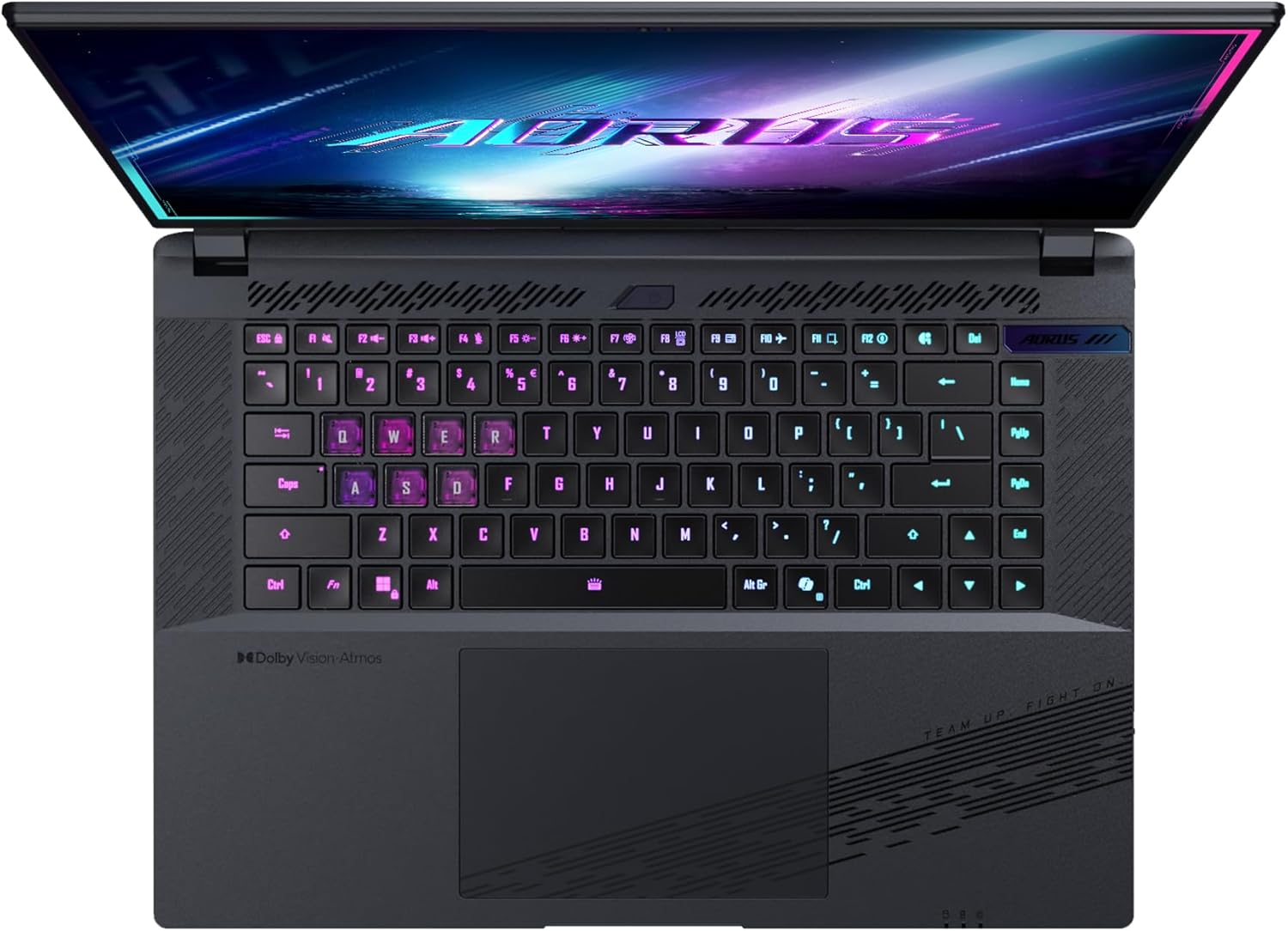
الصورة: من أعلى إلى أسفل view لوحة مفاتيح الكمبيوتر المحمول، عرضasing its backlit keys.
The keyboard also features a dedicated Copilot Key for quick access to AI functionalities in Windows 11.

Image: Close-up of the keyboard, highlighting the Copilot Key for AI features.
3.3 نظام الصوت
Experience immersive audio with Dolby Atmos support and integrated 2W speakers. The laptop also includes a built-in microphone for communication.

Image: Visual representation of Dolby Atmos and Dolby Vision audio and visual enhancements.
3.4 ميزات الأداء
The AORUS Elite 16 BWH is powered by an Intel Core Ultra 9 processor with an integrated NPU for AI acceleration and an NVIDIA GeForce RTX 5070 laptop GPU, ensuring high performance for gaming and demanding tasks. It also features Advanced Optimus with DDS Technology for optimized graphics performance.

الصورة: تفصيلية view of the Intel Core Ultra 9 processor chip.
الصورة: تفصيلية view of the NVIDIA GeForce RTX 50 Series laptop GPU chip.
3.5 GiMATE AI Agent
Utilize GiMATE, your personal AI agent, to optimize performance, manage smart cooling, enhance privacy, control power settings, and improve audio and voice functionalities.

Image: GiMATE AI Agent interface showing various optimization features.
4. الصيانة
4.1 نظام التبريد
The laptop features the WINDFORCE Infinity cooling system to maintain optimal temperatures during intensive use. Ensure the vents are clear of obstructions to allow proper airflow.

Image: Representation of the WINDFORCE Infinity cooling system.
4.2 التنظيف
استخدم قطعة قماش ناعمة وخالية من الوبر لتنظيف الشاشة والأسطح الخارجية. بالنسبة للبقع الصعبة، دampبللي قطعة القماش قليلاً بالماء أو بمحلول تنظيف الشاشات. تجنبي استخدام المواد الكيميائية القاسية.
4.3 العناية بالبطارية
To prolong battery life, avoid extreme temperatures and do not leave the laptop fully charged or fully discharged for extended periods.
4.4 تحديثات البرامج
Regularly update your Windows operating system, drivers, and GIGABYTE software to ensure optimal performance and security.
5. استكشاف الأخطاء وإصلاحها
5.1 مشاكل الطاقة
- الكمبيوتر المحمول لا يعمل: تأكد من توصيل محول الطاقة بإحكام وأن مأخذ التيار يعمل بشكل صحيح. تحقق من مستوى شحن البطارية.
- البطارية لا تشحن: تأكد من عدم تلف محول الطاقة والكابل. جرب منفذًا كهربائيًا آخر.
5.2 مشاكل العرض
- لا يوجد عرض: Connect an external monitor to check if the issue is with the laptop's screen. Ensure the laptop is powered on.
- شاشة عرض متذبذبة أو مشوهة: قم بتحديث برامج تشغيل بطاقة الرسومات. تحقق من توصيلات كابل الشاشة إذا كنت تستخدم شاشة خارجية.
5.3 مشاكل الاتصال
- عدم الاتصال بشبكة Wi-Fi: تحقق من تفعيل Wi-Fi في إعدادات Windows. أعد تشغيل جهاز التوجيه والكمبيوتر المحمول.
- جهاز البلوتوث غير مقترن: Ensure the device is in pairing mode and within range. Update Bluetooth drivers.
5.4 مشاكل الأداء العامة
- الأداء البطيء: Close unnecessary applications. Check for malware. Ensure sufficient free disk space.
- ارتفاع درجة الحرارة: Ensure cooling vents are clear. Use the laptop on a hard, flat surface.
For more complex issues, refer to the GIGABYTE support webالموقع أو الاتصال بخدمة العملاء.
6. المواصفات
| ميزة | التفاصيل |
|---|---|
| ماركة | جيجابايت |
| اسم الموديل | AORUS ELITE 16 BWHC3FRC65SP |
| حجم الشاشة | 16 بوصة |
| لون | رمادي |
| حجم القرص الصلب | 2000 GB (2x 1TB SSD Gen4) |
| نموذج وحدة المعالجة المركزية | Intel Core Ultra 9 275HX |
| حجم ذاكرة الوصول العشوائي المثبتة | 32 جيجا بايت DDR5 |
| نظام التشغيل | ويندوز 11 برو |
| ميزة خاصة | Backlit Keyboard, Memory Card Slot |
| وصف بطاقة الرسوميات | مخلص |
| معالج الرسوميات المساعد | بطاقة الرسوميات NVIDIA GeForce RTX 5070 |
| Hard Disk Technology | SSD |
| وزن العنصر | 2300 جرام |
| Webcam Capability | Yes (Frontal) |
| حجم ذاكرة الوصول العشوائي لبطاقة الرسومات | 8 جيجابايت GDDR6 |
| الحد الأقصى للذاكرة العشوائية المدعومة | 64 جيجا بايت |
| محتوى طاقة البطارية | 99 Watt-hours (Lithium-polymer, 4 cells) |
| الاتصال | Bluetooth 5.4, Ethernet (10/1000 Mbit/s), HDMI (1 port), Thunderbolt 4 (1 port), USB 3.2 Gen 2 (2 ports), Wi-Fi 7 (802.11.be) |
| سرعة المعالج | 2.7 GHz (Max 5.4 GHz) |
| عدد المعالجات | 24 |
| دقة الشاشة | 2560 × 1600 بكسل (WQXGA) |
| نوع العرض | شاشة LCD IPS |
| ميزات الصوت | Dolby Atmos, 2x 2W Integrated Speakers, Integrated Microphone |
7. معلومات الضمان
Your GIGABYTE AORUS Elite 16 BWH laptop comes with a ضمان محدود لمدة سنة واحدة. This warranty covers manufacturing defects and hardware malfunctions under normal use. Please retain your proof of purchase for warranty claims. For detailed terms and conditions, refer to the warranty card included with your product or visit the official GIGABYTE webموقع.
8. الدعم
For technical assistance, driver downloads, and further product information, please visit the official GIGABYTE support webيمكنك أيضًا العثور على الأسئلة الشائعة والمنتديات المجتمعية هناك.
- GIGABYTE Official Webموقع: www.gigabyte.com
- خدمة العملاء: Refer to your regional GIGABYTE webموقع للحصول على معلومات الاتصال المحلية.