
مقدمة
The SONRU B110 is a versatile 2-in-1 Bluetooth 5.3 audio adapter designed to transform your audio experience. It functions as both a Bluetooth transmitter (TX mode) and a Bluetooth receiver (RX mode), allowing you to wirelessly stream audio to and from various devices. Enjoy high-fidelity sound, low latency, and extended battery life for home entertainment, travel, and on-the-go use.
محتويات الحزمة
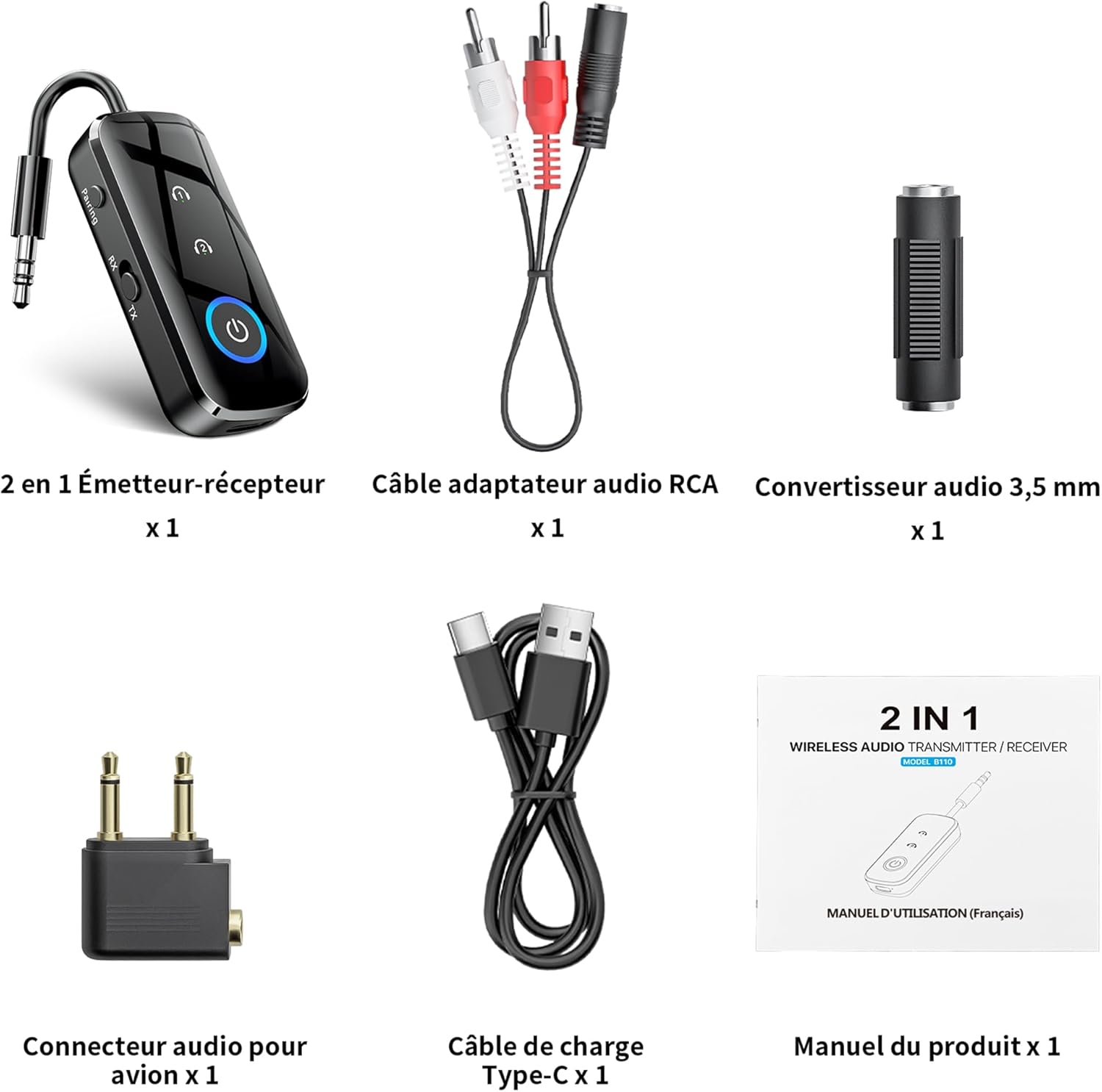
الشكل 1: محتويات العبوة
- 1 x SONRU B110 2-in-1 Bluetooth Transmitter/Receiver
- 1 x RCA Audio Adapter Cable
- 1 x 3.5mm Audio Converter
- 1 x Airplane Audio Connector
- 1 x USB Type-C Charging Cable
- 1 × دليل المستخدم
المنتج انتهىview

Figure 2: Device Features and Controls
The SONRU B110 features a compact design with essential controls for easy operation. It includes a 3.5mm audio jack, a mode switch (RX/TX), power button, and volume/track control buttons. The device also has a USB-C charging port.
تحديد
| ميزة | التفاصيل |
|---|---|
| نموذج | ب110 |
| نسخة البلوتوث | 5.3 |
| بروتوكولات البلوتوث | A2DP/AVRCP (Reception), A2DP (Emission) |
| نطاق التشغيل | >10 meters (open space) |
| واجهة الصوت | Universal 3.5 mm audio input/output |
| سعة البطارية | 250 مللي أمبير |
| وقت الشحن | حوالي 1.5 ساعات (USB-C) |
| عمر البطارية (وضع الإرسال) | تصل إلى 15 ساعة |
| عمر البطارية (وضع الاستقبال) | تصل إلى 12 ساعة |
| أبعاد | 13.9 × 11.6 × 2 سم |
| وزن | 110 جرام |
| المميزات الخاصة | Automatic connection memory, Dual connection, Fast Charging, Hands-Free Calls, Low Latency |
يثبت
1. شحن الجهاز
Before first use, fully charge your SONRU B110.
- Connect the provided USB Type-C charging cable to the charging port on the device.
- قم بتوصيل الطرف الآخر من الكابل بمحول طاقة USB (غير متضمن) أو بمنفذ USB الخاص بالكمبيوتر.
- سيُظهر ضوء مؤشر الشحن حالة الشحن. يستغرق الشحن الكامل حوالي 1.5 ساعات.
- Once fully charged, the device offers up to 15 hours of use in Transmitter (TX) mode and 12 hours in Receiver (RX) mode.

الشكل 3: الشحن وعمر البطارية
2. Pairing in Transmitter (TX) Mode
TX mode allows you to transmit audio from non-Bluetooth devices (e.g., TV, PC, airplane entertainment system) to Bluetooth headphones or speakers.
- Switch the device to TX mode.
- Connect the SONRU B110 to your audio source (e.g., TV, PC, MP3 player) using the 3.5mm audio cable. For airplane entertainment systems, use the provided airplane audio connector.
- Turn on your Bluetooth headphones or speaker and set them to pairing mode.
- The SONRU B110 will automatically search for and connect to nearby Bluetooth devices. The indicator light will confirm a successful connection.
- اتصال مزدوج: The device supports connecting to two Bluetooth headphones/speakers simultaneously. After connecting the first device, put the second device into pairing mode. The B110 will automatically connect to it.

Figure 4: TX Mode in an Airplane

Figure 5: Dual Connection in TX Mode
3. Pairing in Receiver (RX) Mode
RX mode allows you to receive audio from your Bluetooth-enabled smartphone, tablet, or computer and play it through non-Bluetooth devices like car stereos, wired headphones, or home speaker systems.
- Switch the device to RX mode.
- Connect the SONRU B110 to your non-Bluetooth audio device (e.g., car stereo, wired speaker) using the 3.5mm audio cable.
- Enable Bluetooth on your smartphone, tablet, or computer and search for "SONRU B110" in the list of available devices.
- Select "SONRU B110" to pair. The indicator light will confirm a successful connection.
- إعادة الاتصال التلقائي: The device has an automatic connection memory function. After a successful connection, re-enabling Bluetooth on your phone will automatically connect to the B110.

Figure 6: RX Mode in a Car

Figure 7: TX and RX Mode Compatibility
تعليمات التشغيل
تشغيل/إيقاف الطاقة
- تشغيل الطاقة: اضغط مع الاستمرار على زر الطاقة حتى يضيء مؤشر الضوء.
- إيقاف التشغيل: اضغط مع الاستمرار على زر الطاقة حتى ينطفئ مؤشر الضوء.
تبديل الوضع
- Use the TX/RX switch on the side of the device to select the desired mode (Transmitter or Receiver).
Music Control (RX Mode)
- تشغيل/إيقاف مؤقت: اضغط على زر التشغيل مرة واحدة.
- المسار التالي: اضغط مع الاستمرار على زر "+".
- المسار السابق: اضغط مع الاستمرار على زر "-".
- رفع الصوت: اضغط لفترة قصيرة على زر "+".
- اخفض الصوت: اضغط لفترة قصيرة على زر "-".
Call Management (RX Mode)
The SONRU B110 features a built-in microphone for hands-free calls when in RX mode.
- الرد/إنهاء المكالمة: اضغط على زر التشغيل مرة واحدة.
- رفض المكالمة: اضغط مع الاستمرار على زر الطاقة.
- إعادة الاتصال بالرقم الأخير: اضغط زر التشغيل مرتين.
صيانة
- حافظ على الجهاز جافًا. تجنب تعريضه للرطوبة أو السوائل.
- لا تحاول فك أو تعديل الجهاز.
- نظّف الجهاز بقطعة قماش ناعمة وجافة. تجنّب استخدام مواد كيميائية قاسية أو منظفات كاشطة.
- قم بتخزين الجهاز في مكان بارد وجاف عندما لا يكون قيد الاستخدام.
- تجنب درجات الحرارة القصوى.
استكشاف الأخطاء وإصلاحها
- الجهاز لا يعمل:
- تأكد من شحن الجهاز بالكامل. قم بتوصيله بمصدر طاقة باستخدام كابل USB-C وحاول مرة أخرى.
- لا يمكن الاقتران بجهاز بلوتوث:
- Make sure the SONRU B110 is in the correct mode (TX for transmitting, RX for receiving).
- Ensure your target Bluetooth device (headphones, speaker, phone) is in pairing mode.
- Place the devices close to each other.
- امسح سجلات الاقتران السابقة على كلا الجهازين وحاول الاقتران مرة أخرى.
- لا يوجد صوت أو جودة الصوت رديئة:
- Check if the 3.5mm audio cable is securely connected to both the SONRU B110 and the audio source/receiver.
- Ensure the volume on both the SONRU B110 and the connected audio device is turned up.
- Verify that the correct input/output source is selected on your audio system (e.g., AUX input on car stereo).
- Reduce the distance between the B110 and the paired Bluetooth device, and remove any obstacles.
- تأكد من عدم وجود أي تداخل من الأجهزة اللاسلكية الأخرى.
- Dual connection not working:
- Ensure both target Bluetooth devices are in pairing mode when attempting to connect the second device.
- Device not compatible with musical instruments or hearing aids:
- As stated in the product features, this device is not designed for use with musical instruments or hearing aids.
الضمان والدعم
SONRU products are designed for reliability and performance. For warranty information or technical support, please refer to the contact details provided on the product packaging or visit the official SONRU webيرجى الاحتفاظ بإثبات الشراء الخاص بك للمطالبة بالضمان.