
BoxWave Wall Charger Direct (15W)
BoxWave Wall Charger Direct (15W) Instruction Manual
Model: Wall Charger Direct (15W)
مقدمة
This manual provides essential information for the safe and efficient use of your BoxWave Wall Charger Direct (15W). This USB Type-C specific power adapter is designed to provide rapid charging for compatible devices, such as the Marbero Power Station M60, with its built-in 6-foot cable.
يثبت
Follow these steps to set up your BoxWave Wall Charger Direct:
- فك الشاحن: Carefully remove the Wall Charger Direct from its packaging. Inspect the charger and cable for any visible damage.
- Identify the USB Type-C Connector: The charger features a built-in USB Type-C cable. Ensure your device has a compatible USB Type-C charging port.
- الاتصال بمنفذ الطاقة: Plug the AC prongs of the Wall Charger Direct into a standard wall power outlet (100-240V, 50/60Hz).
- الاتصال بالجهاز: Insert the USB Type-C connector firmly into the charging port of your Marbero Power Station M60 or other compatible device.
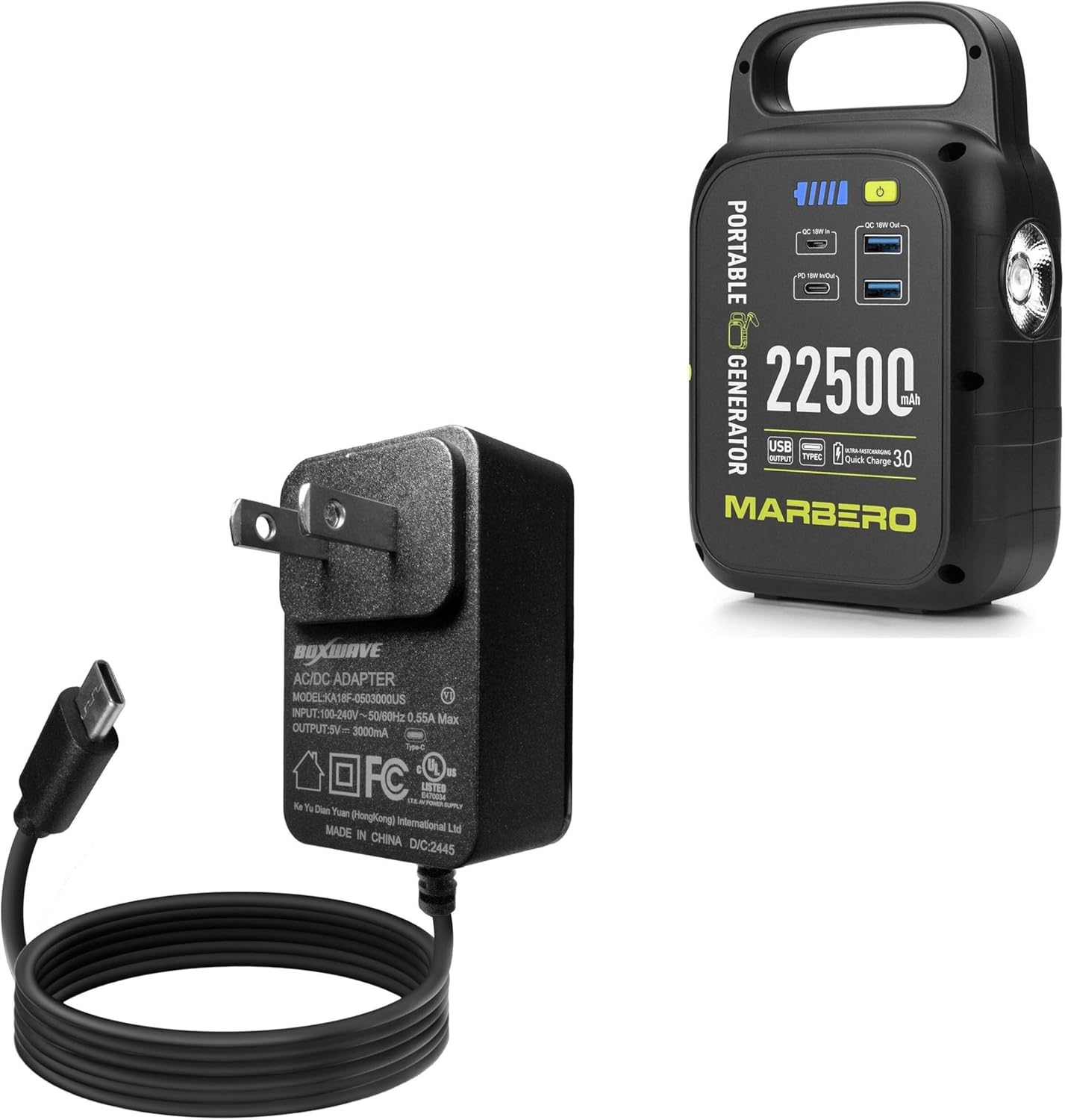
Image: The BoxWave Wall Charger Direct (left) with its built-in USB-C cable, shown alongside a Marbero Power Station M60 (right), illustrating the intended use.
تعليمات التشغيل
The BoxWave Wall Charger Direct is designed for simple and efficient operation:
- الشحن التلقائي: Once connected to a power outlet and your device, the charger will automatically begin delivering 15W of power to your device.
- Rapid Charge Capability: This charger is engineered for rapid charging, allowing your device to charge quickly and efficiently.
- Built-in 6ft Cable: The integrated 6-foot cable provides ample length for flexible placement of your device while charging, reducing the need for extension cords.

Image: A smartphone connected to the BoxWave Wall Charger Direct, illustrating the 15W fast charging capability.

Image: The BoxWave Wall Charger Direct plugged into a wall, demonstrating the extended reach of its 6-foot built-in cable for flexible device placement.
صيانة
الصيانة المناسبة تضمن طول عمر الشاحن والأداء الأمثل له:
- تنظيف: افصل الشاحن عن مقبس الطاقة وعن جهازك قبل التنظيف. استخدم قطعة قماش ناعمة وجافة لمسح السطح. لا تستخدم المنظفات السائلة أو البخاخات.
- تخزين: When not in use, store the charger in a cool, dry place away from direct sunlight and extreme temperatures. Avoid tightly coiling the cable.
- العناية بالكابلات: The charger features reinforced strain relief at the connector to prevent kinking and tearing. Avoid sharp bends or excessive pulling on the cable.
- تقتيش: Periodically inspect the charger and cable for any signs of wear, cuts, or damage. If damage is observed, discontinue use immediately.

الصورة: تفصيلية view of the USB-C connector, showcasing the reinforced strain relief designed to prevent cable damage.
استكشاف الأخطاء وإصلاحها
If you encounter issues with your BoxWave Wall Charger Direct, refer to the following common solutions:
| مشكلة | السبب المحتمل | حل |
|---|---|---|
| الجهاز لا يشحن. | Charger not properly plugged into outlet; device not properly connected; faulty outlet; device issue. | Ensure charger is fully inserted into a working wall outlet. Verify the USB Type-C connector is securely plugged into your device. Try a different outlet. Test the charger with another compatible device if possible. |
| الشحن البطيء. | Device drawing less power; background apps on device; cable damage. | Ensure your device is capable of 15W charging. Close unnecessary background applications on your device. Inspect the cable for damage. |
| الشاحن يشعر بالدفء. | Normal operation during charging; excessive load. | It is normal for chargers to become slightly warm during operation. If the charger becomes excessively hot or emits smoke/odor, immediately unplug it and discontinue use. |
تحديد
- نموذج: Wall Charger Direct (15W)
- مدخل: 100-240 فولت ~ 50/60 هرتز، 0.55 أمبير كحد أقصى
- الإخراج: 5V === 3000mA (15W)
- نوع الموصل: USB Type-C (built-in cable)
- طول الكابل: 6 أقدام (حوالي 1.8 أمتار)
- مادة: بولي كربونات
- وزن السلعة: 3.3 أونصة (حوالي 93.5 جرامًا)
- الشركة المصنعة: بوكس ويف
- بلد المنشأ: الصين
الضمان والدعم
For information regarding warranty coverage or technical support, please refer to the documentation included with your purchase or visit the official BoxWave website. Limited third-party technical support for your device (up to 3 inquiries via messaging) may be available, as noted in the product description. Please note that BoxWave is not affiliated with or endorsed by Marbero.
Ask a question about this manual
Ask about setup, troubleshooting, compatibility, parts, safety, or missing instructions. Manuals+ will review the question and use this page’s manual context to help answer it.