
1. المقدمة
Thank you for choosing the Acekool 12000 BTUs Portable Air Conditioner. This appliance is designed to provide powerful cooling, efficient dehumidification, and effective air circulation through its fan function, creating a comfortable indoor environment. This manual provides detailed instructions for safe operation, installation, maintenance, and troubleshooting to ensure optimal performance and longevity of your unit. Please read this manual thoroughly before operating the appliance and retain it for future reference.
2. معلومات السلامة
لمنع إصابة المستخدم أو غيره من الأشخاص وتلف الممتلكات ، يجب اتباع الإرشادات التالية. قد يتسبب التشغيل غير الصحيح بسبب تجاهل التعليمات في حدوث ضرر أو تلف.
- قم بتشغيل الجهاز دائمًا على سطح مستوٍ وثابت.
- Do not block the air inlets or outlets. Maintain at least 20 cm (8 inches) clearance from walls or other objects.
- تأكد من أن مصدر الطاقة يطابق المجلدtagكما هو محدد على ملصق التصنيف.
- لا تقم بتشغيل الوحدة باستخدام سلك طاقة أو قابس تالف.
- افصل الوحدة قبل التنظيف أو الصيانة.
- أبقِ الوحدة بعيداً عن مصادر الحرارة وأشعة الشمس المباشرة والمواد القابلة للاشتعال.
- لا يُقصد استخدام هذا الجهاز من قبل الأشخاص (بما في ذلك الأطفال) ذوي القدرات البدنية أو الحسية أو العقلية المحدودة، أو الذين يفتقرون إلى الخبرة والمعرفة، ما لم يتم الإشراف عليهم أو إعطائهم تعليمات فيما يتعلق باستخدام الجهاز من قبل شخص مسؤول عن سلامتهم.
- Do not use chemical solvents (e.g., benzene, alcohol, gasoline) to clean the unit.
3. انتهى المنتجview
3.1. المكونات
The Acekool Portable Air Conditioner comes with the main unit and several accessories for installation and operation.

الشكل 3.1: The Acekool Portable Air Conditioner unit shown with its included accessories, which consist of a remote control, exhaust hose, window slider kit, and a user manual.
- وحدة تكييف الهواء المحمولة
- جهاز التحكم عن بعد
- خرطوم العادم
- Window Slider Kit (includes slider bracket, inlet and outlet hoses, locking screws)
- خرطوم التصريف
- دليل المستخدم
3.2. لوحة التحكم وجهاز التحكم عن بُعد
The unit can be operated via the LED display on top of the air conditioner or through the included remote control. Both offer intuitive access to all functions.
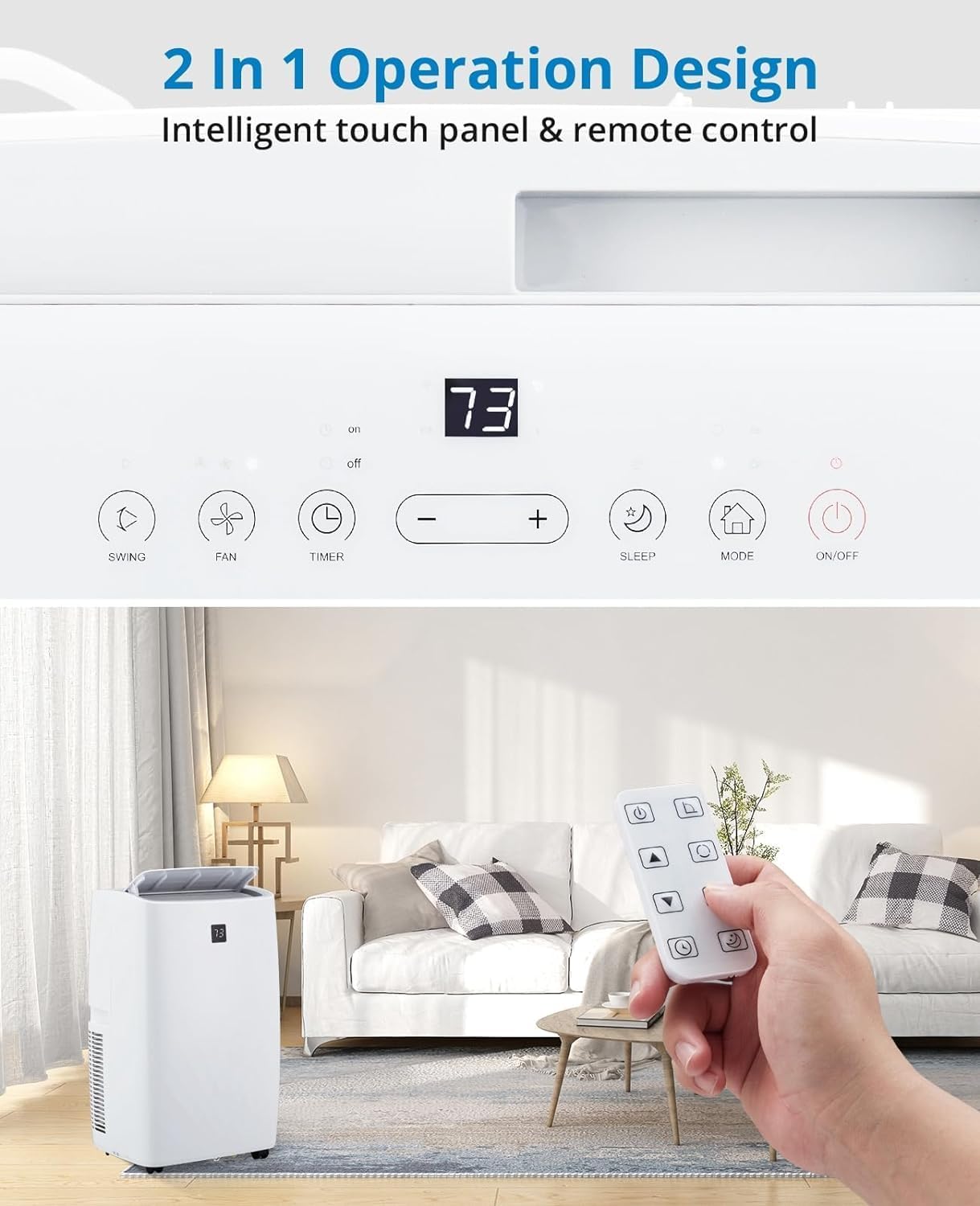
الشكل 3.2: تفصيلية view of the unit's intelligent touch control panel and the remote control. The control panel features buttons for Swing, Fan, Timer, Sleep, Mode, and On/Off, along with temperature adjustment buttons and a digital display.
تشمل الوظائف الرئيسية ما يلي:
- زر التشغيل/الإيقاف: يقوم بتشغيل الوحدة أو إيقاف تشغيلها.
- زر الوضع: يتنقل بين أوضاع التبريد، وإزالة الرطوبة، والتهوية.
- +/- الأزرار: Adjusts temperature settings or timer duration.
- زر المروحة: تحديد سرعة المروحة (منخفضة، متوسطة، عالية، تلقائية).
- زر النوم: Activates Sleep Mode for quiet, energy-efficient operation.
- زر TIMER: تعيين مؤقت التشغيل أو الإيقاف التلقائي.
- زر التأرجح: Controls the oscillation of the air outlet louvers.
4. الإعداد
4.1. فك التعبئة
Carefully remove the air conditioner and all accessories from the packaging. Inspect the unit for any shipping damage. Keep the original packaging for future storage or transport.
4.2. Window Installation Kit
The unit includes a window kit designed for easy installation in various window types, including double/single-hung windows and sliding sash windows. No screws or nails are typically required for standard installation.

الشكل 4.2: This image illustrates the compatibility of the window kit with double/single-hung windows and sliding sash windows, showing an adjustable range of 20.47 to 39.9 inches. The portable AC unit's dimensions are also provided: 17.2 inches (width), 13.1 inches (depth), and 27.7 inches (height).
4.3. خطوات التثبيت
- تحضير النافذة: Open the window to the desired width.
- تجميع طقم منزلق النافذة: Adjust the window slider bracket to fit your window opening. Secure the sections if necessary.
- قم بتوصيل خرطوم العادم: Connect one end of the exhaust hose to the exhaust outlet on the back of the air conditioner unit.
- الاتصال بمجموعة النوافذ: قم بتوصيل الطرف الآخر من خرطوم العادم بالمحول الموجود على مجموعة منزلق النافذة.
- تركيب طقم النافذة: Place the assembled window kit into the window opening and close the window securely against it to seal.
- وضع الوحدة: Place the portable air conditioner unit near the window, ensuring the exhaust hose is not kinked or bent sharply.
- قم بالتوصيل: قم بتوصيل سلك الطاقة بمأخذ كهربائي أرضي.
5. التشغيل
5.1. تشغيل / إيقاف التشغيل
اضغط على تشغيل/إيقاف اضغط على الزر الموجود على لوحة التحكم أو جهاز التحكم عن بعد لتشغيل الوحدة أو إيقاف تشغيلها.
5.2. أوضاع التشغيل
اضغط على وضع button to cycle through the available operating modes: Cool, Dry (Dehumidifier), and Fan.

الشكل 5.2: This image displays three portable AC units, each representing one of the three operational modes: Cooling (64°F-90°F), Dry (dehumidification up to 75 pints/day), and Fan (High, Low, Auto speeds). The visual emphasizes the unit's ability to make living spaces cool, clean, dry, and comfortable.
- وضع التبريد: Provides powerful cooling for rooms up to 550 sq.ft. Use the +/- buttons to set the desired temperature (typically 64°F - 90°F). The compressor operation adjusts automatically based on the current temperature.
- Dehumidifier Mode (Dry): Efficiently removes moisture from the air, with a capacity of up to 75 pints per day. This mode helps create a healthier and more comfortable indoor environment.
- وضع المروحة: Circulates air without cooling. Press the مروحة button to select fan speed: High, Low, or Auto.
5.3. Smart Mode
In Smart Mode, the portable air conditioner automatically adjusts between cooling and fan modes based on the room temperature, optimizing comfort and energy efficiency.
5.4. وضع السكون
Sleep Mode maintains optimal temperatures at low fan speeds, reducing noise levels to as low as 48dB. This mode is designed to improve energy efficiency and minimize energy costs while providing a quiet and comfortable sleeping environment.

الشكل 5.4: This image highlights the quiet operation of the Acekool portable air conditioner in Sleep Mode, with noise levels as low as 48dB. It also shows features like a 24-hour smart timer, auto shut-off, and ultra-quiet operation, ideal for nighttime use.
5.5. وظيفة الموقت
The 24-hour timer allows you to program the unit to automatically turn on or off at a specified time, enhancing convenience and energy savings.
5.6. عملية التحكم عن بعد
The remote control provides full functionality from a distance, allowing you to adjust settings without needing to approach the unit. Ensure batteries are correctly inserted.
6. الصيانة
6.1. تنظيف المرشح
The unit is equipped with a removable and washable double-layer filter. Regular cleaning of the filter is essential to maintain air quality and unit efficiency. Clean the filter every two weeks or more frequently depending on usage and air quality.
- افصل مكيف الهواء عن مأخذ الطاقة.
- Locate and remove the filter from the back or side of the unit.
- اغسل الفلتر تحت الماء الجاري (دافئ، وليس ساخنًا) أو استخدم مكنسة كهربائية لإزالة الغبار.
- اترك الفلتر ليجف تمامًا في الهواء قبل إعادة إدخاله في الجهاز. لا تعرضه لأشعة الشمس المباشرة.
6.2. تصريف المياه
The Acekool portable air conditioner features a self-evaporation system, which significantly reduces the need for manual water drainage. Most condensed water is evaporated and expelled through the exhaust hose.

الشكل 6.2: توفر هذه الصورة لقطة مقربة view of the rear of the portable air conditioner, highlighting the self-evaporation system and the internal components that manage water drainage, effectively reducing the need for manual emptying.
In high humidity conditions, the internal water tank may fill up. If this occurs, the unit will stop operating and display an error code (refer to troubleshooting). Connect the provided drain hose to the drainage port and place the other end into a suitable container or floor drain to empty the water.
6.3. التخزين
عند تخزين الوحدة لفترة طويلة:
- قم بتصريف أي مياه متبقية من الوحدة.
- تنظيف فلتر الهواء.
- افصل سلك الطاقة وقم بلفه بشكل أنيق.
- قم بتخزين الوحدة في مكان بارد وجاف، ويفضل أن يكون ذلك في عبوتها الأصلية، بعيدًا عن أشعة الشمس المباشرة ودرجات الحرارة القصوى.
7. استكشاف الأخطاء وإصلاحها
قبل الاتصال بدعم العملاء، يرجى الرجوع إلى الجدول التالي للتعرف على المشكلات الشائعة وحلولها.
| مشكلة | السبب المحتمل | حل |
|---|---|---|
| الوحدة لا تعمل. | لا يوجد مصدر طاقة؛ سلك الطاقة تالف؛ خزان المياه ممتلئ. | Check power outlet and plug; Inspect power cord; Drain water tank. |
| لا تبرد الوحدة بشكل كافٍ. | Air filter clogged; Room too large; Doors/windows open; Exhaust hose blocked/leaking. | Clean air filter; Ensure room size is within capacity (550 sq.ft.); Close all openings; Check exhaust hose for kinks or leaks. |
| الوحدة صاخبة. | الوحدة ليست على سطح مستوٍ؛ سرعة المروحة عالية جدًا. | Place unit on a flat, stable surface; Reduce fan speed. |
| تسرب مياه. | سدادة التصريف غير محكمة الإغلاق بشكل صحيح؛ الوحدة مائلة. | تأكد من إغلاق سدادة التصريف بشكل آمن؛ ضع الوحدة على سطح مستو. |
| جهاز التحكم عن بعد لا يعمل. | البطاريات فارغة أو تم إدخالها بشكل غير صحيح؛ وجود عائق بين جهاز التحكم عن بعد والوحدة. | Replace batteries; Ensure clear line of sight to unit's receiver. |
8. المواصفات
Detailed technical specifications for the Acekool 12000 BTUs Portable Air Conditioner.
| ميزة | مواصفة |
|---|---|
| ماركة | اسيكول |
| اسم الموديل | FDP35-3034R3 |
| قوة التبريد | 12000 وحدة حرارية بريطانية |
| منطقة التغطية | تصل إلى 550،XNUMX قدم مربع. |
| الوظائف | التبريد، مزيل الرطوبة، المروحة |
| قدرة إزالة الرطوبة | 60 Pints (approx. 7.5 gallons) |
| مستوى الضوضاء | 51 ديسيبل (تصل إلى 48 ديسيبل في وضع السكون) |
| المجلدtage | 115 فولت |
| واتtage | 1200 واط |
| وزن العنصر | 76.8 رطل |
| أبعاد المنتج (العمق × العرض × الارتفاع) | 18.5 × 15.35 × 35.24 بوصة |
| المكونات المضمنة | Remote Control, Window Kit, Exhaust Hose, Drain Hose |
| المميزات الخاصة | Fast Cooling, Smart/Sleep Mode, 24H Timer, Self-Evaporation |
9. الضمان والدعم
For warranty information and customer support, please refer to the warranty card included with your product or visit the official Acekool website. If you encounter any issues not covered in this manual, please contact Acekool customer service for assistance. Please have your model number (FDP35-3034R3) and purchase details ready when contacting support.