
1. المقدمة
شكرا لك على الشراءasing the AWithZ H5 Portable Spot Welder. This device is designed for precise spot welding of various battery types and thin metal sheets, offering a compact and efficient solution for DIY battery pack assembly and repair. This manual provides essential information for safe and effective operation, maintenance, and troubleshooting.
2. معلومات السلامة
يرجى قراءة جميع تحذيرات السلامة والتعليمات بعناية قبل استخدام هذا المنتج لتجنب الصدمة الكهربائية أو الحريق أو الإصابة الخطيرة.
- احرص دائمًا على ارتداء معدات الحماية الشخصية المناسبة، بما في ذلك نظارات السلامة، عند تشغيل جهاز اللحام النقطي.
- التأكد من أن منطقة العمل جيدة التهوية وخالية من المواد القابلة للاشتعال.
- Do not touch the welding pens or the area around them immediately after welding, as they will be hot and can cause burns.
- Do not operate the device in wet conditions or expose it to rain.
- احتفظ بالجهاز بعيدًا عن متناول الأطفال.
- Only use the provided charging cable and a compatible 5V/1A adapter for charging.
- Do not attempt to weld materials thicker than specified (0.3mm maximum).
- If the device overheats (reaches 60°C), it will automatically shut off for safety. Allow it to cool down before resuming operation.
- Always ensure the device is cooled before charging to prevent damage.

Image: AWithZ H5 Spot Welder with safety icons indicating voltage protection, short circuit protection, low temperature protection, high temperature protection, overcharge protection, and over-discharge protection.
3. انتهى المنتجview
3.1. الميزات الرئيسية
- التصميم المتكامل: Power source and welding pens are integrated into a single handheld unit, eliminating the need for external welding pens.
- بطارية عالية السعة: Equipped with a 5000mAh internal battery, allowing for extended use.
- Wide Welding Range: Capable of welding nickel strips from 0.1mm to 0.3mm thick, including pure nickel up to 0.2mm.
- 99 مستويات للطاقة: Offers precise control over welding output for various materials and thicknesses.
- Dual Pulse Output: Provides stable and reliable welding results.
- Minimalist OLED Display: Features a color LCD display showing temperature, mode, preheat time, trigger time, output level, and language selection.
- عملية بيد واحدة: Designed for ease of use with a single hand.
- الإغلاق التلقائي: Configurable auto-off time for safety and power saving.
3.2. محتويات العبوة
The AWithZ H5 Portable Spot Welder package includes:
- AWithZ H5 Spot Welder Unit
- Nickel Sheet Roll
- ورق زجاج
- كابل شحن USB-C
- Replacement Welding Pins

Image: Contents of the AWithZ H5 Spot Welder package, including the welder unit, nickel sheet, sandpaper, charging cable, and replacement pins.
4. المواصفات
| المعلمة | قيمة |
|---|---|
| نموذج | H5 |
| سعة البطارية | 5000 مللي أمبير |
| حجم الإخراجtage | 4.2V (max) |
| تيار الخرج | 1020 أمبير (الحد الأقصى) |
| سمك اللحام | 0.1 مم - 0.3 مم |
| Pure Nickel Welding | حتى 0.2 ملم |
| مستويات الطاقة | 99 مستويات |
| وقت الشحن | 2.5 - 3 ساعة |
| منفذ الشحن | يو إس بي من النوع سي |
| أبعاد | 182 مم (طول) × 47.5 مم (عرض) × 31.4 مم (سُمك) |
| وزن | 260 جرام |

الصورة: انفجرت view of the AWithZ H5 Spot Welder showing internal components and key specifications.
5. الإعداد
5.1. الشحن الأولي
Before first use, fully charge the spot welder. Connect the provided USB-C charging cable to the device and a 5V/1A power adapter. The display will indicate charging status. Ensure the device is cool before charging.
Video: Demonstrates the charging process for an AWithZ spot welder, similar to the H5 model. Connect the USB-C cable to the charging port.
5.2. Preparing the Welding Pins
The welding pins are integrated. Ensure they are clean and sharp for optimal performance. Use the included sandpaper to gently clean the tips if necessary. The recommended welding distance between the tips is approximately 0.8mm.

Image: AWithZ H5 Spot Welder with nickel strip and screwdriver, illustrating the welding pins.
6. تعليمات التشغيل
6.1. تشغيل/إيقاف التشغيل واختيار الوضع
Press and hold the power button to turn the device on or off. The H5 features a minimalist OLED display for easy navigation. Use the adjustment keys to select between automatic and manual welding modes, adjust power levels, preheat time, and trigger time.

Image: AWithZ H5 display showing various settings like mode, gear, preheat, trigger time, and stitch welding.
6.2. ضبط معايير اللحام
The device offers 99 adjustable power levels. Start with lower settings and gradually increase until the desired weld strength is achieved. The OLED display provides real-time feedback on settings. For optimal results, practice on scrap material first.
- مستوى الطاقة: Adjust from 1 to 99. Higher numbers indicate more power.
- وقت التسخين المسبق: Sets the duration of the initial pulse.
- Trigger Time: Sets the main welding pulse duration (0.5ms to 5ms).
- لغة: Select your preferred language from the UI settings.

Image: AWithZ H5 Spot Welder display showing language selection, continuous spot welding, and trigger time settings.
6.3. إجراءات اللحام
- Ensure the battery terminals and nickel strip are clean. Use sandpaper if necessary.
- Place the nickel strip firmly on the battery terminal.
- Position the welding pins onto the nickel strip, ensuring both pins make good contact and are evenly spaced.
- In الوضع التلقائي, the device will detect contact and automatically trigger the weld.
- In الوضع اليدوي, press the trigger button on the side of the device to initiate the weld.
- After welding, inspect the joint for strength and consistency. Adjust power settings as needed.
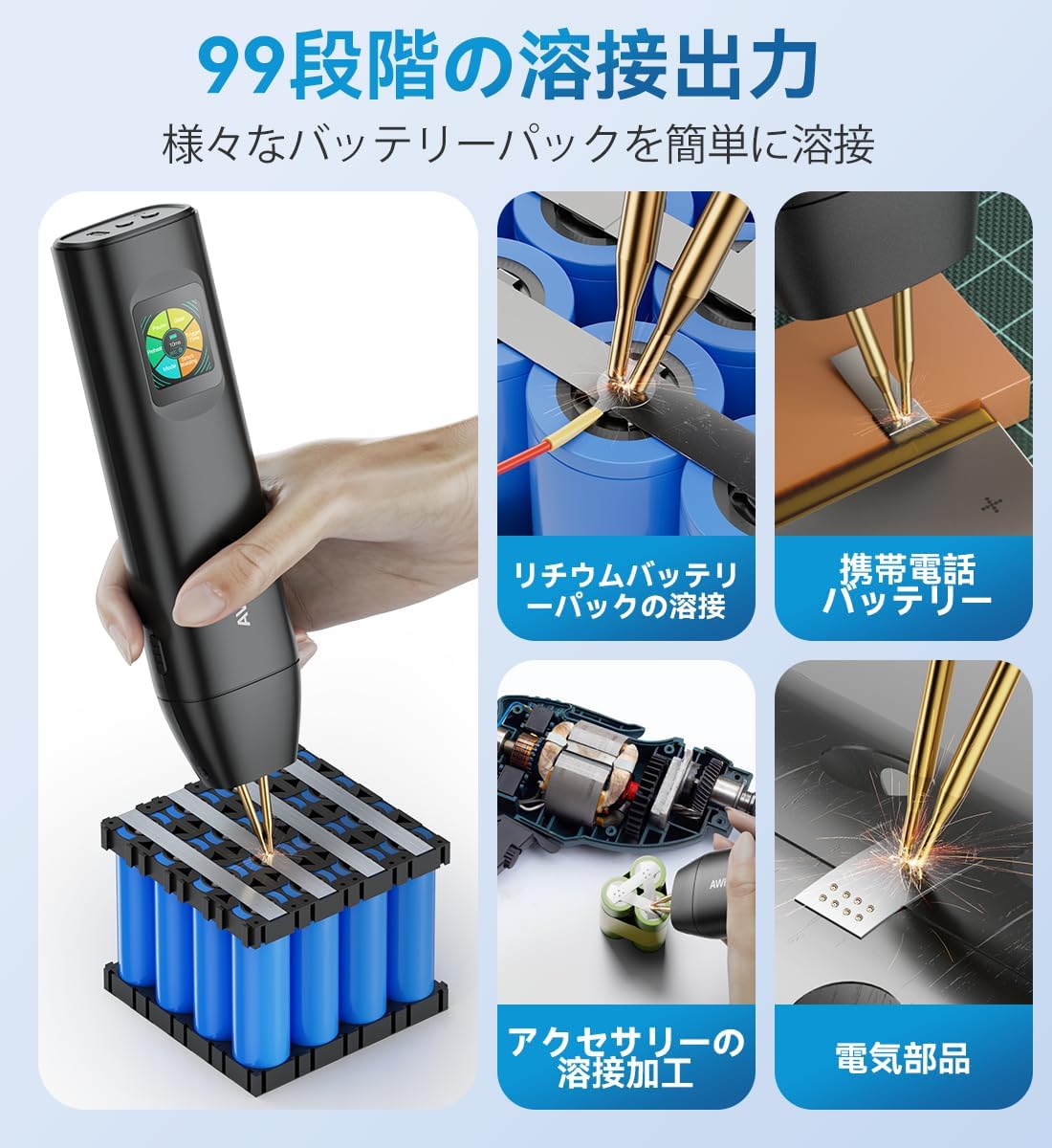
Image: AWithZ H5 Spot Welder demonstrating various welding applications.
Video: Demonstrates the one-handed operation of an AWithZ battery spot welder (H1Pro model), showing how to position the welder and perform a spot weld.
Video: Illustrates continuous spot welding and the capability to weld 0.3mm nickel-plated sheets with an AWithZ spot welder.
7. الصيانة
7.1. التنظيف
Regularly clean the welding pins and the device body. Use a soft, dry cloth. For the welding pins, use the provided sandpaper to remove any residue or oxidation that may affect welding performance.
7.2. Replacing Welding Pins
Over time, the welding pins may wear down. To replace them, carefully unscrew the retaining screws and pull out the old pins. Insert new pins and secure them with the screws. Ensure the pins are properly aligned and protrude evenly.
Video: Demonstrates the method for replacing spot welding needles on an AWithZ spot welder.
7.3. التخزين
Store the device in a cool, dry place away from direct sunlight and moisture. Use the original packaging or a protective case to prevent damage.
8. استكشاف الأخطاء وإصلاحها
| مشكلة | السبب المحتمل | حل |
|---|---|---|
| لا يوجد لحام أو لحام ضعيف | Low power setting, dirty welding pins, poor contact, material too thick. | Increase power level, clean welding pins, ensure firm contact, verify material thickness is within limits. |
| Excessive sparking or holes in material | Too high power setting, dirty welding pins. | Decrease power level, clean welding pins. |
| الجهاز لا يعمل | نفدت طاقة البطارية. | اشحن الجهاز بالكامل. |
| يسخن الجهاز بشكل مفرط وينطفئ | Continuous use, high ambient temperature. | Allow the device to cool down before resuming operation. Avoid prolonged continuous use. |
9. الضمان والدعم
For warranty information or technical support, please refer to the contact details provided with your purchase or visit the AWithZ official webالموقع. احتفظ بإيصال الشراء كإثبات للشراء.