
1. المقدمة
The Innex DS200 is a professional USB book scanner designed for efficient digitization of various documents, including books, magazines, and loose papers. It features a 26MP camera, A3 scanning capability, and advanced software functions to enhance scanning quality and workflow. This manual provides detailed instructions for setting up, operating, and maintaining your DS200 scanner.

Figure 1.1: Innex DS200 Scanner in operation with an open book.
2. محتويات العبوة
تأكد من تضمين جميع العناصر المذكورة أدناه في طردك. في حال وجود أيٍّ منها مفقودًا أو تالفًا، يُرجى التواصل مع خدمة العملاء.
- Innex DS200 Scanner Unit
- لوحة المسح
- كابل يو اس بي
- محول الطاقة (النوع أ)
- Power Plugs (Type C, Type G)
- زر اليد
- دواسة القدم
- Adapter (USB-C to USB-A)
- دليل البدء السريع
- بطاقة الخدمة
- بيان GPSR
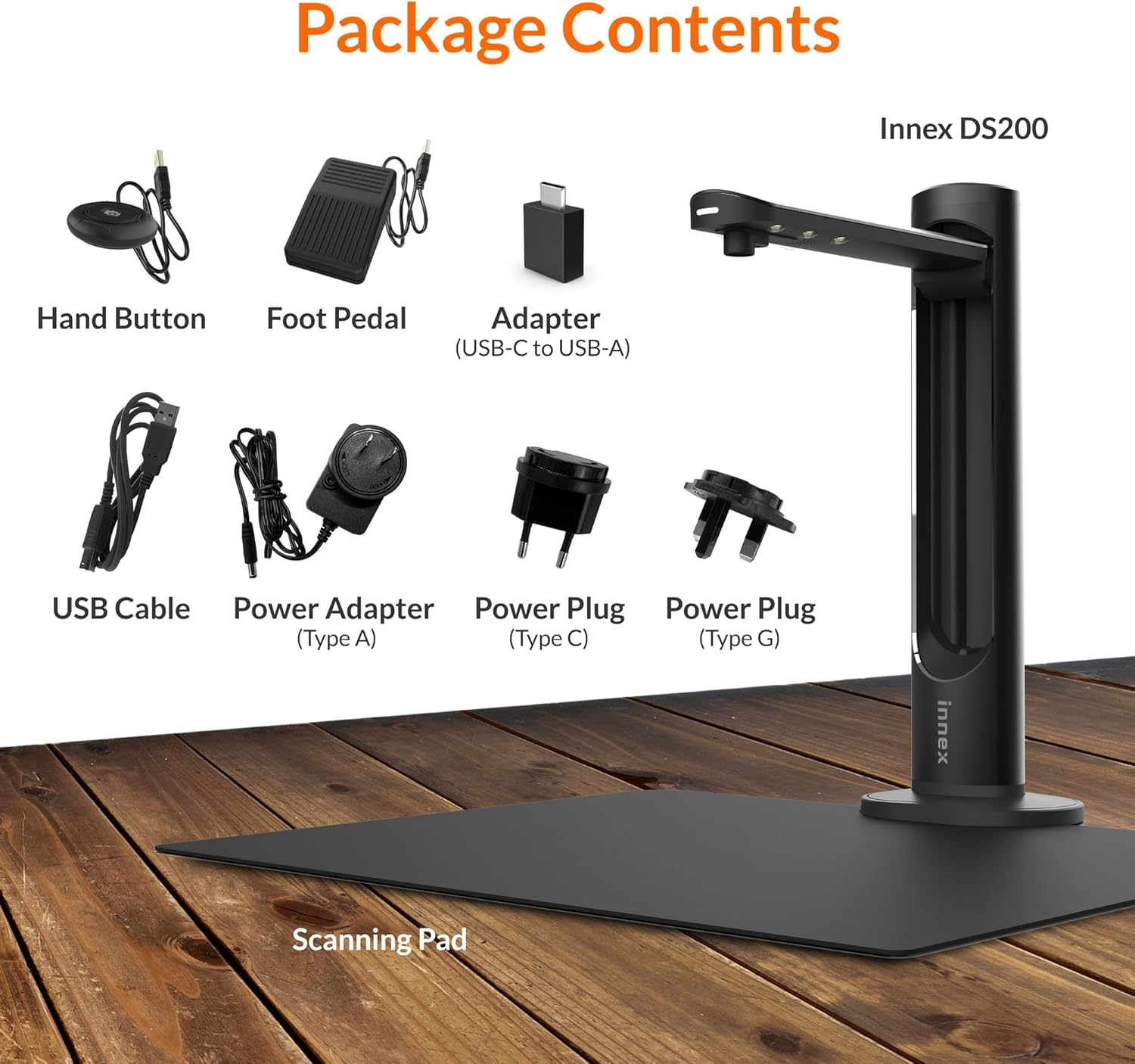
Figure 2.1: Contents of the Innex DS200 package.
3. الإعداد
- فك مكونات الحزمة: قم بإزالة كافة العناصر من العبوة بعناية.
- Position the Scanner: Place the Innex DS200 scanner unit on a stable, flat surface.
- Place the Scanning Pad: Position the black scanning pad directly beneath the scanner head. Ensure it is centered and flat.
- توصيل الطاقة: Connect the power adapter to the scanner and plug it into an electrical outlet. Use the appropriate power plug for your region.
- الاتصال بجهاز الكمبيوتر: Connect the scanner to your computer using the provided USB cable. If your computer only has USB-C ports, use the included USB-C to USB-A adapter.
- تثبيت نظام التشغيل: Download and install the Innex Scan software from the official Innex website. Follow the on-screen instructions for installation. The software is compatible with Windows and macOS.
- ربط الملحقات: Plug in the hand button and foot pedal to the designated ports on the scanner unit.
4. تعليمات التشغيل
4.1. إجراءات المسح الأساسية
- Launch Innex Scan Software: Open the Innex Scan application on your computer.
- مكان المستند: Place the document or book you wish to scan on the scanning pad. Ensure it is within the scanning area. The laser guide can assist with alignment.
- ضبط الإعدادات: In the software, select your desired scanning mode (e.g., Document, Book, Photo) and adjust settings such as color mode, resolution, and output format.
- بدء المسح: Trigger the scan using one of the available methods: the software capture button, the hand button, or the foot pedal.
- Review وفر: بعد المسح الضوئي، أعدview the image in the software. Apply any necessary corrections and save the file to your preferred location and format.

Figure 4.1: Using the laser guide for document alignment.

Figure 4.2: Multiple options for triggering a scan.
4.2. ميزات البرنامج
The Innex Scan software includes several features to optimize your scanning experience:
- Curve Flattening: Automatically corrects the curvature of book pages for flat, readable scans.
- التعرف الضوئي على الحروف (OCR): Converts scanned images into editable and searchable text in over 120 languages.
- Auto-Cropping: Automatically detects and crops the document edges.
- Page-Turn Detection: For book scanning, the software can detect when a page has been turned and automatically initiate the next scan.
- Finger Removal: Intelligently removes images of fingers holding down pages during scanning.
- وضع المسح المتعدد: Allows scanning multiple small items simultaneously, such as business cards or photos, and separates them into individual files.
- Visualizer Mode: Enables the scanner to function as a document camera for presentations or live demonstrations.
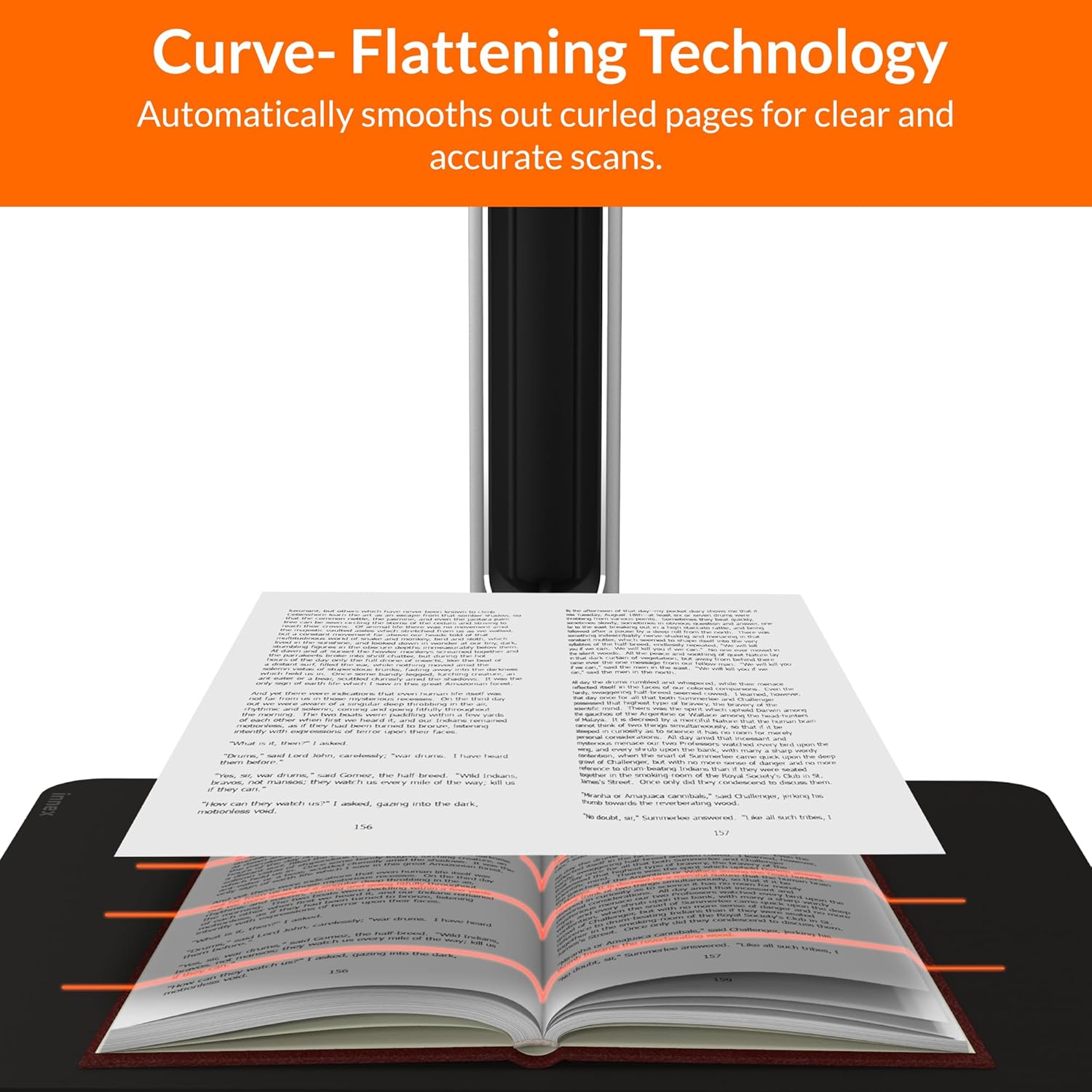
Figure 4.3: Curve Flattening Technology in use.

Figure 4.4: OCR Text Recognition and export options.

الشكل 4.5: انتهىview of Innex Scan software features.
4.3. Export Options
The Innex DS200 supports various export formats for both image and text files:
- صورة Files: JPEG, PNG, BMP, TIFF
- وثيقة Files: PDF (searchable), DOC, EXCEL, TEXT
- الكتاب الإلكتروني Files: إي بي يو بي
- صوتي Files (Text-to-Speech): مبشنومك، واف
- فيديو Files (Visualizer Mode): MP4, AVI, FLV, WMV

Figure 4.6: Available export formats in Innex Scan software.
5. الصيانة
- تنظيف: Regularly wipe the scanner lens and LED lamp with a soft, dry, lint-free cloth to ensure optimal scan quality. Clean the scanning pad with a damp القماش إذا لزم الأمر.
- تحديثات البرامج: Periodically check the official Innex website for software updates to ensure you have the latest features and performance improvements.
- تخزين: عند عدم الاستخدام، قم بتخزين الماسح الضوئي في بيئة نظيفة وجافة، بعيدًا عن أشعة الشمس المباشرة ودرجات الحرارة القصوى.
6. استكشاف الأخطاء وإصلاحها
6.1. المشكلات الشائعة والحلول
| مشكلة | السبب المحتمل | حل |
|---|---|---|
| لم يتم اكتشاف الماسح الضوئي | Loose USB connection, driver issue, power issue | Ensure USB cable is securely connected. Check power connection. Reinstall scanner drivers or software. Try a different USB port. |
| جودة مسح رديئة | Dirty lens, insufficient lighting, incorrect settings, document not flat | Clean the scanner lens. Ensure adequate ambient lighting or use the built-in LED lamp. Adjust resolution and color settings in software. Ensure documents are flat on the scanning pad. |
| Software crashes or freezes | Outdated software, system incompatibility, insufficient system resources | Update Innex Scan software to the latest version. Ensure your computer meets minimum system requirements. Close other demanding applications. Restart the software and computer. |
| لا يعمل التعرف الضوئي على الأحرف بشكل صحيح | Poor scan quality, incorrect language setting, complex font | Improve scan quality. Verify the correct OCR language is selected in the software. For highly stylized or handwritten text, OCR accuracy may vary. |
7. المواصفات
Detailed technical specifications for the Innex DS200 scanner:

Figure 7.1: Innex DS200 Technical Specifications.
- نموذج: دي اس 200
- مستشعر الصورة: مستشعر CMOS
- الحد الأقصى للدقة: 5800 × 4522 بكسل (26 ميجابكسل)
- Output DPI: Approx. 300 dpi (A3)
- الأعلى. منطقة الرماية: A3 (16.77" x 12.59" / 426 x 320mm)
- عمق اللون: 24 بت
- Lens Focus: مُثَبَّت
- سرعة المسح: 1.5 sec per A3 page
- مشغل المسح: زر اليد، دواسة القدم، زر البرنامج، المسح التلقائي
- تنسيقات الإخراج: Picture (JPG, TIFF, BMP, PNG), Document (PDF, Image, PDF Searchable), Text (DOC, EXCEL, TEXT), E-book (EPUB), Audio (MP3, WAV), Video (AVI, MPEG, FLV, WMV)
- إسقاط الليزر: مدمج
- مصدر الضوء: مصباح LED مدمج عالي السطوع
- الواجهة: USB 2.0 Type B x 1 (for PC Connection), USB 2.0 Type-A x 1 (for USB Extension)
- قوة: 5 فولت/2 أمبير
- الحد الأدنى لمتطلبات النظام: Windows 10, 11, macOS 11 or later; Intel i5 Processor or higher; 8GB RAM (Recommended 16GB or more); 20GB Available HDD Space; USB 2.0 Port
- أبعاد المنتج (مطوي): 4.33"D x 5.91"W x 15.75"H (110 x 150 x 400mm)
- Product Dimensions (In Use): 12.05"D x 5.91"W x 15.75"H (307 x 150 x 400mm)
- الوزن الصافي: حوالي 2.64 رطل (1.2 كجم)
8. الضمان والدعم
For warranty information and technical support, please refer to the service card included in your package or visit the official Innex website. You can also contact FunTech Innovation, the manufacturer, for assistance.
الشركة المصنعة: FunTech Innovation
Webموقع: Innex Official Store on Amazon