
Sucetiho Mini Projector User Manual
Model: Mini Projector
1. المقدمة
شكرا لك على الشراءasing the Sucetiho Mini Projector. This manual provides essential information for the safe and efficient operation of your device. Please read it thoroughly before use and retain it for future reference.
This portable projector is designed to deliver a cinematic viewing experience, supporting 4K content and offering versatile connectivity for various devices.
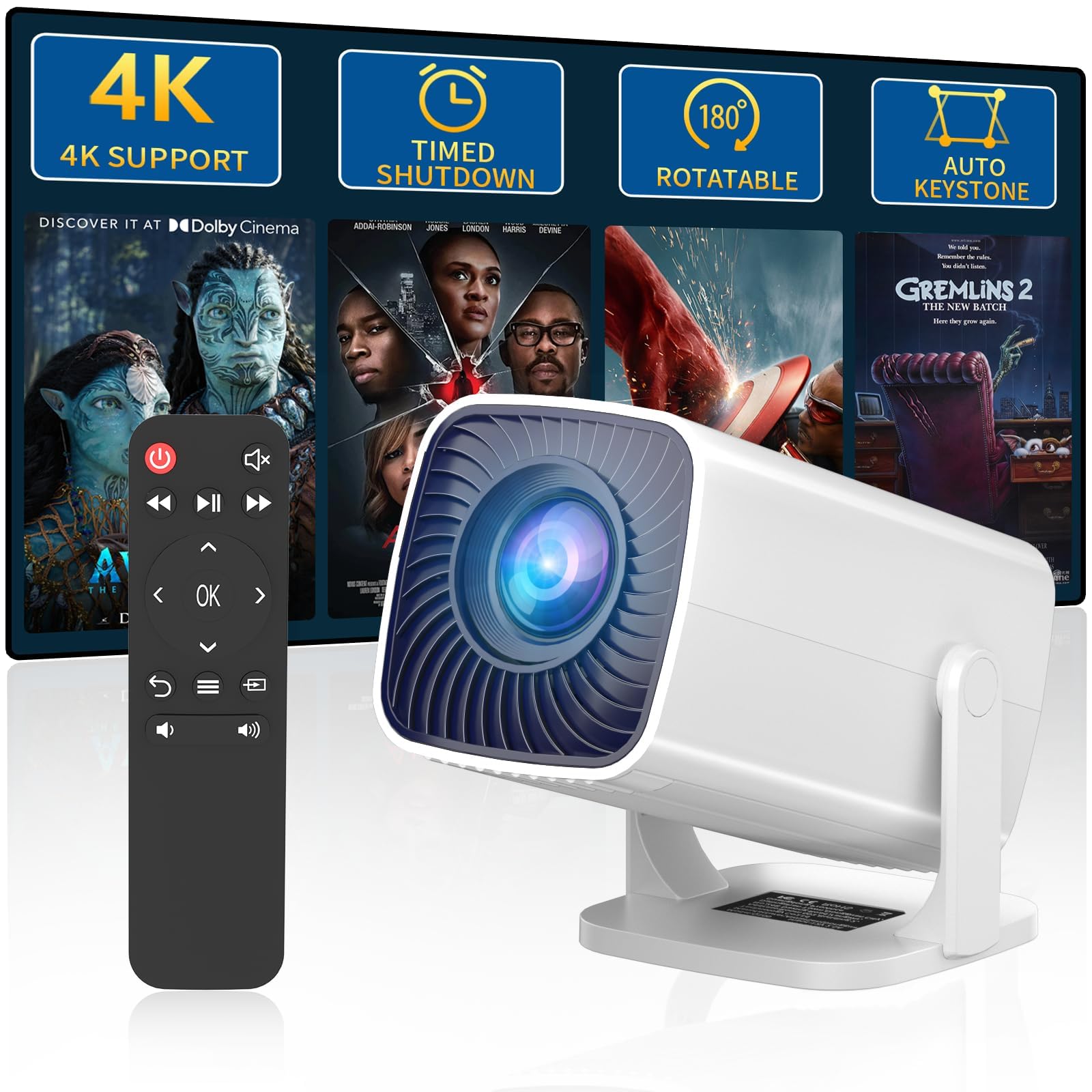
Image 1.1: The Sucetiho Mini Projector showcasing its cinematic capabilities with key features highlighted.
2. انتهى المنتجview
2.1 الميزات الرئيسية
- تجربة سينمائية: Supports 4K content, delivering up to a 200-inch screen with short-throw projection.
- إعداد سهل: Features a 270° rotatable stand and automatic keystone correction for flexible positioning.
- تصميم مضغوط: Lightweight with a built-in speaker and a long-lasting 50,000-hour LED lamp.
- اتصال متعدد الاستخدامات: HDMI, USB, and AUX ports for direct wired connections to smartphones, TV sticks, laptops, and gaming consoles without requiring Wi-Fi or Bluetooth.
- عالية السطوع: 5000 Lumens for clear images.
2.2 محتويات العبوة
عند تفريغ العبوة، تأكد من وجود جميع العناصر المدرجة أدناه:
- Sucetiho Mini Projector
- جهاز التحكم عن بعد
- كبل AV
- دليل المستخدم (هذا المستند)

الصورة 2.1: تفصيلية view of the Sucetiho Mini Projector, highlighting its design and port layout.
3. الإعداد
3.1 التنسيب
Position the projector on a stable, flat surface. The 270° rotatable stand allows for flexible projection angles, including walls, ceilings, or tables. Ensure there is adequate ventilation around the projector.

Image 3.1: The projector's flexible stand allows for projection at various angles, from 0° to 180°.
3.2 توصيل الطاقة
Connect the power adapter to the projector's power input port, then plug the adapter into a standard electrical outlet.
3.3 التعديلات الأولية
- التركيز اليدوي: قم بتدوير حلقة التركيز الموجودة على عدسة جهاز العرض حتى تظهر الصورة حادة وواضحة.
- تصحيح الانحراف التلقائي: The projector features automatic keystone correction to adjust the image shape if the projector is not perfectly perpendicular to the screen.

Image 3.2: Features like auto keystone correction and manual focus simplify initial setup.
4. التشغيل
4.1 تشغيل/إيقاف التشغيل
- تشغيل الطاقة: اضغط على زر الطاقة الموجود بجهاز العرض أو جهاز التحكم عن بُعد.
- إيقاف التشغيل: اضغط على زر التشغيل مرة أخرى. سيبدأ جهاز العرض عملية إيقاف التشغيل.
4.2 توصيل الأجهزة
يدعم جهاز العرض العديد من التوصيلات السلكية:
- منفذ HDMI: Connect TV sticks, gaming consoles, laptops, or other HDMI-enabled devices using an HDMI cable.
- منفذ USB: Connect smartphones, tablets, or laptops using a compatible USB cable for direct mirroring.
- منفذ AUX: Use a 3.5mm audio cable to connect external speakers or headphones.
4.3 اختيار المصدر
After connecting a device, use the remote control or the projector's control panel to select the appropriate input source (HDMI, USB).
4.4 ضبط الإسقاط
- حجم العرض: The projector can display images from 50 to 200 inches. Adjust the distance from the projection surface to change the screen size.
- ركز: Fine-tune the focus using the manual focus ring if the image appears blurry.

Image 4.1: The projector can achieve a screen size of up to 200 inches, depending on placement distance.

Image 4.2: The projector is suitable for various environments, including outdoor, indoor, and home theater use.
5. الصيانة
5.1 تنظيف العدسة
Use a soft, lint-free cloth specifically designed for optical lenses to gently wipe the projector lens. Avoid using abrasive cleaners or excessive force.
5.2 تنظيف فتحات التهوية
Regularly check and clean the air vents to prevent dust buildup, which can affect performance and lead to overheating. Use a soft brush or compressed air to remove dust.
5.3 التخزين
When not in use, store the projector in a cool, dry place, away from direct sunlight and extreme temperatures. Use the original packaging or a protective case to prevent dust and damage.
6. استكشاف الأخطاء وإصلاحها
6.1 لا يوجد طاقة
- تأكد من توصيل كابل الطاقة بشكل آمن بكل من جهاز العرض ومأخذ الطاقة.
- تأكد من أن منفذ الطاقة يعمل.
6.2 لا توجد صورة
- Check that the input source selected on the projector matches the connected device (e.g., HDMI 1, USB).
- تأكد من أن الجهاز المتصل قيد التشغيل ويرسل إشارة.
- Verify the connection cables are securely plugged in.
6.3 صورة ضبابية
- Adjust the manual focus ring on the lens until the image is clear.
- تأكد من وضع جهاز العرض على مسافة مناسبة من الشاشة.
6.4 لا يوجد صوت
- تحقق من إعدادات مستوى الصوت على كل من جهاز العرض والجهاز المتصل.
- في حالة استخدام مكبرات صوت خارجية، تأكد من توصيلها بشكل صحيح بمنفذ AUX وتشغيلها.
6.5 جهاز التحكم عن بعد لا يعمل
- استبدال البطاريات في جهاز التحكم عن بعد.
- تأكد من عدم وجود أي عوائق بين جهاز التحكم عن بعد وجهاز استقبال الأشعة تحت الحمراء الخاص بجهاز العرض.
7. المواصفات
| ميزة | مواصفة |
|---|---|
| ماركة | Sucetiho |
| الاستخدامات الموصى بها | الأعمال، التعليم، الألعاب، السينما المنزلية |
| المميزات الخاصة | Built-In Speaker, Digital Keystone Correction, Lightweight, Portable, Short Throw |
| تكنولوجيا الاتصال | اتش دي ام اي، يو اس بي |
| الدقة الأصلية | 800 × 600 بكسل |
| الحد الأقصى لدقة العرض | 800 x 600 Pixels (4K Supported Input) |
| نوع العرض | شاشة الكريستال السائل |
| عامل الشكل | محمول |
| نوع التركيب | جبل منضدية |
| لومن | 5000 لومن |
| لون | أبيض |
| نوع وحدة التحكم | جهاز التحكم عن بعد |
| الأجهزة المتوافقة | Gaming Console, Laptop, Smartphone, Tablet, Television |
| نسبة التباين | 20000:1 |
| أقصى مسافة للرمي | 14.8 أقدام |
| عمر تشغيل مصدر الضوء | 50000 ساعة |
| الربط الأجهزة | بلوتوث، HDMI، USB |
| الحد الأدنى لمسافة الرمي | 3.7 أقدام |
| أبعاد العنصر (الطول × العرض × الارتفاع) | 13 طول × 10.4 عرض × 17 ارتفاع بالسنتيمتر |
8. الضمان والدعم
For warranty information and technical support, please refer to the contact details provided with your purchase documentation or visit the official Sucetiho webالموقع. احتفظ بإيصال الشراء كإثبات للشراء.