1. المقدمة
This manual provides essential information for the safe and efficient use of your Philips B4000 Soundbar. Please read these instructions carefully before using the product and retain them for future reference. The Philips B4000 Soundbar is designed to enhance your television's audio experience with clear 2.0 channel sound and versatile connectivity options.

Image: The Philips B4000 Soundbar, its remote control, and a television displaying colorful content, illustrating the product in use.
2. محتويات العبوة
تأكد من وجود جميع العناصر في الحزمة الخاصة بك:
- Philips B4000 Soundbar
- جهاز التحكم عن بعد
- 2 × بطاريات AAA (للتحكم عن بعد)
- جدار جبل بين قوسين
- دليل البدء السريع
- بطاقة الضمان
3. انتهى المنتجview
The Philips B4000 Soundbar features a compact design with integrated speakers and various input options for seamless integration with your home entertainment system.

Image: The Philips B4000 Soundbar positioned below a television in a living room, emphasizing its 2.0 channel audio, 60W maximum output power, and dual full-range speakers.
4. الإعداد والتثبيت
4.1 خيارات التنسيب
The soundbar offers flexible placement to suit your setup:
- وضع حامل التلفاز: Place the soundbar on a flat surface directly in front of your TV. Ensure it does not obstruct the TV's remote sensor.
- جدار جبل: Use the included wall mount brackets to attach the soundbar to the wall below your TV. Refer to the Quick Start Guide for detailed wall mounting instructions.
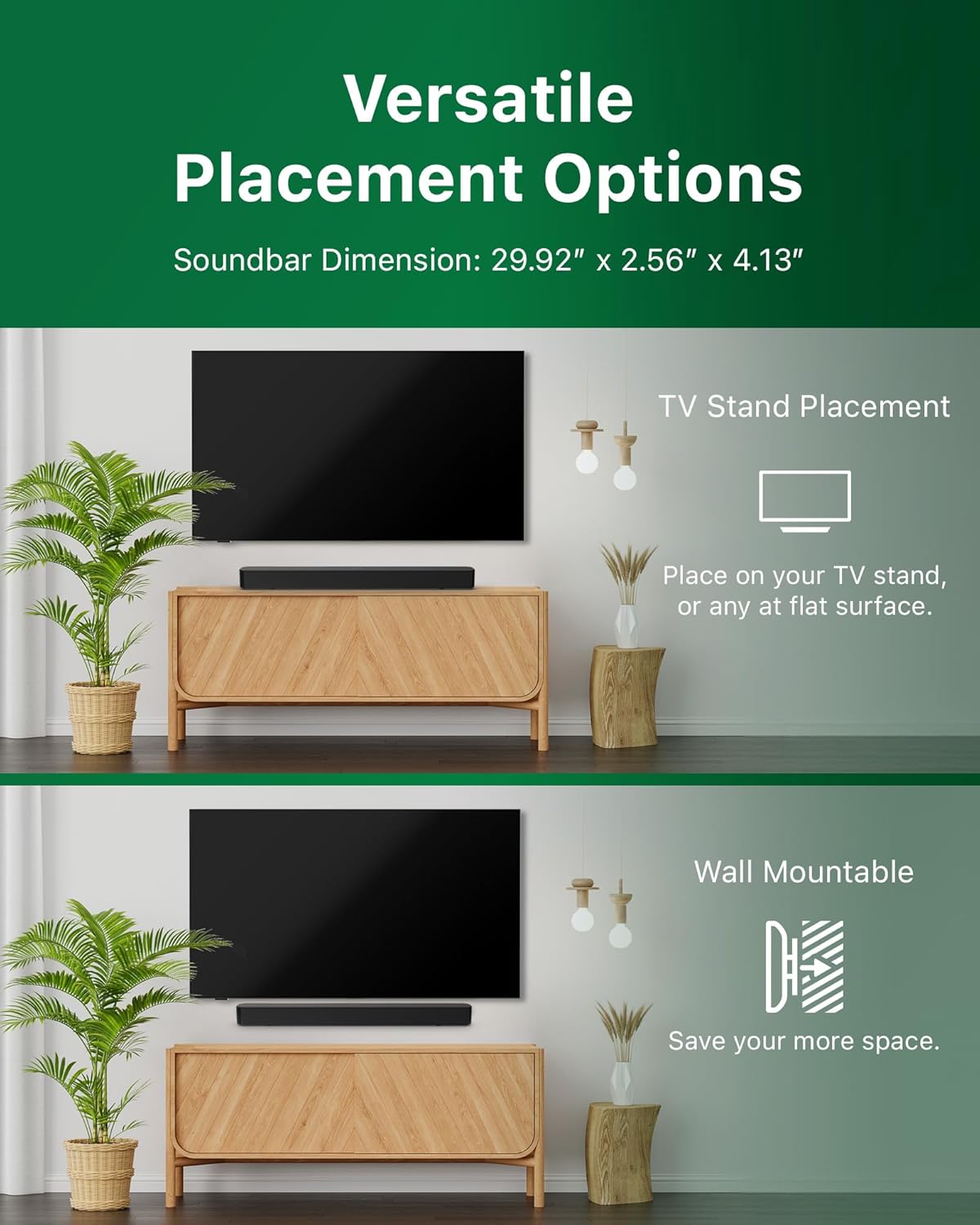
Image: Illustrations demonstrating the two primary placement methods for the soundbar: resting on a TV stand and securely mounted on a wall.
4.2 الاتصال بالتلفزيون الخاص بك
The soundbar supports multiple connection types:
- HDMI ARC (مستحسن): Connect an HDMI cable (not included) from the HDMI ARC port on your TV to the HDMI ARC port on the soundbar. This allows for audio return and control via your TV remote.
- بلوتوث: For wireless audio streaming, pair your soundbar with a Bluetooth-enabled device.
- USB: Connect a USB device for audio playback.
- التيار المباشر الداخل: قم بتوصيل محول الطاقة بمنفذ DC IN.

Image: A visual representation of the soundbar's available audio input ports, including HDMI (ARC), USB, Bluetooth, and DC IN for power.
4.3 Roku TV Ready Setup
The Philips B4000 Soundbar is Roku TV Ready certified, simplifying setup and control when paired with a Roku TV.
- Connect the soundbar to your Roku TV via HDMI ARC.
- Your Roku TV should automatically detect and configure the soundbar.
- Use your Roku TV remote to control the soundbar's power and volume.

Image: The Philips B4000 Soundbar seamlessly integrated with a television, illustrating its 'Roku TV Ready' certification for simplified setup and control.
4.4 إعداد جهاز التحكم عن بعد
Insert the two included AAA batteries into the remote control, ensuring correct polarity.
5. التشغيل
5.1 تشغيل/إيقاف التشغيل
اضغط على زر الطاقة الموجود على مكبر الصوت أو جهاز التحكم عن بعد لتشغيل الوحدة أو إيقاف تشغيلها.
5.2 اختيار المدخلات
Press the 'Source' button on the remote control to cycle through available input sources (HDMI ARC, Bluetooth, USB).
5.3 التحكم في مستوى الصوت
Use the 'Volume Up' and 'Volume Down' buttons on the remote control to adjust the audio level. If connected via HDMI ARC to a Roku TV, your TV remote may also control the volume.
5.4 اقتران بلوتوث
- Press the 'Bluetooth' button on the remote control to enter Bluetooth pairing mode. The indicator light on the soundbar will flash.
- On your mobile device, search for Bluetooth devices and select 'Philips B4000'.
- Once paired, the indicator light will become solid, and you can stream audio wirelessly.
5.5 أوضاع الصوت ومعادل الصوت
The soundbar may offer various sound modes or equalizer settings to optimize audio for different content types (e.g., Movie, Music, News). Use the remote control to access and adjust these settings. While specific equalizer details are not extensively documented, experimentation with available settings is encouraged to find your preferred audio profile.

Image: The Philips soundbar remote control in the foreground, with a television screen in the background displaying the EasyLink 2.0 menu for adjusting sound styles, including Bass, Treble, and Custom Equalize options.
6. الصيانة
لضمان طول العمر والأداء الأمثل لشريط الصوت الخاص بك، اتبع إرشادات الصيانة التالية:
- تنظيف: استخدم قطعة قماش ناعمة وجافة لتنظيف سطح مكبر الصوت. تجنب استخدام المنظفات السائلة أو المواد الكاشطة، لأنها قد تُتلف الطلاء.
- تهوية: تأكد من عدم انسداد فتحات التهوية في مكبر الصوت. فالتدفق الجيد للهواء يمنع ارتفاع درجة الحرارة.
- تخزين: إذا كنت ترغب في تخزين شريط الصوت لفترة طويلة، فافصله عن الطاقة وقم بتخزينه في مكان بارد وجاف.
7. استكشاف الأخطاء وإصلاحها
If you encounter issues with your Philips B4000 Soundbar, refer to the following common problems and solutions:
| مشكلة | السبب المحتمل | حل |
|---|---|---|
| لا يوجد صوت من شريط الصوت |
|
|
| صوت ثابت أو مشوه |
|
|
| مشاكل اقتران البلوتوث |
|
|
| جهاز التحكم عن بعد لا يعمل |
|
|
8. المواصفات
| ميزة | التفاصيل |
|---|---|
| اسم الموديل | TAB4000 / 37 |
| نوع السماعة | شريط الصوت |
| تكوين قناة الصوت المحيطي | 2.0 |
| الحد الأقصى لقوة خرج السماعة | 60 واط |
| تكنولوجيا الاتصال | Bluetooth (5.4), HDMI ARC, USB |
| المميزات الخاصة | Advanced Bluetooth 5.4 Connectivity, Bass Boost, Roku TV Ready™ Certification, Wall mountable |
| أبعاد المنتج | 4.1 بوصة عمق × 30 بوصة عرض × 2.56 بوصة ارتفاع |
| وزن العنصر | 4.89 جنيه (2.22 كيلوجرام) |
| مصدر الطاقة | Battery Powered (for remote), AC Power (for soundbar) |
| حجم الإدخالtage | 120 فولت |
| المكونات المضمنة | Battery, Quick Start Guide, Remote, Wall Mount Bracket, Warranty Card |
9. الضمان والدعم
9.1 معلومات الضمان
The Philips B4000 Soundbar comes with a Limited Warranty. Please refer to the included Warranty Card for specific terms, conditions, and duration of coverage. Retain your proof of purchase for warranty claims.
9.2 دعم العملاء
لمزيد من المساعدة أو الدعم الفني أو استفسارات الخدمة، يرجى زيارة موقع دعم Philips الرسمي website or contact their customer service. Contact details can typically be found on the Philips webالموقع أو في دليل البدء السريع.


