
1. المقدمة
This manual provides essential instructions for the safe and efficient operation, maintenance, and troubleshooting of your DREAME L50 Ultra Robot Vacuum and Mop. Please read this manual thoroughly before using the product and retain it for future reference.
2. معلومات السلامة
To reduce the risk of injury or damage, read and follow all safety precautions when setting up, using, and maintaining your robot. This appliance can be used by children aged 8 years and above and persons with reduced physical, sensory or mental capabilities or lack of experience and knowledge if they have been given supervision or instruction concerning use of the appliance in a safe way and understand the hazards involved. Children shall not play with the appliance. Cleaning and user maintenance shall not be made by children without supervision.
- تأكد من شحن الروبوت بالكامل قبل الاستخدام الأول.
- لا تستخدم الروبوت في البيئات الرطبة أو بالقرب من الماء.
- Remove loose cables, small objects, and fragile items from the floor before cleaning.
- احتفظ بالشعر والملابس الفضفاضة والأصابع وجميع أجزاء الجسم بعيدًا عن الفتحات والأجزاء المتحركة.
- Do not operate the robot in areas where there are open flames or explosive materials.
- استخدم فقط محول الطاقة وقاعدة الشحن المحددة من قبل الشركة المصنعة.
- Do not use the robot to pick up large debris, broken glass, or corrosive liquids.
3. محتويات العبوة
تأكد من وجود جميع العناصر وأنها في حالة جيدة عند فتح العلبة.

صورة: All components included in the DREAME L50 Ultra package. This includes the robot vacuum, base station, various brushes, mop pads, cleaning solution, and documentation.
- مكنسة روبوتية عدد 1
- محطة قاعدة x1
- فرشاة رئيسية (مثبتة مسبقًا) × 1
- واقي الفرشاة (مثبت مسبقًا) × 1
- فرشاة جانبية (مثبتة مسبقًا) × 1
- Scale Inhibitor (pre-installed) x1
- Dust Bags (pre-installed) x2
- حاملان لقماش الممسحة × 2
- قطعتان من وسادات الممسحة
- صندوق الغبار (مثبت مسبقًا، بما في ذلك الفلتر) × 1
- محلول تنظيف 200 مل × 1
- المحطة الأساسية رamp تمديد x1
- دليل البدء السريع x1
- دليل المستخدم x1
4. انتهى المنتجview
The DREAME L50 Ultra is an advanced robot vacuum and mop designed for comprehensive floor cleaning. It features powerful suction, intelligent navigation, and an all-in-one PowerDock for automated maintenance.

صورة: The DREAME L50 Ultra robot vacuum docked with its white base station, alongside a smartphone displaying the companion app icon.
المميزات الرئيسية:
- 19,500Pa Vormax Suction: Powerful suction for effective debris pickup.
- فرشاة فك التشابك المزدوجة HyperStream: Bristled rubber brush and TPU rubber brush for efficient hair removal and tangle prevention.
- ProLeap System: Retractable legs for seamless crossing over door tracks and thresholds up to 6cm.
- AI Action and 3D Structured Light: Precise obstacle avoidance for over 180 types of objects.
- Dual Flex Arm Technology: Extendable side brush and mop for comprehensive edge-to-corner cleaning.
- All-in-One PowerDock: Features auto-empty (up to 100 days), hot water mop self-cleaning, hot air drying, auto solution refilling, and auto water tank refilling.
- Customizable Carpet Cleaning: 5 modes via the Dreamehome App for tailored carpet care.
- On-Demand Voice Control: Compatible with Alexa, Siri, and Google Assistant.
5. الإعداد
5.1 فك الصندوق والوضع الأولي
Carefully remove all components from the packaging. Place the base station on a hard, level surface against a wall, ensuring there is adequate clearance around it (at least 0.5m on both sides and 1.5m in front). Connect the power cable to the base station and plug it into a power outlet.
فيديو: A user unboxes the DREAME L50 Ultra, showing the components and initial setup of the robot and its base station. This video demonstrates the physical setup process.
5.2 تثبيت التطبيق والاتصال به
Download the "Dreamehome" app from your smartphone's app store. Follow the in-app instructions to connect your DREAME L50 Ultra to your home Wi-Fi network. This process typically involves scanning a QR code on the robot and following prompts for network selection.
5.3 Filling Water Tanks and Solution
Open the top cover of the base station to access the clean water tank and cleaning solution compartment. Fill the clean water tank with tap water and the solution compartment with the provided DREAME cleaning solution. Ensure both are securely closed before operation.
6. التشغيل
6.1 بدء عملية التنظيف وإيقافها
- يبدأ: Press the power button on the robot or tap "Clean" in the Dreamehome app.
- يوقف: Press the power button during cleaning or tap "Pause" in the app.
- سيرة ذاتية: Press the power button or tap "Resume" in the app.
- العودة إلى الرصيف: Press the home button on the robot or tap "Dock" in the app.
6.2 أوضاع التنظيف
The Dreamehome app allows you to select various cleaning modes:
- الفراغ فقط: للحطام الجاف على جميع أنواع الأرضيات.
- الممسحة فقط: For wet cleaning on hard floors.
- المكنسة الكهربائية والممسحة: التنظيف بالمكنسة الكهربائية والمسح في آن واحد.
- التنظيف المخصص: Define specific areas or rooms for cleaning with adjustable settings.
6.3 Scheduled Cleaning
Set up recurring cleaning tasks through the Dreamehome app. You can specify start times, frequency (daily, weekly, custom), and cleaning parameters for the entire area or specific rooms.
فيديو: This video demonstrates how to set up scheduled cleaning tasks using the Dreamehome app, allowing the robot vacuum to clean automatically at predefined times.
6.4 Obstacle Avoidance and Dynamic Cleaning
The DREAME L50 Ultra utilizes AI Action and 3D structured light for precise obstacle avoidance. It can detect and navigate around over 180 types of objects, including shoes, furniture, and cables.

صورة: A DREAME L50 Ultra robot vacuum navigating around various obstacles like a teddy bear, slippers, and cables, illustrating its smart obstacle detection capabilities.
Enable "Dynamic Obstacle Area Cleaning" in the app settings to allow the robot to remember skipped areas due to dynamic obstacles (like pets or people) and clean them later.
فيديو: This video highlights the Dynamic Replenishment Sweeping Technology, showing how the robot avoids dynamic obstacles and then returns to clean those areas.
6.5 تنظيف الحواف والزوايا
The Dual Flex Arm technology with an extendable side brush and mop ensures thorough cleaning of corners and tight spots. Activate "AI-driven SideReach" and "AI-driven MopExtend" in the app settings for enhanced coverage.

صورة: A DREAME L50 Ultra robot vacuum cleaning along a wall and corner, demonstrating its ability to reach tight spaces with its extendable components.
فيديو: This video illustrates the DREAME robot's corner and edge cleaning feature, showing how it extends its brush and mop to clean along walls and around furniture legs.
6.6 استراتيجيات تنظيف السجاد
Customize carpet cleaning through the Dreamehome app with 5 available modes:
- Removable Mops: Detach mop pads to maintain dry carpets.
- Liftable Mops: Mops lift for low-pile carpets.
- Complete Carpet Avoidance: Robot avoids all carpets.
- Intensive Carpet Cleaning: Vacuums carpets twice for deeper cleaning.
- Suction Boost: Increases suction power on carpets.
6.7 التحكم الصوتي
Manage your cleaning routine using voice commands with Alexa, Siri, or Google Assistant. Link your DREAME L50 Ultra to your preferred voice assistant through the Dreamehome app.
7. الصيانة
Regular maintenance ensures optimal performance and longevity of your DREAME L50 Ultra.
7.1 All-in-One PowerDock Maintenance
- Auto-Empty: The dock automatically empties the robot's dustbin for up to 100 days. Replace the dust bag in the dock when full.
- Mop Self-Cleaning: Mop pads are automatically rinsed with 167°F hot water.
- التجفيف بالهواء الساخن: Mop pads are dried with hot air to prevent odors and mildew.
- Solution & Water Refilling: The dock automatically refills the robot's water tank and cleaning solution.
- Base Station Cleaning: The AceClean DryBoard system helps prevent dirt buildup in the washboard area. Periodically check and clean the washboard filter.
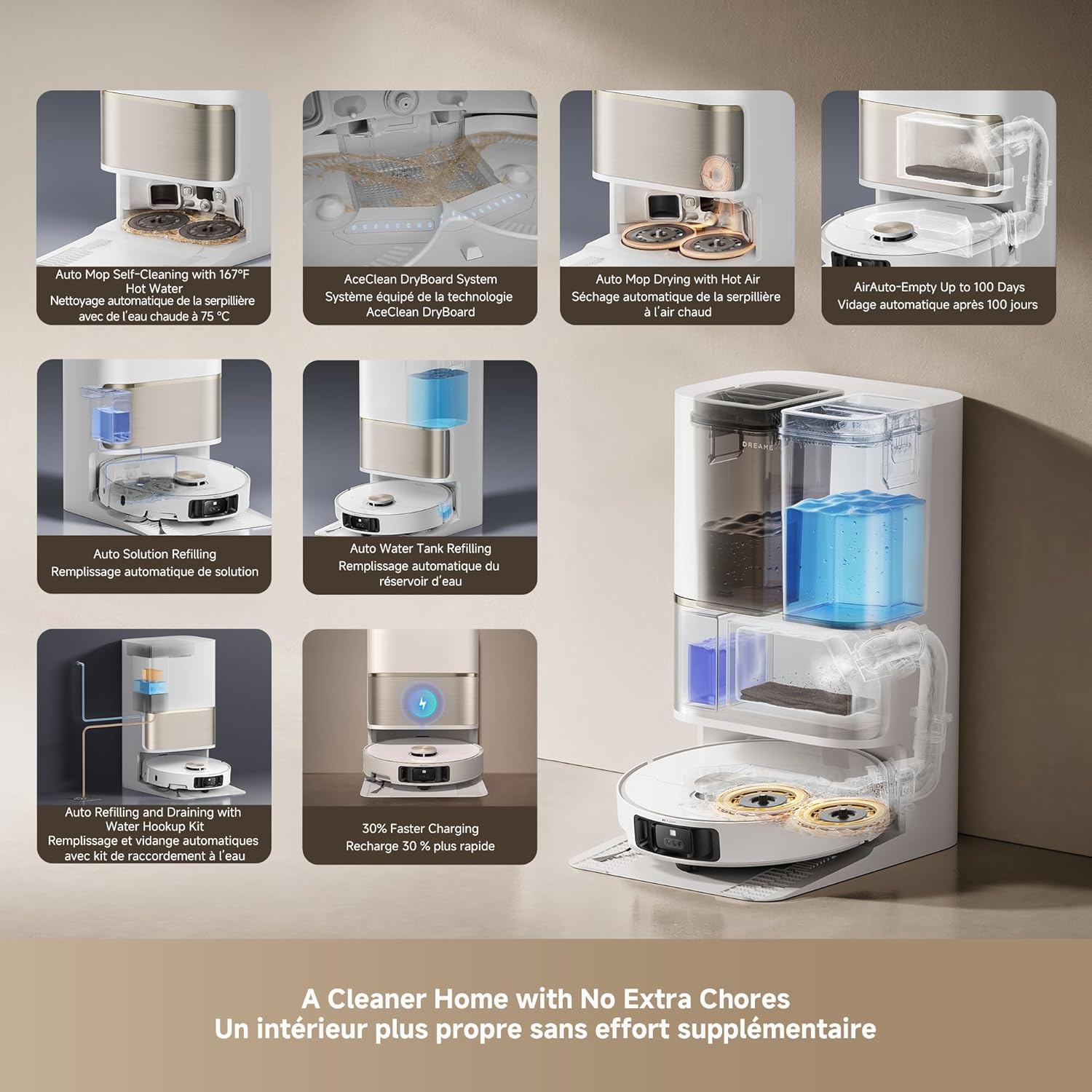
صورة: An infographic detailing the various automated functions of the DREAME L50 Ultra's PowerDock, including auto-empty, mop self-cleaning, hot air drying, and water/solution refilling.
7.2 Robot Vacuum Component Cleaning
- صندوق القمامة: Empty the robot's internal dustbin regularly, especially if not using the auto-empty feature.
- الفرشاة الرئيسية: Remove the main brush and clean any tangled hair or debris. The HyperStream Detangling DuoBrush is designed to minimize tangles.
- فرشاة جانبية: Check for and remove any tangled hair or debris from the side brush.
- المرشحات: Clean the dustbin filter periodically by tapping out debris. Replace as needed.
- أجهزة الاستشعار: Wipe all sensors (cliff sensors, wall sensors, charging contacts) with a clean, dry cloth to ensure proper function.
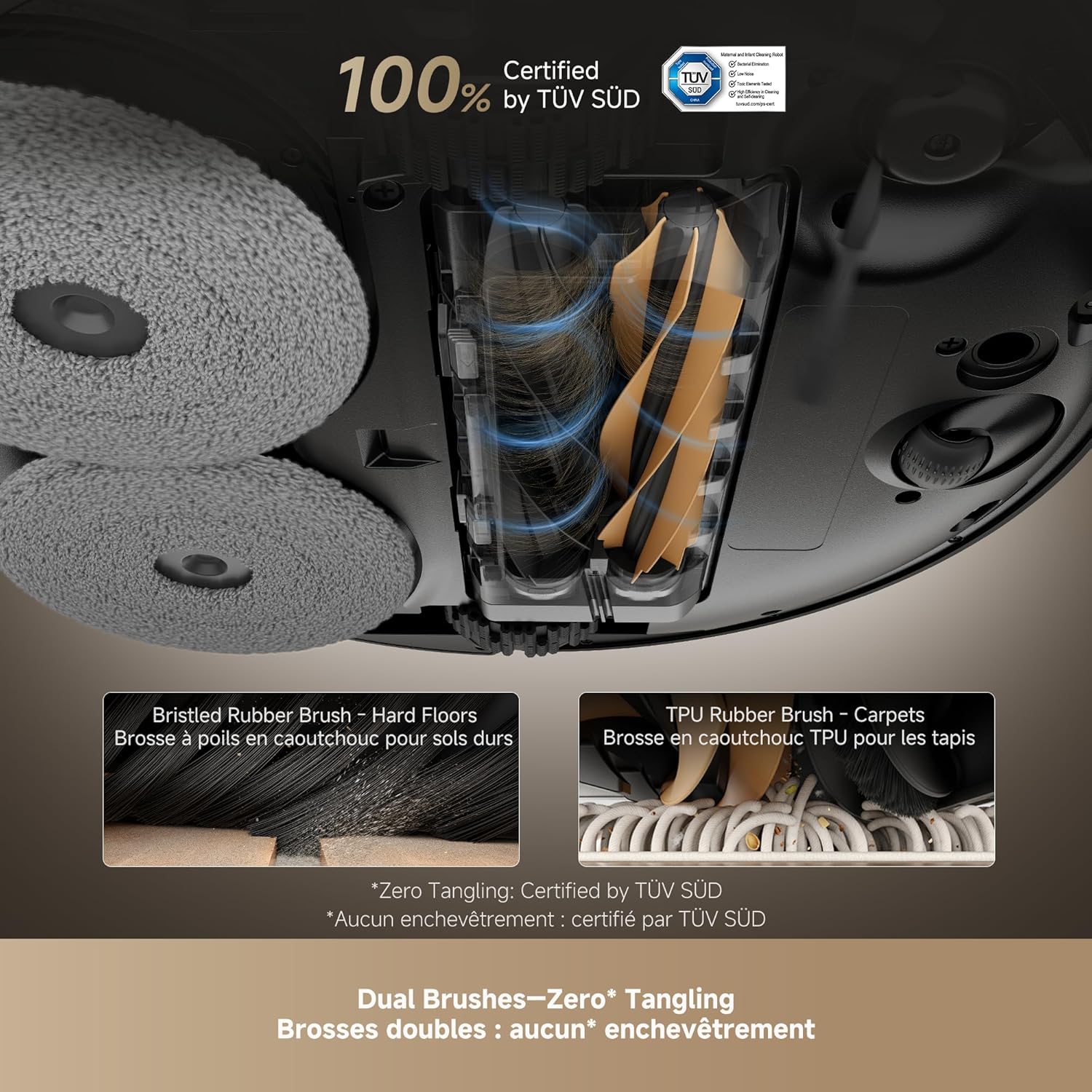
صورة: لقطة مقرّبة view of the DREAME L50 Ultra's dual brush system, showing a bristled rubber brush for hard floors and a TPU rubber brush for carpets, designed for effective hair removal.
فيديو: This video shows the dirty water collected after two mopping cycles, demonstrating the effectiveness of the DREAME L50 Ultra's mopping function.
فيديو: This video measures the sound level of the DREAME L50 Ultra during its self-empty cycle, providing an indication of its operational noise.
8. استكشاف الأخطاء وإصلاحها
If your DREAME L50 Ultra encounters an issue, refer to the following common solutions. For persistent problems, contact customer support.
| مشكلة | السبب المحتمل | حل |
|---|---|---|
| الروبوت لا يعمل. | بطارية منخفضة؛ لم يتم الضغط على زر الطاقة بشكل صحيح. | Place the robot on the charging dock; Press and hold the power button for 3 seconds. |
| لا يمكن للروبوت الشحن. | Charging contacts are dirty; Power cable not connected. | Clean the charging contacts on both the robot and dock; Ensure the power cable is securely plugged in. |
| الروبوت يتعطل بشكل متكرر. | Too many obstacles; Sensors are dirty. | Clear the cleaning area of clutter; Clean all sensors on the robot. |
| أداء التنظيف ضعيف. | سلة المهملات ممتلئة؛ الفرش متشابكة؛ الفلتر مسدود. | Empty the dustbin; Clean the main and side brushes; Clean or replace the filter. |
| لا تنظف وسادات الممسحة بشكل فعال. | Mop pads dirty; Water tank empty; No cleaning solution. | Ensure mop pads are clean; Refill the clean water tank; Refill the cleaning solution. |
| Robot is too loud during self-empty. | التشغيل العادي. | The self-empty function involves powerful suction and is inherently noisy. This is normal. |
8.1 Restarting the Robot
If the robot is unresponsive or behaving erratically, a simple restart may resolve the issue. Press and hold the power button on the robot for a few seconds until it powers off, then press it again to turn it back on.
فيديو: This video demonstrates how to perform a simple restart on the DREAME L50 Ultra robot vacuum by pressing and holding the power button.
8.2 إعادة ضبط المصنع
A factory reset will restore the robot to its original settings and delete all saved maps and Wi-Fi connections. This should be used as a last resort for persistent issues.
- Ensure the robot is powered on.
- افتح الغطاء العلوي للروبوت.
- Locate the small reset button (often a pinhole) near the Wi-Fi indicator.
- Using a small tool (like a SIM ejector tool or paperclip), press and hold the reset button for approximately 5 seconds until you hear a voice prompt confirming the factory reset.
- The robot will then restart with factory settings.
فيديو: This video guides you through the process of performing a factory reset on the DREAME L50 Ultra robot vacuum, including locating the reset button and confirming the reset.
9. المواصفات
| ميزة | التفاصيل |
|---|---|
| ماركة | حلم |
| اسم الموديل | Dreame L50 Ultra White |
| رقم موديل العنصر | رلل94سي اي |
| رمز المنتج الموحد | 810142561310 |
| لون | أبيض |
| أبعاد المنتج | 17 بوصة طول × 16 بوصة عرض × 27 بوصة ارتفاع |
| وزن العنصر | 42.1 رطل |
| قوة الشفط | قوة شفط فورماكس 19,500 باسكال |
| عمر البطارية | 180 دقائق |
| المجلدtage | 110 فولت |
| طريقة التحكم | التطبيق، البعيد، الصوت |
| نوع الفلتر | رغوة |
| توصية السطح | Wood, Marble, Tile |
10. الضمان والدعم
DREAME products are covered by a limited warranty from the date of purchase. For specific warranty terms and conditions, please refer to the warranty card included in your package or visit the official DREAME webموقع.
دعم العملاء:
If you have any questions, require technical assistance, or need to report an issue, please contact DREAME customer support through the following channels:
- رسمي Webموقع: Visit the DREAME official webالموقع الخاص بالأسئلة الشائعة وموارد الدعم ومعلومات الاتصال.
- تطبيق دريم هوم: Access support directly through the app's help section.
- البريد الإلكتروني/رقم الهاتف: Refer to your product's quick start guide or the official webالموقع للحصول على تفاصيل الاتصال المحددة في منطقتك.
Please have your product model number (RLL94CE) and purchase information ready when contacting support.