
1. المقدمة
This manual provides detailed instructions for the installation, operation, and maintenance of your RSNAVI Android Car Stereo. This unit is designed to integrate advanced multimedia and navigation features into your Chrysler Grand Voyager (2011-2015 model years).
Please read this manual thoroughly before installation and use to ensure proper functionality and to maximize your experience with the device.

الشكل 1.1: RSNAVI Android Car Stereo with included accessories.
This image displays the RSNAVI 9-inch Android Car Stereo unit integrated into a vehicle's dashboard, specifically designed for the Chrysler Grand Voyager. Surrounding the main unit are various accessories: a rearview camera for enhanced visibility, an external microphone for clear audio input during calls, and a cooling fan to maintain optimal operating temperature. The screen shows a map interface and various application icons, indicating its multimedia and navigation capabilities.
2. Compatibility and Package Contents
2.1 توافق المركبات
This RSNAVI Android Car Stereo is specifically designed for the Chrysler Grand Voyager manufactured between 2011 و 2015. Before installation, confirm the year, size, and shape of your vehicle's center console to ensure proper fitment.
2.2 محتويات العبوة
تتضمن الحزمة القياسية المكونات التالية:
- RSNAVI Android Car Stereo Head Unit
- فك تشفير كانبوس
- سلك الطاقة
- RCA كابل
- هوائي الراديو
- هوائي نظام تحديد المواقع العالمي (GPS)
- USB Cables (Dual USB interface)
- ميكروفون خارجي
- مؤخرةview Camera (AHD/CVBS compatible)
- Installation Frame (if applicable for specific models)
3. الإعداد والتثبيت
3.1 فحص التثبيت المسبق
- Ensure the vehicle's ignition is off and the battery is disconnected before starting any electrical work.
- تأكد من وجود جميع المكونات المدرجة في القسم 2.2.
- Familiarize yourself with your vehicle's dashboard removal process. Online video tutorials specific to the Chrysler Grand Voyager 2011-2015 can be helpful.
3.2 الأسلاك والتوصيلات
The car stereo comes with dedicated wiring harnesses designed for your vehicle. Connect the power cord, RCA cables, radio antenna, GPS antenna, USB cables, external microphone, and rearview camera to their respective ports on the head unit and to the vehicle's wiring system.
- سلك الطاقة: Connect to the vehicle's power supply, ensuring correct polarity. The included Canbus decoder facilitates integration with vehicle systems.
- كابلات RCA: For audio/video input/output connections (e.g., external amplifier, additional monitors).
- هوائيات: Connect the radio antenna for FM/RDS reception and the GPS antenna for navigation functionality. Position the GPS antenna in a location with a clear view من السماء.
- واجهات يو اس بي: Use the dual USB interfaces for connecting USB drives, charging devices, or for wired CarPlay/Android Auto connections.
- ميكروفون خارجي: Connect for improved call quality and voice commands.
- مؤخرةview آلة تصوير: Connect the camera to the 'Inverted Input' (AHD/CVBS) port. Ensure proper routing of the camera cable to the rear of the vehicle.

الشكل 3.1: Included wiring harness and installation frame.
This image displays the specific wiring harness and a custom-fit frame provided with the RSNAVI car stereo. The harness includes various connectors for power, speakers, and data, designed to integrate seamlessly with the Chrysler Grand Voyager's electrical system. The frame ensures a flush and secure installation of the 9-inch head unit into the vehicle's dashboard opening.

الشكل 3.2: Dashboard before and after stereo installation.
This image set illustrates the visual transformation of a Chrysler Grand Voyager dashboard. The top-left panel shows the original factory radio. The other panels demonstrate the RSNAVI Android Car Stereo installed, displaying various interfaces such as a navigation map, a media player, and the main application screen, highlighting the integrated appearance and functionality.
3.3 فحوصات ما بعد التثبيت
- أعد توصيل بطارية السيارة.
- Turn on the ignition and power on the head unit.
- Test all functions: radio, Bluetooth, GPS, USB, steering wheel controls, and rearview آلة تصوير.
- If any issues arise, refer to the Troubleshooting section or recheck connections.
4. تعليمات التشغيل
4.1 انتهى النظامview
The RSNAVI car stereo operates on an Android system, providing a familiar and customizable user interface via its 9-inch touchscreen. The system supports various applications and features, similar to a smartphone or tablet.
4.2 CarPlay اللاسلكي / Android Auto
Connect your smartphone wirelessly to access Apple CarPlay or Android Auto. This feature allows for hands-free calls, access to phone contacts, emails, notifications, map navigation, music, and video playback directly on the car stereo display. This integration is designed to enhance driving safety by minimizing phone interaction.
- تأكد من تمكين Bluetooth وWi-Fi على هاتفك الذكي.
- افتح تطبيق CarPlay أو Android Auto على جهاز ستيريو السيارة.
- اتبع التعليمات التي تظهر على الشاشة لإقران جهازك.
- بمجرد الاتصال، ستظهر التطبيقات المتوافقة مع هاتفك على شاشة الاستريو.

الشكل 4.1: CarPlay, Android Auto, and Mirror Link interfaces.
This image illustrates the various smartphone integration options available with the RSNAVI car stereo. It shows the user interfaces for Wireless CarPlay and Android Auto, displaying familiar app icons for navigation, music, and communication. Additionally, it demonstrates the Mirror Link function, which allows the display of an iOS or Android phone screen directly onto the car stereo, enabling full control of the phone's interface.
4.3 ملاحة GPS
The unit features a dual navigation system supporting both offline and online maps. A built-in offline map is provided, but internet data download is required for initial setup or updates. Online maps require a Wi-Fi connection.
- تأكد من تركيب هوائي نظام تحديد المواقع العالمي (GPS) بشكل صحيح وأن الإشارة واضحة.
- To use offline maps, navigate to the map application and download the necessary regional data via a Wi-Fi connection.
- For online navigation, connect the unit to a Wi-Fi hotspot.
4.4 اتصال واي فاي
Connect the car stereo to a Wi-Fi hotspot (e.g., from your smartphone) to access online features. This enables app installation from the Play Store, online navigation, and streaming media.
- Go to the system settings and select 'Wi-Fi'.
- قم بتشغيل الواي فاي واختر الشبكة التي تريدها.
- أدخل كلمة المرور إذا طُلب منك ذلك.

الشكل 4.2: GPS Navigation and WiFi Hotspot features.
This image highlights the navigation and connectivity capabilities of the RSNAVI car stereo. The top section displays a detailed GPS map with route guidance, indicating distance and estimated travel time. The bottom section illustrates the WiFi Hotspot feature, showing a screen filled with various streaming applications like Netflix, Hulu, and YouTube, demonstrating the unit's ability to access online content when connected to a network.
4.5 وظيفة البلوتوث
The integrated Bluetooth module allows for hands-free calling, phone book synchronization, and audio streaming from your smartphone.
- قم بتمكين تقنية Bluetooth على هاتفك الذكي واجعلها قابلة للاكتشاف.
- On the car stereo, open the Bluetooth application and search for devices.
- اختر هاتفك من القائمة وقم بتأكيد رمز الاقتران.
- Once paired, you can make/receive calls and play music wirelessly.
راديو 4.6 FM/RDS
The unit includes an FM/RDS radio tuner for clear channel reception and low noise. RDS (Radio Data System) provides additional information such as station name and program type.
- Open the Radio application.
- Use the scan function to automatically find and save available stations.
- Manually tune to frequencies or select from saved presets.
4.7 مُعادل الصوت (EQ)
Adjust the audio output using the built-in equalizer to customize the sound profile. This includes settings for bass, treble, and mid-range frequencies, as well as various sound field modes.
- Access the EQ settings from the main menu or audio settings.
- Select a preset or manually adjust the frequency bands to your preference.
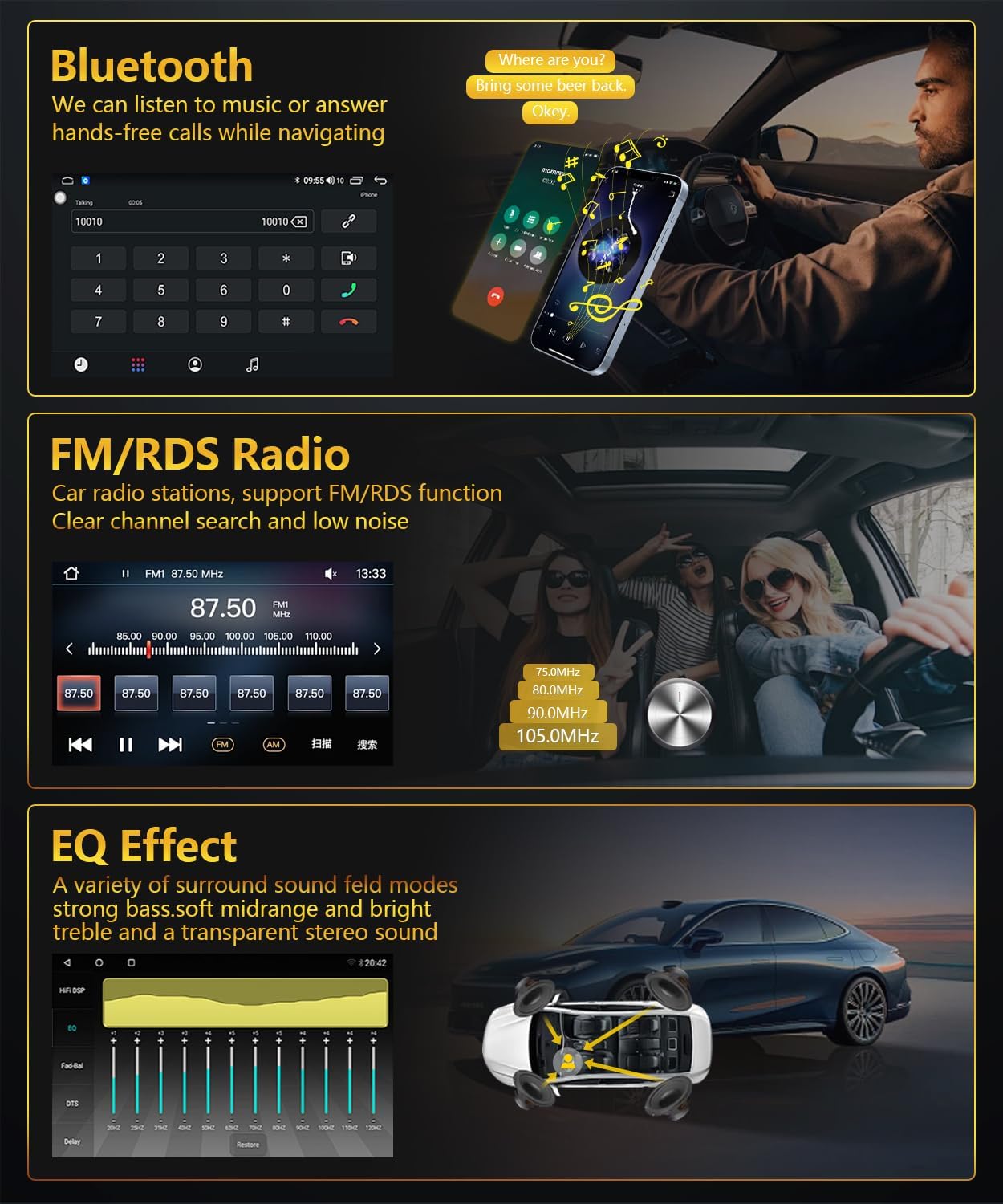
الشكل 4.3: Bluetooth, FM/RDS Radio, and EQ Effect features.
This image showcases three key audio features of the RSNAVI car stereo. The top section displays the Bluetooth calling interface, showing a dial pad and contact information. The middle section illustrates the FM/RDS radio tuner, with frequency display and station presets. The bottom section presents an audio equalizer (EQ) interface, allowing users to fine-tune sound characteristics like bass, mid-range, and treble, accompanied by a diagram showing speaker placement in a car for optimal sound distribution.
4.8 شاشة عرض كاميرا الرجوع للخلف
تدعم الوحدة الجزء الخلفيview camera input. When the vehicle is shifted into reverse gear, the screen automatically switches to display the camera feed, aiding in safe maneuvering. The included camera is waterproof and features night vision and a wide-angle view.
- تأكد من الخلفview camera is correctly installed and connected to the 'Inverted Input'.
- Shift the vehicle into reverse gear; the display will automatically show the camera view.
4.9 التحكم في عجلة القيادة
If your vehicle has original steering wheel control buttons, they can be configured to operate the car radio, providing convenient and safe control while driving.
- Access the 'Steering Wheel Control' settings in the system menu.
- Follow the on-screen instructions to map the vehicle's steering wheel buttons to the desired functions on the car stereo.

الشكل 4.4: Reversing Display and Steering Wheel Control.
This image highlights two important safety and convenience features. The top section illustrates the rearview camera system, detailing its HD image quality, waterproof design, night vision, and wide-angle capabilities, with a visual representation of the camera's field of view. The bottom section displays the car stereo's interface for configuring steering wheel controls, showing various button functions like volume, track skip, and call management, allowing for seamless operation without taking hands off the wheel.
5. الصيانة
5.1 العناية العامة
To ensure the longevity and optimal performance of your car stereo, follow these general maintenance guidelines:
- تنظيف الشاشة: استخدم قطعة قماش ناعمة وخالية من الوبر لمسح شاشة اللمس برفق. لإزالة البقع الصعبة، امسحها برفق.ampامسح القماش بالماء أو بمنظف آمن للشاشات. تجنب المواد الكيميائية القاسية أو المواد الكاشطة.
- إزالة الغبار: Periodically clean dust from the unit's vents and openings using a soft brush or compressed air to prevent overheating.
- درجة حرارة: Avoid exposing the unit to extreme temperatures for extended periods. The operating temperature range is -20℃ to 75℃.
- تحديثات البرامج: Check for available software updates periodically to ensure the system has the latest features and bug fixes.
6. استكشاف الأخطاء وإصلاحها
This section addresses common issues you might encounter with your RSNAVI Android Car Stereo.
6.1 المشكلات والحلول الشائعة
- لا يوجد طاقة:
- تحقق من جميع توصيلات الطاقة والصمامات.
- تأكد من توصيل بطارية السيارة بشكل صحيح.
- لا يوجد صوت:
- تحقق من توصيلات السماعات.
- تحقق من مستويات الصوت وإعدادات كتم الصوت.
- تأكد من تحديد مصدر الصوت الصحيح.
- فقدان إشارة GPS:
- تأكد من توصيل هوائي نظام تحديد المواقع العالمي (GPS) بشكل آمن ووضعه في مكان ذي رؤية واضحة view من السماء.
- If using offline maps, ensure map data has been fully downloaded.
- مشاكل الاتصال عبر البلوتوث:
- تأكد من تمكين البلوتوث على كل من الاستريو والهاتف.
- احذف عمليات الاقتران السابقة وحاول إعادة الاقتران.
- أعد تشغيل كلا الجهازين.
- Poor UI Responsiveness:
- أغلق التطبيقات الخلفية غير الضرورية.
- قم بإعادة تشغيل النظام.
- عناصر التحكم في عجلة القيادة لا تعمل:
- Verify the Canbus decoder is correctly installed.
- Reconfigure the steering wheel control settings in the system menu.
6.2 إعدادات المصنع
If persistent issues occur, a factory reset may resolve them. The factory setting keyword is 3368. Use this option with caution as it will erase all user data and settings.
7. المواصفات
| ميزة | مواصفة |
|---|---|
| نظام | أندرويد |
| مجموعة الشرائح | UIS81411 |
| حجم الشاشة | 9 بوصة |
| الذاكرة (RAM + ROM) | 2 جيجابايت (رام) + 64 جيجابايت (روم) |
| دقة الشاشة | 1280*720 |
| شريحة الراديو | جامعة إلينوي في سبرينغفيلد |
| انتاج الطاقة | 4 × 45 واط |
| درجة حرارة التشغيل | -20 درجة مئوية إلى 75 درجة مئوية |
| قوة Ampرقاقة مكبر | تي دي ايه 7388 |
| راديو باند | FM / RDS |
| مخرج الفيديو | مدعوم |
| Inverted Input | AHD/CVBS (Rearview الة تصوير) |
| ميكروفون خارجي | مدعوم |
| تقسيم الشاشة | مدعوم |
| رسم خريطة | Built-in offline map (Internet download data required) |
| واي فاي | مدعوم |
| USB | Dual USB interface |
| تكنولوجيا الاتصال | بلوتوث، يو اس بي، واي فاي |
| وضع إخراج الصوت | ستيريو |
| المكونات المضمنة | Canbus, Car Radio, Power cord, RCA Cable, Radio Antenna |
| أبعاد المنتج | 33.02 × 27 × 11.02 سم؛ 1 كجم |
| رقم الموديل | 4 Core 2G-64G CAM |
8. الضمان ودعم العملاء
RSNAVI is committed to providing quality products and support. Your purchase includes:
- ضمان استرداد الأموال لمدة 30 يومًا: إذا لم تكن راضيًا عن عملية الشراء الخاصة بك، فيمكنك إرجاعها خلال 30 يومًا لاسترداد أموالك بالكامل.
- ضمان 24-Month: The product is covered by a 24-month warranty against manufacturing defects.
- الدعم الفني مدى الحياة: RSNAVI offers lifetime technical assistance for any questions regarding installation or use.
For any questions or assistance, please contact our customer service team via email. We aim to respond and address your concerns within 24 hours.