
Micool DY20PLUS
دليل مستخدم سماعة بلوتوث Micool DY20PLUS الإصدار 5.4
Model: DY20PLUS | Brand: Micool
مقدمة
Thank you for choosing the Micool DY20PLUS Bluetooth Headset V5.4. This manual provides comprehensive instructions to help you set up, operate, and maintain your new headset. Please read this manual carefully before use to ensure optimal performance and longevity of your device.
محتويات الحزمة
- Micool DY20PLUS Bluetooth Headset
- كابل شحن USB-C
- دليل المستخدم
- Multiple Sized Ear Tips (L, M, S)
المنتج انتهىview
Familiarize yourself with the components of your Micool DY20PLUS Bluetooth Headset.
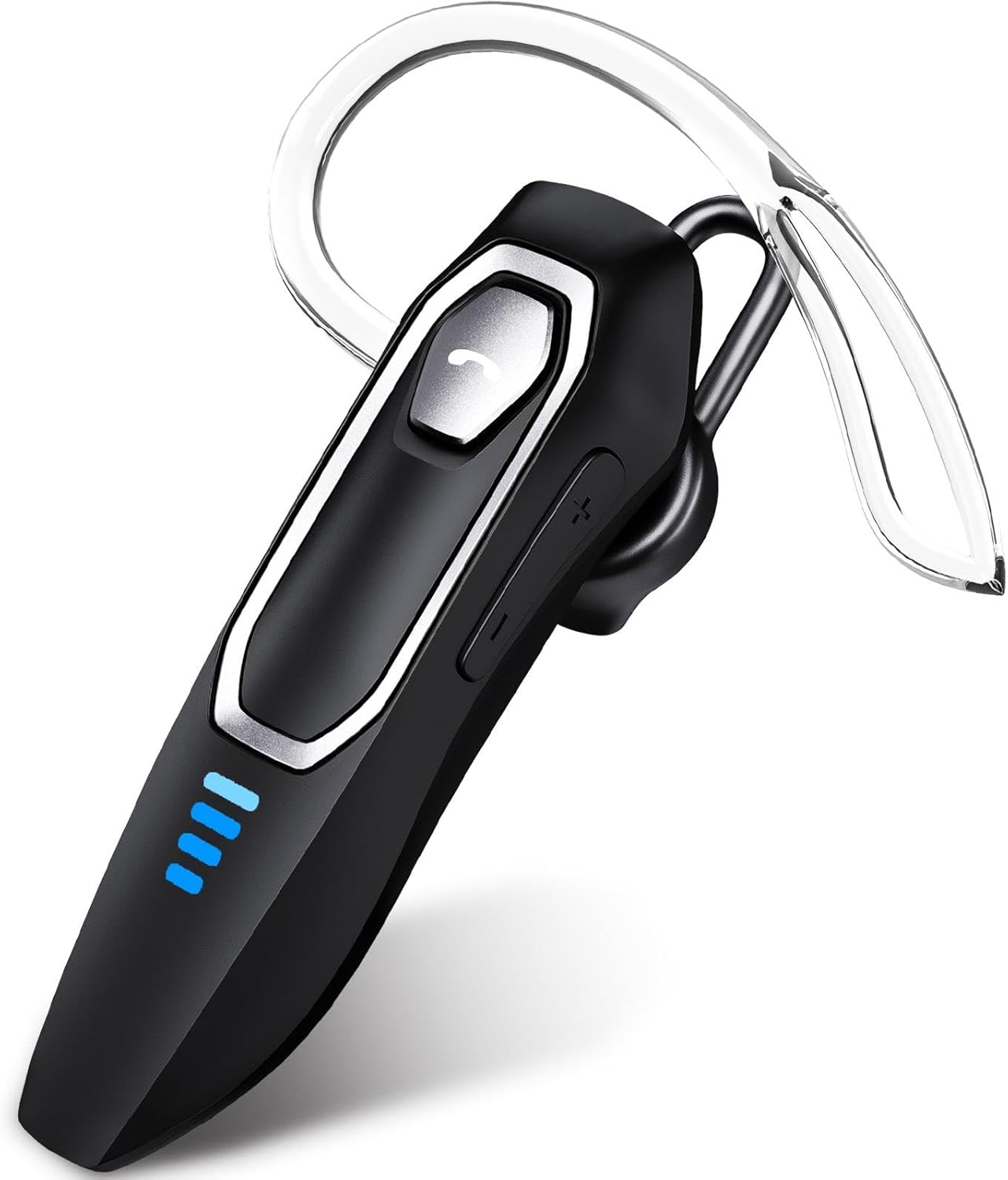
Image 1: Micool DY20PLUS Bluetooth Headset. This image displays the main headset unit, highlighting the call button, volume controls, and LED power indicators.

Image 2: Headset Controls Diagram. This diagram illustrates the Multi-Function Button (MFB) for power, play/pause, and Bluetooth pairing, along with volume controls and mute function.
شحن سماعة الرأس
Before first use, fully charge the headset.
- قم بتوصيل كابل الشحن USB-C المرفق بمنفذ الشحن الموجود على سماعة الرأس.
- قم بتوصيل الطرف الآخر من الكابل بمصدر طاقة USB (مثل الكمبيوتر أو محول الحائط).
- The LED indicators will show charging status. A full charge typically takes 1.5-2 hours.
- Once fully charged, the LED indicators will change or turn off (refer to LED Power Display section for details).
The headset offers up to 36 hours of talk time and 45 hours of music playback on a single charge.
يثبت
تشغيل/إيقاف الطاقة
- تشغيل الطاقة: Press and hold the Multi-Function Button (MFB) for approximately 3 seconds until the LED indicator flashes.
- إيقاف التشغيل: Press and hold the MFB for approximately 3 seconds until the LED indicator turns off.
بلوتوث الاقتران
- تأكد من إيقاف تشغيل سماعة الرأس.
- Press and hold the MFB for approximately 3 seconds until the LED indicator flashes red and blue alternately, indicating pairing mode.
- على جهازك (الهاتف الذكي، الجهاز اللوحي، الكمبيوتر)، قم بتمكين البلوتوث وابحث عن الأجهزة المتاحة.
- Select "DY20PLUS" from the list of found devices.
- بمجرد الاتصال، سيومض مؤشر LED الموجود على سماعة الرأس باللون الأزرق ببطء.
اتصال متعدد النقاط: The DY20PLUS headset can connect to two devices simultaneously. After pairing with the first device, disable Bluetooth on that device. Then, put the headset back into pairing mode and connect to the second device. Re-enable Bluetooth on the first device, and the headset should automatically connect to both.
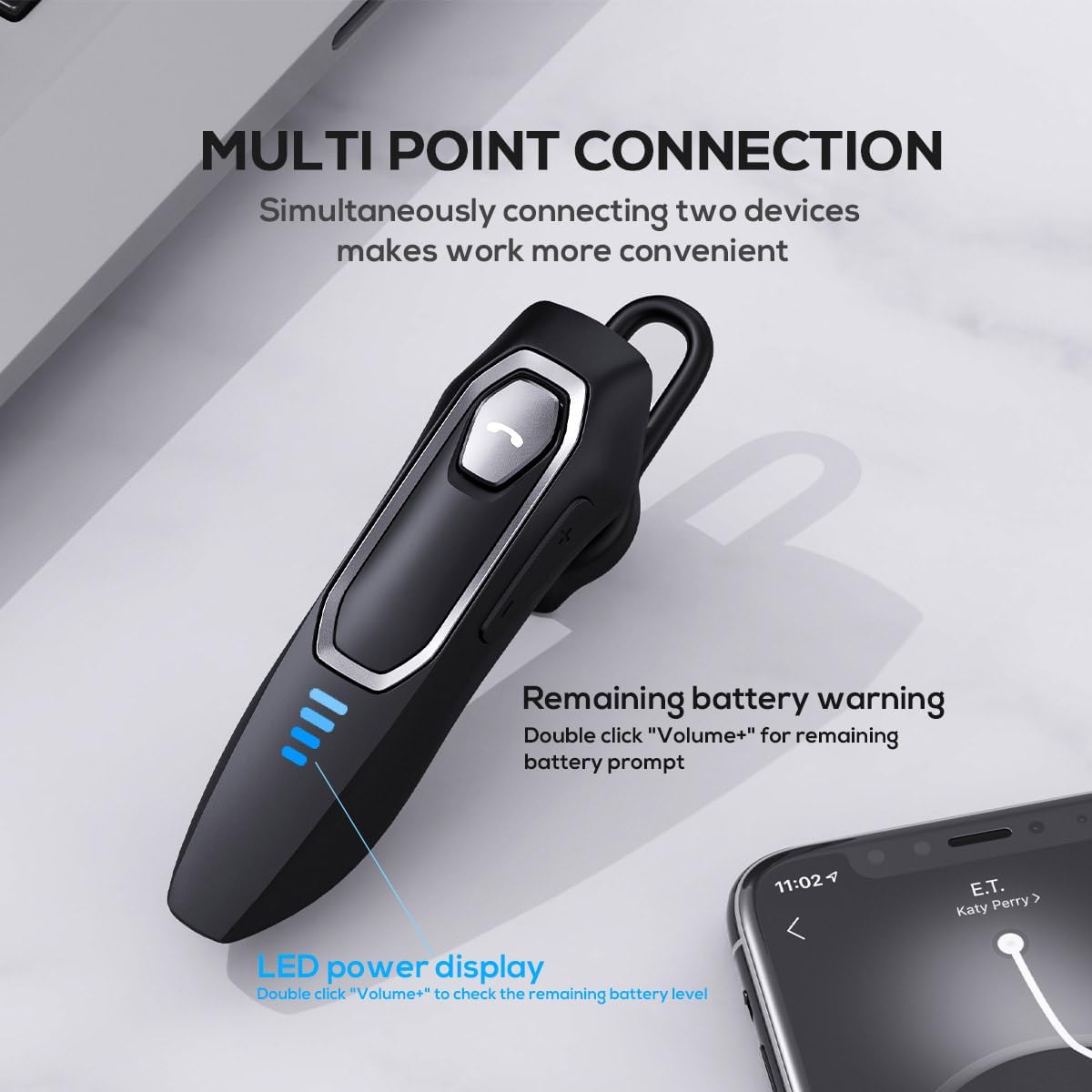
Image 3: Multi-Point Connection and LED Display. This image illustrates the headset's ability to connect to two devices simultaneously and the LED power display.
تعليمات التشغيل
استدعاء إدارة
- الرد/إنهاء المكالمة: اضغط على MFB مرة واحدة.
- رفض المكالمة: اضغط مع الاستمرار على زر MFB لمدة ثانيتين تقريبًا.
- كتم / إلغاء كتم صوت الميكروفون: During a call, press and hold the volume down button (marked with a microphone icon) for approximately 2 seconds.
- إعادة الاتصال بآخر مكالمة صادرة: Triple-tap the MFB.
تشغيل الموسيقى
- تشغيل/إيقاف مؤقت: اضغط على MFB مرة واحدة.
- المسار التالي: Press and hold the Volume + button for approximately 2 seconds.
- المسار السابق: Press and hold the Volume - button for approximately 2 seconds.
- رفع/خفض الصوت: Press the Volume + or Volume - button briefly.
مساعد صوتي
- تفعيل المساعد الصوتي (Siri، Google Assistant، وما إلى ذلك): انقر نقراً مزدوجاً على زر MFB.
الصمام عرض السلطة
The headset features an LED power display with four levels, each representing 25% of the battery charge.
- To check the remaining power, double-click the Volume + button.
الراحة والملاءمة
The Micool DY20PLUS is designed for comfortable, all-day wear.
- The ergonomic design ensures a secure fit without causing ear fatigue.
- Interchangeable ear tips (L, M, S) are included to help you find the best fit for your ear canal, optimizing bass and overall sound quality.
- The headset can be worn on either the left or right ear.

Image 4: Ear Tips and Durability. This image shows the included ear tips in different sizes (L, M, S) and highlights the enhanced durability features of the headset.
صيانة
- تنظيف: استخدم قطعة قماش ناعمة وجافة لتنظيف سماعة الرأس. تجنب استخدام مواد كيميائية قاسية أو مواد كاشطة.
- تخزين: عند عدم الاستخدام، قم بتخزين سماعة الرأس في مكان بارد وجاف، بعيدًا عن أشعة الشمس المباشرة ودرجات الحرارة القصوى.
- العناية بالبطارية: لإطالة عمر البطارية، تجنب تفريغها بالكامل بشكل متكرر. اشحنها بانتظام، حتى في حال عدم استخدامها باستمرار.
- مقاومة الماء: The headset is water-resistant, but not waterproof. Avoid submerging it in water or exposing it to heavy rain.
استكشاف الأخطاء وإصلاحها
| مشكلة | الحل المحتمل |
|---|---|
| سماعة الرأس لا تعمل. | Ensure the headset is charged. Connect it to a power source using the USB-C cable. |
| لا يمكن الاقتران بالجهاز. |
|
| لا يوجد صوت أو جودة الصوت رديئة. |
|
| الميكروفون لا يعمل أثناء المكالمات. |
|
| Voice assistant not activating. | Ensure the headset is connected and double-tap the MFB firmly. Check your device settings for voice assistant activation. |
تحديد
| ميزة | التفاصيل |
|---|---|
| اسم الموديل | DY20PLUS |
| تكنولوجيا الاتصال | لاسلكي (بلوتوث) |
| نسخة البلوتوث | 5.4 |
| مدى البلوتوث | حتى 50 مترا (164 قدما) |
| عمر البطارية (وقت التحدث) | تصل إلى 36 ساعة |
| عمر البطارية (تشغيل الموسيقى) | تصل إلى 45 ساعة |
| وقت الشحن | 1.5 - 2 ساعة |
| منفذ الشحن | يو اس بي-سي |
| إلغاء الضوضاء | Dual Microphones with Noise Reduction Algorithm |
| المميزات الخاصة | Voice Assistant, Multipoint Pairing, LED Power Display, Mute Function, Fast Charging |
| وزن | حوالي 12 غرام (0.42 أونصة) |
| مستوى مقاومة الماء | مقاوم للماء |
| الأجهزة المتوافقة | الهواتف الذكية، والأجهزة اللوحية، ومكبرات الصوت الذكية |
الضمان والدعم
For warranty information or technical support, please refer to the documentation included with your purchase or contact Micool customer service through their official channels.
Ask a question about this manual
Ask about setup, troubleshooting, compatibility, parts, safety, or missing instructions. Manuals+ will review the question and use this page’s manual context to help answer it.