1. المقدمة
This manual provides essential information for the proper setup, operation, and maintenance of your new Generic Replacement Remote Control. This infrared (IR) remote is designed to function as a direct replacement for the original remote controls of ALBA T-701, AXXION AXX-1028, and Polaroid T-901 portable DVD players. No programming or setup is required; simply insert batteries and begin use.
2. انتهى المنتجview
The replacement remote control is designed to replicate the primary functions of your original remote. It features a standard layout for DVD player controls, including number input, navigation, playback, and volume adjustments. Please compare the appearance of this remote with your original to ensure compatibility.
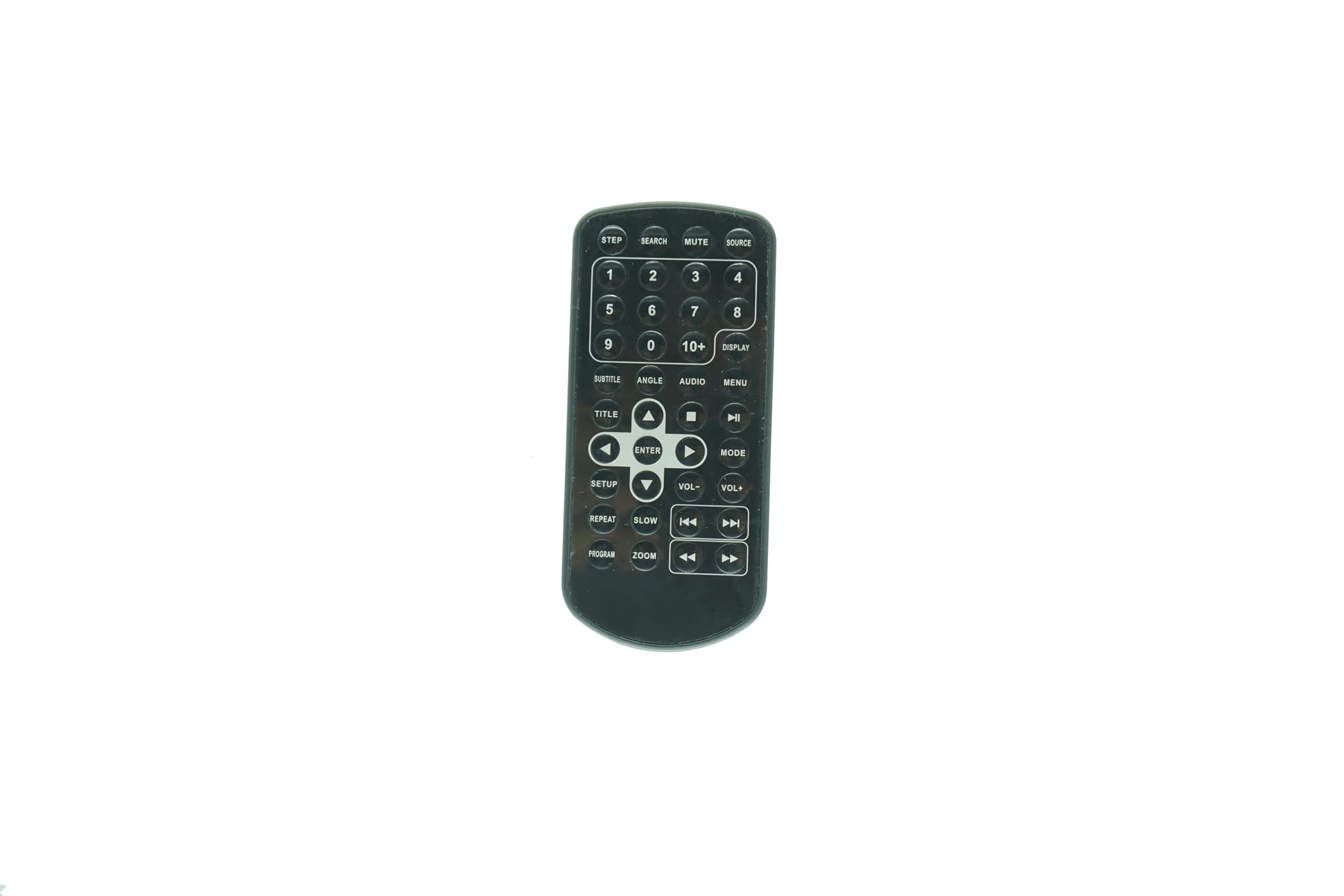
الشكل 2.1: أمام view of the Generic Replacement Remote Control. This image displays the overall shape and button layout of the remote, confirming its design for compatibility.
3. الإعداد: تركيب البطارية
Your remote control requires two (2) AAA batteries (not included) for operation. Follow these steps to install the batteries:
- حدد موقع حجرة البطارية في الجزء الخلفي من جهاز التحكم عن بعد.
- قم بتحريك غطاء حجرة البطارية برفق إلى الأسفل أو للخارج لفتحه.
- Insert two AAA batteries, ensuring the positive (+) and negative (-) terminals align correctly with the markings inside the compartment. Incorrect insertion can prevent the remote from functioning.
- قم بإدخال غطاء حجرة البطارية في مكانه مرة أخرى حتى يصدر صوت نقرة آمنة.

الشكل 3.1: خلف view of the remote control, showing the battery compartment area and a small clip. This clip is part of the battery cover mechanism.
4. تعليمات التشغيل
This remote control operates via infrared (IR) signals. Point the remote directly at the IR receiver on your portable DVD player for optimal performance. No programming is needed; the remote is ready for use once batteries are installed.

الشكل 4.1: مفصل view of the remote control's buttons. This image provides a clear reference for identifying each button and its label.
وظائف الأزرار:
- لوحة الأرقام (0-9، 10+): يُستخدم لاختيار المسار مباشرةً أو لإدخال القيم العددية.
- مصدر: Selects the input source (if applicable to your DVD player model).
- كتم الصوت: يكتم الصوت. اضغط مرة أخرى لاستعادة الصوت.
- يبحث: Initiates a search function within the DVD content.
- عرض: Shows on-screen information such as current track, time, or settings.
- MENU: Accesses the DVD's main menu.
- صوتي: Cycles through available audio tracks or languages.
- زاوية: Changes the camera angle during playback (if supported by the DVD).
- العنوان الفرعي: Cycles through available subtitle options.
- عنوان: Returns to the DVD's title menu.
- أزرار التنقل (أعلى، أسفل، يسار، يمين): Used to navigate menus and selections.
- أدخل: يؤكد التحديد أو الإجراء.
- تشغيل/إيقاف مؤقت (►/❚❚): يبدأ التشغيل أو يوقفه مؤقتًا.
- توقف (■): يوقف التشغيل.
- التقديم السريع (►►): يُسرّع عملية التشغيل.
- REWIND (◄◄): يعيد تشغيل المقطع بسرعة.
- NEXT (►❚): يتخطى إلى الفصل أو المسار التالي.
- PREVIOUS (❚◄): Skips to the beginning of the current chapter or track, or to the previous one.
- حجم+/حجم-: يزيد أو يخفض مستوى الصوت.
- اقامة: Accesses the system setup menu of the DVD player.
- بطيئ: Initiates slow-motion playback.
- يكرر: يكرر المقطع الحالي أو الفصل أو القرص بأكمله.
- برنامج: Allows programming of track playback order.
- تكبير: Zooms in or out on the video display.
- الخطوة: يتم تشغيل الفيديو إطارًا تلو الآخر.
5. الصيانة
- تنظيف: استخدم قطعة قماش ناعمة وجافة لتنظيف جهاز التحكم عن بعد. لا تستخدم المنظفات السائلة أو المواد الكاشطة، لأنها قد تُتلف السطح أو المكونات الداخلية.
- استبدال البطارية: Replace batteries when the remote's performance degrades or stops working. Always replace both batteries at the same time with new ones of the same type (AAA).
- تخزين: إذا لم يتم استخدام جهاز التحكم عن بعد لفترة طويلة، فقم بإزالة البطاريات لمنع التسرب والتلف المحتمل. خزّنه في مكان بارد وجاف.
6. استكشاف الأخطاء وإصلاحها
If your remote control is not functioning as expected, consider the following:
- جهاز التحكم عن بعد لا يستجيب:
- تأكد من إدخال البطاريات بشكل صحيح بالقطبية الصحيحة (+/-).
- استبدال البطاريات القديمة ببطاريات AAA جديدة.
- Check for any obstructions between the remote and the DVD player's IR receiver.
- Ensure you are pointing the remote directly at the DVD player.
- بعض الوظائف لا تعمل:
- While this remote is a replacement, some advanced or unique functions of your original DVD player's remote may not be fully supported. The remote is designed for core playback and navigation.
- Verify that the function you are trying to use is supported by your specific DVD player model.
7. المواصفات
- التوافق: ALBA T-701, AXXION AXX-1028, Polaroid T-901 Portable DVD Players
- يكتب: جهاز التحكم عن بعد بالأشعة تحت الحمراء (IR)
- مصدر الطاقة: 2 بطاريات AAA (غير مدرجة)
- لون: أسود
- الحد الأقصى لعدد الأجهزة المدعومة: 1
- الشركة المصنعة: إيستري
8. الضمان والدعم
As a generic replacement product, specific warranty details may vary. Please refer to the retailer's return policy for information regarding exchanges or refunds. For any operational questions or concerns not covered in this manual, please contact the seller directly through your purchase platform. It is recommended to verify your original remote's appearance against the product images before purchase to ensure full compatibility.