
مقدمة
Thank you for choosing the Micool Mini Sleep Earbuds Wireless. These earbuds are designed for ultimate comfort and discretion, especially for sensitive sleepers. Featuring IPX5 waterproofing, Bluetooth 5.3 connectivity, and a lightweight, invisible design, they provide a peaceful audio experience for relaxation, sleep, or discreet listening.

Image: Micool Mini Sleep Earbuds in their charging case.
محتويات الحزمة
- Micool Mini Sleep Earbuds (Left and Right)
- حافظة الشحن
- كابل شحن USB-C
- دليل المستخدم
يثبت
1. الشحن الأولي
- ضع كلتا سمّاعات الأذن في علبة الشحن.
- Connect the USB-C charging cable to the port on the charging case and to a power source.
- ستعرض الشاشة الرقمية الموجودة على علبة الشحن نسبة البطاريةtagهـ. تأكد من شحن سماعات الأذن بالكامل قبل الاستخدام الأول.
2. اقتران بلوتوث
- افتح علبة الشحن. ستدخل سماعات الأذن تلقائيًا في وضع الاقتران.
- On your device (e.g., smartphone, tablet, laptop), enable Bluetooth.
- بحث عن available Bluetooth devices and select "Micool Q26" (or similar name) from the list.
- بمجرد الاتصال، سوف تسمع صوتًا موجهًا، وستكون سماعات الأذن جاهزة للاستخدام.
تعليمات التشغيل
ارتداء سماعات الأذن
The Micool Mini Sleep Earbuds are designed to fit snugly and discreetly within your ear, making them ideal for side sleepers. Gently insert each earbud into your ear canal until it feels secure and comfortable. The soft silicone ear tips adapt to your ear shape, minimizing pressure for extended wear.
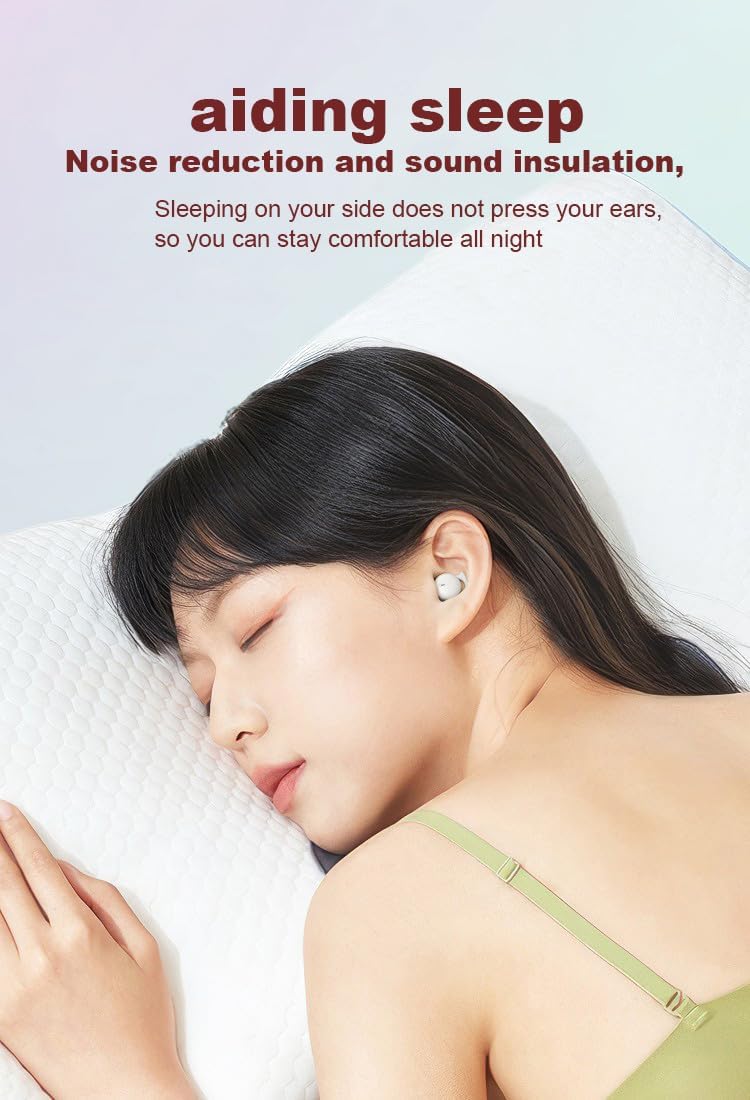
Image: Earbud worn discreetly for sleep.
عناصر التحكم باللمس
Each earbud features a touch-sensitive button for easy control of your audio and calls.

Image: Touch button controls diagram.
- تشغيل/إيقاف مؤقت: ضغطة واحدة على أي سماعة أذن.
- الرد/إنهاء المكالمة: اضغط مرة واحدة على سماعة الأذن أثناء مكالمة واردة أو مكالمة نشطة.
- الأغنية التالية: اضغط مرتين على سماعة الأذن اليمنى.
- الأغنية السابقة: اضغط مرتين على سماعة الأذن اليسرى.
- رفض المكالمة: اضغط مع الاستمرار على أي سماعة أذن لمدة ثانيتين أثناء المكالمة الواردة.
- تنشيط مساعد الصوت: اضغط ثلاث مرات على أي سماعة أذن.
استخدام سماعات الأذن بشكل مستقل
Both earbuds can be used independently. You can use one earbud while the other charges in the case, effectively extending your listening time. Simply remove one earbud from the case to use it in mono mode.
مقاومة الماء (IPX5)
The earbuds are rated IPX5 water-resistant, meaning they can withstand splashes of water and sweat. They are suitable for use during light rain or workouts, but should not be submerged in water.
صيانة
- قم بتنظيف سماعات الأذن وعلبة الشحن بانتظام باستخدام قطعة قماش ناعمة وجافة.
- تجنب استخدام المنظفات الكاشطة أو المذيبات.
- حافظ على نظافة نقاط التلامس الخاصة بالشحن في كل من سماعات الأذن والعلبة لضمان الشحن السليم.
- قم بتخزين سماعات الأذن في علبة الشحن الخاصة بها عند عدم استخدامها لحمايتها والحفاظ على عمر البطارية.
استكشاف الأخطاء وإصلاحها
سماعات الأذن لا تقترن
- تأكد من شحن سماعتي الأذن بالكامل.
- قم بإيقاف تشغيل البلوتوث على جهازك، ثم قم بتشغيله مرة أخرى.
- Forget/delete "Micool Q26" from your device's Bluetooth list and attempt to pair again.
- أعد وضع سماعات الأذن في العلبة، وأغلق الغطاء، وانتظر بضع ثوانٍ، ثم افتحه لإعادة بدء وضع الاقتران.
لا يوجد صوت أو حجم منخفض
- تحقق من مستويات الصوت على كل من جهازك وسماعات الأذن.
- تأكد من تثبيت سماعات الأذن بشكل صحيح في أذنيك.
- أعد توصيل سماعات الأذن بجهازك.
مشاكل الشحن
- تأكد من توصيل كابل USB-C بشكل آمن بكل من العلبة ومصدر الطاقة.
- تأكد من أن نقاط اتصال الشحن الموجودة على سماعات الأذن وداخل العلبة نظيفة وخالية من الحطام.
- حاول استخدام كابل USB-C أو محول طاقة مختلف.
تحديد
| اسم الموديل | س26 |
| ماركة | Micool |
| تكنولوجيا الاتصال | لاسلكي (بلوتوث 5.3) |
| مقاومة الماء | IPX5 |
| وضع الأذن | في الأذن |
| عامل الشكل | في الأذن |
| مادة | بلاستيك |
| المكونات المضمنة | كابل، دليل المستخدم |
| رمز المنتج الموحد | 770029329733 |
| الشركة المصنعة | ميكول |
| تاريخ أول توفر | 12 يونيو 2023 |
الضمان والدعم
Specific warranty information for the Micool Mini Sleep Earbuds (Model Q26) is not provided in the product details. Please refer to the warranty card included in your package or contact Micool customer support for detailed warranty terms and conditions.
For further assistance, technical support, or inquiries, please visit the official Micool website or contact their customer service department. Contact information can typically be found in the included user manual or on the product packaging.