
Epico Epico Keyboard Case
دليل مستخدم حافظة لوحة مفاتيح Epico لجهاز iPad
Model: Epico Keyboard Case
مقدمة
Transform your iPad into a versatile workstation with the Epico iPad Keyboard Case. This innovative accessory features a detachable keyboard with seven-colour backlighting, a multi-finger gesture touchpad, and comprehensive iPadOS shortcuts. Designed for both functionality and protection, it enhances your iPad experience for typing, watching, and browsing.

Image: The Epico iPad Keyboard Case with an iPad inserted, shown in a tilted typing position.
سمات
- لوحة مفاتيح ذات إضاءة خلفية: Seven distinct backlight colours with adjustable brightness levels for comfortable typing in any lighting condition.
- Touchpad Functionality: Multi-finger gesture touchpad provides precise control and enhanced navigation capabilities.
- Shortcut Integration: Comprehensive range of iPadOS shortcuts built into the keyboard for efficient device control and workflow optimisation.
- تصميم متعدد الاستخدامات: Includes detachable keyboard and tilted backside stand for multiple viewing angles and usage modes.
- حل الطاقة: Equipped with Li-ion battery and USB-C charging capability, operating independently from iPad's power source.
محتويات الحزمة
- Epico iPad Keyboard Case
- كابل شحن USB-C إلى USB-C
- دليل المستخدم (هذا المستند)
يثبت
1. شحن لوحة المفاتيح
Before first use, fully charge the keyboard. Connect the provided USB-C to USB-C charging cable to the keyboard's USB-C port and the other end to a compatible USB-C power adapter (not included).
الصورة: الجانب view of the keyboard case, highlighting the USB-C charging port.
2. إدخال جهاز iPad الخاص بك
- Gently align your iPad with the case's frame.
- Press firmly but carefully to secure the iPad into the protective shell. Ensure all edges are properly seated.

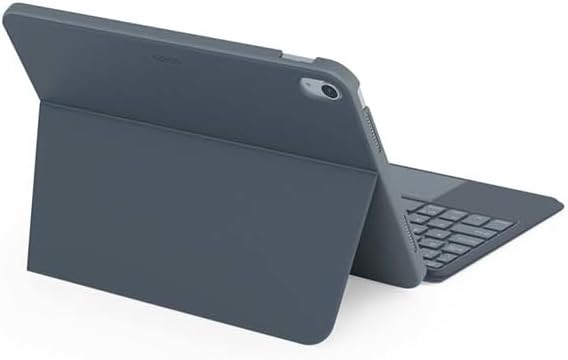
الصورة: الخلفية view of the Epico iPad Keyboard Case, demonstrating the secure fit of the iPad.
3. Pairing with iPad
- Turn on the keyboard by sliding the power switch (usually located on the side or back of the keyboard).
- على جهاز iPad الخاص بك، انتقل إلى إعدادات > بلوتوث.
- Enable Bluetooth. The keyboard should appear in the "Other Devices" list as "Epico Keyboard" or similar.
- Tap on the keyboard name to pair. Follow any on-screen prompts.
- Once paired, the keyboard's indicator light will change, and it will be ready for use.
تعليمات التشغيل
استخدام لوحة المفاتيح
The keyboard functions like a standard QWERTY keyboard. Ensure the keyboard is paired with your iPad before typing.

الصورة: الجبهة view of the Epico iPad Keyboard Case, displaying the full keyboard layout and touchpad.
التحكم في الإضاءة الخلفية
- اضغط على مصباح كهربائي key (often near the function keys) to cycle through backlight colours.
- يضعط Fn + لمبة الإضاءة key to adjust backlight brightness levels.
إيماءات لوحة اللمس
The integrated touchpad supports multi-finger gestures for enhanced navigation:
- النقر بإصبع واحد: الزر الأيسر.
- النقر بإصبعين: انقر بزر الماوس الأيمن (قائمة السياق).
- التمرير بإصبعين: قم بالتمرير لأعلى/لأسفل أو لليسار/لليمين.
- الضغط للتكبير: تكبير/تصغير المحتوى.
- Refer to iPadOS settings for additional gesture customization.
iPadOS Shortcuts
The keyboard includes dedicated function keys for common iPadOS shortcuts. These may vary slightly by iPadOS version, but typically include:
- بيت: العودة إلى الشاشة الرئيسية.
- يبحث: Activate Spotlight search.
- التحكم في السطوع: ضبط سطوع الشاشة.
- التحكم في الوسائط: Play/Pause, Previous/Next track.
- التحكم في مستوى الصوت: ضبط مستوى صوت النظام.
- قفل الشاشة: Lock your iPad.
صيانة
تنظيف
- Use a soft, lint-free cloth to wipe the exterior of the case and keyboard.
- بالنسبة للعلامات العنيدة، د قليلاًampاغمر قطعة القماش بالماء أو بمنظف معتدل غير كاشط.
- Avoid getting moisture into the keyboard keys or ports.
- لا تستخدم مواد كيميائية قاسية أو مذيبات أو مواد كاشطة.
تخزين
When not in use for extended periods, store the keyboard case in a cool, dry place. Ensure the keyboard is turned off to preserve battery life.
استكشاف الأخطاء وإصلاحها
- لوحة المفاتيح غير متصلة:
Ensure the keyboard is charged and turned on. Check iPad's Bluetooth settings to confirm it's enabled and the keyboard is paired. Try unpairing and re-pairing the keyboard.
- المفاتيح لا تستجيب:
Check battery level. Restart both the keyboard and your iPad. Ensure no debris is lodged under the keys.
- الإضاءة الخلفية لا تعمل:
Ensure the keyboard is on and charged. Cycle through backlight settings using the dedicated key.
- لوحة اللمس لا تستجيب:
Ensure the touchpad is enabled (some keyboards have a function key to toggle it). Check iPadOS settings for touchpad functionality.
تحديد
| ماركة | ملحمي |
| اسم الموديل | Epico Keyboard Case |
| الأجهزة المتوافقة | آيباد آبل |
| الاتصال | بلوتوث |
| الإضاءة الخلفية | 7-Colour, Adjustable Brightness |
| لوحة اللمس | Multi-finger Gesture Support |
| منفذ الشحن | يو اس بي-سي |
| مصدر الطاقة | بطارية ليثيوم أيون مدمجة |
| وزن العنصر | 15.9 أونصة (حوالي 450 جرامًا) |
| أبعاد المنتج (الطول × العرض × الارتفاع) | 9.94 × 7.24 × 0.48 بوصة (حوالي 25.25 × 18.39 × 1.22 سم) |
| مادة | بلاستيك، معدن |
الضمان والدعم
This Epico product is covered by a manufacturer's warranty. Please refer to the warranty card included with your purchase or visit the official Epico webالموقع للحصول على شروط وأحكام الضمان التفصيلية.
For technical support, troubleshooting assistance, or inquiries about your product, please contact Epico customer service through their official webالموقع أو معلومات الاتصال المقدمة على إيصال الشراء الخاص بك.
Ask a question about this manual
Ask about setup, troubleshooting, compatibility, parts, safety, or missing instructions. Manuals+ will review the question and use this page’s manual context to help answer it.