
1. المقدمة
يوفر هذا الدليل معلومات أساسية لإعداد وتشغيل وصيانة واستكشاف أعطال جهازك ViewSonic IFP55G1 55-inch 4K UHD ViewBoard Interactive Display. Please read this manual thoroughly before using the product to ensure proper and safe operation.
ال ViewSonic IFP55G1 is a 55-inch 4K Ultra HD (3840x2160p) interactive display designed for educational and business environments. It features multi-point touch recognition, an OPS slot for external PCs, 10W dual speakers, and versatile connectivity options including HDMI, VGA, USB Hub, and USB-C inputs. Its OS-free design allows flexibility with various computing solutions.
المميزات الرئيسية:
- Ultra HD Resolution: 55 Inch 4K Ultra HD (3840x2160p) interactive display for crisp visuals.
- Advanced Multi-Touch: Allows multiple users to write and interact simultaneously with fingers and passive pens.
- اتصال مرن: Equipped with a powerful quad-core processor and versatile ports including HDMI, VGA, RJ45, and USB.
- OS-Free Design: Provides enhanced security and flexibility to integrate with your preferred operating system via external PC or OPS device.
- Write-Away Technology: Enables instant writing with the stylus without extended setup.
2. ماذا يوجد في الصندوق
تأكد من وجود جميع العناصر المذكورة أدناه في طردك. في حال وجود أي عناصر مفقودة أو تالفة، يرجى الاتصال بالموزع فوراً.
- ViewSonic IFP55G1 Interactive Display
- 3m USB 2.0 touch cable x 1
- Touch pen (Passive pen) x 2 (VB-PEN-002)
- كابل طاقة 3 م
- HDMI 2.0 cable 3m x 1
- دليل البدء السريع + بيان الامتثال
- محول RS232
- Screw (wall mount 4)
- لوحة الكاميرا
- Remote control with AAA battery (Optional)
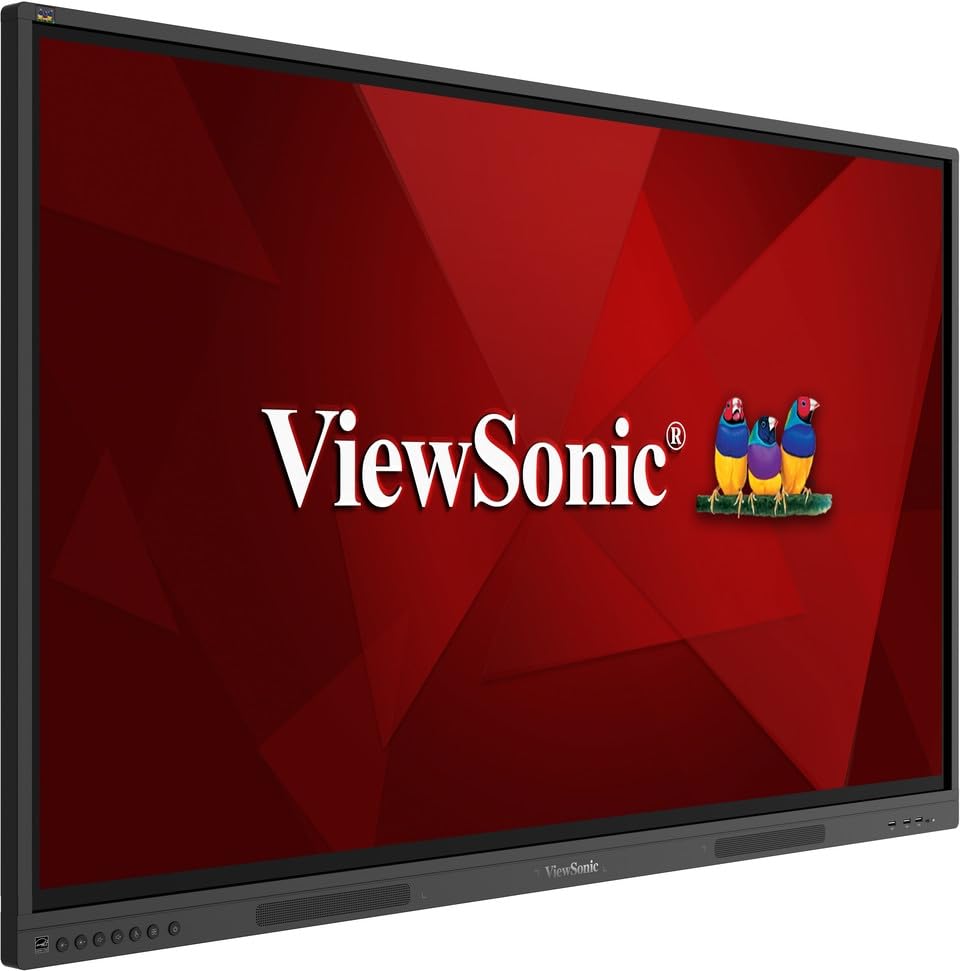
صورة: ViewSonic IFP55G1 55-inch ViewBoard Interactive Display, front view.
3. تعليمات الإعداد
3.1 تركيب الشاشة
The IFP55G1 can be wall-mounted or installed on a compatible mobile cart (sold separately). Ensure the mounting solution supports the display's weight (approximately 59.3 lbs / 26.9 kg) and dimensions (3.37 x 49.7 x 30.3 inches).
- For wall mounting, use the provided wall mount screws and ensure the wall structure is robust enough.
- Follow the instructions provided with your specific wall mount or mobile cart.
3.2 توصيل الأجهزة الطرفية
The display offers various ports for connecting external devices. Refer to the image below for port locations.

الصورة: الجانب view التابع ViewSonic IFP55G1 interactive display showing various input ports including HDMI, VGA, and USB.
- توصيل الطاقة: Connect the 3m power cable to the display and a grounded power outlet.
- مدخلات الفيديو: Connect your external PC or media player to the display using an HDMI 2.0 cable (provided), VGA cable, or USB-C cable. The display has 3 HDMI ports, 1 VGA port, and USB-C connectivity.
- وظيفة اللمس: For interactive touch features with an external PC, connect the 3m USB 2.0 touch cable from the display's USB-B (Touch) port to a USB-A port on your PC.
- خانة العمليات: If using an optional ViewSonic Slot-in PC (OPS device), insert it into the dedicated OPS slot on the rear of the display. This provides an integrated computing solution.
- شبكة: Connect an Ethernet cable to the RJ45 port for wired network access.
- جهاز USB:٪ s: Use the available USB-A ports to connect USB drives, keyboards, mice, or other peripherals.

الصورة: ViewSonic IFP55G1 display demonstrating connectivity with various external devices, including laptops and mini PCs, highlighting its 'Bring Your Own Devices' capability.
4. تعليمات التشغيل
4.1 تشغيل/إيقاف التشغيل
- تشغيل الطاقة: Press the power button located on the display's front or side panel, or use the remote control. The display will power on and show the input source.
- إيقاف التشغيل: Press the power button again. A confirmation message may appear; select 'Power Off'. For complete power disconnection, unplug the power cable.
4.2 تحديد مصدر الإدخال
Use the 'Source' button on the display or remote control to cycle through available input sources (HDMI 1, HDMI 2, HDMI 3, VGA, USB-C, OPS).
4.3 Using Touch Functionality
Once the USB touch cable is connected to your external PC, the display will function as a multi-touch input device. You can use your fingers or the provided passive pens for interaction.
- لمسة الإصبع: Use gestures similar to a tablet or smartphone for navigation, zooming, and drawing.
- Passive Pens: The two included passive pens (VB-PEN-002) allow for precise writing and drawing on the screen. The display's Write-Away technology enables instant use of the pens.

Image: A group of individuals collaborating around a ViewSonic IFP55G1 interactive display in a modern meeting room, demonstrating its multi-touch capabilities for instantaneous collaboration.
4.4 التحكم في الصوت
The display features integrated 10W dual speakers. Adjust volume using the remote control or the buttons on the display panel.
5. الصيانة
5.1 تنظيف الشاشة
- شاشة: امسح الشاشة برفق بقطعة قماش ناعمة وخالية من الوبر. لإزالة البقع الصعبة، امسح برفقampen the cloth with water or a non-abrasive, ammonia-free screen cleaner. Do not spray cleaner directly onto the screen.
- Casing: امسح جasinامسح بقطعة قماش ناعمة وجافة. تجنب استخدام المواد الكيميائية القاسية أو المواد الكاشطة.
5.2 العناية العامة
- تجنب وضع أشياء ثقيلة على الشاشة.
- Do not block ventilation openings on the rear of the display.
- Keep the display away from direct sunlight, heat sources, and excessive moisture.
6. استكشاف الأخطاء وإصلاحها
إذا واجهت مشاكل مع ViewSonic IFP55G1, refer to the following common problems and solutions.
6.1 لا يوجد عرض / شاشة سوداء
- Ensure the power cable is securely connected to both the display and a working power outlet.
- Verify that the display is powered on (power indicator light should be active).
- Check that the video cable (HDMI, VGA, USB-C) is securely connected to both the display and the source device (PC, OPS).
- Select the correct input source using the 'Source' button on the display or remote control.
- Ensure the source device (PC, OPS) is powered on and outputting a video signal.
6.2 وظيفة اللمس لا تعمل
- Confirm the USB touch cable is securely connected from the display's USB-B (Touch) port to a USB-A port on your external PC.
- Ensure your external PC's operating system has the necessary drivers installed for touch input.
- Restart both the display and the connected PC.
6.3 لا يوجد صوت
- Check the volume level on the display and the connected source device.
- Ensure the audio output from your source device is routed correctly to the display (e.g., via HDMI).
- If using an external audio system, ensure it is properly connected and powered on.
7. المواصفات
فيما يلي المواصفات الفنية لـ ViewSonic IFP55G1 interactive display.
| ميزة | مواصفة |
|---|---|
| ماركة | Viewسونيك |
| اسم الموديل | IFP55G1 |
| حجم الشاشة | 55 بوصة |
| الحد الأقصى لدقة العرض | 3840x2160 بكسل (4K UHD) |
| الدقة الأصلية | 3840 × 2160 |
| نوع العرض | شاشة الكريستال السائل |
| نسبة العرض إلى الارتفاع | 16:9 |
| إدخال واجهة الإنسان | شاشة تعمل باللمس |
| تكنولوجيا الاتصال | Ethernet, HDMI, USB Type C, VGA |
| Total Number of HDMI Ports | 3 |
| إجمالي منافذ USB | 9 |
| واجهة إخراج الفيديو | منفذ العرض |
| مخرج الصوت | Integrated 10W Dual Speakers |
| أبعاد العنصر (LxWxH) | 3.37 × 49.7 × 30.3 بوصة |
| وزن العنصر | 59.3 رطل |
| لون | أسود |
| المميزات الخاصة | All-in-one USB port, Anti Glare Display, Light Sensor, Speakers, Touchscreen |
| الأجهزة المتوافقة | سطح المكتب، الكمبيوتر المحمول |
| رمز المنتج الموحد | 766907024654 |
8. الضمان والدعم
8.1 معلومات الضمان
ال ViewSonic IFP55G1 interactive display comes with an industry-leading ضمان محدود لمدة سنة واحدة on parts, labor, and backlight. Onsite warranty service may also be available. Please refer to the warranty card included in your package or visit the official Viewسونيك website for detailed terms and conditions, and information on optional warranty extensions.
8.2 دعم العملاء
للحصول على المساعدة التقنية، أو الاستفسارات عن المنتجات، أو مطالبات الضمان، يرجى الاتصال بنا. ViewSonic's award-winning customer service team. Contact information can be found on the official Viewسونيك webالموقع الإلكتروني أو في دليل البدء السريع المرفق مع منتجك.