1. المقدمة
Thank you for choosing this Generic brand remote control. This manual provides essential information for the proper setup, operation, and maintenance of your new remote control. This remote is designed to be compatible with various High One TV models, ensuring a seamless replacement or secondary control option for your television. Please read this manual thoroughly before use and retain it for future reference.
2. معلومات السلامة
- معالجة البطارية: Always insert batteries with the correct polarity (+ and -) as indicated in the battery compartment.
- لا تخلط البطاريات القديمة والجديدة، أو أنواع مختلفة من البطاريات (على سبيل المثال، البطاريات القلوية والبطاريات القابلة لإعادة الشحن).
- قم بإزالة البطاريات إذا لم يتم استخدام جهاز التحكم عن بعد لفترة طويلة لمنع التسرب.
- تخلص من البطاريات المستعملة وفقًا للأنظمة المحلية. لا تحرقها.
- الاستخدام العام: احتفظ بجهاز التحكم عن بعد بعيدًا عن أشعة الشمس المباشرة ومصادر الحرارة والرطوبة.
- تجنب إسقاط جهاز التحكم عن بعد أو تعريضه لصدمات قوية.
- لا تحاول تفكيك جهاز التحكم عن بعد أو تعديله. سيؤدي ذلك إلى إلغاء الضمان.
3. محتويات العبوة
يرجى التأكد من وجود جميع العناصر في الحزمة الخاصة بك:
- 1 x Generic Remote Control for High One TV
- 1 × دليل التعليمات (هذه الوثيقة)
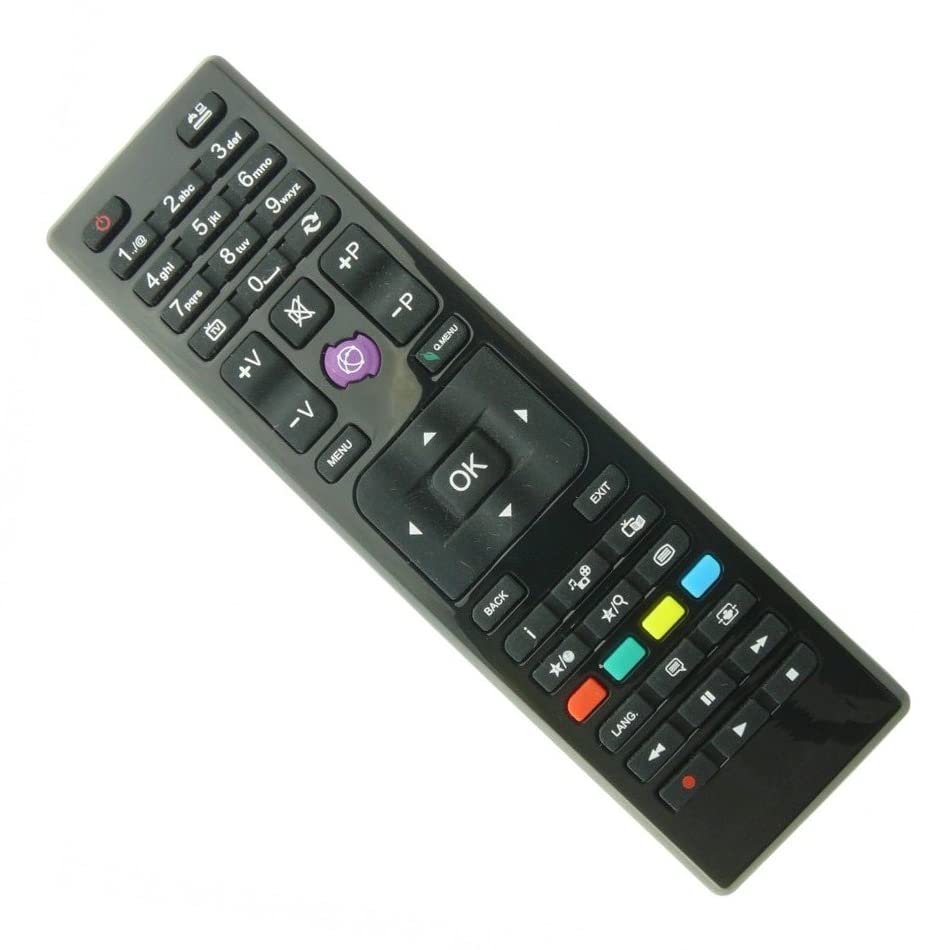
Image: The remote control, typically black, with various buttons for TV functions. It features a standard layout including number keys, navigation buttons, volume, channel, and power controls.
4. الإعداد
4.1 تركيب البطارية
- حدد موقع حجرة البطارية في الجزء الخلفي من جهاز التحكم عن بعد.
- قم بتحريك غطاء البطارية إلى الأسفل أو اضغط على المزلاج وارفعه لفتحه.
- Insert two AAA batteries (not included) according to the polarity markings (+ and -) inside the compartment.
- أغلق غطاء البطارية عن طريق تحريكه إلى مكانه حتى تسمع صوت طقطقة محكم.
4.2 الاستخدام الأول
This remote control is an infrared (IR) type and is pre-programmed for compatibility with the listed High One TV models. No special pairing or code setup is required. Simply insert the batteries and point the remote control directly at your High One TV to begin operation.
5. تعليمات التشغيل
5.1 وظائف الأزرار
The remote control features a standard layout for easy navigation and control of your High One TV. Below is a general overview من وظائف الأزرار الشائعة:
Image: Close-up of the remote control showing its various buttons, including power, number pad, volume up/down, channel up/down, menu, navigation arrows, and input selection.
| زر | وظيفة |
|---|---|
| الطاقة (⏻) | تشغيل التلفزيون أو إيقاف تشغيله. |
| لوحة الأرقام (0-9) | يختار قنوات التلفزيون مباشرة. |
| رفع/خفض مستوى الصوت (VOL +/-) | يضبط مستوى الصوت. |
| القناة لأعلى/لأسفل (CH +/-) | يغير قناة التلفزيون. |
| كتم الصوت (🔇) | كتم صوت التلفزيون أو إلغاء كتمه. |
| الإدخال/المصدر | حدد مصدر الإدخال (HDMI، AV، وما إلى ذلك). |
| قائمة طعام | فتح القائمة الرئيسية للتلفزيون. |
| Navigation Arrows (▲ ▼ ◄ ►) | التنقل عبر القوائم والخيارات. |
| موافق / أدخل | تأكيد الاختيارات في القوائم. |
| مخرج | يخرج من القائمة أو الوظيفة الحالية. |
| خلف | يعود إلى الشاشة أو القائمة السابقة. |
5.2 العمليات الأساسية
- تشغيل/إيقاف: اضغط على قوة اضغط على الزر مرة واحدة لتشغيل التلفزيون أو إيقاف تشغيله.
- القنوات المتغيرة: استخدم CH +/- buttons to cycle through channels or enter the channel number directly using the لوحة الأرقام.
- ضبط مستوى الصوت: اضغط على المجلد +/- أزرار لزيادة أو خفض مستوى الصوت.
- اختيار الإدخال: اضغط على الإدخال/المصدر button to cycle through available input sources (e.g., HDMI 1, AV, TV).
- الوصول إلى القوائم: اضغط على قائمة طعام استخدم الزر لفتح قائمة الإعدادات الرئيسية للتلفزيون. أسهم التنقل و OK button to make selections.
6. الصيانة
- تنظيف: استخدم قطعة قماش ناعمة وجافة لتنظيف جهاز التحكم عن بعد. لا تستخدم المنظفات السائلة أو المواد الكاشطة.
- تخزين: Store the remote control in a cool, dry place when not in use for extended periods.
- استبدال البطارية: Replace batteries when the remote control's response becomes sluggish or stops working. Always replace both batteries at the same time.
7. استكشاف الأخطاء وإصلاحها
إذا واجهت مشاكل مع جهاز التحكم عن بعد، يرجى الرجوع إلى الجدول التالي للاطلاع على المشاكل الشائعة وحلولها:
| مشكلة | السبب المحتمل | حل |
|---|---|---|
| جهاز التحكم عن بعد لا يعمل. | البطاريات الميتة أو المدخلة بشكل غير صحيح. | استبدل البطاريات بأخرى جديدة، مع التأكد من القطبية الصحيحة. |
| مدى التحكم عن بعد ضعيف. | Weak batteries; Obstruction between remote and TV; Remote not pointed directly at TV's IR sensor. | Replace batteries; Remove any obstructions; Ensure direct line of sight to TV's IR sensor. |
| بعض الأزرار فقط تعمل. | Specific button malfunction; TV model incompatibility for certain advanced functions. | Check if the remote is fully compatible with your specific TV model. If basic functions work, advanced features might not be supported by all compatible TVs. |
| TV does not respond to any remote commands. | TV's IR sensor is blocked or faulty; TV is off or unplugged. | Ensure TV is powered on and its IR sensor is clear. Try controlling the TV with its physical buttons. |
8. المواصفات
- ماركة: نوعي
- اسم الموديل: HI3201HD (Compatible Remote)
- لون: أسود
- تقنية الاتصال: الأشعة تحت الحمراء (IR)
- الأجهزة المتوافقة: High One Televisions (HI2400HD, HI3201HD, HI3202HD, HI3204HD, HI3224HD-VE, HI3900HD, HI3901HD, HI3902HD, HI4000UHD, HI4001FHD, HI4001UHD-VE, HI4901UHD-VE, HI4801FHD)
- عدد الأزرار: 25
- نوع تحكم: التحكم بالأزرار
- وصف البطارية: قلوية (بطاريات AAA عدد 2، غير متضمنة)
9. الضمان والدعم
ضمان الشركة المصنعة: This product comes with a 1-year manufacturer's warranty from the date of purchase. This warranty covers defects in materials and workmanship under normal use.
استثناءات الضمان: The warranty does not cover damage caused by misuse, accidents, unauthorized modifications, battery leakage, or normal wear and tear.
دعم العملاء: For technical assistance, warranty claims, or further inquiries, please refer to the retailer or point of purchase for support contact information. Please have your purchase receipt and product model information ready when contacting support.
