
1. علىview
The Tomate MTS-2049 Soundbar is designed to enhance your audio experience with powerful 90W sound. It offers versatile connectivity options including Bluetooth, optical, and USB, making it suitable for various devices such as TVs, mobile phones, and notebooks. This manual provides essential information for safe and efficient use of your soundbar.
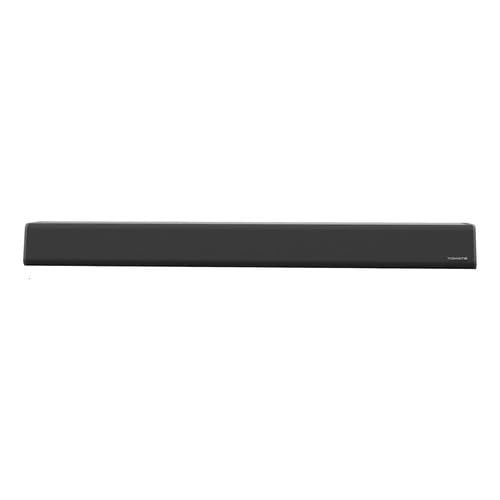
2. محتويات العبوة
تأكد من وجود جميع العناصر في العبوة:
- Tomate MTS-2049 Soundbar
- كابل محوري
- كابل بصري
- كابل مساعد
- محول الطاقة
- كابل الطاقة
- جهاز التحكم عن بعد
- دليل المستخدم (هذا المستند)
3. المميزات
- Powerful 90W Audio Output: Delivers high-quality sound for movies, music, and games.
- اتصال متعدد الاستخدامات: Includes Bluetooth, optical input, and USB for easy connection to TVs, mobile phones, notebooks, and other devices.
- 2.0 قناة صوتية: Provides clear and balanced stereo sound for an improved listening experience.
- المجلد العالميtagالتوافق ه: Bivolt automatic (127V/220V) for convenient and safe use.
- صوت التلفزيون المحسن: Ideal for upgrading TV sound without complex audio systems.
- المميزات الخاصة: Noise cancellation and high-resolution audio capabilities.
4. تعليمات السلامة
يرجى قراءة واتباع إرشادات السلامة التالية لضمان التشغيل الآمن ومنع تلف الجهاز:
- Read all instructions thoroughly before using the soundbar.
- لا تعرض مكبر الصوت للماء أو الرطوبة أو درجات الحرارة القصوى.
- Ensure adequate ventilation around the soundbar to prevent overheating.
- Use only the power adapter and cables supplied with the product.
- Keep the soundbar and its accessories out of reach of children and pets.
- Do not attempt to open or repair the soundbar yourself. Refer all servicing to qualified personnel.
- Unplug the soundbar during lightning storms or when unused for long periods.
5. الإعداد
5.1 التفريغ والتنسيب
- Carefully unpack the soundbar and all included accessories.
- Place the soundbar on a stable, flat surface in front of your TV, or mount it securely on a wall (mounting hardware not included).
5.2 توصيل الطاقة
- قم بتوصيل كابل الطاقة بمحول الطاقة.
- Plug the power adapter into the DC input port on the back of the soundbar.
- Insert the power cable into a suitable electrical outlet (127V/220V compatible).
5.3 Audio Connection Options
اختر إحدى الطرق التالية لتوصيل مصدر الصوت الخاص بك:
- اتصال بصري: Connect one end of the optical cable to the OPTICAL OUT port on your TV or audio source and the other end to the OPTICAL IN port on the soundbar.
- Auxiliary (AUX) Connection: Connect one end of the auxiliary cable to the AUDIO OUT (3.5mm) port on your device and the other end to the AUX IN port on the soundbar.
- اتصال USB: أدخل محرك أقراص فلاش USB يحتوي على الصوت fileقم بإدخاله في منفذ USB الموجود على شريط الصوت.
- اتصال بلوتوث: This is a wireless connection. Refer to the 'Operating Instructions' section for pairing details.
6. تعليمات التشغيل
6.1 تشغيل/إيقاف التشغيل
اضغط على قوة زر على مكبر الصوت أو جهاز التحكم عن بعد لتشغيل الوحدة أو إيقاف تشغيلها.
6.2 اختيار مصدر الإدخال
اضغط على مدخل or وضع button on the soundbar or remote control repeatedly to cycle through the available input sources: Bluetooth, Optical, USB, and AUX.
6.3 التحكم في مستوى الصوت
استخدم المجلد+ و المجلد- أزرار على مكبر الصوت أو جهاز التحكم عن بعد لضبط مستوى الصوت.
6.4 اقتران بلوتوث
- قم بتشغيل مكبر الصوت وحدد وضع البلوتوث باستخدام وضع الإدخال button. The Bluetooth indicator light will flash.
- Enable Bluetooth on your mobile phone, tablet, or other device.
- بحث عن available devices and select "Tomate MTS-2049" from the list.
- Once successfully paired, the Bluetooth indicator light on the soundbar will become solid.
6.5 تشغيل USB
When a USB flash drive is inserted into the USB port, the soundbar will automatically switch to USB mode and begin playing compatible audio files. Use the remote control for playback functions such as play/pause, next track, and previous track.
7. الصيانة
للحفاظ على أداء ومظهر شريط الصوت الخاص بك:
- Clean the soundbar's exterior with a soft, dry, lint-free cloth.
- Do not use liquid cleaners, aerosol sprays, or abrasive materials, as they may damage the finish.
- تأكد من عدم انسداد فتحات التهوية بالغبار أو الحطام.
- Store the soundbar in a cool, dry place when not in use for extended periods.
8. استكشاف الأخطاء وإصلاحها
| مشكلة | السبب المحتمل | حل |
|---|---|---|
| لا يوجد طاقة | كابل الطاقة غير متصل؛ منفذ الطاقة لا يعمل. | Check if the power cable is securely connected to the soundbar and the power outlet. Test the outlet with another device. |
| لا يوجد صوت | Incorrect input source selected; Volume too low; Audio cables not connected properly. | اضغط على وضع الإدخال button to select the correct source. Increase the volume. Ensure all audio cables are securely connected. |
| فشل اقتران البلوتوث | Soundbar not in pairing mode; Bluetooth disabled on device; Device too far. | Ensure the soundbar is in Bluetooth mode and the indicator is flashing. Enable Bluetooth on your device. Move your device closer to the soundbar. |
| جهاز التحكم عن بعد لا يعمل | البطاريات فارغة أو تم إدخالها بشكل غير صحيح؛ وجود عائق بين جهاز التحكم عن بعد وشريط الصوت. | Replace batteries with new ones, ensuring correct polarity. Remove any obstructions between the remote and the soundbar's sensor. |
9. المواصفات
- ماركة: طماطم
- اسم الموديل: متس-2049
- نوع السماعة: شريط الصوت
- المميزات الخاصة: Noise cancellation, High-resolution audio
- المكونات المتضمنة: Coaxial Cable, Optical Cable, Auxiliary Cable, Power Adapter, Power Cable, Remote Control
- أبعاد العنصر (الطول × العرض × الارتفاع): 100 سم × 15 سم × 15 سم
- مصدر الطاقة: كهرباء سلكية
- المجلدtagالتوافق ه: 127V/220V (Bivolt Automatic)
- الشركة المصنعة: Amazbrand
10. الضمان والدعم
10.1 معلومات الضمان
يأتي هذا المنتج مع ضمان لمدة 60 يومًا from the date of purchase. Please retain your proof of purchase (receipt or invoice) as it is required for any warranty claims. The warranty covers manufacturing defects and malfunctions under normal use conditions.
10.2 دعم العملاء
For technical assistance, troubleshooting, or any other inquiries regarding your Tomate MTS-2049 Soundbar, please contact your retailer or the manufacturer, Amazbrand. Contact details can typically be found on your purchase receipt or the retailer's webموقع.