
مقدمة
Thank you for choosing the GGSTOPWATER XG99PRO Open Ear Headphones. These wireless Bluetooth 5.4 earbuds are designed for comfort and stability, featuring an open-ear design, earhooks, and IPX5 water resistance. This manual provides detailed instructions to help you set up, operate, and maintain your headphones for optimal performance.
The ergonomic design ensures a firm fit, preventing slippage during activities. With multi-point support, the weight is evenly distributed for comfortable long-term wear. Bluetooth 5.4 technology provides a stable and fast connection. The open-ear design helps prevent pressure and irritation to the ear canal and eardrum, promoting extended comfortable use.
محتويات الحزمة
- GGSTOPWATER XG99PRO Open Ear Headphones (Left and Right)
- حافظة الشحن اللاسلكي
- كابل شحن USB
- دليل المستخدم (هذا المستند)
المنتج انتهىview
Familiarize yourself with the components of your GGSTOPWATER XG99PRO Open Ear Headphones.
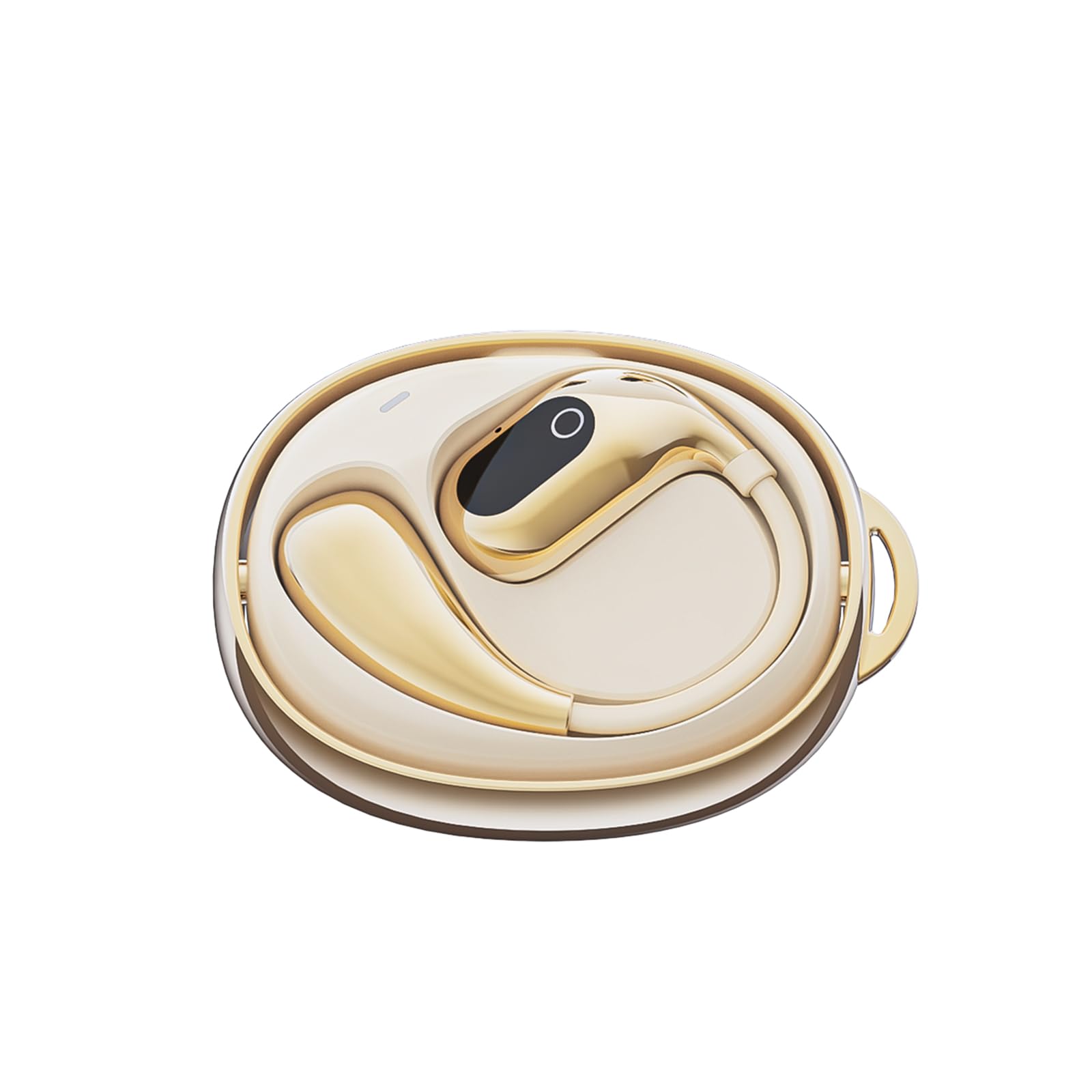
الشكل 1: The GGSTOPWATER XG99PRO wireless charging case. This compact case protects and charges your earbuds.

الشكل 2: The XG99PRO earbuds securely placed within their charging case. The case ensures the earbuds are charged and ready for use.

الشكل 3: An XG99PRO earbud worn on the ear, demonstrating its open-ear design and secure earhook fit. This design allows for situational awareness while listening.
يثبت
1. شحن سماعات الرأس
- ضع سماعتي الأذن في علبة الشحن. تأكد من تثبيتهما بشكل صحيح.
- قم بتوصيل كابل شحن USB بمنفذ الشحن الموجود على العلبة وبمصدر الطاقة (على سبيل المثال، محول حائط USB، أو منفذ USB في الكمبيوتر).
- The indicator light on the charging case will show the charging status. A full charge for the case and earbuds typically takes approximately 1.5-2 hours.
- The earbuds provide up to 6 hours of listening time on a single charge, and the charging case extends the total battery life to up to 60 hours.
2. الاقتران بجهاز بلوتوث
- تأكد من شحن وسادات الأذن.
- افتح علبة الشحن. ستدخل سماعات الأذن تلقائيًا في وضع الاقتران، ويُشار إلى ذلك بضوء LED وامض على سماعات الأذن.
- على جهازك (الهاتف الذكي، الجهاز اللوحي، الكمبيوتر)، قم بتمكين البلوتوث.
- بحث عن الأجهزة المتاحة بتقنية البلوتوث. حدد "XG99PRO" من القائمة.
- بمجرد الاتصال، سيتوقف مؤشر LED الموجود على سماعات الأذن عن الوميض، وستسمع نغمة تأكيد.
- سيتم إعادة توصيل سماعات الرأس تلقائيًا بالجهاز المقترن الأخير عند إخراجها من العلبة، إذا تم تمكين البلوتوث على الجهاز.
تعليمات التشغيل
The XG99PRO headphones feature touch controls for easy management of audio and calls.
تشغيل/إيقاف الطاقة
- تشغيل الطاقة: Open the charging case, and the earbuds will power on automatically. Alternatively, press and hold the touch control area on both earbuds for 3 seconds.
- إيقاف التشغيل: Place the earbuds back into the charging case and close the lid. They will power off automatically. Alternatively, press and hold the touch control area on both earbuds for 5 seconds.
التحكم بالموسيقى
- تشغيل/إيقاف مؤقت: انقر نقرة واحدة على منطقة التحكم باللمس في أي من سماعتي الأذن.
- المسار التالي: انقر نقراً مزدوجاً على منطقة التحكم باللمس الموجودة على سماعة الأذن اليمنى.
- المسار السابق: انقر نقراً مزدوجاً على منطقة التحكم باللمس الموجودة على سماعة الأذن اليسرى.
- رفع الصوت: انقر ثلاث مرات على منطقة التحكم باللمس الموجودة على سماعة الأذن اليمنى.
- اخفض الصوت: انقر ثلاث مرات على منطقة التحكم باللمس الموجودة على سماعة الأذن اليسرى.
التحكم في المكالمات
- الرد/إنهاء المكالمة: انقر نقرة واحدة على منطقة التحكم باللمس في أي من سماعتي الأذن.
- رفض المكالمة: اضغط مع الاستمرار على منطقة التحكم باللمس على أي سماعة أذن لمدة ثانيتين.
مساعد صوتي
- تنشيط مساعد الصوت: اضغط مع الاستمرار على منطقة التحكم باللمس في أي من سماعات الأذن لمدة ثانيتين (عندما لا تكون في مكالمة).
صيانة
تضمن الصيانة المناسبة طول عمر سماعات الرأس والأداء الأمثل لها.
تنظيف
- امسح سماعات الأذن وعلبة الشحن برفق باستخدام قطعة قماش ناعمة وجافة وخالية من الوبر.
- لا تستخدم المنظفات الكاشطة أو المذيبات أو البخاخات الهوائية.
- Avoid getting moisture into any openings. The earbuds are IPX5 water-resistant, meaning they can withstand splashes and sweat, but are not designed for submersion.
تخزين
- عندما لا تكون قيد الاستخدام، قم دائمًا بتخزين سماعات الأذن في علبة الشحن الخاصة بها لحمايتها والحفاظ عليها مشحونة.
- قم بتخزينه في مكان بارد وجاف، بعيدًا عن درجات الحرارة العالية وأشعة الشمس المباشرة.
استكشاف الأخطاء وإصلاحها
إذا واجهت أي مشاكل، راجع المشاكل والحلول الشائعة التالية:
| مشكلة | حل |
|---|---|
| سماعات الأذن غير مقترنة بالجهاز. |
|
| لا يصدر صوت من إحدى سماعات الأذن أو كلتيهما. |
|
| علبة الشحن لا تشحن. |
|
تحديد
| ميزة | التفاصيل |
|---|---|
| اسم الموديل | XG99PRO |
| ماركة | جي جي ستوب ووتر |
| تكنولوجيا الاتصال | لاسلكي (بلوتوث 5.4) |
| وضع الأذن | On Ear (Open Ear Design) |
| عامل الشكل | على الأذن |
| مقاومة الماء | IPX5 |
| مقاومة | 40 أوم |
| وزن العنصر | 2 أونصات |
| البطاريات | يتطلب بطاريتين C (متضمنتين) |
| المكونات المضمنة | حافظة الشحن اللاسلكي |
معلومات الضمان
GGSTOPWATER products are covered by a limited warranty from the date of purchase. Please retain your proof of purchase for warranty claims. This warranty covers manufacturing defects and does not cover damage caused by misuse, accidents, unauthorized modifications, or normal wear and tear. For specific warranty terms and conditions, please refer to the warranty card included with your product or contact customer support.
دعم العملاء
If you have any questions, require technical assistance, or need further support, please contact our customer service team. You can find contact information on our official webالموقع أو من خلال بائع التجزئة الذي اشتريت منه المنتج.
الدعم عبر الإنترنت: Visit the GGSTOPWATER official webالموقع للأسئلة الشائعة وموارد الدعم.
دعم البريد الإلكتروني: [Placeholder for Support Email Address]