
Macap MI40 Touch
دليل مستخدم مطحنة القهوة الفورية ماكاب MI40 تاتش
Model: MI40 Touch
Brand: Macap
1. انتهى المنتجview
The Macap MI40 Touch Instant Burr Coffee Grinder is a high-performance appliance designed for precise and consistent coffee grinding. Featuring 65mm flat burrs, a responsive 3.5-inch touchscreen, and multiple operating modes, it is suitable for various brewing methods from espresso to cold brew. Its robust construction ensures quiet operation and stability.
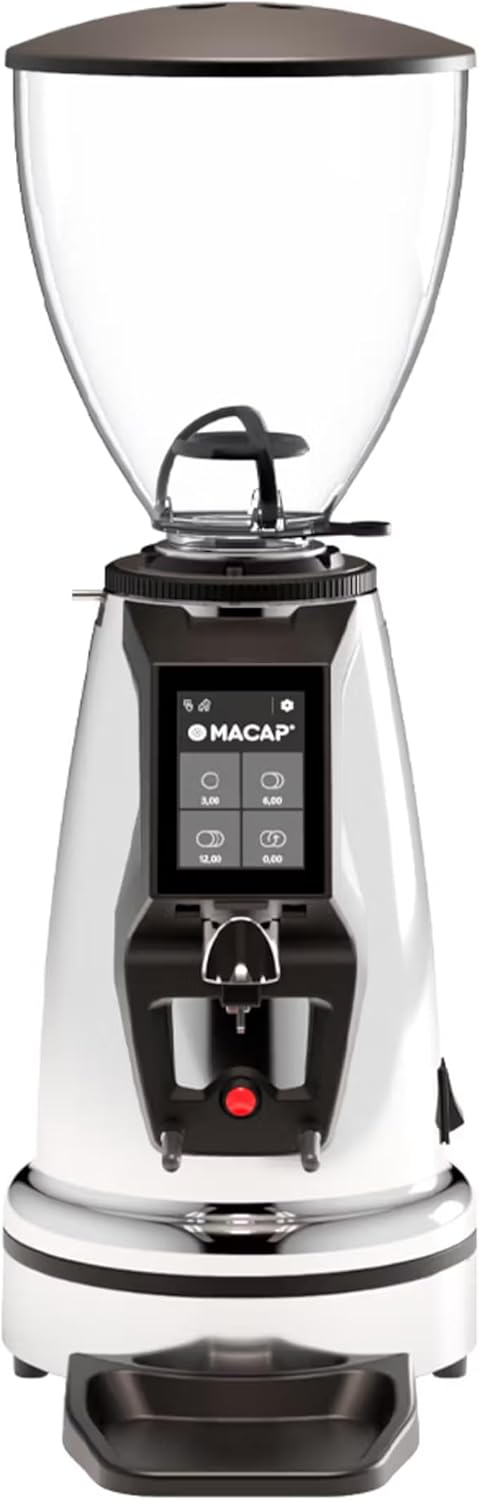
أمام view of the Macap MI40 Touch Instant Burr Coffee Grinder, showcasing its sleek chrome finish and integrated touchscreen display.
2. معلومات السلامة
Please read all safety instructions carefully before operating the grinder to prevent injury or damage.
- Always unplug the grinder from the power outlet before cleaning, maintenance, or if it will be left unattended.
- Do not immerse the grinder, power cord, or plug in water or any other liquid.
- Keep hands and utensils out of the bean hopper and grind chute during operation.
- Ensure the bean hopper lid is securely in place before grinding.
- This appliance is intended for grinding whole roasted coffee beans only. Do not grind other substances.
- لا تقم بتشغيل المطحنة إذا كان السلك أو القابس تالفًا، أو إذا كان الجهاز معطلاً أو تعرض للتلف بأي شكل من الأشكال.
- احتفظ بالجهاز بعيدًا عن متناول الأطفال.
3. المكونات
Familiarize yourself with the main components of your MI40 Touch coffee grinder:
حبوب هوبر: Transparent container for holding whole coffee beans. Capacity: 1.2 Kilograms.

3.5'' Touchscreen Display: Intuitive interface for controlling grind settings, dose programming, and operating modes.

Grind Adjustment Collar: Stepless micrometric adjustment for precise control over grind particle size.

Portafilter Fork & Drip Tray: Adjustable fork to hold your portafilter for hands-free grinding, with a removable drip tray for easy cleaning.
4. الإعداد
Follow these steps to set up your Macap MI40 Touch grinder:
- فك التعبئة: Carefully remove the grinder and all accessories from the packaging. Retain the packaging for future transport or storage.
- الموقع: Place the grinder on a stable, flat, and dry surface. Ensure there is adequate ventilation around the unit.
- تركيب هوبر: Place the bean hopper onto the grinder body, aligning the tabs. Rotate the hopper clockwise until it locks securely into place.
- تركيب صينية التنقيط: Slide the removable drip tray into its designated slot at the base of the grinder.
- توصيل الطاقة: قم بتوصيل سلك الطاقة بمأخذ كهربائي أرضي.
- التنظيف الأولي: قبل الاستخدام الأول، امسح السطح الخارجي بـamp cloth. Ensure the burrs and grind chute are free of any packing debris.

جانب view of the Macap MI40 Touch grinder, illustrating its compact design and the placement of the bean hopper and drip tray.
5. تعليمات التشغيل
5.1. Grind Adjustment
The MI40 Touch features stepless micrometric grind adjustment, allowing for precise control over particle size. To adjust the grind:
- Ensure the grinder is off or not actively grinding.
- Rotate the grind adjustment collar located below the bean hopper.
- تناوب في اتجاه عقارب الساعة for a finer grind (e.g., for espresso).
- تناوب عكس عقارب الساعه for a coarser grind (e.g., for drip, French press, or cold brew).
- Make small adjustments and test the grind to achieve the desired consistency for your brewing method.
عن قرب view of the grind adjustment collar, showing the numerical markings for reference.
5.2. واجهة شاشة اللمس
The 3.5-inch touchscreen allows for intuitive control and customization of your grinding experience. It features four programmable dose buttons and various settings.
The 3.5-inch touchscreen display showing the main interface with programmable dose buttons.
For a detailed demonstration of the touchscreen interface and its functionalities, please refer to the official video below:
This video demonstrates the various features and customization options of the 3.5-inch touchscreen interface on the Macap MI Series coffee grinders, including dose programming, color customization, and different operating modes.
5.3. أوضاع التشغيل
The MI40 Touch offers three primary operating modes:
- الوضع القياسي: Allows you to select a pre-programmed dose by pressing the corresponding button on the touchscreen. The grinder will dispense the set amount of coffee.
- وضع الدفع والطحن: Grinding starts when the portafilter activates the button on the fork and stops when the portafilter is removed. This mode is ideal for manual control.
- Barista Hands-Free Mode: Similar to Push and Grind, but designed for continuous grinding as long as the portafilter is in place, allowing baristas to multitask.
6. الصيانة والتنظيف
Regular cleaning and maintenance will ensure optimal performance and longevity of your grinder.
6.1. التنظيف اليومي
- Grind Chute: Use a brush or vacuum to clear any residual coffee grounds from the grind chute after each use.
- صينية التنقيط: Remove and empty the drip tray regularly. Wipe it clean with a damp قطعة قماش وتجفف جيدا.
- الخارج: امسح الجزء الخارجي من المطحنة بقطعة قماش ناعمة.amp القماش. لا تستخدم المنظفات أو المذيبات الكاشطة.

The removable drip tray and portafilter fork area, designed for easy cleaning.
6.2. Deep Cleaning (Weekly/Bi-Weekly)
- افصل المطحنة.
- إزالة قادوس الفول: Empty any remaining beans. Rotate the hopper counter-clockwise to unlock and remove it.
- تنظيف الشفرات: Use a stiff brush or a specialized grinder brush to remove accumulated coffee oils and grounds from the burrs. You may need to remove the upper burr for thorough cleaning (refer to specific instructions in the full manual for burr removal).
- تنظيف حجرة الطحن: Use a vacuum cleaner with a narrow attachment to remove grounds from the grind chamber.
- إعادة التجميع: Reinstall the burrs (if removed) and the bean hopper securely.
7. استكشاف الأخطاء وإصلاحها
If you encounter issues with your MI40 Touch grinder, refer to the table below for common problems and solutions.
| مشكلة | السبب المحتمل | حل |
|---|---|---|
| المطحنة لا تعمل. | غير متصل بالكهرباء؛ تم إيقاف تشغيل الطاقة؛ تم فصل قاطع الدائرة. | Check power connection; ensure power switch is on; reset circuit breaker. |
| لا يوجد توزيع للقهوة. | Hopper empty; grind chute clogged; burrs jammed. | Fill hopper; clean grind chute; clear any foreign objects from burrs (unplug first). |
| طحن غير متناسق. | Burrs dirty or worn; grind setting too coarse/fine. | Clean burrs thoroughly; adjust grind setting incrementally. Consider burr replacement if worn. |
| Grinder is excessively noisy. | Foreign object in burrs; loose components. | Unplug and inspect burrs for foreign objects; check for loose parts. If noise persists, contact support. |
| شاشة اللمس لا تستجيب. | خلل برمجي مؤقت؛ مشكلة في الطاقة. | Unplug the grinder for 30 seconds, then plug back in. If issue persists, contact support. |
8. المواصفات
Key technical specifications for the Macap MI40 Touch Instant Burr Coffee Grinder:
| ميزة | مواصفة |
|---|---|
| نموذج | MI40 Touch |
| نوع النتوء | Flat Burrs |
| Burr Diameter | 65 ملم |
| قوة المحرك | 480 واط |
| سعة القادوس | 1.2 كيلوغرام |
| تعديل الطحن | ميكرومتري بدون خطوات |
| عرض | 3.5'' Touchscreen |
| أبعاد المنتج (الطول × العرض × الارتفاع) | 12 بوصة × 7.63 بوصة × 22 بوصة |
| وزن العنصر | 19.58 رطل |
| بلد المنشأ | إيطاليا |
9. الضمان والدعم
Macap products are manufactured to high standards and undergo rigorous quality control. For warranty information, technical support, or service inquiries, please refer to the warranty card included with your product or visit the official Macap website. Please have your model number (MI40 Touch) and purchase date available when contacting support.
Ask a question about this manual
Ask about setup, troubleshooting, compatibility, parts, safety, or missing instructions. Manuals+ will review the question and use this page’s manual context to help answer it.