
1. انتهى المنتجview
The Hisense 65E7Q QLED Smart TV offers a premium viewing experience with its 65-inch QLED display. This television integrates advanced technologies such as Dolby Vision and Dolby Atmos for immersive audio-visuals, AI Smooth Motion for fluid images, and dedicated modes for gaming and sports. Powered by the VIDAA operating system, it provides easy access to a wide range of streaming content and smart features, including voice control.

أمام view of the Hisense 65E7Q QLED Smart TV.
المميزات الرئيسية:
- QLED Colour: Experience rich, vibrant, and realistic colors.
- حركة سلسة بتقنية الذكاء الاصطناعي: Advanced MEMC and 3D Noise Reduction for fluid, blur-free images.
- دولبي فيجن ودولبي أتموس: Cinematic picture and immersive sound for an enhanced entertainment experience.
- وضع اللعبة الإضافي: Reduces input lag to 16ms, with 60Hz VRR and ALLM for ultra-fluid gaming.
- وضع الرياضة بالذكاء الاصطناعي: Optimizes picture and sound for sports content, reducing motion blur and enhancing stadium-like audio.
- مُحسِّن دقة 4K بتقنية الذكاء الاصطناعي: Enhances blurry images to near-4K quality.
- VIDAA Smart TV OS: Fast, secure, and intuitive operating system with access to popular streaming applications.
- التحكم الصوتي: Integrated Alexa and VIDAA Voice for convenient operation.
2. معلومات السلامة
Please read all safety instructions carefully before using your TV. Keep this manual for future reference. Always ensure the TV is placed on a stable surface to prevent tipping. Do not expose the TV to rain or moisture. Refer to the full safety guidelines in the included safety manual.
3. محتويات العبوة
تأكد من وجود جميع العناصر في الصندوق:
- Hisense 65E7Q QLED Smart TV
- كابل الطاقة
- Remote Control (with 1 AAAA battery included)
- حامل تلفزيون (قطعتين)
- براغي لتجميع الحامل
- دليل المستخدم (هذا المستند)
- بطاقة الضمان
4. الإعداد
4.1 تجميع الحامل
- قم بوضع شاشة التلفزيون بعناية على سطح ناعم ومسطح لمنع تعرضها للتلف.
- قم بمحاذاة قطع الحامل مع الفتحات المقابلة لها في الجزء السفلي من التلفزيون.
- ثبّت قطع الحامل باستخدام البراغي المرفقة. تأكد من إحكام ربطها.

Diagram illustrating TV dimensions and stand installation points.
4.2 التركيب على الحائط
If you plan to wall mount your TV, ensure you use a VESA-compatible wall mount kit (not included). The Hisense 65E7Q supports a VESA mounting standard of 600 x 400 mm. Follow the instructions provided with your wall mount kit for safe installation.
4.3 توصيل الأجهزة الطرفية
Connect your external devices to the TV's ports as needed. Refer to the port diagram below:

مؤخرة view showing available ports and connections.
- منافذ HDMI (x3): Connect Blu-ray players, game consoles, and other HDMI devices. One port supports eARC for enhanced audio return.
- منافذ USB (x2): Connect USB flash drives for media playback. (1x USB 3.0, 1x USB 2.0)
- Antenna Inputs (x2): قم بتوصيل هوائيك الأرضي أو الكابلي.
- إيثرنت (LAN): للاتصال بالشبكة السلكية.
- مخرج الصوت البصري: قم بتوصيله بمكبر صوت أو جهاز استقبال صوتي للحصول على صوت رقمي.
- مقبس سماعة الرأس: للاستماع الخاص.
- مدخلات AV: لتوصيل الأجهزة القديمة باستخدام كابلات الفيديو المركبة وكابلات الصوت الاستريو.
4.4 التشغيل المبدئي
- قم بتوصيل كابل الطاقة بالتلفزيون ثم بمأخذ الطاقة.
- اضغط على زر الطاقة الموجود في جهاز التحكم عن بعد أو التلفزيون.
- اتبع الإرشادات التي تظهر على الشاشة لإكمال الإعداد الأولي، بما في ذلك تحديد اللغة، واتصال الشبكة، ومسح القنوات.
5. تشغيل جهاز التلفزيون
5.1 التحكم عن بعد
The included remote control allows you to navigate the TV's features. Insert the provided AAAA battery into the remote. The remote supports voice control for convenient operation.
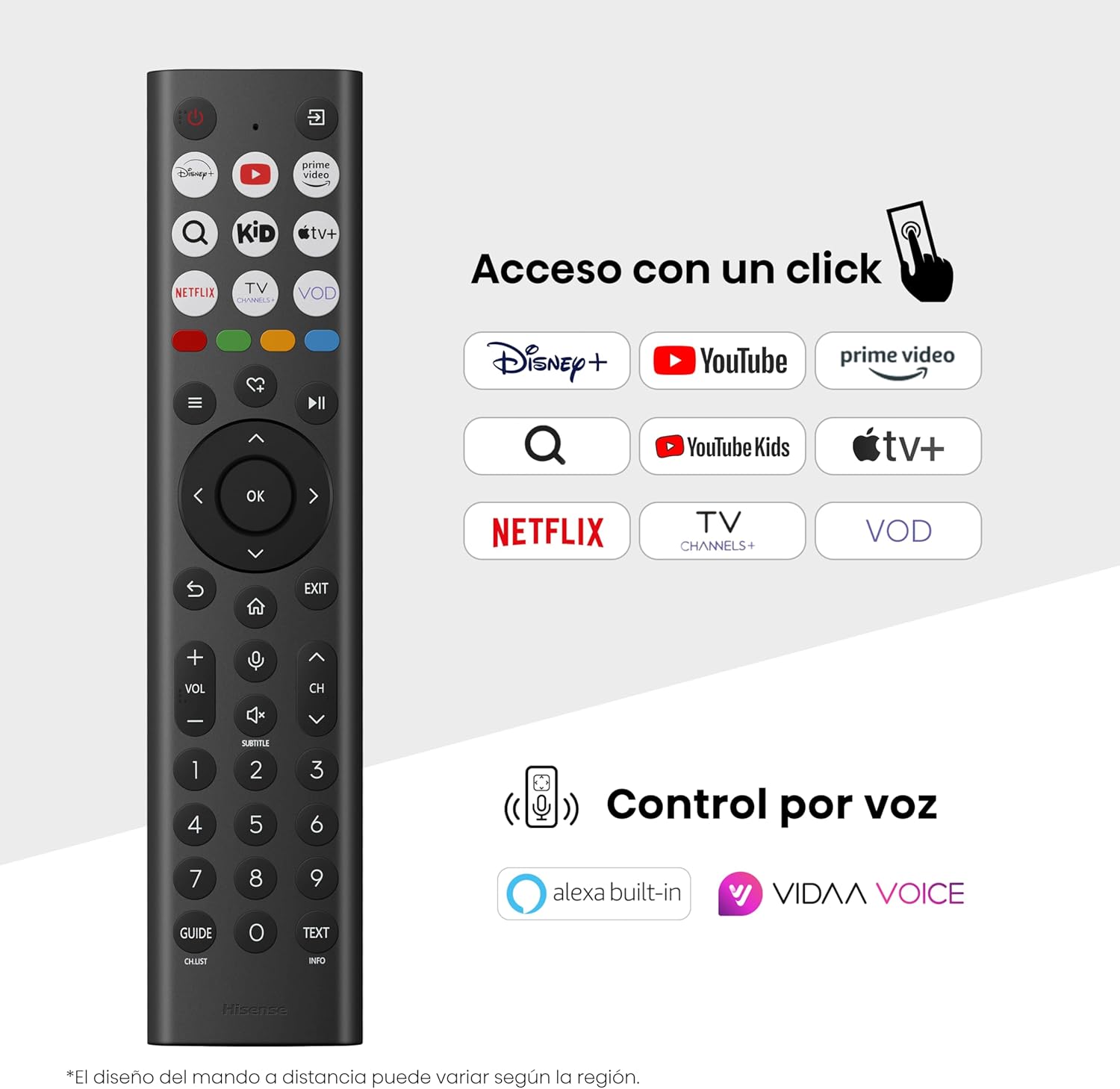
Hisense Smart TV remote control with dedicated app buttons and voice control.
5.2 ميزات التلفزيون الذكي (VIDAA OS)
Your Hisense TV runs on the VIDAA operating system, offering a user-friendly interface for accessing various applications and services.

The VIDAA Smart TV interface with popular streaming applications.
- التطبيقات: Access pre-installed apps like Netflix, YouTube, Prime Video, and more.
- التحكم الصوتي: Use the remote's voice function to search for content, adjust settings, or interact with Alexa built-in and VIDAA Voice.
- Screen Mirroring (AirPlay): Share content from your Apple devices directly to the TV.
- شارك على التلفزيون: Easily send content from your mobile devices to the TV.
5.3 إعدادات الصورة
تحسين الخاص بك viewing experience with various picture enhancement technologies:
- QLED Colour: Delivers over a billion shades of vibrant, lifelike colors.
- مُحسِّن دقة 4K بتقنية الذكاء الاصطناعي: Automatically enhances lower-resolution content to near-4K quality.
- حركة سلسة بتقنية الذكاء الاصطناعي: Reduces motion blur in fast-paced scenes, ensuring clear and fluid visuals.
- دولبي فيجن: Provides stunning brightness, contrast, and color for a dramatic visual experience.
- وضع صانع الفيلم: Preserves the original aspect ratio, colors, and frame rates to display movies as intended by the director.
- مستشعر الضوء بالذكاء الاصطناعي: Intelligently adjusts screen brightness based on ambient light for optimal viewوكفاءة الطاقة.
- وضع العناية بالعين: يقلل من انبعاث الضوء الأزرق لتقليل إجهاد العين.
- وضع توفير الطاقة: Optimizes power consumption without significantly compromising picture quality.

QLED technology delivers over a billion vibrant color tones.

AI 4K Upscaler enhances lower resolution content to near 4K clarity.

AI Smooth Motion ensures fluid images without blur, especially in fast-moving scenes.

Filmmaker Mode presents content exactly as the director intended.
5.4 إعدادات الصوت
Enhance your audio experience with:
- دولبي أتموس: Immersive, multi-dimensional sound that fills your room.
- مكبر صوت متكامل: Built-in speakers with a maximum output of 1 Watt per channel.
- إيزي بلاي: Seamlessly control compatible Hisense soundbars directly from your TV screen.

Dolby Vision and Dolby Atmos combine for a spectacular audio-visual experience.
5.5 ميزات الألعاب
بالنسبة لعشاق الألعاب، يوفر التلفزيون:
- وضع اللعبة الإضافي: Reduces input lag to 16ms, ensuring responsive gameplay.
- معدل التحديث المتغير (VRR) 60 هرتز: Synchronizes the TV's refresh rate with the game console's output to prevent screen tearing.
- ALLM (وضع الكمون المنخفض التلقائي): Automatically switches the TV to low-latency mode when a game is detected.
- شريط اللعبة: An integrated control center for quick access to game settings and real-time performance monitoring.

Game Mode Plus provides ultra-fluid, lag-free gaming.

The Game Bar offers centralized control for game settings.
5.6 Sports Features
- وضع الرياضة بالذكاء الاصطناعي: Automatically detects sports content and optimizes picture and sound settings for a stadium-like experience, enhancing clarity and audio effects.
6. الصيانة
6.1 تنظيف التلفزيون
- افصل دائمًا التلفاز عن الكهرباء قبل التنظيف.
- استخدم قطعة قماش ناعمة وجافة وخالية من الوبر لمسح الشاشة وجسم التلفزيون بلطف.
- بالنسبة للعلامات العنيدة، قم بالتدليك برفقampبلل قطعة القماش بالماء أو بمنظف الشاشة المتخصص (لا ترش مباشرة على الشاشة).
- تجنب استخدام المنظفات الكاشطة أو الكحول أو البنزين أو المخففات، حيث يمكن أن تؤدي هذه المواد إلى إتلاف سطح التلفزيون.
6.2 تحديثات البرامج
Your TV may receive software updates periodically to improve performance and add new features. Ensure your TV is connected to the internet to receive these updates. You can usually check for updates manually in the TV's settings menu.
7. استكشاف الأخطاء وإصلاحها
إذا واجهت مشكلات مع التلفزيون الخاص بك، فراجع الحلول الشائعة التالية:
- لا يوجد طاقة: Check if the power cable is securely connected and the power outlet is working. Try a different outlet.
- لا صورة/صوت: تأكد من اختيار مصدر الإدخال الصحيح. تحقق من جميع توصيلات الكابلات (HDMI، الهوائي).
- جهاز التحكم عن بعد لا يعمل: Check the battery (1 AAAA battery). Ensure there are no obstructions between the remote and the TV.
- مشاكل الاتصال بالشبكة: تحقق من كلمة مرور شبكة Wi-Fi أو اتصال كابل Ethernet. أعد تشغيل جهاز التوجيه (الراوتر).
- جودة الصورة رديئة: اضبط إعدادات الصورة (السطوع، التباين، الحدة). تأكد من أن مصدر الإدخال يوفر إشارة عالية الجودة.
- تشويه الصوت: Check audio settings. If using external speakers, ensure they are connected correctly.
For more detailed troubleshooting, consult the full electronic user manual or contact Hisense customer support.
8. المواصفات
Detailed technical specifications for the Hisense 65E7Q QLED Smart TV:
| ميزة | مواصفة |
|---|---|
| رقم الموديل | 65E7Q |
| حجم الشاشة | 65 بوصة |
| تكنولوجيا العرض | تلفزيون كيو إل إي دي |
| دقة | 4K (3840 × 2160) |
| معدل التحديث | 60 هرتز |
| دعم تنسيق HDR | دولبي فيجن |
| Motion Enhancement Technology | الحركة السلسة بالذكاء الاصطناعي |
| تحسين جودة الصورة | AI 4K Upscaler, AI Smooth Motion, QLED Colour |
| وقت الاستجابة | 100 ميلي ثانية |
| تكوين الإضاءة الخلفية | Direct Illumination, Dimming |
| وصف المتحدث | Integrated speaker with Dolby Atmos |
| أقصى طاقة خرج للسماعة | 1 واط |
| قنوات الصوت | متعدد القنوات |
| Surround Sound Format | دولبي أتموس |
| نظام التشغيل | فيدا |
| سعة تخزين الذاكرة | 1 جيجا بايت |
| طريقة التحكم | صوت |
| تكنولوجيا الاتصال | بلوتوث، HDMI، واي فاي |
| Internet Applications | Netflix, YouTube, Prime Video, AirPlay 2 |
| منافذ HDMI | 3 (including HDMI 2.1 with eARC) |
| منافذ USB | 2 (1x USB 3.0، 1x USB 2.0) |
| التكنولوجيا اللاسلكية | واي فاي |
| Screen Mirroring Technology | اير بلاي |
| معيار التثبيت VESA | 600 × 400 ملم |
| أبعاد المنتج (عمق×عرض×ارتفاع) | 7.6 × 145.3 × 83.8 سم |
| وزن المنتج | 15.2 كجم (مع الحامل) |
| فئة كفاءة الطاقة | E |
| الاستهلاك السنوي للطاقة | 84 كيلوواط ساعة/1000 ساعة (SDR)، 160 كيلوواط ساعة/1000 ساعة (HDR) |
| قوة | 1 واط (وضع الاستعداد) |
| المجلدtage | 100-240 VCA 50-60 Hz |
| المكونات المضمنة | كابل الطاقة، جهاز التحكم عن بعد، الحامل |
| سنة الموديل | 2025 |
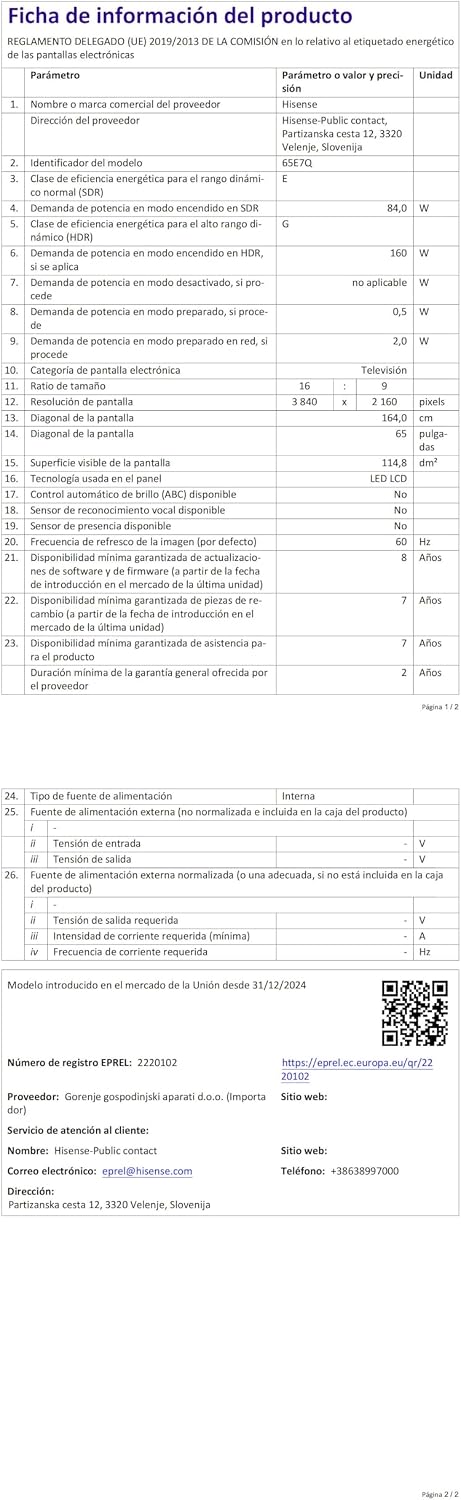
Energy label for the Hisense 65E7Q TV.
للحصول على معلومات أكثر تفصيلاً عن المنتج، يرجى الرجوع إلى قاعدة بيانات EPREL: https://eprel.ec.europa.eu/qr/2220102
9. الضمان والدعم
9.1 ضمان المنتج
This Hisense TV comes with a ضمان المنتج لمدة 3 عامًايرجى الاحتفاظ بإثبات الشراء الخاص بك لاستخدامه في المطالبات بالضمان.
9.2 توافر قطع الغيار
Spare parts for this model are guaranteed to be available in the EU for a duration of سنتان from the product's market introduction.
9.3 دعم العملاء
For technical assistance, troubleshooting, or warranty service, please contact Hisense customer support. Refer to the contact information provided in your warranty card or visit the official Hisense webموقع لمنطقتك.