
1. انتهى المنتجview
The Zunate X99H Motherboard is designed for high-performance desktop computing, supporting LGA 2011-3 CPUs including E5 V3, E5 V4, i7 58xx, and i7 68xx series processors. It features four DDR4 DIMM slots, allowing for a maximum memory capacity of 128GB, with support for DDR4 2666, 2400, and 2133MHz memory types. This mATX form factor motherboard includes M.2 NVMe and SATA3 interfaces for storage, USB 3.0 connectivity, and integrated HD multimedia and VGA interfaces for display output. The design incorporates solid capacitors for enhanced stability and extended lifespan.

Figure 1: Zunate X99H Motherboard - Top View. This image displays the overall layout of the motherboard, including the LGA 2011-3 CPU socket, four DDR4 DIMM slots, PCIe slots, and various headers and ports.
2. الإعداد والتثبيت
Follow these steps for proper installation of your Zunate X99H Motherboard and its components.
2.1 تثبيت وحدة المعالجة المركزية
- تحضير مقبس وحدة المعالجة المركزية: Gently lift the CPU retention lever on the LGA 2011-3 socket.
- قم بمحاذاة وحدة المعالجة المركزية: Carefully align your LGA 2011-3 CPU (E5 V3/V4, i7 58xx/68xx series) with the socket, ensuring the triangular markers on the CPU and socket match. Do not force the CPU into place.
- تأمين وحدة المعالجة المركزية: Lower the CPU into the socket. Close the retention lever until it clicks into place.
- تثبيت مبرد وحدة المعالجة المركزية: Apply thermal paste (if not pre-applied) and install your compatible CPU cooler according to its manufacturer's instructions.

Figure 2: CPU Socket Compatibility. This image emphasizes the LGA 2011-3 CPU socket, compatible with E5 V3/V4 and i7 58xx/68xx series processors, and shows the 8-pin and 24-pin power sockets.
2.2 تثبيت الذاكرة (RAM)
- Open DIMM Latches: Open the retention clips at both ends of the DDR4 DIMM slots.
- Align RAM Modules: قم بمحاذاة الشق الموجود على وحدة ذاكرة DDR4 الخاصة بك مع المفتاح الموجود في فتحة DIMM.
- Insert RAM: اضغط بقوة على طرفي وحدة الذاكرة حتى تستقر مشابك التثبيت في مكانها.
- Install Multiple Modules: For optimal performance, refer to your CPU and memory manufacturer's guidelines for dual or quad-channel memory configuration.

Figure 3: Memory Support. This image highlights the four DDR4 DIMM slots, capable of supporting up to 128GB of DDR4 2666/2400/2133MHz memory.
2.3 تركيب جهاز التخزين
- M.2 NVMe/SATA SSD:
- حدد مكان فتحة M.2 على اللوحة الأم.
- قم بإدخال SSD M.2 في الفتحة بزاوية.
- ادفع SSD للأسفل برفق وقم بتثبيته باستخدام المسمار المرفق.
- Ensure the jumper switch for the M.2 interface is set correctly for either Serial ATA or PCIE protocol, depending on your M.2 device.
- Serial ATA (SATA) Devices:
- Connect one end of a SATA data cable to a SATA port on the motherboard (2 x SATA2.0, 1 x SATA3.0).
- قم بتوصيل الطرف الآخر من كابل بيانات SATA بمحرك الأقراص الصلبة SATA أو محرك الأقراص ذي الحالة الصلبة SSD.
- Connect a SATA power cable from your power supply unit (PSU) to the SATA device.
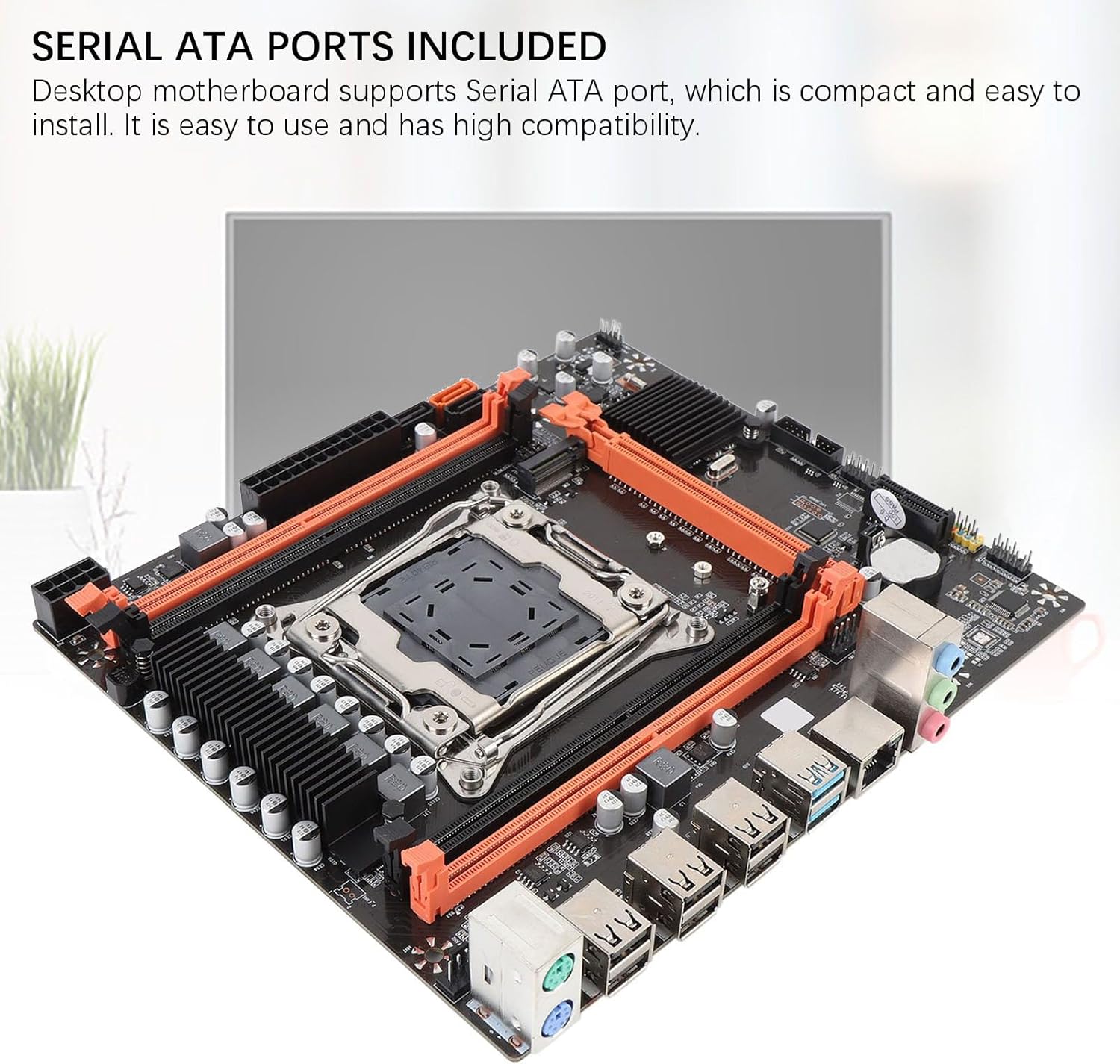
Figure 4: Storage Connectivity. This image shows the Serial ATA ports and the M.2 slot, supporting NGFF and NVME protocols for various storage solutions.
2.4 توصيلات الطاقة
- طاقة ATX ذات 24 سنًا: Connect the main 24-pin power cable from your PSU to the 24-pin power socket on the motherboard.
- طاقة وحدة المعالجة المركزية ذات 8 دبابيس: Connect the 8-pin (or 4+4 pin) CPU power cable from your PSU to the 8-pin power socket near the CPU.
2.5 الاتصالات الطرفية
- بطاقة الرسوميات: Insert your PCI Express 16X graphics card into the designated slot and secure it.
- موصلات اللوحة الأمامية: Connect the power switch, reset switch, HDD LED, power LED, and front panel USB/audio headers to their respective pins on the motherboard. Refer to the motherboard's silkscreen labels for correct orientation.
- جهاز USB:٪ s: Connect USB 2.0 and USB 3.0 devices to the rear I/O panel ports.
- شبكة: Connect an Ethernet cable to the RJ45 network interface.
- عرض: Connect your monitor to the graphics card or the integrated HD multimedia/VGA interfaces if using integrated graphics (CPU dependent).

Figure 5: Rear I/O Panel. This image provides a clear view of the motherboard's rear input/output ports, including USB 2.0, USB 3.0, RJ45 network, and audio jacks.
3. تعليمات التشغيل
بمجرد تثبيت كافة المكونات وتوصيلها، يمكنك تشغيل نظامك.
- التشغيل الأولي: Ensure all power cables are securely connected. Press the power button on your PC case.
- الوصول إلى BIOS/UEFI: أثناء بدء التشغيل، اضغط بشكل متكرر على المفتاح المخصص (عادةً ديل, F2، أو ف10) to enter the BIOS/UEFI setup utility. Here you can configure boot order, system time, and other advanced settings.
- تركيب نظام التشغيل: قم بإدخال وسائط تثبيت نظام التشغيل (محرك أقراص USB أو DVD) واتبع التعليمات التي تظهر على الشاشة لتثبيت نظام التشغيل المفضل لديك.
- تثبيت برنامج التشغيل: After OS installation, install the necessary drivers for your motherboard (chipset, network, audio, USB, etc.) from the manufacturer's webالموقع أو الوسائط المقدمة.
4. الصيانة
Regular maintenance helps ensure the longevity and stable performance of your motherboard and PC system.
- إزالة الغبار: Periodically clean dust from inside your PC case, especially from fans, heatsinks, and motherboard components, using compressed air. Ensure the system is powered off and unplugged before cleaning.
- إدارة الكابلات: Ensure internal cables are neatly routed to improve airflow and prevent obstruction.
- تحديثات BIOS/UEFI: تحقق من الشركة المصنعة webموقع لتحديثات BIOS/UEFI. يمكن للتحديثات تحسين التوافق والاستقرار والأداء. اتبع تعليمات التحديث بعناية.
- فحص المكونات: Occasionally check that all components (RAM, graphics card, storage drives) are securely seated in their slots.

Figure 6: Stable Performance Components. This image highlights the solid capacitors used on the motherboard, contributing to its stability and extended lifespan.
5. استكشاف الأخطاء وإصلاحها
إذا واجهت مشاكل، فضع في اعتبارك خطوات استكشاف الأخطاء وإصلاحها الشائعة التالية:
- لا يوجد طاقة:
- تأكد من تشغيل وحدة إمداد الطاقة وتوصيلها بمأخذ طاقة يعمل.
- Verify that the 24-pin and 8-pin power cables are securely connected to the motherboard.
- تحقق من توصيل مفتاح الطاقة الموجود على اللوحة الأمامية باللوحة الأم.
- لا يوجد عرض:
- Confirm that your monitor is connected to the correct display output (graphics card or integrated graphics port).
- أعد تركيب بطاقة الرسومات ووحدات ذاكرة الوصول العشوائي (RAM).
- Test with a single RAM module in different slots.
- Ensure the CPU cooler is properly installed and connected.
- عدم استقرار النظام/الأعطال:
- Check for overheating. Ensure CPU cooler and case fans are functioning.
- Verify RAM compatibility and stability (e.g., run memory diagnostic tools).
- تأكد من تحديث كافة برامج التشغيل.
- Check for loose power or data cables.
- لم يتم اكتشاف التخزين:
- بالنسبة لمحركات أقراص SATA، تحقق من توصيلات كابلات البيانات والطاقة.
- For M.2 drives, ensure it is fully seated and secured, and the M.2 jumper is set correctly for its protocol (NVMe or SATA).
- Check BIOS/UEFI settings to ensure SATA ports are enabled and M.2 detection is configured.

Figure 7: Expansion Capabilities. This image highlights the M.2 slot, supporting NGFF and NVME protocols, and other expansion slots like PCIe x16 and PCIe x1, along with HD multimedia and VGA interfaces.
6. المواصفات
| ميزة | مواصفة |
|---|---|
| هيكل اللوحة الأم | ام-اتكس |
| مجموعة الشرائح | إكس 99 إتش |
| مقبس وحدة المعالجة المركزية | LGA 2011-3 |
| Supported CPU Types | سلسلة Intel E5 V3/V4، سلسلة i7 58xx/68xx |
| فتحات الذاكرة | 4 × ذاكرة DDR4 DIMM |
| سعة الذاكرة القصوى | 128 جيجا بايت |
| أنواع الذاكرة | DDR4 2666MHz, 2400MHz, 2133MHz |
| Onboard Network Card | Yes (RJ45 interface) |
| فتحة بطاقة الرسومات | 1 x PCI Express 16X |
| فتحات التوسعة | 1 x PCIE x1, 1 x NVME M.2 Interface (Serial ATA, PCIE with Jumper Switch) |
| USB Interfaces (Rear) | 6 X USB 2.0، 2 X USB 3.0 |
| USB Pins (Internal) | 1 set USB3.0, 1 set USB2.0 |
| Serial ATA Ports | 2 x Serial ATA2.0, 1 x Serial ATA3.0 |
| مآخذ الكهرباء | 1 x 8-pin, 1 x 24-pin |
| بطارية مدمجة | CR2032x1 240mah |
| I / O واجهات | PS/2 Keyboard/Mouse Universal Interface, 1 x RJ45 Network Interface, HD multimedia, VGA |
7. الضمان والدعم
For warranty information and technical support, please refer to the official Zunate webالموقع أو اتصل بتاجر التجزئة الخاص بك.
- الشركة المصنعة: زونات
- رقم الموديل: Zunatear2wnouip9
- الدعم عبر الإنترنت: قم بزيارة متجر زوناتي على أمازون for product information and potential support links. For direct manufacturer support, search for "Zunate official webالموقع الإلكتروني.
- سياسة العائدات: This product may be subject to a 30-day return/replacement policy. Please check with your retailer for specific details.