
1. المقدمة
Thank you for choosing the CAPXSNOB Magician1 Mini Espresso Machine. This versatile 5-in-1 coffee maker is designed to provide a premium brewing experience with its multi-pod compatibility, 19-bar pressure system, and customizable settings. Please read this manual thoroughly before initial use to ensure proper operation, maintenance, and safety.
2. تعليمات السلامة الهامة
- اقرأ جميع التعليمات قبل تشغيل الجهاز.
- لا تغمر الجهاز أو سلك الطاقة أو القابس في الماء أو أي سوائل أخرى.
- تأكد من مستوى الصوتtagيتوافق الرقم المحدد على الجهاز مع مصدر الطاقة المحلي لديك.
- احتفظ بالجهاز بعيدًا عن متناول الأطفال.
- افصل الجهاز عن المنفذ عندما لا يكون قيد الاستخدام وقبل التنظيف.
- لا تقم بتشغيل أي جهاز بسلك أو قابس تالف، أو بعد حدوث عطل في الجهاز أو تعرضه للتلف بأي شكل من الأشكال.
- استخدم فقط الملحقات الموصى بها من قبل الشركة المصنعة.
- تجنب ملامسة الأسطح الساخنة. استخدم المقابض أو الأزرار.
- لا تضعه على أو بالقرب من موقد غاز أو كهرباء ساخن، أو في فرن ساخن.
- Always ensure the water reservoir is filled to the appropriate level before brewing.
- Exercise extreme caution when dispensing hot beverages.
3. مكونات المنتج
Familiarize yourself with the parts of your Magician1 Mini Espresso Machine:
- Water Reservoir (21oz capacity)
- Control Panel with LED Display (Time, Temperature, Brew Size indicators)
- Brewing Handle
- غرفة تخمير
- صينية وشبكة تنقيط
- زر الطاقة
- Brew Size Selection Buttons (Small, Medium, Large)
- Adapter for Nespresso Original capsules
- محول لكبسولات دولتشي جوستو
- Adapter for Lavazza Blue capsules
- Adapter for ESE Pods
- Adapter for Ground Coffee
- دبوس التنظيف
- Coffee Dosing Funnel (for ground coffee)
- Scoop & Tamper (for ground coffee)

الصورة: أكثر منview of the Magician1 Mini Espresso Machine and its compatible coffee types.
4. الإعداد الأولي
4.1 فتح العبوة والاستخدام الأول
- قم بإزالة جميع مواد التغليف والملصقات من الجهاز.
- Clean the water reservoir, drip tray, and all adapters with warm, soapy water. Rinse thoroughly and dry.
- Fill the water reservoir with fresh, clean water up to the 'MAX' line.
- ضع خزان المياه مرة أخرى على الجهاز.
- Plug the machine into a grounded electrical outlet. The LED display will illuminate.
- Perform a cleaning cycle: Without any coffee pod or ground coffee in an adapter, insert an empty adapter into the brewing chamber. Place a large cup under the dispenser. Press the largest cup size button to run a full cycle of hot water through the machine. Repeat this process 2-3 times to flush the system.
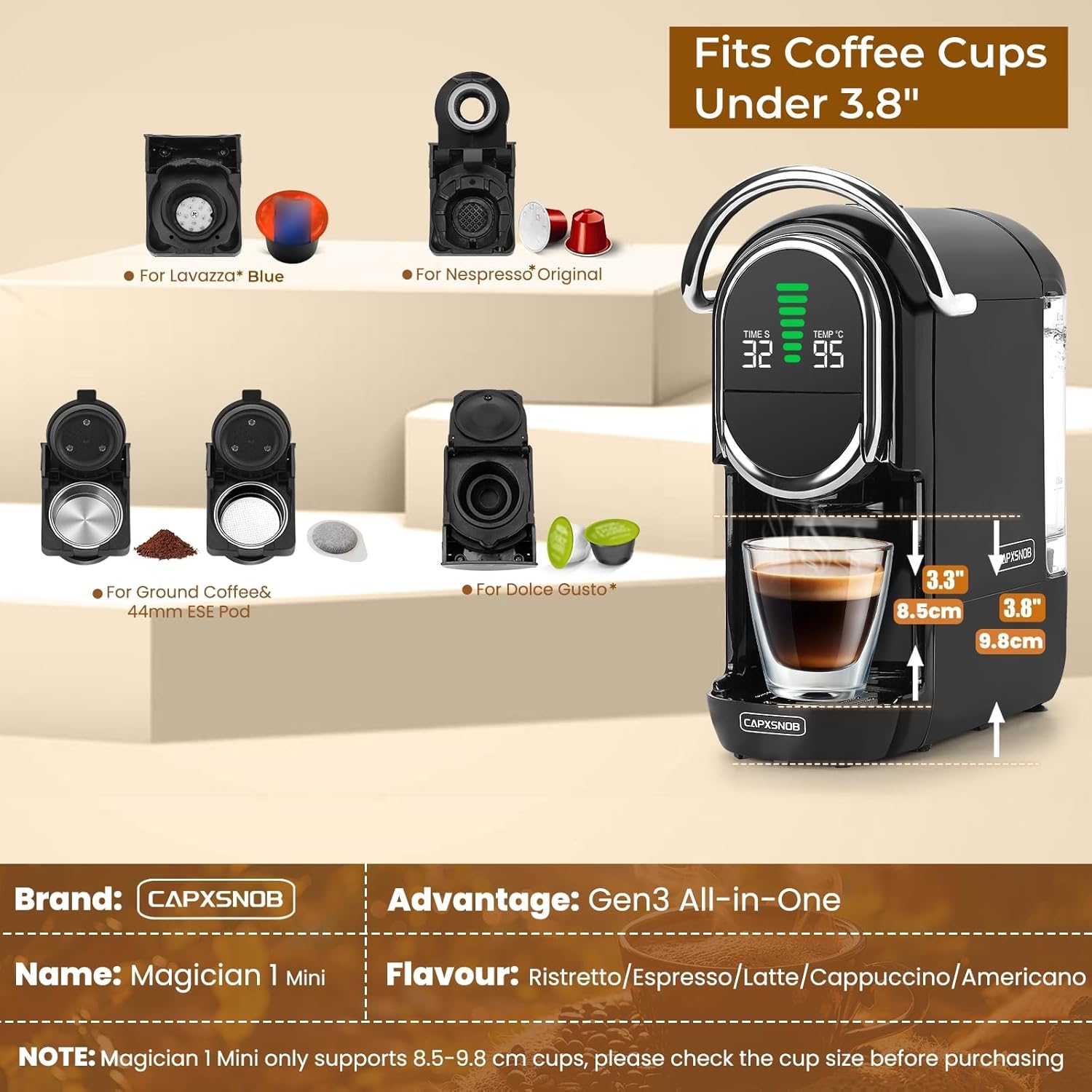
Image: Visual guide for the brewing process, including water filling and adapter insertion.
5. تعليمات التشغيل
5.1 Brewing Coffee (General Steps)
- تأكد من أن خزان المياه مملوء بالمياه العذبة.
- Select the appropriate adapter for your chosen coffee type (Nespresso Original, Dolce Gusto, Lavazza Blue, ESE Pod, or Ground Coffee).
- Insert your coffee pod or ground coffee into the selected adapter.
- Place the filled adapter into the brewing chamber and firmly push down the handle to lock it in place.
- Place a cup (under 3.8 inches in height) on the drip tray beneath the dispenser.
- The machine will preheat (approx. 20-25 seconds). The LED display will show the current temperature.
- Select your desired brew size by pressing one of the three brew size buttons.
- The machine will begin brewing. Once complete, the flow will stop automatically.
- Carefully remove your cup and enjoy. Lift the handle to eject the used pod/grounds into the internal waste bin.

Image: The Gen3 All-in-One system illustrating compatibility with various coffee capsule types and ground coffee.
5.2 Hot & Cold Brew Options
The machine supports both hot and cold brewing modes.
- Hot Brew Mode: This is the default mode. The power button light will be red.
- Cold Brew Mode: In standby mode, press and hold the power button for 5 seconds until the light turns blue. The display will show 'CO'. This mode uses room-temperature water.

Image: Instructions for activating hot and cold brew modes, with visual examples of brewed coffee.
5.3 Adjustable Temperature
Customize your coffee temperature between 85°C and 97°C.
- Hold the brew button for 5 seconds; the temperature value on the LED display will start flashing.
- Press the volume buttons (small, medium, large cup icons) to adjust the temperature up or down.
- The setting will auto-save after 3 seconds of inactivity.

Image: Detailed steps for adjusting the brewing temperature on the machine's display.
5.4 Brew Sizes
The machine offers seven customizable brew sizes. Press the corresponding button for your desired volume.

Image: Chart detailing the seven available brew sizes, from Ristretto to Americano, with approximate brewing times.
5.5 Official Product Video: Main Functions and Operation Guide
Video: This video demonstrates the main functions and operational steps of the CAPXSNOB Magician1 Mini Espresso Machine, including water filling, adapter insertion, and brewing various coffee types.
6. الصيانة والتنظيف
6.1 التنظيف اليومي
- دورة التنظيف الذاتي: Insert an empty adapter (without a coffee pod) into the brewing chamber. Place a large cup under the dispenser and select the largest cup size. This flushes the internal water path and brewing chamber.
- صينية التنقيط: قم بإفراغ وشطف صينية التنقيط والشبكة يوميًا.
- خزان مياه: Rinse the water reservoir daily and refill with fresh water.
- Used Pod Bin: Empty the internal waste bin after each use or when full.
6.2 Ground Coffee Adapter Maintenance
Regular cleaning of the ground coffee adapter is crucial to prevent clogging.
- After use, disassemble the ground coffee adapter.
- شطف جميع الأجزاء تحت الماء الجاري.
- Use the provided cleaning pin to clear any coffee grounds from the plastic filter holes and stainless steel filters.
- تأكد من أن جميع الأجزاء جافة قبل إعادة التجميع.

Image: Visual instructions for the correct brewing guide, maintenance tips, and disassembly/assembly of the ground coffee adapter.
6.3 إزالة الترسبات
Depending on water hardness, descaling should be performed every 3-6 months. Refer to the full descaling instructions in the comprehensive user manual (if provided separately) or contact customer support for guidance.
7. استكشاف الأخطاء وإصلاحها
| مشكلة | السبب المحتمل | حل |
|---|---|---|
| No water coming out after long inactivity | غرفة معادلة الضغط في النظام | Use the inflator (if included) to inject water into the tank inlet. Refer to Section 3.2 of the manual for detailed instructions. |
| Leaking during brewing | Damaged or unsupported pod; grounds too fine or overfilled (max 15g); handle not fully locked. | Ensure pod is compatible and undamaged. Do not overfill ground coffee. Verify the handle is fully locked. |
| Cup size doesn't seem right | Minor variation is normal due to pod type, water temperature, and pressure. | This is expected behavior. Adjust brew size manually if needed. |
| Handle won't lift | High pressure from some pods or too fine ground coffee. | Wait until the pressure fully releases before attempting to lift the handle. |
| No coffee with Dolce Gusto adapter | Outlet needle on the adapter is clogged. | Use the cleaning pin to clear the outlet needle on the adapter. |

Image: A summary of friendly reminders and tips for troubleshooting common issues.
8. المواصفات
- ماركة: CAPXSNOB
- اسم الموديل: Magician1 Mini
- رقم موديل المنتج: ST-542S
- لون: أسود
- أبعاد المنتج: 10.7 بوصة عمق × 5.6 بوصة عرض × 11.2 بوصة ارتفاع
- سعة خزان المياه: 21 أونصة
- ضغط: مضخة إيطالية 19 بار
- وقت التسخين المسبق: حوالي 20-25 ثانية
- نطاق درجة الحرارة القابل للتعديل: 85 درجة مئوية – 97 درجة مئوية
- أحجام التحضير: 7 customizable options
- التوافق: Nespresso Original, Dolce Gusto, Lavazza Blue/A Modo Mio, ESE Pod, Ground Coffee (A Modo Mio, Caffitaly adapters sold separately)
- سمات: Hot & Cold Brew, LED Display, Adjustable Brew Strength, Adjustable Temperature & Cup Size, Multiple modular capsule adapters.
- مصدر الطاقة: محول التيار المتردد
- وزن السلعة: 9.13 رطل
9. الضمان ودعم العملاء
Your CAPXSNOB Magician1 Mini Espresso Machine comes with a 60-day return policy and a 2-year limited warranty. To receive an extended 2-year replacement service and a complimentary starter set of coffee pods, please register your product on the official CAPXSNOB webموقع.
For any questions, troubleshooting assistance, or warranty claims, please contact CAPXSNOB customer support through the official webالموقع أو منصة الشراء الخاصة بك.