
1. المقدمة
This manual provides detailed instructions for the Symcode Wearable Glove Barcode Scanner. This device is designed for efficient, hands-free barcode scanning, featuring dual wireless connectivity (Bluetooth 6.0 & 2.4G) and a long-lasting battery. It is suitable for various applications including warehouses, retail, and logistics, offering fast decoding of 1D, 2D, and QR codes.
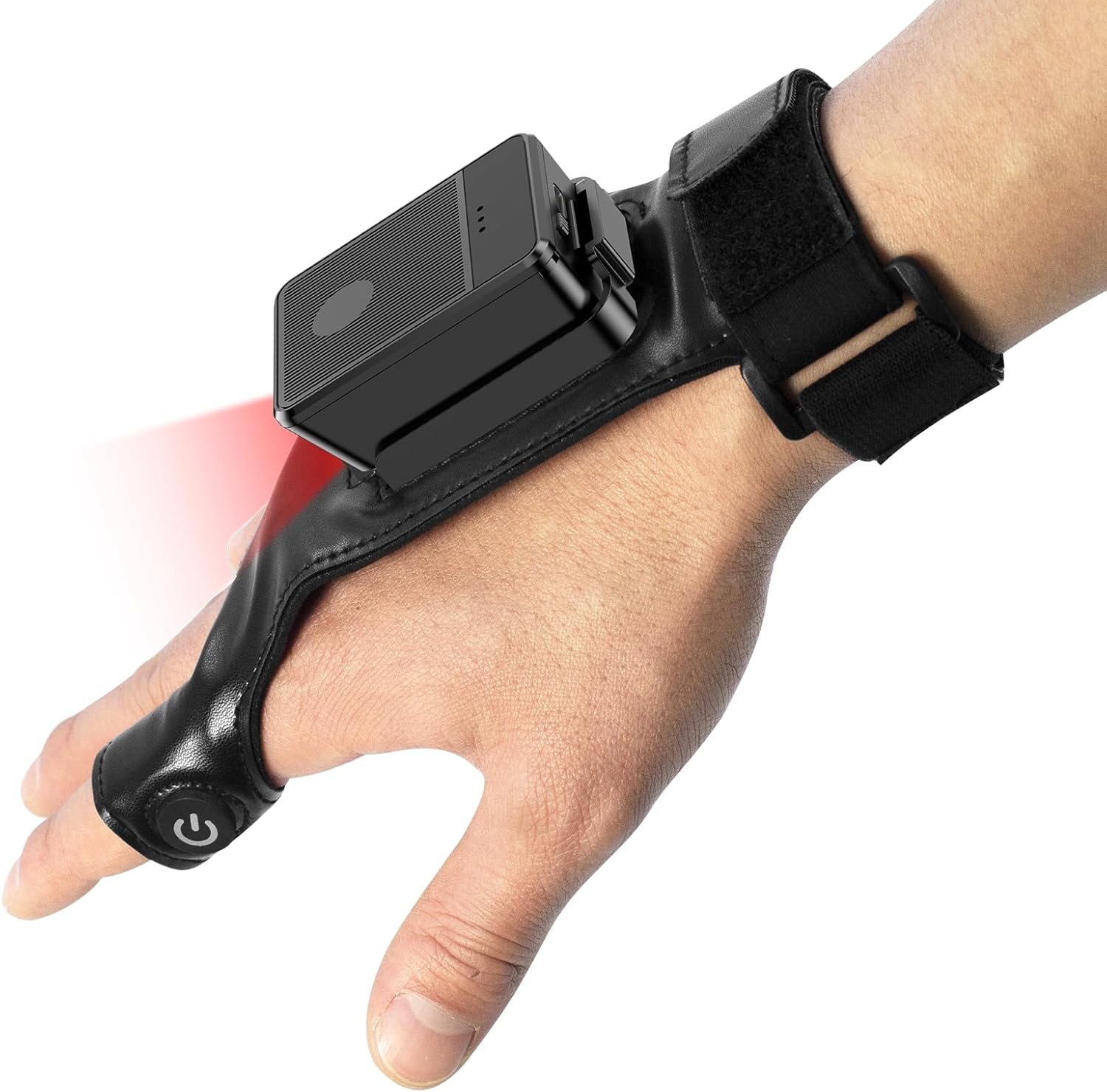
This image shows the Symcode Wearable Glove Barcode Scanner attached to a user's hand, demonstrating its ergonomic, hands-free design. The scanner unit is positioned on the back of the hand, with the scanning beam visible.
2. معلومات السلامة
- Do not expose the device to extreme temperatures, moisture, or corrosive substances.
- تجنب تعرض العين المباشر لضوء المسح.
- لا تحاول تفكيك الجهاز أو إصلاحه بنفسك. اتصل بفني مؤهل للصيانة.
- استخدم فقط كابل الشحن والمحول المرفقين لتجنب التلف.
3. محتويات العبوة
يرجى التحقق من محتويات العبوة عند الاستلام. في حال وجود أي أغراض مفقودة أو تالفة، يُرجى التواصل مع البائع.
- Symcode Wearable Glove Barcode Scanner
- كابل شحن USB
- دونجل لاسلكي 2.4G
- دليل المستخدم
4. انتهى المنتجview
The Symcode Wearable Glove Barcode Scanner consists of a compact scanning unit and an adjustable glove-style strap. The scanning unit features a durable trigger button, indicator lights, and a charging port. The glove is designed for comfort and secure fit, allowing for hands-free operation.

لقطة مقرّبة view of the scanner on a hand, highlighting the red scanning beam and the durable resin material of the trigger button located on the index finger. The image also shows a roll of barcode labels, indicating its primary function.
5. الإعداد
5.1 شحن الجهاز
Before first use, fully charge the scanner. Connect the USB charging cable to the scanner's charging port and to a power source (e.g., computer USB port or USB wall adapter). The charging indicator light will show charging status. A full charge takes approximately 5 hours.
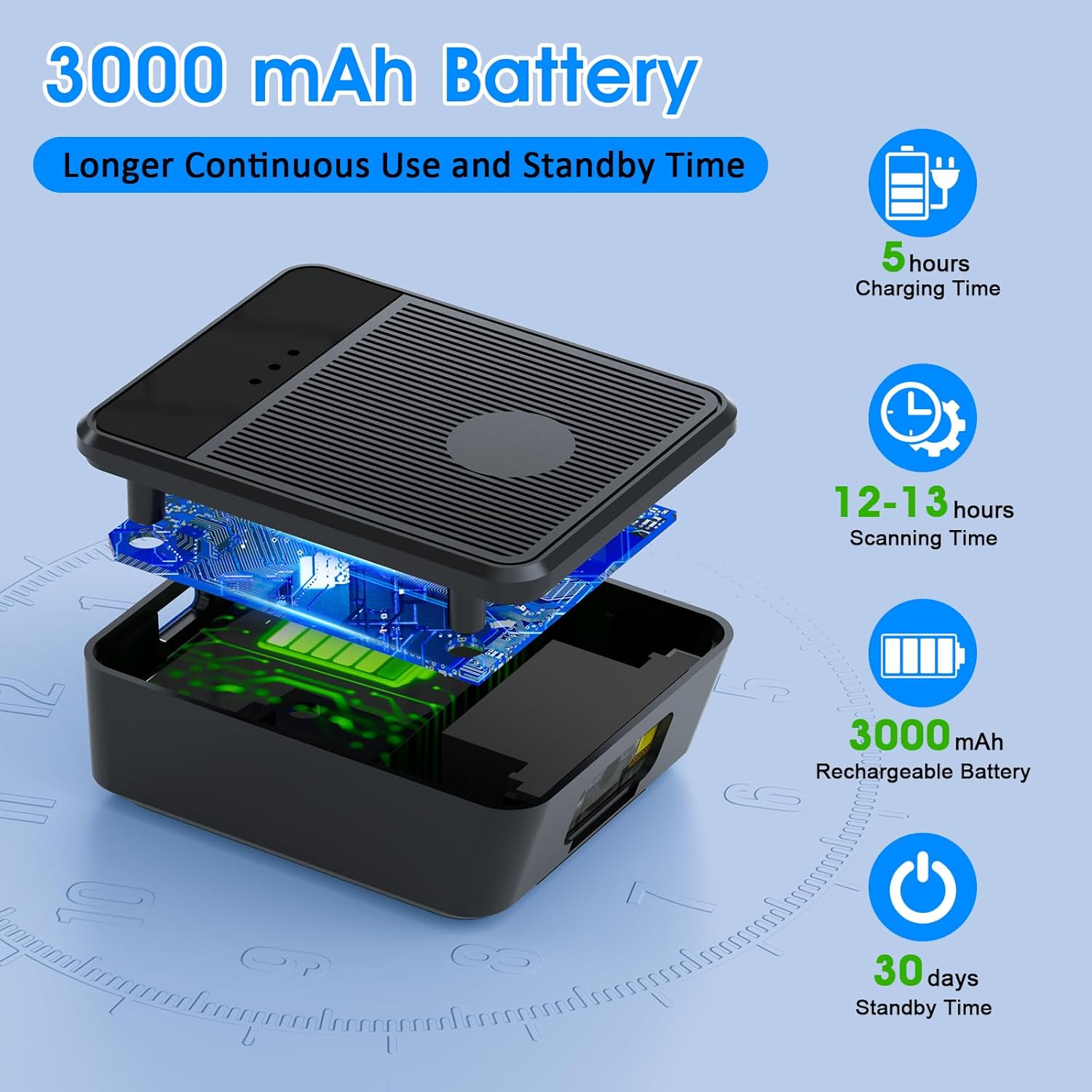
انفجرت view diagram of the scanner unit, emphasizing its 3000 mAh rechargeable battery. Accompanying text indicates a 5-hour charging time, 12-13 hours of continuous scanning, and 30 days of standby time.
5.2 ارتداء الماسح الضوئي
Slide your hand into the glove, ensuring the scanner unit is positioned comfortably on the back of your hand. Adjust the strap for a secure fit. The trigger button should align with your index finger for easy access.

Two workers are shown in a warehouse environment, handling boxes. One worker is actively using the wearable barcode scanner on their hand to scan a package, demonstrating the hands-free benefit of the device during logistics operations.
5.3 الاتصال بجهاز
The scanner supports two wireless connection methods:
5.3.1 2.4G Wireless Dongle Connection
- Plug the 2.4G wireless dongle into a USB port on your computer or compatible device.
- Turn on the scanner. It should automatically pair with the dongle.
- A successful connection is indicated by a specific light pattern or sound (refer to device indicators).
5.3.2 اتصال بلوتوث 6.0
- قم بتشغيل الماسح الضوئي.
- قم بتفعيل البلوتوث على جهازك المضيف (مثل الهاتف الذكي أو الجهاز اللوحي أو الكمبيوتر).
- بحث عن available Bluetooth devices and select the Symcode scanner from the list.
- Pairing may require a confirmation or a default PIN (check device documentation for specific PIN if required).
6. تعليمات التشغيل
6.1 المسح الأساسي
To scan a barcode, point the scanner's beam at the barcode and press the trigger button located on your index finger. A successful scan will typically be indicated by a beep, a vibration, or a change in the indicator light.
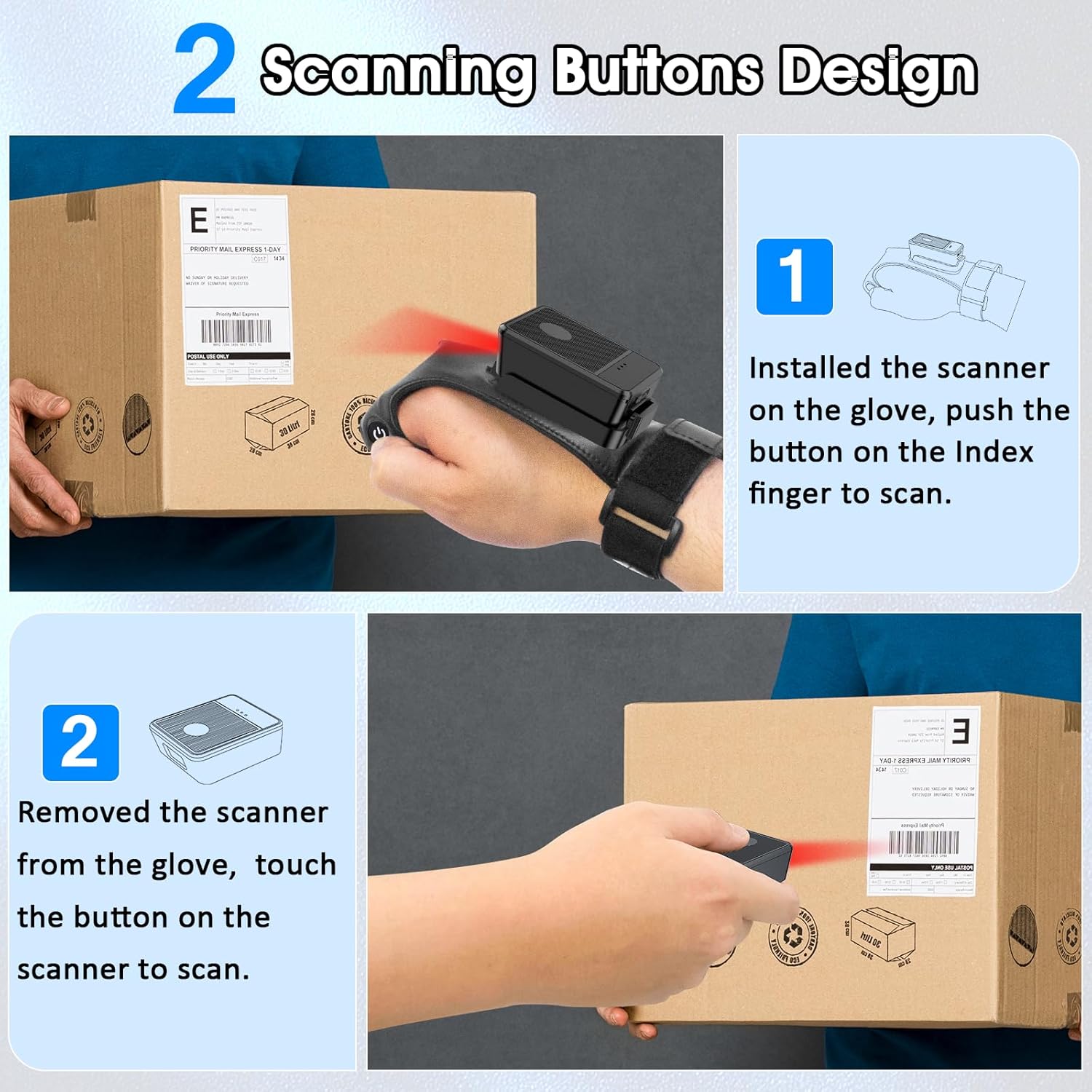
This diagram illustrates two ways to use the scanner: 1) installed on the glove, scanning with the index finger button, and 2) removed from the glove, scanning by touching the button directly on the scanner unit. Both methods are shown with the scanner pointed at a package.
6.2 أوضاع العمل
The scanner supports two operational modes:
6.2.1 وضع التحميل الفوري
In this mode, scanned barcode data is immediately transmitted to the connected host device. This is ideal for real-time inventory updates or point-of-sale transactions.
6.2.2 Offline Storage Mode
This mode allows the scanner to store up to 50,000 barcodes internally when not connected to a host device or when connectivity is intermittent. Data can then be uploaded to a computer or POS system at a later time.
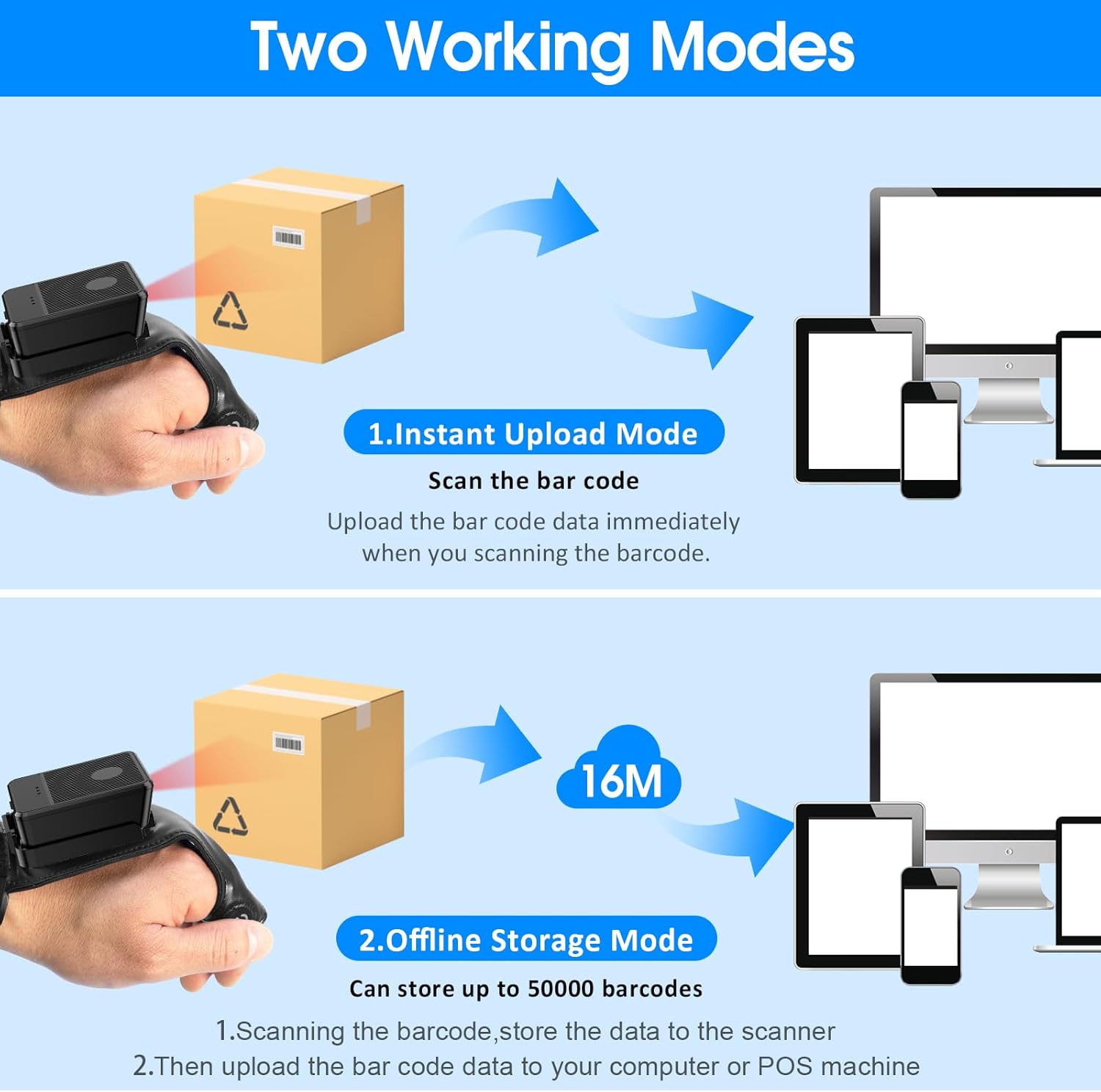
This image explains the two operational modes: Instant Upload Mode, where scanned data is immediately sent to a connected device, and Offline Storage Mode, which allows storing up to 50,000 barcodes internally before uploading them to a computer or POS system.
6.3 تخصيص الإعدادات
The scanner allows for customization of various settings, including:
- صوت: Enable or disable the audible beep for successful scans.
- اهتزاز: Enable or disable vibration alerts for successful scans, useful in quiet environments.
- وظائف لوحة المفاتيح: Add keyboard functions such as TAB or Enter after each scan for seamless data entry into applications.
Refer to the quick setup guide or manufacturer's website for specific programming barcodes to adjust these settings.
7. الصيانة
- تنظيف: Use a soft, dry cloth to clean the scanner's exterior. For stubborn dirt, slightly dampاغسل قطعة القماش بالماء. لا تستخدم مواد كيميائية قاسية أو منظفات كاشطة.
- تخزين: قم بتخزين الماسح الضوئي في مكان بارد وجاف بعيدًا عن أشعة الشمس المباشرة ودرجات الحرارة القصوى عندما لا يكون قيد الاستخدام.
- العناية بالبطارية: لإطالة عمر البطارية، تجنب تفريغها بالكامل بشكل متكرر. اشحن الجهاز بانتظام، حتى في حال عدم استخدامه باستمرار.
8. استكشاف الأخطاء وإصلاحها
8.1 الماسح الضوئي لا يعمل
- Ensure the battery is charged. Connect the scanner to a power source and allow it to charge for at least 30 minutes before attempting to turn it on again.
8.2 Unable to Connect Wirelessly
- 2.4G اتصال: Verify the 2.4G dongle is securely plugged into the host device. Try plugging it into a different USB port. Ensure the scanner is within range of the dongle.
- اتصال بلوتوث: Ensure Bluetooth is enabled on your host device. Delete any previous pairings for the scanner and attempt to pair again. Ensure the scanner is in pairing mode (refer to device indicators).
- أعد تشغيل كل من الماسح الضوئي والجهاز المضيف.
8.3 الماسح الضوئي لا يقرأ الباركود
- تأكد من أن الرمز الشريطي نظيف وغير تالف ومطبوع بشكل واضح.
- اضبط المسافة والزاوية بين الماسح الضوئي والباركود.
- Check if the scanner is in the correct working mode (Instant Upload or Offline Storage).
- Verify that the barcode type is supported by the scanner (1D, 2D, QR codes are supported).
9. المواصفات
| ماركة | رمز الرمز |
| نموذج | Wearable Glove Barcode Scanner (B0F1FSMWCD) |
| تكنولوجيا الاتصال | 2.4G، بلوتوث 6.0 |
| الأجهزة المتوافقة | Desktop, Laptop, Tablet, Smartphone (Windows XP/7/8/10, Android, iOS) |
| مصدر الطاقة | تعمل بالبطارية |
| نوع البطارية | 1 بطارية ليثيوم بوليمر (متضمنة) |
| سعة البطارية | 1100mAh (Product Description) / 3000mAh (Image) - Note: Discrepancy in source data, refer to product packaging for accurate capacity. |
| وقت التشغيل المستمر | Up to 10 hours (Product Description) / 12-13 hours (Image) - Note: Discrepancy in source data, refer to product packaging for accurate time. |
| وقت الشحن | حوالي 5 ساعات |
| وقت الاستعداد | حتى 30 يوما |
| سرعة المسح الضوئي | Up to 300 scans per second |
| نطاق المسح | 2 إلى 4.9 قدم |
| Offline Storage Capacity | ما يصل إلى 50,000 رمز شريطي |
| وزن العنصر | 5 أونصات |
| أبعاد الحزمة | 7.48 × 3.74 × 2.44 بوصة |
10. معلومات الضمان
This Symcode product is covered by a manufacturer's warranty. For specific warranty terms, duration, and conditions, please refer to the warranty card included with your product or visit the official Symcode webالموقع. احتفظ بإثبات الشراء الخاص بك لتقديم مطالبات الضمان.
11. دعم العملاء
If you encounter any issues or have questions regarding your Symcode Wearable Glove Barcode Scanner, please contact Symcode customer support. Contact details can typically be found on the product packaging, the official Symcode webالموقع، أو من خلال بائع التجزئة الخاص بك.