
1. المقدمة
Thank you for choosing the JUNJIEUNVO Q16 PRO Wireless Translation Earbuds. These earbuds are designed to provide a versatile audio experience, featuring real-time language translation, high-definition sound, and an open-ear design for comfort. This manual provides essential information for setting up, operating, and maintaining your device.
2. محتويات العبوة
- JUNJIEUNVO Q16 PRO Wireless Translation Earbuds (Left and Right)
- علبة شحن مزودة بشاشة لمس ذكية
- دليل المستخدم
- كابل الشحن (USB-C)
3. انتهى المنتجview

الشكل 3.1: JUNJIEUNVO Q16 PRO Wireless Translation Earbuds and Charging Case. This image displays the white and silver earbuds with their unique ear-hook design, alongside the charging case which features a digital display showing time and battery levels.
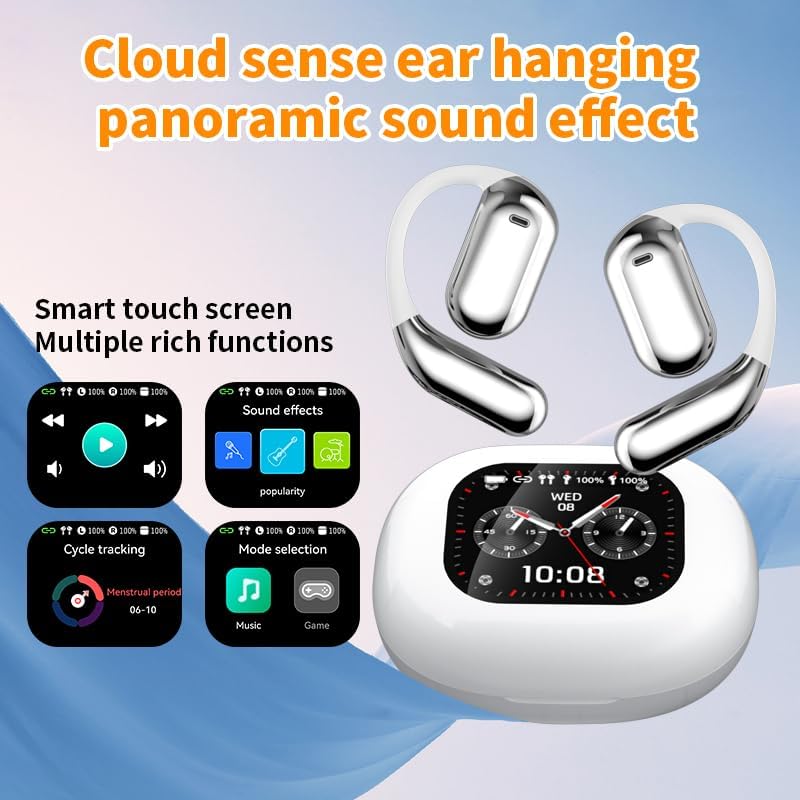
الشكل 3.2: Smart Touch Screen Functions. This image highlights the charging case's smart touch screen, illustrating various functions such as media playback controls, sound effects, cycle tracking, and mode selection (music/game).

الشكل 3.3: Environmental Noise Cancellation (ENC). This image depicts a person wearing the earbuds, with an overlay illustrating how the ENC technology reduces ambient noise by up to 99.44%, providing a clearer audio experience.

الشكل 3.4: Open-Ear Design for Comfort. This image shows a person wearing the earbuds, emphasizing the open-ear design that offers comfort and allows for awareness of external sounds, protecting ear canal health.

الشكل 3.5: Multiple Sound Adjustment Modes. This image displays the charging case's screen showing "Sound effects" with options for various music genres, indicating the ability to customize audio preferences.

الشكل 3.6: Extended Battery Life and Rich Functions. This image showcases the earbuds and charging case, highlighting a 40-hour endurance with a 500mAh charging case capacity, along with a mention of multiple functions.

الشكل 3.7: Earbuds and Charging Case (Open View). A detailed view of both earbuds and the open charging case, showing the internal design and charging contacts.

الشكل 3.8: Earbuds in Charging Case. This image shows the earbuds securely placed within their charging case, ready for charging or storage.

الشكل 3.9: Earbuds and Charging Case (Angled View). Another perspective of the earbuds and charging case, emphasizing their sleek design and compact form factor.
4. الإعداد
4.1 شحن سماعات الأذن والعلبة
قبل الاستخدام الأول، قم بشحن سماعات الأذن وعلبة الشحن بالكامل.
- ضع سماعات الأذن في علبة الشحن. تأكد من تثبيتها بشكل صحيح في فتحاتها المخصصة (L لليسار، R لليمين).
- Connect the charging cable to the USB-C port on the charging case and to a power source.
- ستشير الشاشة الرقمية الموجودة على علبة الشحن إلى حالة الشحن.
A full charge for the earbuds takes approximately 1.5 hours. The charging case has a 500mAh battery, providing extended use.
4.2 الاقتران بجهاز
The earbuds use Bluetooth 5.4 for a stable connection up to 10 meters.
- افتح علبة الشحن. ستدخل سماعات الأذن تلقائيًا في وضع الاقتران.
- على جهازك (الهاتف الذكي، الجهاز اللوحي، وما إلى ذلك)، قم بتمكين البلوتوث.
- بحث عن available Bluetooth devices and select "Q16 PRO" from the list.
- بمجرد الاتصال، ستشير سماعات الأذن إلى نجاح عملية الاقتران، وسيظهر الجهاز أنها متصلة.
سيتم إعادة توصيل سماعات الأذن تلقائيًا بالجهاز المقترن الأخير عند إزالتها من العلبة، إذا تم تمكين البلوتوث على الجهاز.
5. تعليمات التشغيل
5.1 وظائف شاشة اللمس الذكية
The charging case features a smart touch screen for easy control of various functions. Navigate through options by swiping or tapping on the screen.
- تشغيل الوسائط: Control music (play, pause, skip tracks) directly from the screen.
- المؤثرات الصوتية: Select from various sound modes.
- اختيار الوضع: Switch between music and game modes.
- تتبع الدورة: Access additional features if supported by the connected application.
5.2 Touch Controls (Earbuds)
The earbuds themselves also feature touch-sensitive areas for basic controls:
- نقرة واحدة: تشغيل/إيقاف الموسيقى مؤقتًا، الرد على المكالمة/إنهائها.
- الضغط مرتين (يسارًا): المسار السابق.
- الضغط مرتين (يمينًا): المسار التالي.
- ضغطة طويلة: تفعيل المساعد الصوتي، رفض المكالمة.
5.3 وظيفة الترجمة
The Q16 PRO earbuds support real-time translation for up to 144 languages. This feature typically requires a dedicated application on your connected smartphone.
- Download and install the companion translation application (refer to the app store or product packaging for details).
- Open the application and follow the on-screen instructions to connect your earbuds.
- Select the desired source and target languages within the application.
- Use the earbuds as instructed by the application for real-time translation during conversations or audio playback.
5.4 Sound Adjustment Modes
Customize your audio experience through the charging case's smart touch screen. Available sound modes include:
- طبيعي
- بوب
- صخر
- موسيقى الجاز
- كلاسيكي
- شعبي
- Custom (user-defined equalizer settings)
5.5 تصنيف مقاومة الماء IPX5
The earbuds are rated IPX5 waterproof, meaning they are resistant to splashes and sweat. They are suitable for sports and outdoor activities but should not be submerged in water.
6. الصيانة
- تنظيف: استخدم قطعة قماش ناعمة وجافة لتنظيف سماعات الأذن وعلبة الشحن. تجنب استخدام المواد الكاشطة أو المواد الكيميائية القاسية.
- تخزين: قم بتخزين سماعات الأذن في علبة الشحن الخاصة بها عند عدم استخدامها لحمايتها وإبقائها مشحونة.
- تجنب درجات الحرارة القصوى: Do not expose the device to extreme heat or cold, as this can damage the battery and internal components.
- التعرض للماء: While IPX5 rated, avoid prolonged exposure to water or high humidity. Ensure the charging port is dry before charging.
7. استكشاف الأخطاء وإصلاحها
| مشكلة | الحل المحتمل |
|---|---|
| سماعات الأذن لا تقترن | Ensure earbuds are charged. Turn off and on Bluetooth on your device. Forget "Q16 PRO" from your device's Bluetooth list and re-pair. |
| لا يوجد صوت من سماعة أذن واحدة | Check battery level of both earbuds. Place both earbuds back in the case, close it, then reopen to reset. Re-pair with your device. |
| علبة الشحن لا تشحن | Ensure the charging cable is securely connected. Try a different USB-C cable and power adapter. |
| وظيفة الترجمة لا تعمل | Ensure the companion app is installed and updated. Check app permissions (microphone, internet). Verify a stable internet connection. |
| جودة الصوت سيئة | Ensure earbuds are clean. Check the distance to your device (within 10m). Avoid obstacles between earbuds and device. |
8. المواصفات
| ميزة | التفاصيل |
|---|---|
| اسم الموديل | YYK-Q16 PRO |
| نسخة البلوتوث | V5.4 + EDR |
| رقاقة | Blue Flood |
| البروتوكولات المدعومة | AVRCP V1.6, A2DP V1.3, HFP V1.7, Simultaneous LE and BR / EDR |
| Usage/Playback Time | حوالي 8 ساعات (بحجم 80%) |
| وقت الاستعداد | 80 ساعات |
| وقت الشحن | حوالي 1.5 ساعات |
| المسافة اللاسلكية | 10 متر |
| سعة بطارية سماعة الأذن | 40 مللي أمبير (كل سماعة أذن) |
| سعة بطارية علبة الشحن | 500 مللي أمبير |
| تصنيف مقاومة الماء | IPX5 |
| وزن العنصر | 6.4 أونصة (الإجمالي) |
| رمز المنتج الموحد | 884613749637 |
| الشركة المصنعة | UNVO |
| لون | White+Silver |
| وضع الأذن | On Ear (Open-wear design) |
| عامل الشكل | لاسلكية حقيقية |
9. الضمان والدعم
للحصول على معلومات الضمان ودعم العملاء، يُرجى الرجوع إلى الوثائق المرفقة مع المنتج أو الاتصال مباشرةً بالبائع/الشركة المصنعة. احتفظ بإثبات الشراء لتقديم أي مطالبات ضمان.