
مقدمة
شكرا لك على الشراءasing the Sigma 50mm F2 DG Contemporary lens. This manual provides essential information for the safe and effective use of your new lens. Please read it thoroughly before using the product and keep it for future reference.
احتياطات السلامة
- Do not look at the sun or other strong light sources through the lens, as this can cause permanent vision damage.
- احفظ العدسة بعيدًا عن أشعة الشمس المباشرة عند عدم استخدامها لتجنب مخاطر الحريق.
- Avoid exposing the lens to extreme temperatures, humidity, or dust.
- Do not attempt to disassemble or modify the lens. Repairs should only be performed by authorized service personnel.
- يحفظ بعيدًا عن متناول الأطفال.
محتويات الحزمة
تأكد من وجود جميع العناصر في الحزمة الخاصة بك:
- Sigma 50mm F2 DG Contemporary Lens
- Lens Hood (LH633-02S)
- غطاء العدسة الأمامية
- غطاء العدسة الخلفي
- دليل التعليمات (هذا المستند)
أجزاء العدسة
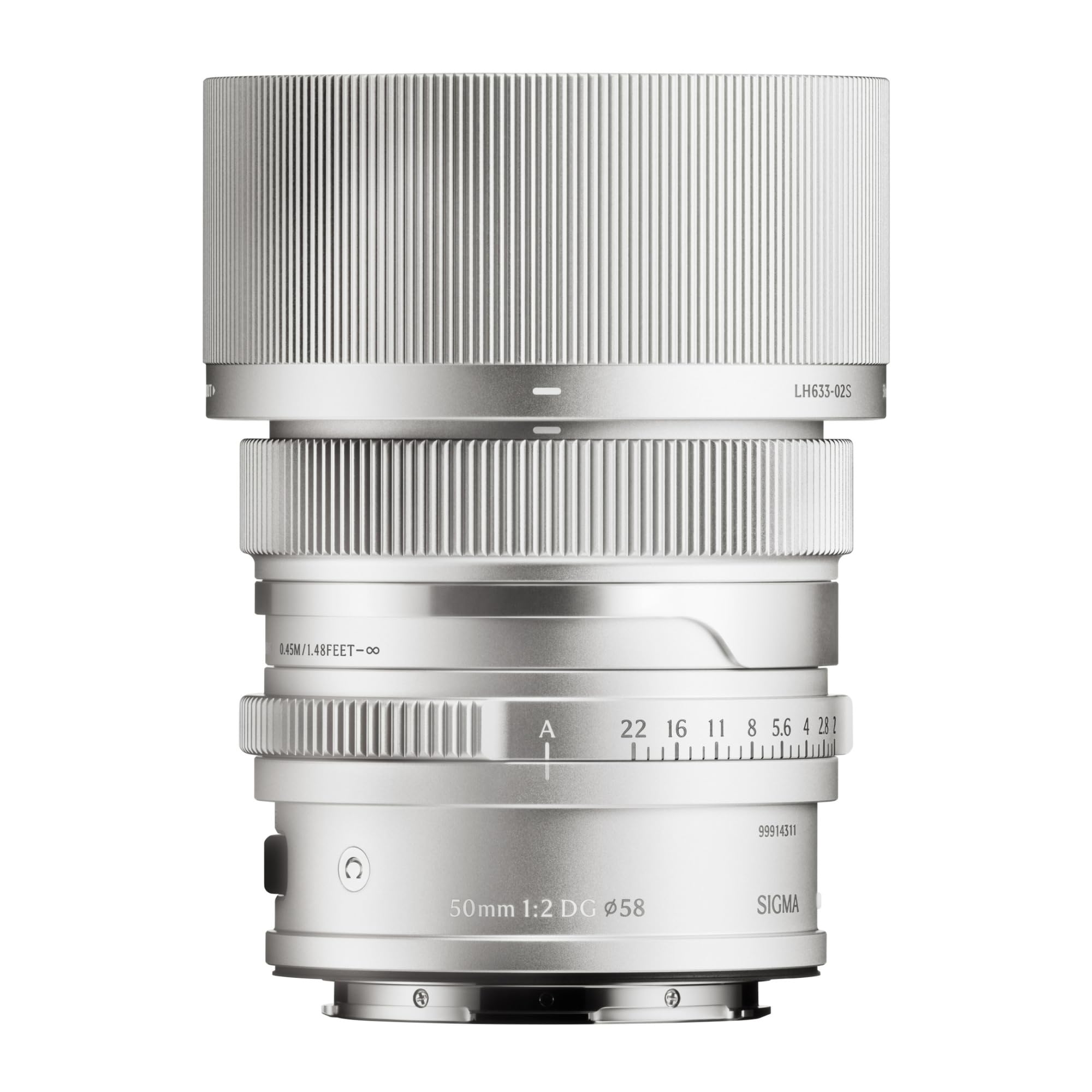
This image displays the Sigma 50mm F2 DG Contemporary lens, a prime lens designed for L-mount cameras. It features a sleek silver finish and a compact design, suitable for various photographic applications.
The Sigma 50mm F2 DG Contemporary lens features several key components:
- حلقة التركيز: يستخدم للتركيز اليدوي.
- حلقة الفتحة: Allows direct control over the lens aperture.
- حامل العدسة: Connects the lens to the camera body (L-Mount).
- Lens Hood Attachment Point: Where the dedicated lens hood is secured.

The image shows the LH633-02S lens hood, a cylindrical accessory with a ribbed exterior, designed to attach to the Sigma 50mm F2 DG Contemporary lens. It helps to prevent stray light from entering the lens, reducing flare and ghosting, and offers protection to the front element.
يثبت
تركيب العدسة
- تأكد من إيقاف تشغيل كل من الكاميرا والعدسة.
- قم بإزالة غطاء العدسة الخلفي من العدسة وغطاء جسم الكاميرا.
- قم بمحاذاة مؤشر التركيب الموجود على العدسة مع مؤشر التركيب الموجود على جسم الكاميرا.
- أدخل العدسة في حامل الكاميرا وقم بتدويرها باتجاه عقارب الساعة حتى تستقر في مكانها. لا تجبر العدسة على الدخول.
Attaching the Lens Hood (LH633-02S)
- قم بمحاذاة النقطة الحمراء الموجودة على غطاء العدسة مع النقطة الحمراء الموجودة على الجزء الأمامي من العدسة.
- Rotate the lens hood clockwise until it locks securely into position.
- To remove, press the release button on the lens hood and rotate counter-clockwise.
التشغيل
التركيز
This lens supports both autofocus (AF) and manual focus (MF).
- ضبط تلقائي للصورة: Set your camera's focus mode to AF. The lens will automatically focus when the shutter button is half-pressed.
- التركيز اليدوي: Set your camera's focus mode to MF. Rotate the focus ring on the lens to adjust focus manually. Use your camera's focus peaking or magnification features for precise focusing.
السيطرة الفتحة
The lens features an aperture ring for direct control over the aperture setting. You can also control the aperture through your camera body, depending on your camera's settings and mode.
الكاميرات المتوافقة
This lens is designed for L-Mount cameras, including models such as Leica SL, Leica TL2, and Leica CL.
صيانة
تنظيف العدسة
- استخدم فرشاة نفخ لإزالة الغبار من سطح العدسة.
- لإزالة البقع أو بصمات الأصابع، استخدم قطعة قماش ناعمة ونظيفة مصنوعة من الألياف الدقيقة، مصممة خصيصًا للعدسات البصرية. ضع كمية صغيرة من محلول تنظيف العدسات على قطعة القماش، وليس مباشرة على العدسة.
- Never use abrasive materials, solvents, or harsh chemicals to clean the lens.
تخزين
- When not in use, attach both the front and rear lens caps.
- Store the lens in a cool, dry place, away from direct sunlight and high humidity.
- في حال التخزين لفترة طويلة، يُنصح باستخدام مادة مجففة لمنع نمو العفن.
استكشاف الأخطاء وإصلاحها
- العدسة غير متعرف عليها بواسطة الكاميرا: Ensure the lens is securely attached to the camera body. Power off and restart the camera. Check for any firmware updates for both the lens and camera.
- خاصية التركيز التلقائي لا تعمل: Verify the camera's focus mode is set to AF. Ensure there is sufficient light and contrast in the scene for the autofocus system to operate effectively.
- الصور غير واضحة: Check that the lens is properly focused. Ensure the shutter speed is fast enough to prevent camera shake, especially in low light. Clean the lens elements if smudges are present.
- Lens hood difficult to attach/remove: Ensure proper alignment of the red dots. Do not force the hood; it should click into place smoothly.
تحديد
| اسم الموديل | 31س969 |
| البعد البؤري | 50 ملم |
| الفتحة القصوى | F2 |
| الفتحة الدنيا | F2 |
| نوع العدسة | عدسة أساسية |
| حوامل متوافقة | لايكا إل |
| نوع التركيز | التركيز التلقائي |
| تثبيت الصورة | لا يوجد تثبيت للصورة |
| مستوى مقاومة الماء | غير مقاوم للماء |
| وزن العنصر | 2 رطل |
الضمان والدعم
معلومات الضمان
يأتي هذا المنتج مع ضمان لمدة 9 سنوات. Please retain your proof of purchase for warranty claims. The warranty covers manufacturing defects under normal use. It does not cover damage caused by misuse, accidents, unauthorized repairs, or normal wear and tear.
دعم العملاء
For technical assistance, service, or warranty inquiries, please contact Sigma customer support through their official website or the retailer where you purchased the product. Have your model number (31S969) and proof of purchase ready when contacting support.