
GPD RM-Pocket-4
دليل مستخدم GPD Pocket 4 Mini Laptop
Model: RM-Pocket-4 | Brand: GPD
1. المقدمة
Welcome to the user manual for your GPD Pocket 4 Mini Laptop. This document provides essential information for setting up, operating, maintaining, and troubleshooting your device. The GPD Pocket 4 is a high-performance, ultra-portable 2-in-1 device designed for both productivity and entertainment, featuring an AMD Ryzen AI 9 HX 370 CPU and an 8.8-inch 2.5K 144Hz touchscreen display.
Please read this manual thoroughly before using your GPD Pocket 4 to ensure proper operation and to maximize its capabilities.
2. معلومات السلامة
- مزود الطاقة: Use only the original power adapter provided with the device. Using unauthorized adapters may damage the device and void the warranty.
- العناية بالبطارية: Do not attempt to replace the battery yourself. Avoid exposing the device to extreme temperatures (below 0°C or above 35°C) or direct sunlight for prolonged periods.
- الماء والرطوبة: Keep the device away from water, rain, and excessive humidity. Do not operate with wet hands.
- تهوية: Ensure proper ventilation. Do not block the ventilation openings, especially during heavy use, to prevent overheating.
- تنظيف: Disconnect the power before cleaning. Use a soft, dry cloth. Avoid liquid cleaners or aerosols.
- التفكيك: Do not attempt to disassemble or repair the device yourself. This may cause damage and void the warranty. Contact authorized service personnel for repairs.
3. محتويات العبوة
يرجى التحقق من محتويات العبوة عند فتحها. في حال وجود أي أغراض مفقودة أو تالفة، يُرجى التواصل مع البائع فورًا.
- GPD بوكيت 4 كمبيوتر محمول صغير
- USB-C Power Adapter (100W PD Fast Charging)
- كابل USB-C إلى USB-C
- دليل المستخدم (هذا المستند)
4. انتهى المنتجview
The GPD Pocket 4 is a versatile 2-in-1 device, combining a mini laptop with a tablet. It features a high-resolution touchscreen and a physical keyboard.
4.1 الميزات الرئيسية
- المعالج: AMD Ryzen AI 9 HX 370 CPU (up to 5.1 GHz)
- الرسومات: AMD Radeon 890M iGPU (RDNA 3.5 architecture)
- عرض: 8.8-inch 2.5K (2560x1600) IPS Touchscreen, 144Hz refresh rate
- ذاكرة: 32GB LPDDR5X RAM (7500 MT/s)
- تخزين: 2TB M.2 NVMe PCIe 4.0 SSD
- نظام التشغيل: ويندوز 11 هوم
- الاتصال: واي فاي 6E، بلوتوث 5.3
- بطارية: 44.8Wh, up to 9 hours video playback
- الموانئ: HDMI 2.1, 2x USB-C (full-featured), USB-A, RJ45 Network Port, Earphone/Microphone Ports
- Modular IO: Support for 4G, MicroSD, KVM, and RS-232 modules.
4.2 تخطيط الجهاز

Figure 4.2.1: Side and rear view of the GPD Pocket 4 highlighting ports and features.
- Top/Rear: Charge Indicator, USB4, Memory Card Readers, Reset Button, HDMI 2.1, USB A 3.2 Gen 2, Speaker Port.
- الجانب الأيسر: Full-Featured USB-C, Air Outlet, RJ45 Network Port, Lanyard Hole, Earphone/Microphone Ports, USB-A, Power Button/Fingerprint.
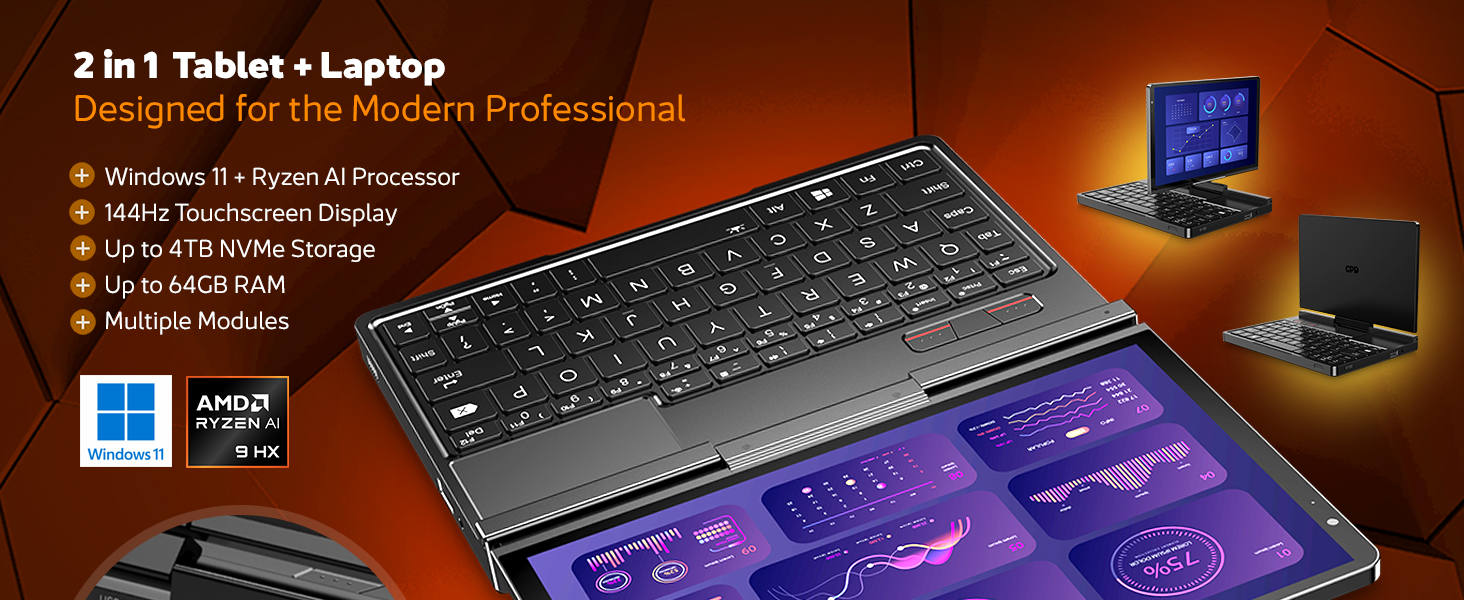
الشكل 4.2.2: انتهىview of the GPD Pocket 4's core specifications and 2-in-1 design.
This image illustrates the device's key technical specifications, including its modular IO, screen, CPU, GPU, RAM, storage, OS, battery, and connectivity, emphasizing its nature as a pocket-sized modular AI PC.

Figure 4.2.3: Modular expansion options for the GPD Pocket 4.
The GPD Pocket 4 supports various modular expansions, including KVM, Memory Card Reader, 4G LTE, and RS-232 modules, enhancing its versatility for different professional needs.
5. الإعداد
5.1 التشغيل المبدئي
- اشحن الجهاز: Before first use, connect the GPD Pocket 4 to the power adapter using the provided USB-C cable. Plug the adapter into a wall outlet. The charge indicator light will illuminate.
- تشغيل الطاقة: Press and hold the Power Button (integrated with the fingerprint sensor) for a few seconds until the GPD logo appears on the screen.
- إعداد ويندوز: Follow the on-screen instructions to complete the Windows 11 Home setup process. This includes selecting your region, language, connecting to Wi-Fi, and creating a user account.
5.2 توصيل الأجهزة الطرفية
- العرض الخارجي: Connect an external monitor via the HDMI 2.1 port or one of the full-featured USB-C ports.
- جهاز USB:٪ s: Use the USB-A or USB-C ports for connecting external keyboards, mice, USB drives, or other peripherals.
- شبكة: For a wired internet connection, connect an Ethernet cable to the RJ45 network port.
- صوتي: Connect headphones or external speakers to the 3.5mm earphone/microphone port.
6. Operating the GPD Pocket 4
6.1 طرق التشغيل
- وضع الكمبيوتر المحمول: Use the integrated keyboard and touchpad for traditional laptop functionality. The 8.8-inch display provides a compact yet clear workspace.
- وضع الجهاز اللوحي: Fold the screen back to transform the device into a tablet. The 10-point multi-touch display allows for intuitive navigation and interaction.

Figure 6.1.1: GPD Pocket 4 in tablet mode, showcasing its touch interface.
The device seamlessly transitions between laptop and tablet modes, offering flexibility for various tasks.
6.2 لوحة المفاتيح ولوحة اللمس
- The integrated keyboard is designed for comfortable typing in a compact form factor.
- تدعم لوحة اللمس إيماءات اللمس المتعدد للتنقل. راجع إعدادات ويندوز لتخصيصها.
- The power button doubles as a fingerprint sensor for secure login.

Figure 6.2.1: User interacting with the GPD Pocket 4's keyboard and touchpad.
This image highlights the comfortable keyboard and backlit trackpad, along with the integrated camera and microphone for meetings.
6.3 إدارة البطارية
- The GPD Pocket 4 features a 44.8Wh battery.
- For optimal battery life, adjust power settings in Windows.
- The device supports 100W PD fast charging. Use the provided charger for quickest recharge times.

الشكل 6.3.1: داخلي view showing the 44.8Wh battery and device dimensions.
This image provides a visual representation of the device's internal battery and its compact dimensions, emphasizing its portability and power endurance.
7. الصيانة
7.1 التنظيف
- Always power off the device and disconnect the charger before cleaning.
- Use a soft, lint-free cloth to wipe the screen and chassis. For stubborn smudges on the screen, lightly dampen the cloth with water or a screen-specific cleaner (do not spray directly on the screen).
- Use a soft brush or compressed air to clean dust from the keyboard and ventilation openings.
- تجنب استخدام المواد الكيميائية القاسية، أو المنظفات الكاشطة، أو المذيبات.
7.2 تحديثات البرامج
- Regularly check for Windows updates to ensure your system has the latest security patches and performance improvements. Go to الإعدادات > تحديث Windows.
- Periodically check the GPD official website for driver updates, especially for graphics (AMD Radeon 890M) and chipset drivers, to ensure optimal performance.
7.3 إدارة التخزين
- احذف الأشياء غير الضرورية بانتظام fileوتطبيقات لتحرير مساحة التخزين.
- Consider using cloud storage for large files to reduce local storage consumption.
- The 2TB M.2 NVMe SSD is expandable; consult GPD support for compatible upgrade options if needed.
8. استكشاف الأخطاء وإصلاحها
| مشكلة | السبب المحتمل | حل |
|---|---|---|
| الجهاز لا يعمل. | Low battery; Power adapter not connected; Hardware issue. | Ensure the device is fully charged. Verify the power adapter and cable are securely connected. If issues persist, perform a hard reset (press and hold power button for 15 seconds). |
| الشاشة فارغة أو تومض. | Display driver issue; Incorrect resolution; Hardware fault. | Restart the device. Update graphics drivers. Check display settings in Windows. |
| الواي فاي أو البلوتوث لا يعملان. | Wireless adapter disabled; Driver issue; Interference. | Check Wi-Fi/Bluetooth settings in Windows. Restart the device. Update wireless drivers. Ensure no physical obstructions or strong interference sources. |
| الجهاز بطيء أو لا يستجيب. | Too many applications running; Low storage space; Overheating. | Close unnecessary applications. Free up disk space. Ensure ventilation is not blocked. Check Task Manager for resource-intensive processes. |
| شاشة اللمس لا تستجيب. | Software glitch; Driver issue; Physical damage. | Restart the device. Check for touchscreen driver updates. If physically damaged, contact support. |
9. المواصفات
| ميزة | التفاصيل |
|---|---|
| ماركة | ال جي بي دي |
| اسم الموديل | Pocket (RM-Pocket-4) |
| المعالج | AMD Ryzen AI 9 HX 370 (5.1 GHz) |
| معالج الرسوميات المساعد | Radeon™ 890M |
| كبش | 32 جيجابايت LPDDR5X |
| تخزين | 2 TB NVMe PCIe Gen4 SSD |
| حجم الشاشة | 8.8 بوصة |
| دقة الشاشة | 2560 × 1600 بكسل (2.5K) |
| معدل التحديث | 144 هرتز |
| نظام التشغيل | ويندوز 11 هوم |
| نوع لاسلكي | 802.11ax (واي فاي 6E)، بلوتوث 5.3 |
| متوسط عمر البطارية | 9 ساعة (تشغيل الفيديو) |
| وزن العنصر | 1.6 جنيه (725 جرام) |
| أبعاد المنتج | 8.11 × 5.67 × 0.87 بوصة |
| لون | أسود |
10. الضمان والدعم
GPD products typically come with a limited manufacturer's warranty. Please refer to the warranty card included in your package or visit the official GPD webالموقع للحصول على شروط وأحكام الضمان التفصيلية الخاصة بمنطقتك.
For technical support, troubleshooting assistance beyond this manual, or warranty claims, please contact GPD customer support through their official website or the retailer from whom you purchased the device.
GPD Official Webموقع: www.gpd.hk
Please have your product model number (RM-Pocket-4) and purchase information ready when contacting support.
Ask a question about this manual
Ask about setup, troubleshooting, compatibility, parts, safety, or missing instructions. Manuals+ will review the question and use this page’s manual context to help answer it.