
1. المقدمة
The AirheadStorm FS899C is a versatile digital multimeter designed for accurate electrical measurements. This device can measure AC/DC current and voltage, capacitance, continuity, resistance, frequency, non-contact voltage (NCV), and ambient temperature. Featuring a large backlit display and a rechargeable battery, it is suitable for both home and industrial electrical tasks.
This manual provides essential information for the safe and effective use of your FS899C Digital Multimeter. Please read it thoroughly before operation and retain it for future reference.
2. محتويات العبوة
تأكد من وجود جميع العناصر المدرجة أدناه وأنها في حالة جيدة عند فتح العبوة:
- 1 x AirheadStorm FS899C Digital Multimeter
- سلكان اختبار (أحمر وأسود)
- كابل شحن 1 x USB-C
- دليل تعليمات واحد (هذه الوثيقة)
- 1 × مربع التعبئة والتغليف

Figure 2.1: Contents of the FS899C package, including the multimeter, test leads, and charging cable.
3. معلومات السلامة
Always adhere to basic safety precautions when using electrical testing equipment to reduce the risk of fire, electric shock, or personal injury. Improper use can result in electric shock or damage to the meter.
- Inspect the Meter: Before each use, check the meter and test leads for any damage. Do not use the meter if it appears damaged or if the insulation on the test leads is compromised.
- المجلدtagالحدود الإلكترونية: لا تستخدم أكثر من الحجم المقدرtagهـ، كما هو موضح على العداد، بين الأطراف أو بين أي محطة وأرضية.
- Proper Terminal Use: Ensure the test leads are connected to the correct input terminals for the measurement function selected.
- Avoid Live Circuits: Do not measure current on a circuit with voltage exceeding the meter's specified limits.
- بيئة العمل: Use the meter in a dry environment. Avoid using it in wet or damp شروط.
- معدات الحماية الشخصية: Always wear appropriate personal protective equipment, such as safety glasses, when working with electrical circuits.
- حماية من الصدمات: The meter features an impact-resistant plastic housing designed to protect against damage from drops. However, avoid unnecessary drops and handle the device with care.
- الخدمة: Refer all servicing to qualified service personnel. Do not attempt to repair the meter yourself.
4. مواصفات المنتج
The AirheadStorm FS899C Digital Multimeter offers a range of features for efficient and accurate electrical testing:
- قدرات قياس متعددة الاستخدامات: Accurately measures AC/DC current and voltage, capacitance, continuity, resistance, frequency, non-contact voltage (NCV), and ambient temperature.
- بطارية قابلة لإعادة الشحن: Equipped with a USB-C rechargeable battery, providing up to 8 hours of operation after approximately 2 hours of charging.
- شاشة كبيرة بإضاءة خلفية: Features a 4.8-inch display with backlight for clear visibility in various lighting conditions.
- مصباح يدوي مدمج: A practical torch function assists in illuminating dark work areas.
- وظيفة الاحتفاظ بالبيانات: Allows users to freeze the current reading on the display for convenient recording.
- بناء متين: Impact-resistant plastic housing provides protection against accidental drops.
- High Accuracy with True RMS: Offers precise measurements with a count capacity of up to 6000.
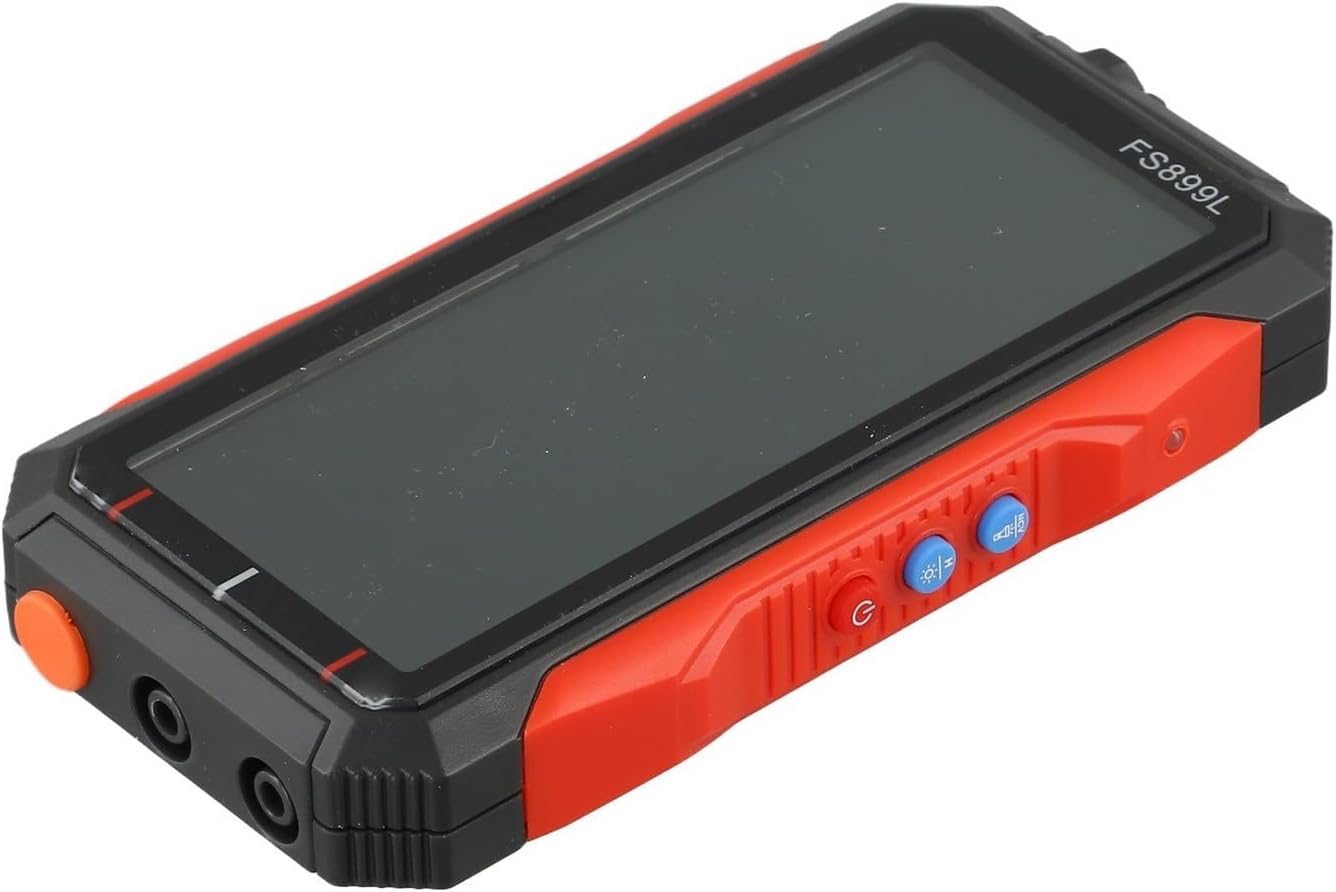
الشكل 4.1: الجانب view of the FS899C multimeter, highlighting its robust casing and control interface.
5. الإعداد
5.1 Charging the Multimeter
- Locate the USB-C charging port on the side of the multimeter.
- Connect the provided USB-C charging cable to the multimeter and to a standard USB power adapter (not included).
- The charging indicator on the display will show the charging status. A full charge typically takes approximately 2 hours and provides up to 8 hours of operation.
5.2 توصيل أسلاك الاختبار
Always ensure the multimeter is powered off before connecting or disconnecting test leads.
- أدخل أحمر الاختبار يؤدي إلى VΩmA input jack for voltage, resistance, capacitance, frequency, and low current measurements.
- أدخل أسود الاختبار يؤدي إلى كوم مقبس الإدخال (المشترك).
- For high current measurements (up to 10A), insert the أحمر الاختبار يؤدي إلى 10 أمبير جاك المدخلات.
6. تعليمات التشغيل
6.1 تشغيل/إيقاف التشغيل
اضغط مع الاستمرار على قوة button to turn the multimeter on or off.
6.2 اختيار الوظيفة
The FS899C typically features an auto-ranging function, simplifying operation. For specific modes, use the function buttons on the device.

Figure 6.1: The FS899C display showing active measurements for voltage, resistance, and temperature, along with mode indicators.
6.3 Common Measurements
- المجلدtagالقياس الإلكتروني (تيار متردد/تيار مستمر):
- قم بتوصيل السلك الأحمر بـ VΩmA والسلك الأسود بـ COM.
- حدد مستوى التيار المتردد أو المستمر المناسبtagالوضع الإلكتروني.
- قم بتوصيل مجسات الاختبار بالتوازي مع الدائرة أو المكون قيد الاختبار.
- قياس التيار (تيار متردد/تيار مستمر):
- تحذير: تأكد من فصل التيار الكهربائي عن الدائرة قبل توصيل العداد على التوالي.
- For low current, connect the red lead to VΩmA; for high current (up to 10A), connect the red lead to 10A. Connect the black lead to COM.
- Select the appropriate AC or DC current mode.
- قم بتوصيل مجسات الاختبار على التوالي مع الدائرة.
- قياس المقاومة:
- قم بتوصيل السلك الأحمر بـ VΩmA والسلك الأسود بـ COM.
- Select the resistance mode (Ω).
- Ensure the circuit or component is de-energized before measuring resistance. Connect the probes across the component.
- اختبار الاستمرارية:
- قم بتوصيل السلك الأحمر بـ VΩmA والسلك الأسود بـ COM.
- Select the continuity mode (often indicated by a speaker icon).
- Touch the probes to the ends of the circuit or component. A beep indicates continuity.
- قياس السعة:
- قم بتوصيل السلك الأحمر بـ VΩmA والسلك الأسود بـ COM.
- Select the capacitance mode (F).
- Ensure the capacitor is fully discharged before testing. Connect the probes across the capacitor terminals.
- قياس التردد:
- قم بتوصيل السلك الأحمر بـ VΩmA والسلك الأسود بـ COM.
- Select the frequency mode (Hz).
- قم بتوصيل المجسات بمصدر الإشارة.
- حجم عدم الاتصالtagالكشف عن (NCV):
- Select the NCV mode.
- Hold the top of the multimeter near a live conductor. The meter will indicate the presence of AC voltagمن خلال إنذار صوتي و/أو مؤشر مرئي.
6.4 وظيفة الاحتفاظ بالبيانات
اضغط على يمسك button to freeze the current reading on the display. Press it again to release the hold function and resume live readings.
7. الصيانة
7.1 التنظيف
امسح عداد Casing مع الإعلانamp استخدم قطعة قماش ومنظفًا معتدلًا. لا تستخدم مواد كاشطة أو مذيبات. تأكد من جفاف الجهاز تمامًا قبل الاستخدام.
7.2 العناية بالبطارية
The FS899C uses a rechargeable battery. To prolong battery life:
- اشحن البطارية بالكامل قبل الاستخدام لأول مرة.
- تجنب تفريغ البطارية بالكامل بشكل متكرر.
- If storing the meter for an extended period, charge it periodically (e.g., every 3-6 months) to maintain battery health.
7.3 فحص أسلاك الاختبار
Regularly inspect the test leads for any cuts, cracks, or damage to the insulation. Replace damaged leads immediately to prevent electric shock hazards.
8. استكشاف الأخطاء وإصلاحها
| مشكلة | السبب المحتمل | حل |
|---|---|---|
| العداد لا يعمل. | Low or discharged battery. | Charge the multimeter using the provided USB-C cable. |
| قراءات غير صحيحة أو غير مستقرة. | تم اختيار وظيفة غير صحيحة؛ ضعف توصيل سلك الاختبار؛ تداخل خارجي. | Verify the correct measurement function. Ensure test leads are securely connected. Move away from strong electromagnetic fields. |
| تم عرض "OL" أو "OVERLOAD". | يتجاوز القياس نطاق العداد. | Select a higher range if available, or ensure the measured value is within the meter's specifications. |
| لا يوجد صوت تنبيه للاستمرارية. | Open circuit; continuity mode not selected. | Check the circuit for breaks. Ensure the meter is in continuity mode. |
9. المواصفات
| المعلمة | قيمة |
|---|---|
| نموذج | FS899C |
| عرض | 4.8-inch, Backlit |
| Count Capacity | Up to 6000 counts |
| المجلد العاصمةtage المدى | 60mV to 600V (Accuracy: ±(1.2%+5d)) |
| المجلد ACtage المدى | 60mV to 600V (Accuracy: ±(1.5%+8d)) |
| نطاق التيار المستمر | 300mA to 10A (Accuracy: ±(2.2%+8d)) |
| نطاق التيار المتردد | 300mA to 10A (Accuracy: ±(2.5%+8d)) |
| مدى المقاومة | 600Ω to 60MΩ (Accuracy: ±(1.5%+10d)) |
| مجموعة السعة | 10nF to 60mF (Accuracy: ±(10%+88d)) |
| نطاق التردد | (Specific range not provided, but implied by feature) |
| بطارية | قابلة لإعادة الشحن (USB-C) |
| وقت التشغيل | Up to 8 hours (after 2 hours charge) |
| أبعاد المنتج | 6.3 × 4.72 × 1.38 بوصة |
| وزن العنصر | 9.4 أونصة (267 جرامًا) |
| الشركة المصنعة | AirheadStorm |
10. الضمان والدعم
For warranty information, technical support, or service inquiries regarding your AirheadStorm FS899C Digital Multimeter, please contact the retailer or manufacturer directly. Retain your proof of purchase for warranty claims.